
Hello guys i'm back! Have been thinking in a good theme to write about, and i got back to my first theme i had write here in Publish0x, it was about Telegram Bot! If you don't know, go back to my gold articles here, and here.
I'll use the same code i used in the old article, but now we will put our telegram bot to LIVE! Without running just in your computer but everyone can be reached by him! :'D
First things first
First things first, you'll need to clone or download the github project: https://github.com/andrecrjr/telegram-example-price-bot
This project I did with Telegraf and We will adapt it for our deploy! We will be using Heroku to host our bot using webhooks. :D
What is Heroku
Heroku is a container-based cloud Platform as a Service (PaaS). Developers use Heroku to deploy, manage, and scale modern apps. Our platform is elegant, flexible, and easy to use, offering developers the simplest path to getting their apps to market.
We can use heroku to deploy our Web Servers, I talked about Web servers better in this article.
To start this hands on, you'll need to signup at Heroku platform: https://signup.heroku.com/login
Heroku has 500 hours free by month request time to use, is enough to our bot! You can host your web server and websites together!
About our Cryptocurrency Price's Bot Project
So, if you already downloaded the project in the github and already know how to run it using NodeJS and Yarn/NPM that you read my article about, you can follow this new steps to host our bot for everyone outside of your pc! ;)
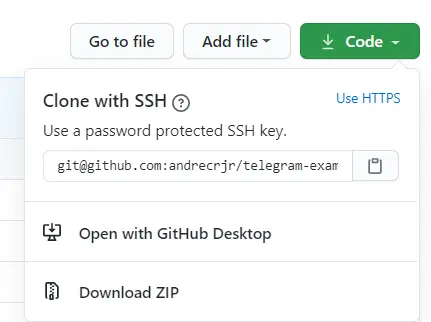
A Web Server for our Bot
If you know about web server is just a HTTP server that runs all the World wide web and heroku will host it for us and our bot.
All the programming languages has for yourself a framework to helps us to create HTTP server easy, and the Nodejs is not different, we will use a framework called: Express.
Express is a http web framework for NodeJS that real make web server in a easier way! To install it you can use or NPM or Yarn inside your folder:
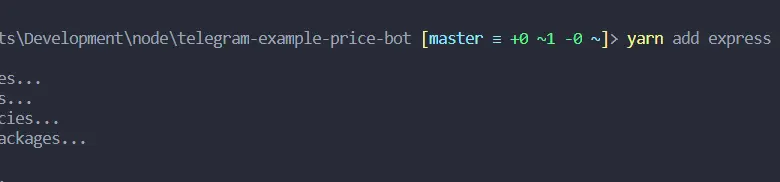
yarn add express
npm install express
So now we have a ultra framework to use! Let's see our code for now in telegram price:
imports to get our lib
const Telegraf = require("telegraf");
const axios = require("axios");

//instantiate Telegraf with your bot token from Botfather
const bot = new Telegraf("yourtoken");

//our command /start
bot.command("start", (msg) => msg.reply(`Hello ${msg.from.username}`));
//price for bitcoin
bot.command("bitcoin", async (ctx) => {
  //we will use async await from js language to get our price information!!!
  try {
    //axios will use the url to get usd price for bitcoin
    const { data } = await axios.get(
      "https://api.coingecko.com/api/v3/simple/price?ids=bitcoin&vs_currencies=usd"
    );
    //you will see the json if you console in the terminal!
    console.log(data);
    //answer our user!
    ctx.reply(`Price for bitcoin: U$${data.bitcoin.usd}`);
  } catch (e) {
    console.log(e);
  }
});

/* all your bot commands*/

//start polling
bot.startPolling();
If you look i just replaced a lot of commands by "/* all your bot commands */ " so we can focus in our basic bot.
Let's instantiate Express inside this index.js:
const Telegraf = require("telegraf");
const axios = require("axios");
const express = require("express")
//get app inside express
const app = express()

const CURRENT_URL = "here we will put our heroku address";
//we will get the port from our web server process.env is a ENVIROMENT VAR
//Heroku put this when will be host it
let PORT = process.env.PORT || 3000


const bot = new Telegraf("yourtoken");


bot.command("start", (msg) => msg.reply(`Hello ${msg.from.username}`));


/* all your bot commands*/

/*
this will die can be excluded!
bot.startPolling();
*/

//now let's use our App from express

app.get("/", (req, res) =>{
    res.send("Our new tab!!");
})


//now my APP will be listening in the IP Heroku address(0.0.0.0)
//My variable PORT that I did before will come here.
app.listen(PORT, 0.0.0.0, ()=>{
console.log(`Listen in the port ${PORT}`)
})
Nice! Now our code has an Web Server HTTP working on it! If you did everything right, you have to go again in the terminal:
yarn start or npm start!

Then if you can reach your web browser...:
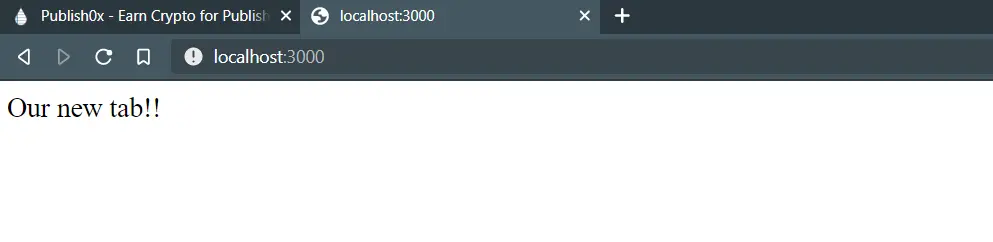
Amazing! Let's comunicate our BOT using a thing called in the web development world as WebHooks.
Settings our WebHook with Telegram
WebHooks is a concept to create an API in real-time you can read more about it here!
Real used a lot in the Bot's world, telegram offers a way to access our Bot using this concept, originally you'll need to get each POST request that cames from telegram API using Axios and this becomes real big situation for developers, so... Telegraf is an angel and it'll help us a lot with a simple add using Express!
//this unite Express with webHook from Telegraf
app.use(bot.webhookCallback("/bot"));

//and this will set our webhook for our bot
bot.telegram.setWebhook(`${CURRENT_URL}/bot`);

//before app.get
app.get("/", (req, res) => {
  res.send("Our new tab!!");
});
Ok, now this united our webhook with Express framework! So now we have a path ${CURRENT_URL}/bot to telegram do its POST requests in our webhook path in our website path, but... Now we will need to use HEROKU to HOST our bot because this will not stay forever in our PC!
Creating an App in Heroku!
Heroku as I said before it's a good place to start your web server and web applications, but for now you'll need to use Heroku CLI.
Heroku CLI is the way that we can use to deploy our Apps in the heroku, first things first, I asked you to sign up at the heroku website.
Pretty cool, for now you'll need to login there! We'll create a App inside heroku... if you login in the heroku... will show something like this:
 I already have some application there; I hope your account is just personal as I am, or you have a bit money to pay to them a better account :D.
But now we will create a new app as I mentioned before... Click in New button then Create new app.
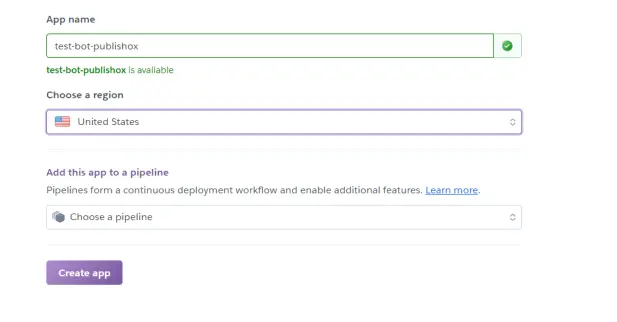
Nice, now you'll have your App name, this will be your url address, so be careful what you'll choose here then Create app bellow.
Nice! Now it'll open your app dashboard! Really easy!
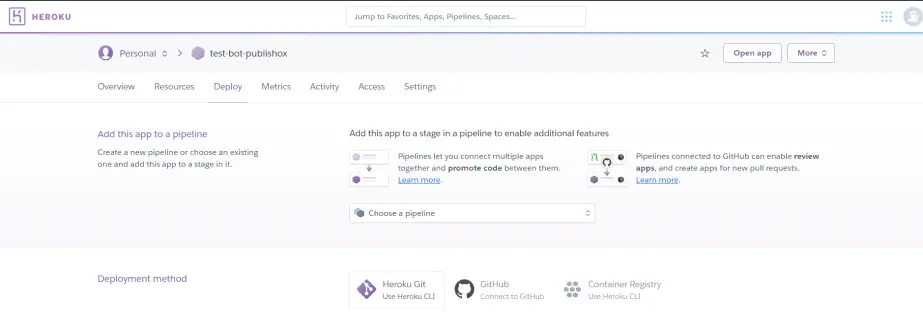
Deploy in Heroku
So now you'll have you own website address! Then don't forget to add the CURRENT_URL in the index.js code using your new herokuapp website!
const app = express();
//now add your CURRENT URL
const CURRENT_URL = "https://test-bot-publishox.herokuapp.com";
Then now you'll can start the Deployment, of course it'll be prefer to use Heroku CLI, they'll ask to download the Heroku CLI (trust me this will be better) because you can diff what's going to github and going to heroku itself.
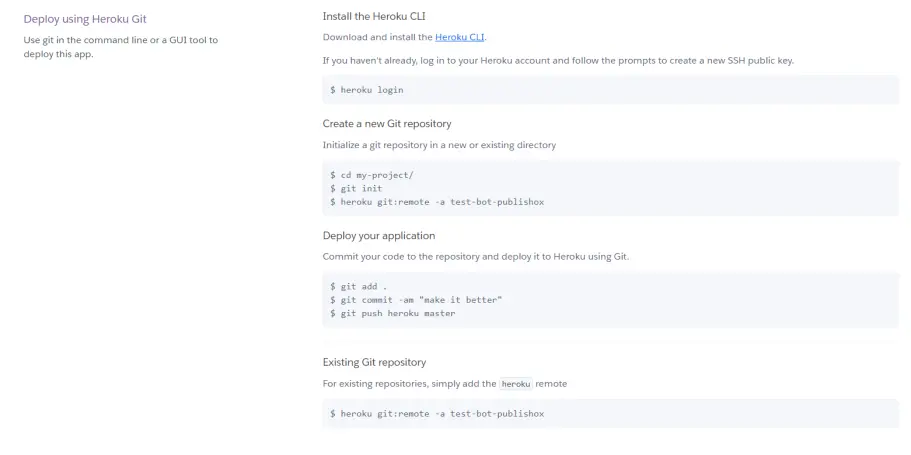
Looks like a lot pushing to github in the terminal, if you know Github terminal commands, is almost the same thing.
If you don't know a lot, it's easy, just do it inside your folder terminal the commands that they ask to do, but don't forget it's when you don't have a git repository(normally it'll happen this to you), if you have repository can jump to "Deploy your application" BUT... we can't to forget something that we need to do in our project's folder... Heroku don't know what project we have here... if it's python, or NodeJS, or how to start our project... We need in the root of our folder someone to run our project in the heroku, and this file is called by Procfile!
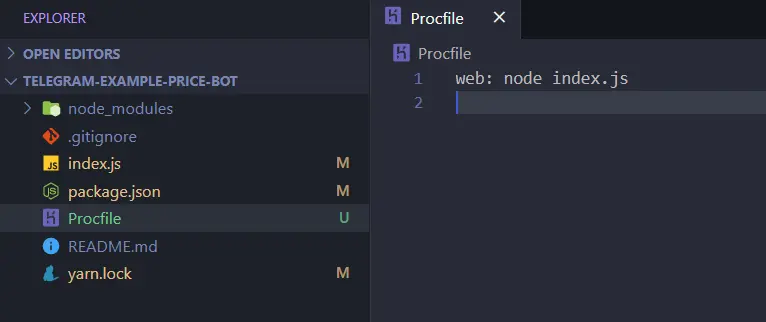
So now we speak to Heroku "please heroku run this in your Dyno(server): node index.js".
And now we can follow the heroku-cli path step by step:

- We add all my diff code using web hook
- Create my commit with git calling by "adding webhooks"
- Now I did twice, just one is necessary, heroku git:remote -a name-of-your-app
- Then you can push using git push heroku master!
Now then becomes magic! Where our code will be there in the heroku!
You can use your path to open your own bot, will be like this:https://test-bot-publishox.herokuapp.com/
Ugly, but functional :)
Telegram and the WebHook
Nice, now we do de deploy, so HOW TO RUN in the Telegram... is it already working?
Nope! It's not! Why?
So... It's because we haven't told to telegram that we have a WebHook to this bot yet! ._.
We already have a address that accepts POST requests from telegram webhook thankfully to Heroku, Express and Telegraf framework, (really, without telegraf is a hell) let me remind you:
//Remember this part?
app.use(bot.webhookCallback("/bot"));

//this is telling you: So Express you'll have a /myBot path
// to telegram POST do its requests and use our bot!
So now we need to set this URL for telegram API to send POST requests:
https://api.telegram.org/bot<YOUR_BOT_TOKEN>/setwebhook?url=<YOUR_HEROKU_APP>/bot
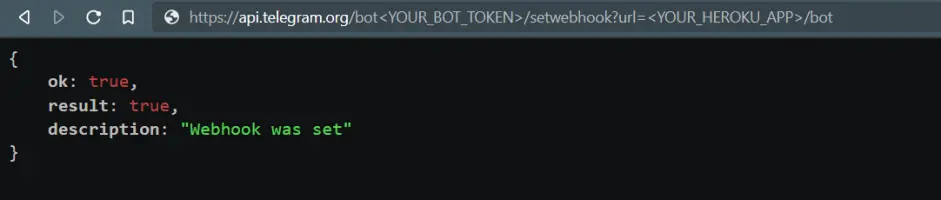
Just put in the browser then it's done! You can go back to your Bot in the telegram and now, it'll be receiving all the commands that you did inside index.js...!
What we did in this article?
- Meet heroku
- Create a web server that will be hosted in the heroku
- United telegraf framework with Express to host our Bot in the Heroku easily and using WebHooks!
- Uses Terminal a lot!
You can see this project on my Github:https://github.com/andrecrjr/telegram-example-price-bot
So that's it guy, and if you like can tip here! or follow me and tip me with BATor Banano in twitter or in my discord!😛
I hope everyone likes it some doubt contact me! Thank you! 💓






