How to Withdraw $USDC Tokens, How to Set Up Your Address Correctly, and When are Withdrawals Processed?
Important! USDC (and not USDC.e) withdrawals are sent over Optimism Network (OP Mainnet). Make sure to use the correct withdrawal address for OP Mainnet if you are withdrawing from an exchange.
Withdrawal process explained:
1. Request a withdrawal from this page (the one you are on right now).
2. We aim to send the payouts between Sunday (after 6 PM UTC) and Monday. However we reserve the right to send the payment at a later date, if there are network or tech based issues, high gas fees, or other issues. We currently send payouts from this Optimism (OP Mainnet) address. Read more info below that shows the withdrawals processing timeline.
3. All of the withdrawal requests are checked; all users are emailed after their withdrawal request is checked, usually at the end of the week.
4. Once the crypto is sent to you, you will get a new email from us that is notifying you of this. You can check your address on Optimistic EtherScan to verify that your payments were sent: https://optimistic.etherscan.io/
Next Payout Dates:
- On-Chain Withdrawals to Optimism Network (OP Mainnet) of USDC tokens sent over Optimism Network (OP Mainnet): Every week, on Monday, after 6PM UTC! *Sometimes, at our discretion and in addition to Mondays, we send payouts mid-week as well.
- Minimum On-Chain withdrawals for USDC tokens sent over Optimism Network (OP Mainnet): $0.5 in USDC.
Withdrawal Deadline!
The deadline to request a payout is Sunday, 6 PM UTC. Convert your local time to UTC time here. We aim to send the payouts between Sunday (after 6 PM UTC) and Monday. However we reserve the right to send the payment at a later date, if there are network or tech based issues, high gas fees, or other issues.
*Sometimes, at our discretion and in addition to Mondays, we send payouts mid-week as well.
Note: You can have one active payout request per token.
Important! USDC withdrawals are sent over Optimism Network (OP Mainnet). Make sure to use the correct withdrawal address for OP Mainnet if you are withdrawing from an exchange.
Help! How to Withdraw $USDC tokens sent from Publish0x over Optimism Network / OP Mainnet (an Ethereum Layer 2)?
How to change networks in MetaMask Extension and Mobile, written by Metamask support: https://support.metamask.io/configure/networks/how-to-change-networks
The Optimism Network (OP Mainnet) is a Layer 2 scaling solution for the Ethereum blockchain, enjoying support from leading exchanges such as Binance, Bybit, KuCoin, BitGet, and more.
IMPORTANT! We recommend that you withdraw your tokens to your Metamask address. Your Ethereum addresses from Trust Wallet and MyCrypto Wallet will also work well.
We send $USDC (not USDC.e) to the Optimism Network (Ethereum Layer 2 network) only, by using smart contracts. It is your responsibility to make sure that your wallet, or the exchange you’re withdrawing funds to accepts the tokens you are withdrawing from Publish0x, AND that it accepts tokens sent via smart contracts.
Your withdrawals will be sent from this address, where you can also verify that we send withdrawals regularly, and on time. Your transaction hash or transaction ID will be sent in an email from Publish0x, once the payment to your address is finalized.
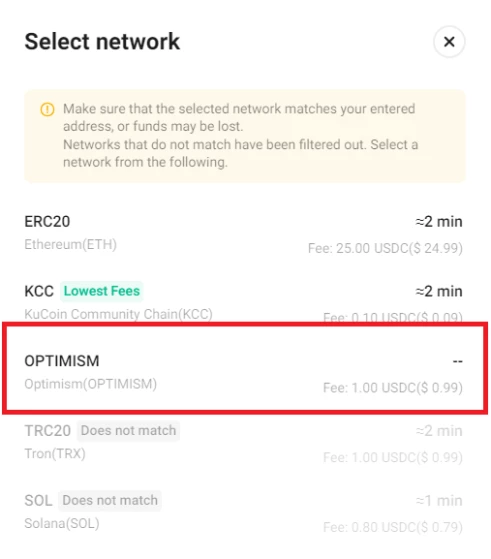
How to Withdraw to an Exchange Like KuCoin, Binance, ByBit, BitGet, and others.
NOTE: Your transaction hash or transaction ID will be sent in an email from Publish0x, once the payment to your address is finalized.
The Optimism Network is a Layer 2 scaling solution for the Ethereum blockchain, enjoying support from leading exchanges such as Binance, Bybit, KuCoin, BitGet, and more.
To withdraw tokens via Publish0x, assign a new withdrawal address specifically for Optimism Network tokens from here.
IMPORTANT! Ensure the accuracy of the following to prevent loss of funds: Make sure that the withdrawal address for USDC tokens (not USDC.e) you use is for USDC sent over Optimism Network (OP Mainnet).
- Verify the correct address for each token.
- Confirm that the address obtained from the exchange is configured for the Optimism Network.
How to Withdraw to a Personal Wallet Like Metamask.
If withdrawing to a self-custody wallet, use your existing Ethereum Network address. Yes, you can use the same address that holds the same keys as your current Ethereum Network address, or you can use a completely new Ethereum address for Optimism Network withdrawals.
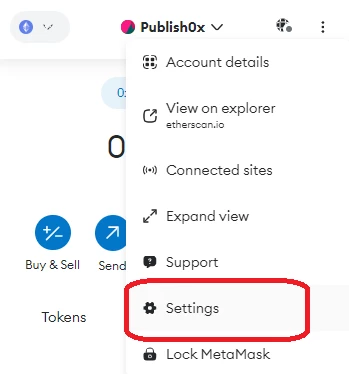
To access tokens on the Optimism Network, switch your wallet's network to 'Optimism Network'. This can be done with Metamask, in four quick, easy steps:
1. Open Metamask and navigate to "Settings".
2. Select "Networks" then "Add Network".
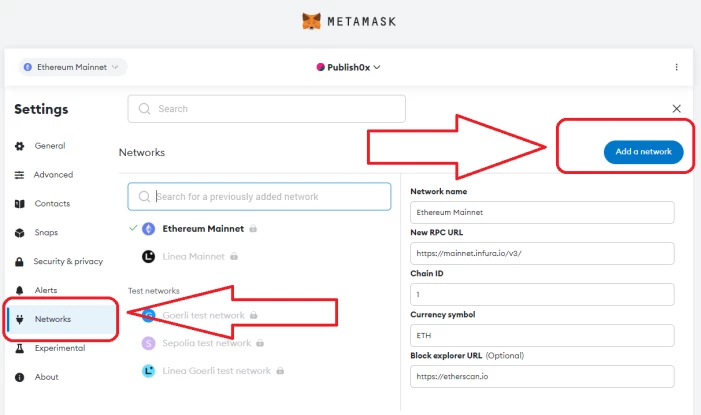
3. Choose either "Optimism" or "OP Mainnet" (whichever one of these shows for you) and confirm by clicking "Add Network".
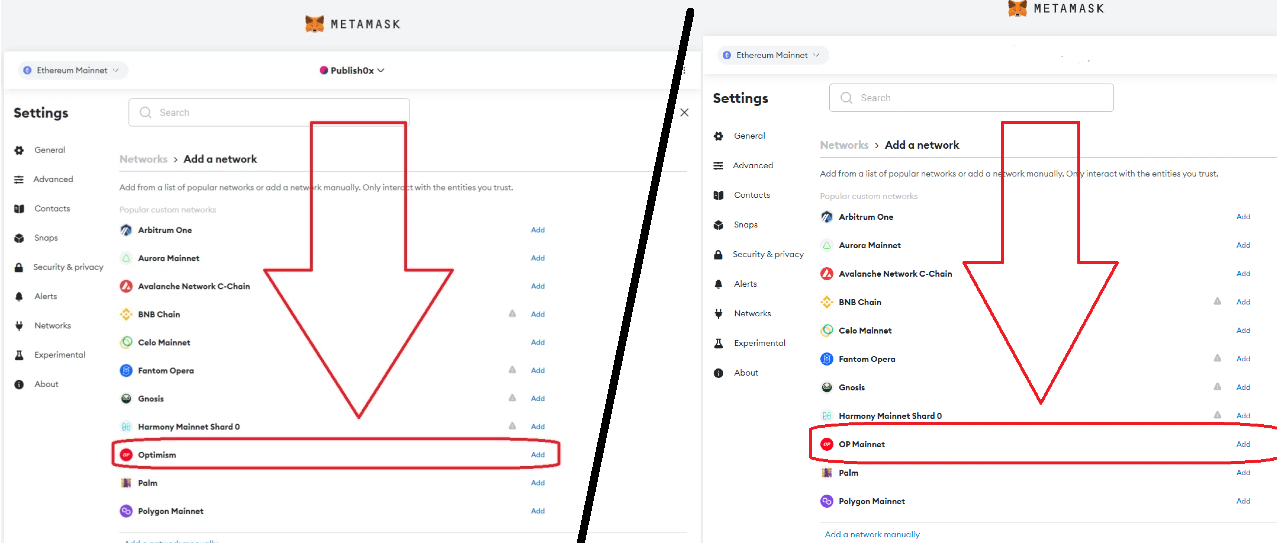
4. You can now toggle between Ethereum and Optimism networks seamlessly.
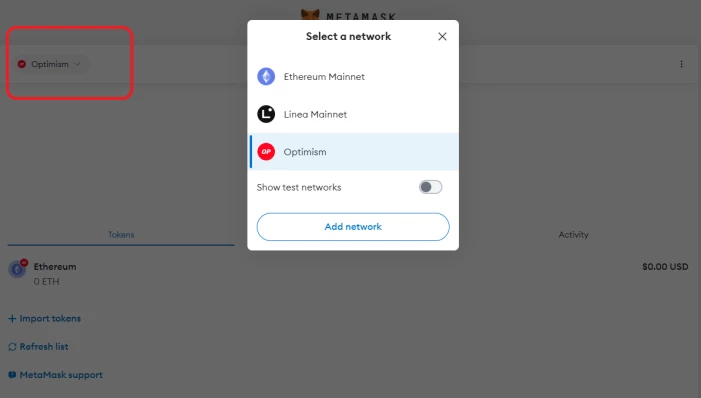
DONE!
In case you'd like to add a network manually these are settings to add Optimism Network to your self hosted wallet like Metamask:
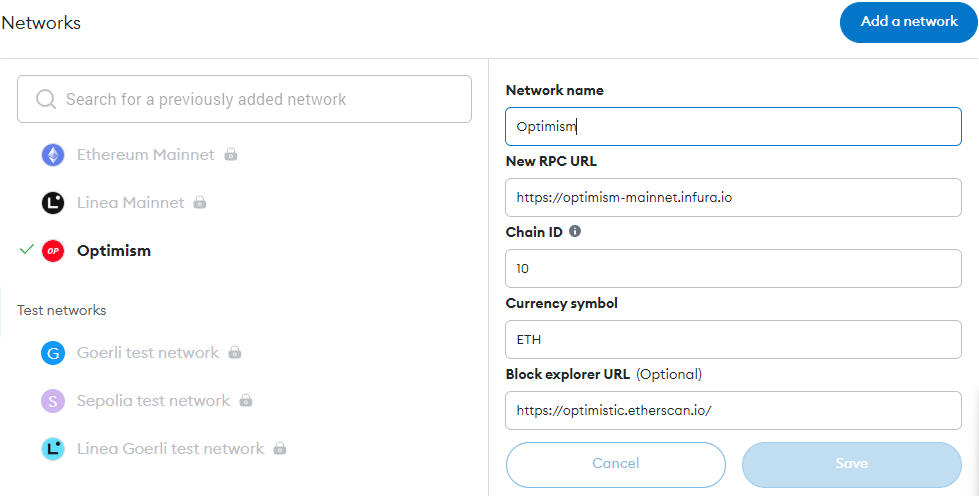
If you have any questions about these changes, let us know in the comments or reach out to [email protected]. We will answer them as soon as possible!
Note: By using the site, you agree that Publish0x.com has the final say in interpreting the rules and code of conduct should there be a misunderstanding or a dispute.