

CLICK ON THE PHOTO - Matic Mainnet - Blockchain will never be the same
The Matic Network Token staking will commence on or before the 29th of June 2020. This is a major event with high rewards comparable with other projects, especially in the first year. POS Staking on the Matic Network will enable an individual to mint Matic tokens with each block. A total of 1 066 250 000 tokens have been allocated over a five year period. This is approximately 12% of the total supply (See the chart below).
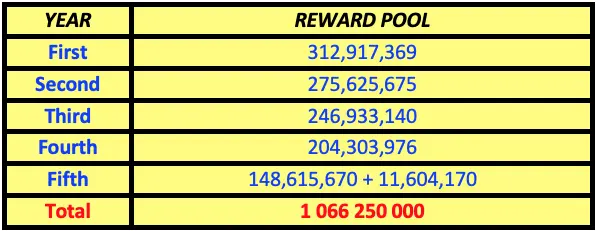
Tokens Reward Pool
In addition to the over 1 billion tokens allocated for rewards, the passive income stream is encouraging and even exciting. By locking up crypto assets as collateral in order to secure blockchain networks by periodically validating transactions; delegators to the network are paid in newly minted crypto assets. Validators (owners of nodes) additionally earn a portion of the network fee.
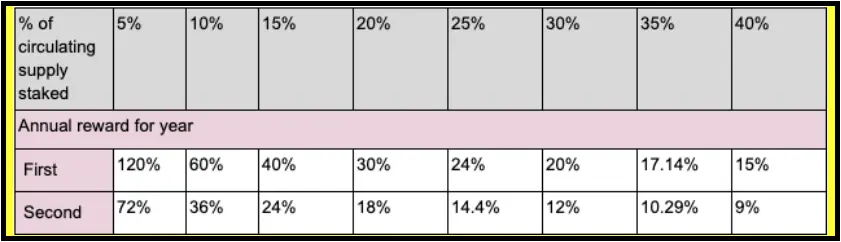
Percentage Reward Dependent of Amount of the Total Tokens in Circulation Staked
For example, if 30% of the total circulating supply is staked then the reward as can be seen below to the delegator. Consider the example below:

If the price remained at $0.02 for 5 years the rewards would be $21 325 000 (1 066 250 000 X $0.02)
If the price averaged $0.20 over 5 years the rewards would be $213 250 000 (1 066 250 000 X $0.20)
When considering the reward for staking it is important to understand that rewards are fixed for the number of tokens received but not for the value of the tokens. As can be seen above the $ monetary value received can be much higher than anticipated dependent on the value increase of the Matic Token. Matic Mainnet is only launching on the 29th of June. It is expected that exponential growth will occur over the next few months, along with numerous new partnerships and exchange listings. For example, Coinbase is a seed investor of Matic and it is highly probable that Matic will be listed there in the coming weeks/months after Mainnet.
In the week's May 4th to June 15th 8 new projects integrated with Matic. This brings the total to approximately 60. In addition, about 180 layer-1 projects currently in the top 200 CoinMarketCap list will be able to integrate and become layer-2 projects with institutional level adoption capacity once Mainnet is launched. Other blockchains have and can integrate with Matic for scalability.
Matic Staking Tutorial Instructions
The following instructions will be helpful in preparing for the staking program.
1. Metamask
The first step for those who wish to participate in Matic staking is to set up a MetaMask account of Chrome or Brave. The app is a browser extension and not a desktop one.
-Metamask can be downloaded here https://metamask.io/
Setting up the Metamask will require (a) a password & (b) storing or writing down your 12 seed-words.
Important points
a)If you set up the MetaMask on Chrome and on Brave you will need to create 2 passwords but your 12 seed-words will remain the same and the wallets will be synced.
b)Once you have your MetaMask wallet you need to add your Matic tokens that you intend to stake
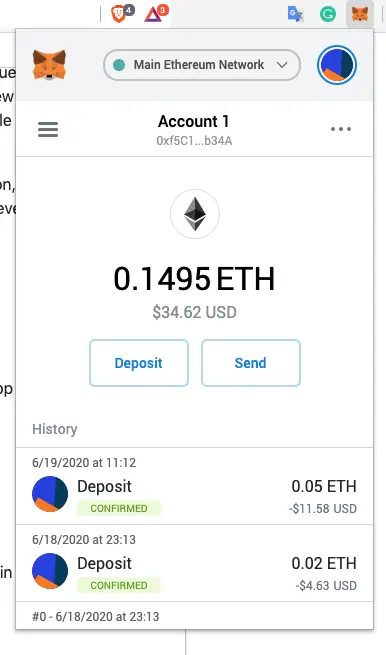
c)You will also need to add some Ethereum to your MetaMask Wallet for transaction purposes (staking the Matic tokens will require a small amount of Eth
2. Matic Staking Dashboard https://wallet.matic.network/staking
a) Next, you will need to go to this page https://wallet.matic.network/staking
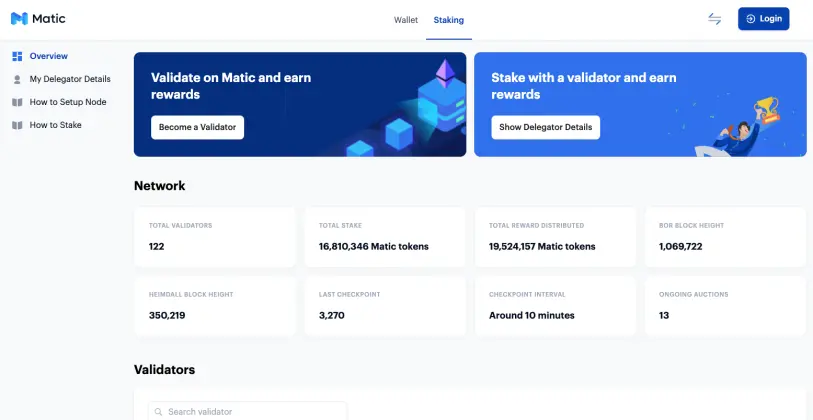
b) Next to the Login button you will see what looks like two lightning bolts - click on them and select "ETHEREUM" not Matic Network. All staking and delegation will happen on Ethereum only.
Staking has not yet started but will start on the 29th or before — wait for the announcement.
Note: Depositing to the Matic Mainnet is not required to participate in staking and delegation. All staking and delegation activities happen on Ethereum only.
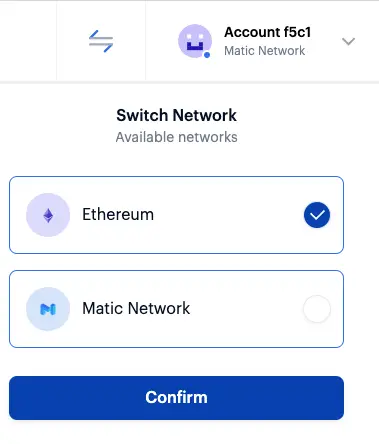
3) Login (Connect Staking Dashboard with the Metamask Wallet)
a) To Login make sure that you have logged into you Metamask first
b) Click Login of the Matic Dashboard page and Metamask will ask you to sign
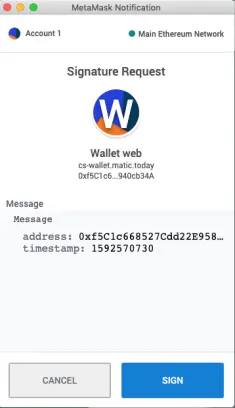
c) Click "sign" and wait a few seconds and you will now be logged in to your Dashboard which will be connected to your Metamask account. The new dashboard will look like this. Where the login button was you now have an Account number details.
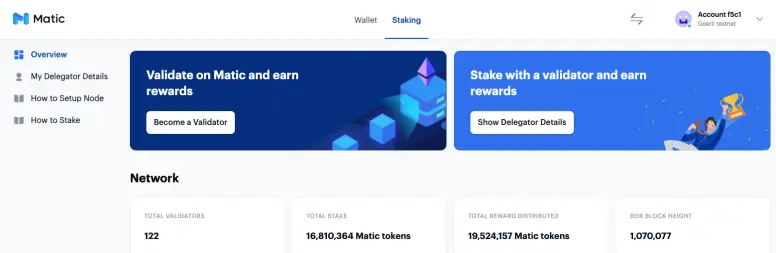
***** If the sign box does not appear then you need a VPN - certain EU and possibly other countries need one (I had to use a VPN).
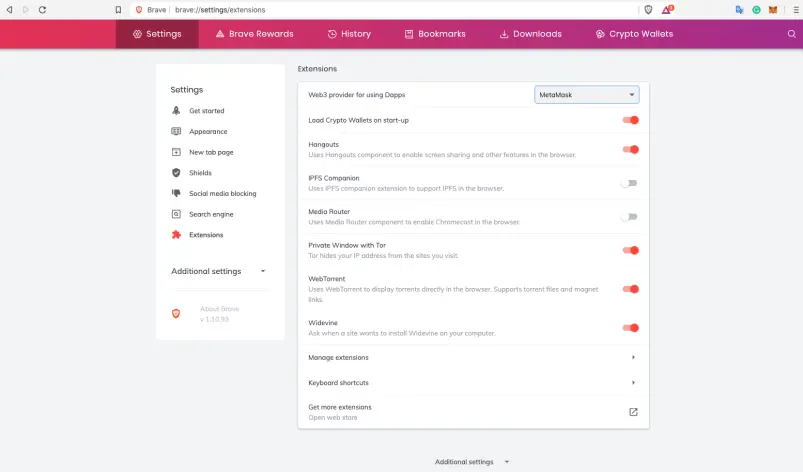
******If you have used Brave Browser you will also need to change your settings for Metamask (Default is Brave wallet) - See the image below:
NEXT
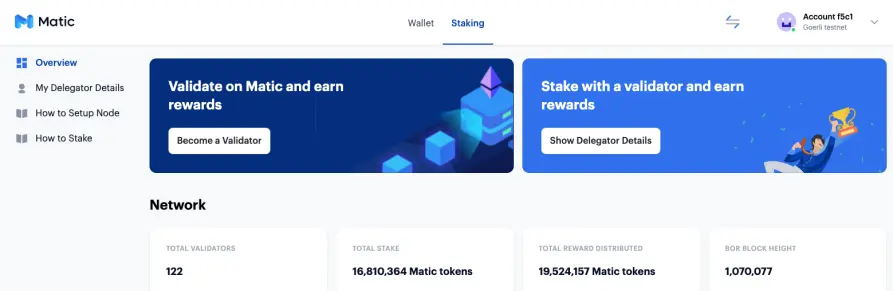
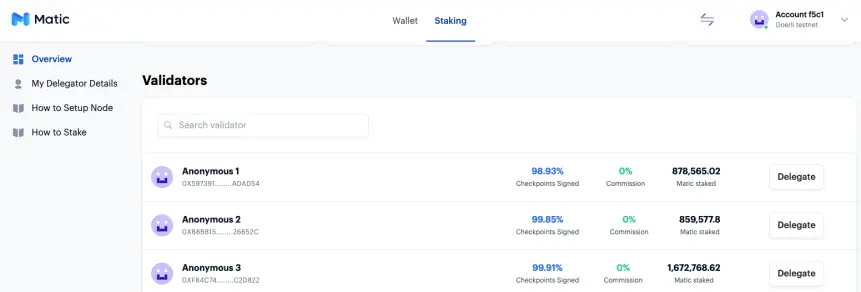
d) Now scroll down the dashboard page and choose a validator - then click delegate of the far-right
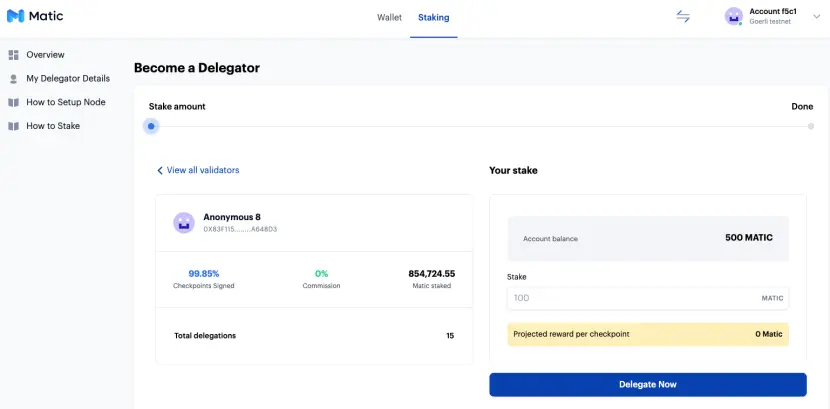
e) (i)You will now be on this page where you can delegate the Matic Tokens. (ii) Your account balance will show (Matic Tokens) - decide how many you want to stake and type the number in the box and click delegate
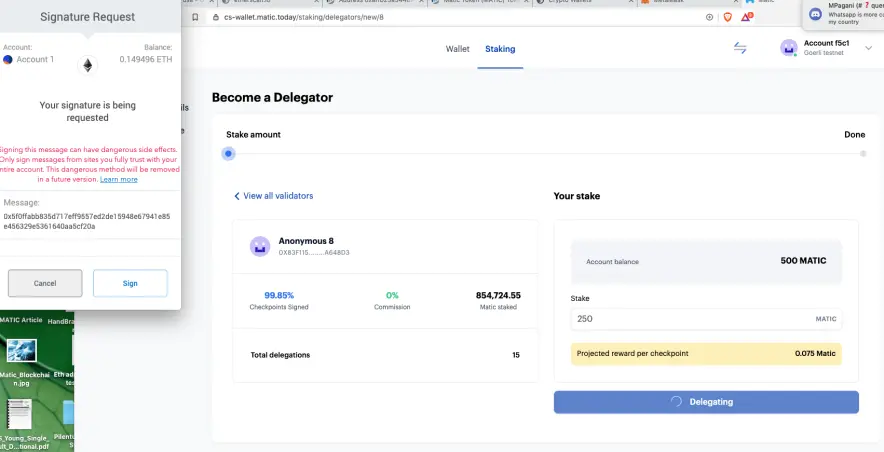
F) This box will appear and you will have to click sign ---- wait a few seconds and the MetaMask box will appear again and click sign again (twice).
g) Wait a few seconds/minutes (be patient) and then the following screen will appear. Your delegation has been successful. Click on go to my account.
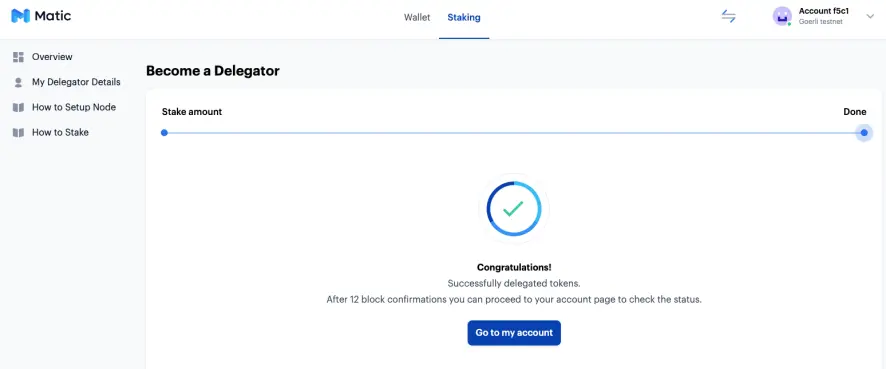
h) You will now be able to see the staked tokens on the dashboard and the new-minted tokens over time. Rewards are paid after each block and with Matic block, times are 1 second :-)
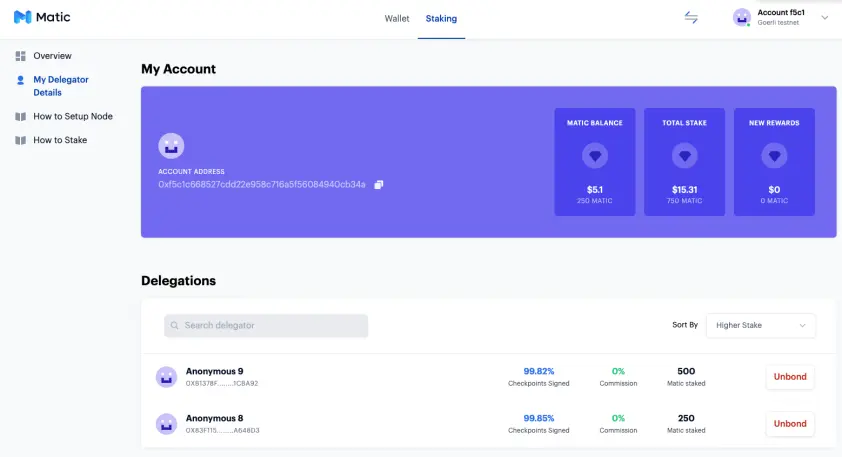
As can be seen from the image above your (1) Matic un-staked balance is visible (2) The staked Matic Tokens (3) Rewards. It can also be seen that I have chosen 2 validators to stake tokens with.
4. Redelegate Rewards - Withdraw Rewards
a) Unbond: On the Staking dashboard on the far right-click "My Delegator Details".
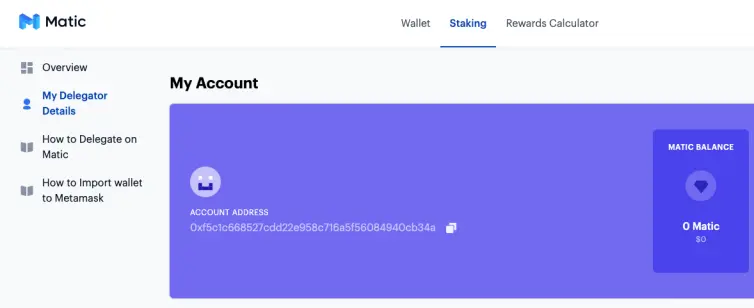
At the bottom of this page, you will see the nodes that you have delegated to. If you wish you unbond your staked tokens - click unbond and follow the instructions. The un-bonding will take 21 days.
b)To withdraw rewards earned can be done instantly. On the staking dashboard page in "My Delegator Details", you will see the "New Rewards" Box.
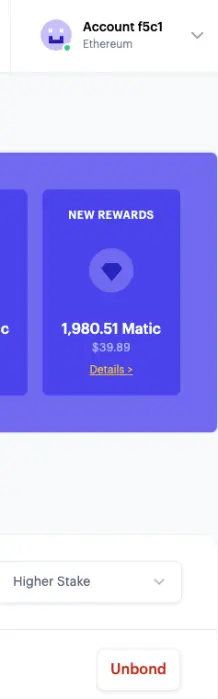
In the new rewards box, you will see "Details" - click on it and it will take you to this page
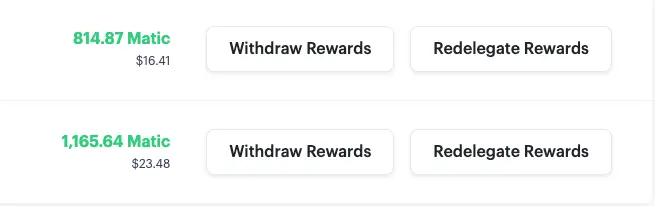
To withdraw rewards click on withdraw rewards and follow the prompts - this will be instant or as fast as Eth can perform the task
c)Redelegate Rewards: To redelegate rewards click the "redelegate rewards" button and follow the prompt. The newly minted tokens will be redelegated and added to your existing staked tokens
This is the end of the tutorial on how to stake Matic tokens. The Matic team welcomes you on this exciting journey!
important Staking links:
Official Support queries group (on Telegram): https://t.me/maticwalletweb
Staking UI URL: https://wallet.matic.network/staking
Staking Rewards calculator: https://wallet.matic.network/rewards-calculator
Primary Delegation help doc: https://docs.matic.network/docs/validate/delegator
Import into Metamask doc: https://docs.matic.network/docs/home/blockchain-basics/import-account-to-metamask
FOR OTHER MATIC ARTICLES BY THE SAME AUTHOR GO TO BLOCKCHAIN INNOVATION
Contact a Matic Team Member to Integrate Your Project for Layer 2 Scaling
For those interested in building / integrating with the Ethereum / Matic network you can contact a member of the team at https://matic.network/about/ where individual team members contact information can be found, or at [email protected]
Links
CoinMarketCap Layer-1 Projects that can Integrate with Matic
Matic Network - Deposits and withdrawals https://blog.matic.network/deposits-and-withdrawals-on-matic-network-walkthrough-guide/
Matic Staking Page
https://wallet.matic.network/staking
Matic Staking Economics
https://blog.matic.network/matic-network-staking-economics/
Matic Announcements
https://t.me/maticnetwork_announcements/1028
MetaMask Download





