
In the dynamic world of cryptocurrencies, challenges may arise that call for innovative solutions, such as unstaking your crypto assets manually when a staking website becomes inaccessible. Note that you should only need to manually unstake your assets if the protocol’s website is completely inaccessible and you need to enact emergency measures. In that rare case, you’ll be happy you saved this article!
The process of manually unstaking crypto assets is simple, and you’ll likely receive a simple answer if you ask for help: “Just unstake directly from the contract.” Great, so we’re done here! Or maybe not so much… If you’re like me, that simple statement doesn’t quite cut it, and a few questions should arise:
-
How do I find the contract?
-
How do I interact with it?
-
What tools do I need?
This guide provides general instructions applicable to various blockchains and web3 wallets, along with specific examples using the Arbitrum network and MetaMask wallet. We’ll break it down into six steps:
-
Review your transactions
-
Find the staking transaction
-
Find the staking contract address
-
Find the unstaking function on the contract
-
Understand the function parameters and requirements
-
Execute the function to unstake your assets
1. Review Your Transactions
Access your transaction history in your web3 wallet or by using a blockchain explorer compatible with your network, such as Etherscan (Ethereum), BscScan (Binance Smart Chain), PolygonScan (Polygon), or Arbiscan (Arbitrum).
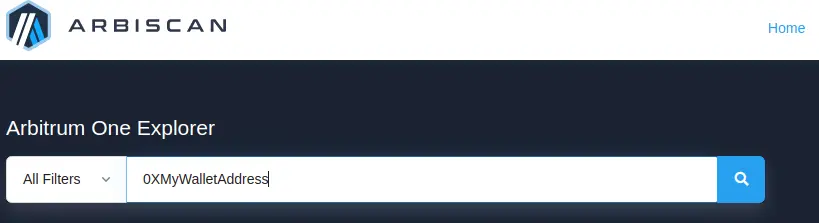
I’ll start a running example using MetaMask on the Arbitrum network. In this example I followed the steps below.
-
Open the MetaMask wallet
-
Switch to the Arbitrum network
-
Copy the wallet address and paste it into the search field on arbiscan.com.
Whether on Arbiscan or elsewhere, you should now see a list of the transactions associated with your wallet.
More Info
If you’re lost already, no worries! Here is a quick detour to explain what a blockchain explorer is, and why we’re starting here.
Key features and functionalities of a blockchain explorer include:
-
Transaction Lookup: Users can search for specific transactions by their transaction IDs (hashes), view the details of the transaction, such as sender, recipient, amount, gas fees, and confirmations.
-
Address Lookup: Users can look up wallet addresses to view their balances, transaction history, and, in some cases, associated tokens.
-
Block Information: Blockchain explorers display details about individual blocks, such as block height, timestamp, miner, and transactions contained within the block.
-
Network Statistics: Explorers often provide real-time statistics about the blockchain network, such as the total number of transactions, hash rate, average block time, and network difficulty.
-
Smart Contract Interaction: For blockchains that support smart contracts, explorers enable users to view contract details, read and write contract data, and interact with contract functions.
-
Token Tracking: Blockchain explorers can track and display information about tokens built on top of the underlying blockchain, such as token balances, transfers, and related smart contracts.
-
Network Events: Some explorers allow users to monitor real-time network events, such as pending transactions, new blocks, and contract events.
The three bold points are especially important for our task.
2. Find the Staking Transaction
Look for a transaction in your history related to staking, liquidity provision, or yield farming. This transaction should contain information about the contract you need to interact with for unstaking your assets.
It’s more challenging to provide specific guidance here, because the transaction may be named differently or feature different characteristics based on your specific situation. Knowing the date of the transaction can make this easier. If you’re not actually in this situation yet, then you can save yourself some trouble by taking notes of your staking transaction details at the moment of the transaction, so you can easily find the details months or years later if needed.
On Arbitrum, looking at my transaction history, I see a transaction titled "Add Liquidity and Create Position." That sounds about right for my LP position, and the date looks right.
3. Find the Staking Contract Address
Within the staking transaction, find the "Interacted With" field or a similar indicator, which should reveal the address of the contract you need to interact with for unstaking your assets. One side of the transaction will be your wallet, and the other side should be the staking contract. Click the staking contract to view more details about the contract.
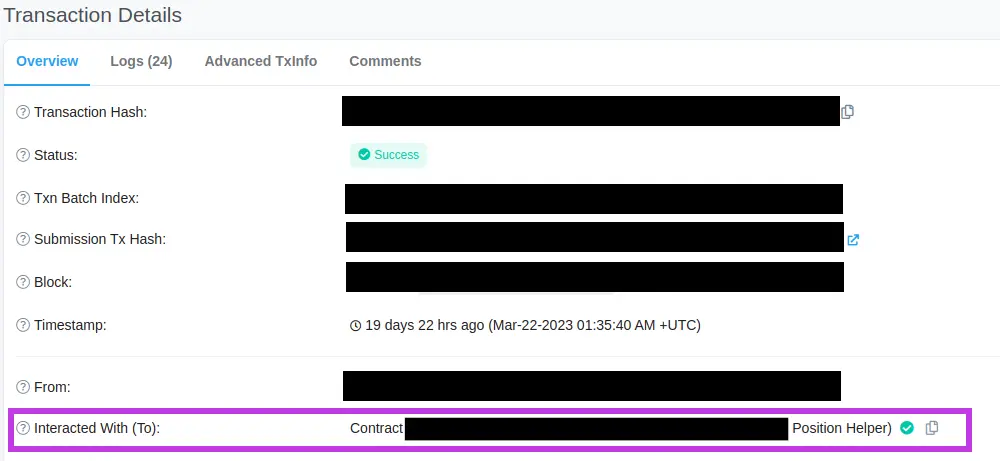
In the "Add Liquidity and Create Position" transaction on Arbitrum, the "Interacted With" field shows me a contract named "Position Helper", which contains the required address.
4. Find the Unstaking Function on the Contract
Visit the contract's page on the compatible blockchain explorer and look for the function responsible for unstaking or removing liquidity. This function's name may vary, for the same reasons cited earlier. You’ll need to use critical thinking and deduction here, as well (assuming you cannot ask the protocol developers or other users).
In the Position Helper contract on Arbitrum, I found a function called "removeLiquidity." Since I am here to remove liquidity, I’m willing to bet that this is the function I want. Note that this is not a built-in function of Solidity (the language used to create smart contracts), but is rather a function developed by a specific protocol to serve their ecosystem. That means I can’t look up this function on a popular website, but that’s not a problem! We can see the code in the next step.
More Info
If you haven’t viewed a contract page on a blockchain explorer before, it can be overwhelming. If you’d like to learn more about what you see, here is a breakdown of what you might find on this page:
-
Contract Address: The unique identifier of the smart contract on the blockchain, which is used for interacting with the contract.
-
Contract Creator: The address that deployed the smart contract to the network.
-
Transaction History: A list of transactions involving the contract, including transactions that interact with its functions or transfer assets to and from it.
-
Contract ABI (Application Binary Interface): A JSON representation of the contract's interface, which is used by web3 libraries to encode and decode data when interacting with the contract.
-
Contract Source Code: The original programming code written in a smart contract language (e.g., Solidity for Ethereum-based blockchains) that defines the contract's logic, functions, and state variables.
-
Contract Functions: A list of the contract's executable functions, including their names, input parameters, and descriptions. Users can interact with these functions by providing the required parameters and executing the functions through a web3 wallet.
-
Read/Write Contract: Sections that allow users to read data from the contract's state variables and execute functions that modify the contract's state or perform actions, such as transferring assets.
-
Events and Logs: Information about the events emitted by the contract, which can be used for monitoring and tracking specific actions or changes in the contract's state.
-
Contract Verification: Some blockchain explorers offer a feature to verify the contract's source code against its compiled bytecode, ensuring the code's authenticity and transparency.
The three bold points are especially important to our task.
5. Understand the Function Parameters and Requirements
To execute the unstaking function, you must first comprehend its requirements. These parameters are typically defined in the contract's code, written in the programming language used for smart contracts on your specific blockchain. Access this code by visiting the contract's page on a compatible blockchain explorer and selecting the relevant options to read or write the contract.
For example, consider the removeLiquidity function I mentioned earlier. On Arbiscan, there is a tab named “Code”. Since I’m looking to understand the removeLiquidity function, I’ll bet I can find more info on the Code tab.
Looking at the code, I see that this function allows users to withdraw their liquidity from a pool in the form of the underlying assets (tokenA and tokenB). Its parameters include:
-
Token addresses
-
Amount of liquidity tokens to remove
-
Minimum amounts of tokens expected
-
Recipient address
-
Deadline for the transaction
function removeLiquidity(

address tokenA,

address tokenB,

uint liquidity,

uint amountAMin,

uint amountBMin,

address to,

uint deadline

) external returns (uint amountA, uint amountB);
Make sure you understand the required parameters before attempting to call the function.
6. Execute the Function to Unstake Your Assets
Connect your web3 wallet to the blockchain explorer and execute the unstaking function by providing the correct parameters. Ensure you understand the gas fees and potential risks associated with manually interacting with smart contracts before proceeding.
In my example, when I’m ready to unstake, I would input the appropriate parameters, then execute (or “write”) the function directly on Arbiscan.
For instance, to call this function with example values, I might fill in the fields like so:
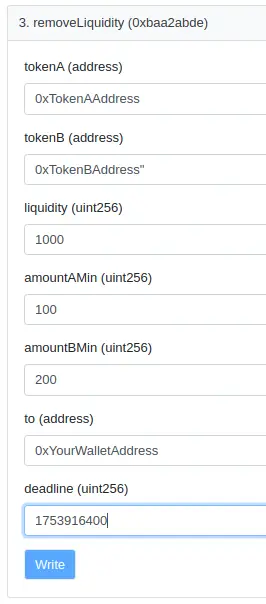
In this example, I would be removing 1,000 liquidity tokens from the pool, expecting to receive at least 100 of tokenA and 200 of tokenB. The withdrawn tokens will be sent to my wallet address, and the transaction must be executed before the deadline of 1753916400 (Unix timestamp).
Final Thoughts
Remember, the power to manage your crypto assets lies in your hands, and with perseverance and a proactive approach, you can navigate this exciting digital landscape with confidence and optimism. So, go forth and conquer the world of crypto unstaking, knowing that you have the power to succeed!





