
Like most I use a lot of different wallet for everyday use (Metamask, phantom,... ). Got also a hardware wallet to centralize operation but I think they are not 100% secure (zero-click attack, Q day,... ). So I create a BTC wallet where I will periodically send my BTC for long time HODL.
This wallet is created offline by using Tails and electrum. Private key are thus generated offline and destroyed when tails shutdown. No exposition.
The only thing you need to secure is the seed.
I find this procedure convenient and secure so I share it :
Using Tails and Electrum for Offline Wallet Seed and Address Generation
For those who don't know, Tails is a live linux operating system that provides a secure and private environment. Electrum is a lightweight Bitcoin wallet.
Prerequisites
1. Download the latest version of Tails, it comes preinstalled with electrum
2. Prepare a new, empty USB drive (8 GB minimum) to use as a live-USB (or format one).
3. Install Tails on the USB. Follow the instruction on their site to do so depending on your operating system.
Step 1: Boot into Tails
1. Insert the USB drive into your computer.
2. Reboot your computer and enter the BIOS settings.
3. Set the USB drive as the first boot device.
4. Save the changes and exit the BIOS settings.
5. Tails will boot from the USB drive.
Step 2: Launch Electrum
1. Find electrum in the menu under the category "internet" and launch it.
2. Don't create a persistent storage.
Step 3: Create a New Wallet
1. In Electrum, select "File" > "New/Restore Wallet".
2. Choose "Standard Wallet" and click "Next".
3. Select "Use a seed" and click "Next".
4. Choose "Generate a new seed" and click "Next".
5. Electrum will generate a new seed and display it on the screen.
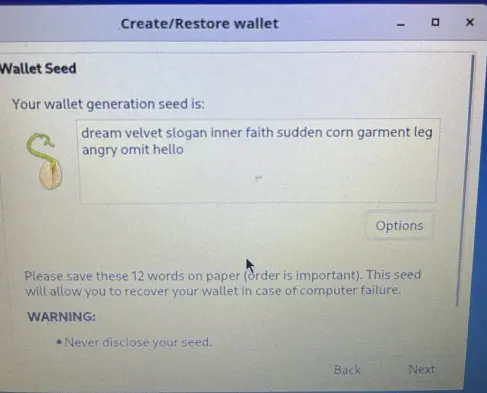
Step 4: Secure the Wallet Seed
1. Write it down. Paper or metal plate.
2. Hide it.
Step 5: Generate multiple new Address
1. In the "view" menu select "Addresses" so you can access them.
2. Go to the newly appeared "addresses" tab
3. I recommend you should use 5 to 10 addresses depending on your wealth so you can spread your BTC between them. Balances and transactions are exposed on the blockchain but those addresses are not linked (Beware poor privacy hygiene can link them!).
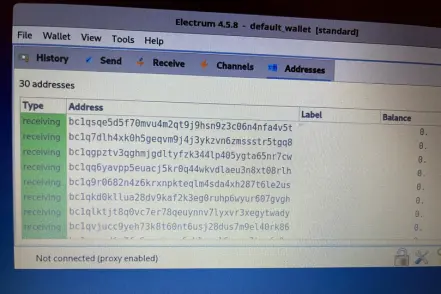
4. Copy these addresses to a text file on another USB drive.
Step 6 (optional): Save the master public key
1. Find the menu "wallet information".
2. Save it on the same USB drive as the addresses.
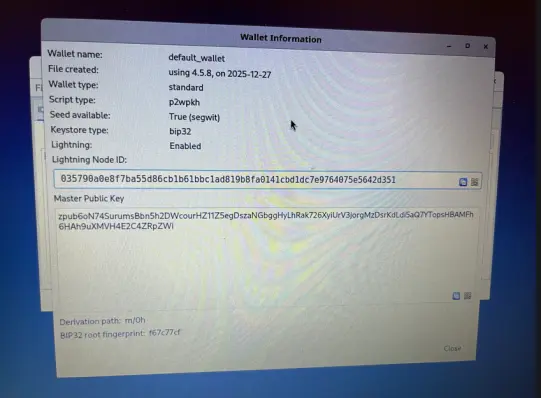
This zpub can be used in an online wallet app (electrum, bluewallet ,...) to make a "watch only" version of your wallet. (beware sometime it may flag your addresses and link them). An alternate more private way is to individually check them on a blockchain explorer. I use a spreadsheet, no stress...
Step 7: Exit Tails
1. Close Electrum and Tails.
2. Reboot your computer and remove the USB drive.
3. For the paranoid : format the stick and destroy it :).
Step 8: Verification
1. Reboot Tails and launch electrum.
2. Choose to create a wallet based on seed.
3. Input your seed.
2. Verify that your address and zpub match.
So, if everything work well you got a seed to hide, a zpub to turn into a watch-only wallet and some addresses to fill.
Step 9: Spend a portion of your BTC ?
You'll need to migrate the remaining BTC to a new set of addresses on a new wallet.
1. Repeat every step to get new addresses/seed/zpub.
2. Use your old seed to generate your old wallet on an online machine and make your transaction.
This entire procedure is free, private and secure. The only point of failure is the location of your seed so choose wisely.
Disclaimer : I'm not inventing anything, this procedure is well know by BTC maximalist. Even here on Publish0x, I_g_o_r describe a similar procedure involving dynamical passwords generators and converter that may suits you better.





