Here's a one-minute guide that any beginner can follow to back up and protect their keys offline in a safe place (like a USB flash drive or SD card).
What you'll need:
A computer.
An offline QR generator app, or even Microsoft Word (just make sure whatever you pick doesn't need an internet connection to work).
How to do it:
Write down your keys —a notepad text file or a Word doc works just fine.
Launch your QR generator app, paste in your seed phrase (the words need to be in order, with just a single space between them), and generate a new QR.
Do the same step again for each seed phrase you want to back up. You can actually use Microsoft Word to create the QRs (check out the following video):
Keep all the QRs you just generated together as images in one folder —pick a picture size that's not too tiny, 400px height and above works fine—, then select them all, right-click, and hit Add to archive... (use Winrar to compress it)
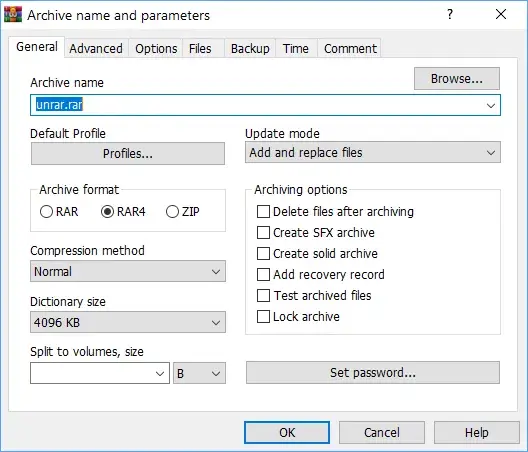
A window pops up where you can set some options. These are the ones that matter to you: pick RAR rather than ZIP for the archive format —the compression method doesn't matter, just leave it as is or choose 'Normal'—, then select Add recovery record and Set password (this is where you can also choose to encrypt file names). Pick a strong password that you're sure to remember. Name the file anyway you see fit. Hit OK.
All done —now you've got all your keys as QRs packed into one encrypted, password-protected file. Backup this file to a flash drive, sd card or external disk of any kind. To get one of your keys back, simply double-click the Rar file, enter your password, and scan the corresponding QR with your phone camera, for example.
Hope this was helpful.