In this guide I'd like to show you how to do offline-transactions using MyEtherWallet.
By using this method your private-key won't leave the offline machine so this is the safest way of sending transactions without using a hardware-wallet (which I'd still prefer as it's much more convenient and meanwhile you're getting a Ledger Nano S for less than 60€).
First of all something about your private-key/keystore-file/recovery-seed: Do NOT store this files on your computer which is connected to the internet! If you're getting infected my malware you may lose all of your coins/tokens linked to this private-key. The safest way would be just using your keystore-file on your offline computer to sign transactions and storing your private-key/recovery seed safely on paper. Your private-key and recovery-seed are unencrypted provide instant access to your wallet while the keystore-file is encrypted and requires an additional password.
Requirements:
- a computer which is connected to the internet
- a computer which isn't connected to the internet
- Your ETH public-key
- Your ETH private-key (Keystorefile should be preferred)
Installing MyEtherWallet locally [Do this on the offline computer]
Download the local version of MyEtherWallet from the official MyEtherWallet Github (etherwallet-vX.X.X.X.zip):
https://github.com/kvhnuke/etherwallet/releases
Move "etherwallet-vX.X.X.X.zip" to your offline computer (USB Stick, Smartphone, ...) and extract the content from the ZIP.
Open MyEtherWallet by double clicking 'index.html' - you may have to right-click it, then go to 'Open with' and select a browser; I'd recommend using Google Chrome - you may want to download it on your online machine and transfer it to the offline machine.
Making an offline transaction
STEP 1: [ONLINE]
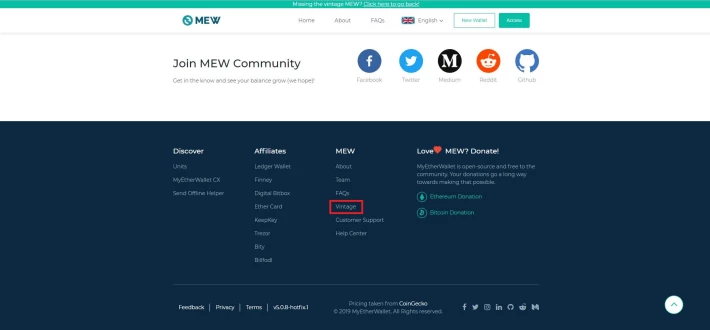
Go to the MyEtherWallet-Website, scroll down to the bottom and navigate to "Vintage" - you'll be redirected to old MEW interface.
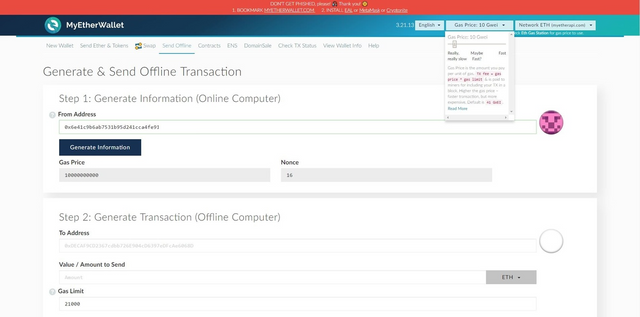
Select the 'Send Offline'-tab (https://vintage.myetherwallet.com/#offline-transaction) and adjust your GWEI according to https://ethgasstation.info/ by clicking on 'Gas Price: X GWEI' in the upper right corner and adjusting the slider to your needs. Then enter the public-address of the sender account into the 'From Address' textbox and click 'Generate'.
Write down the contents of 'Gas Price' and 'Nonce'.
STEP 2: [OFFLINE]
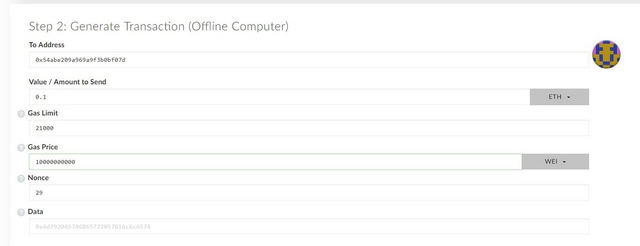
Open your local copy of MyEtherWallet, select the 'Send Offline'-tab and scroll down to 'Step 2: Generate Transaction (Offline Computer)'.
Enter the following information:
- To Address: Receiver-address
- Value / Amount to Send: Amount you want to send (it's also possible to send Tokens by clicking on 'ETH' on the right side of the textbox and selecting the respective Token in the dropdown-menu)
- Gas Limit: https://kb.myetherwallet.com/gas/what-is-gas-ethereum.html
- Gas Price: Value from STEP 1
- Nonce: Value from STEP 1
- Data: optional - leave empty if not needed
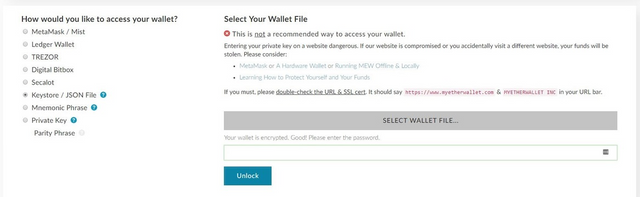
Now scroll down until you see 'How would you like to access your wallet?' and log in using your preferred authentication-method (I'd recommend using your Keystore-File!) and click 'Unlock'.
Click 'Generate Transaction'
STEP 3: [OFFLINE]
You'll now see two textboxes - 'Raw Transaction' and 'Signed Transaction'. Copy the content from 'Signed Transaction' and transfer it to your online computer.

STEP 4: [ONLINE]
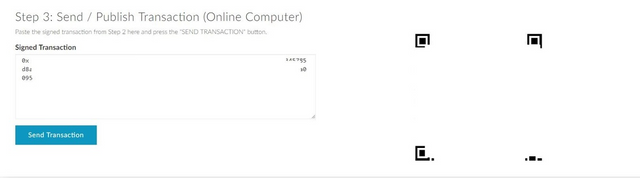
Go back to the MyEtherWallet-Website and select the 'Send Offline'-tab (https://vintage.myetherwallet.com/#offline-transaction). Scroll down to 'Step 3: Send / Publish Transaction (Online Computer)', enter your signed transaction, click 'Send Transaction' and confirm it.
Congratulations, you're done :)
Sidenotes:
1.) To check your balance just use https://ethplorer.io/ or https://etherscan.io/ or log in to MyEtherWallet just using your public-key (View only of couse).
2.) Many other coins also support offline transactions. For more information you'll have to do a Google search and/or check the respective coin's (wallet) documentation.
If you have any questions please feel free to ask anytime.
Best regards,
xuNsh1ne
Bitcointalk: https://bitcointalk.org/index.php?action=profile;u=134226
Steemit: https://steemit.com/@xunsh1ne
Facebook: https://www.facebook.com/xuNsh1neV1337
Twitter: @xuNsh1ne_V1
Telegram: @xuNsh1ne





