When first exposed to artificial intelligence (AI), I quickly recognized that we are living out a sci-fi novel.
But now fast-forward to today, and you can find this amazing technology everywhere! You have heard of GPT models already,
but maybe you haven’t thought much about integrating them into your workflow yet.
Whatever your niche – be it writing, coding, marketing, or having a ton of data sitting on your hands-
– there are plenty of uses for AI, and knowing how to use it without sacrificing your unique voice is where most people stumble.
Here are a few ways to seamlessly integrate these tools with your current system to boost productivity!
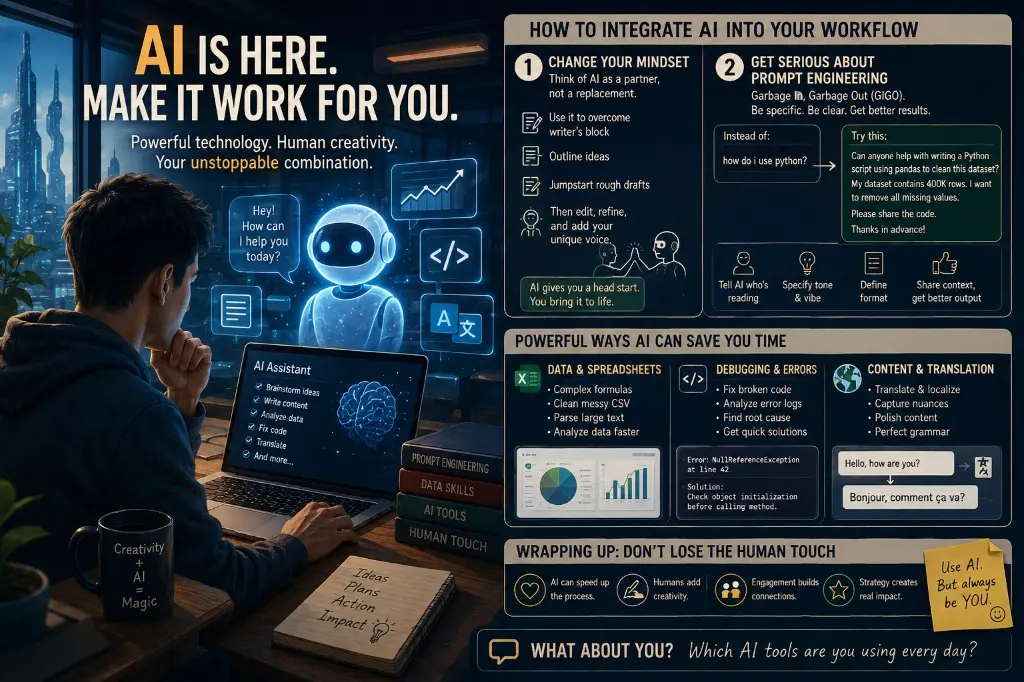
Changing your mindset is key:
Think of an AI as a partner rather than replacement.
When I started learning about AI, I immediately fell for the ‘magic oracle’ concept- a tool that does everything by itself without me needing to write anything.
But then again, if you read any other article about AI integration, you’ll see the same advice repeated over and over – treat it like a personal assistant.
Use this app to fight writer’s block, sketch out an idea for an outline, or jumpstart writing your rough draft.
Once you’re in there, keep editing. Ensure you make changes and infuse personality as needed.
2. Get serious about prompt engineering
Garbage In, Garbage Out (GIGO). There’s no avoiding this phrase when talking about using an AI tool like this one. How much you get out of an AI tool boils down to how good you are at explaining exactly what you need from it.
Instead of just writing “how do i use python?”, specify things more like this:
Can anyone here help with writing a Python script which uses panda’s library to clean this dataset?
My dataset contains 400K row(s) I would love to remove all the missing values. So my request is just for code that cleans up the data set. I’ll be very grateful if someone can share that.
Also tell them who’s gonna be reading this, what kind of vibe/tone you’re looking for, how you wanna lay out stuff etc.
AI Can Easily Save You Hours Of Grinding On Tedious Data Cleanup Or Basic Coding Headaches!
Data & Spreadsheets — If you’re stumped on creating an embarrassingly complex formula for a spreadsheet, want some help cleaning up that messy CSV, or need a way to parse massive blocks of text, just drop it over your AI’s lap.
Debugging & Errors — When staring down a broken block of code or confusing system error log, dropping this kind of data into your AI assistant will typically yield immediate results by pinpointing the root cause behind whatever problem has popped up and giving you a quick solution.
Supercharge Content Creation and Translation – If you consider yourself a creator, translator, or have plans for launching a digital side hustle, AI acts as a massive accelerator for many different kinds of projects.
Translation & Localization – When we’re translating our work, AI can be a huge help by providing those important cultural and technical nuances that make all the difference. With this tech, it's possible to bridge everything from technical terms to business jargon across different languages.
Polishing Up - Run some rough drafts past AI to check for spelling mistakes and smooth up your sentences. It will really take away the ‘boring’ stuff to get the big picture right.
Wrapping Up: Don’t Lose The Human Touch – While it’s true that AI helps us churn out more content faster than ever before, let’s not forget that the key ingredient behind every great project should always come down to the human touch. So if there are any tasks where humans need to flex their creative muscle, leave them up to us! And finally, don’t forget the most critical part of our job — engaging with people. That takes some serious strategy skills.
And now I'm interested to know what about YOU GUYS?
Which AI Tools are you guys using everyday?