
Back in April 2025, I'm hosting two web applications in Azure here and here. Both are built with HTML, CSS and JavaScript. While working two different apps, I'm already calling the same functions to do the same tasks. Hence, I have implemented a JavaScript module that can be imported and exported throughout my projects hosted in Azure.
Modules does not mean API
An API stands for Application Programming interface and in JavaScript is used with GET or POST to send and receive data from a server. Using import and export in JavaScript is referencing another file to re-use that function or variable.
Import / Export
In order to use the modular feature here is an example of the export feature with a function. This file is saved as helper.js.
// This will get a random int between the two numbers, including the numbers of min and max.
 export function randomInteger(min, max) {
   return Math.floor(Math.random() * (max - min + 1)) + min;
 }
In another file you import the previous file and name the function you need.
// Import generic functions.
import { randomInteger } from './helper.js';
Now you can use the function like normal.
var randnr = randomInteger(1, 3);Hosting in Azure
In order to use these functions and resources across multiple apps, I've started hosting them in Azure. For this I created a storage account and enabled the 'static website' and 'custom domain' options:

Then, navigate to the $web container and add your files that you want to be exported.
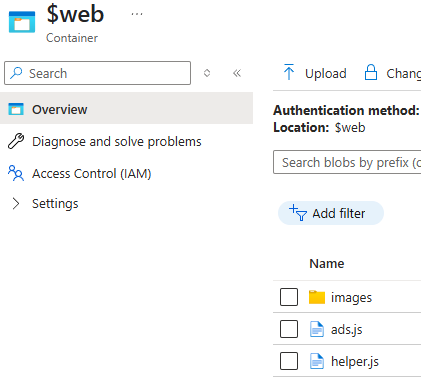
If you want a detailed how-to on hosting a static site in Azure, check out my blog on the subject here.
Why use JavaScript module?
I can already tell that using JavaScript modules to import and export functions will save me time. Not having to re-create new functions while getting the same code into my projects is great. Additionally, I will save on storage costs. The more I can centralize with code, pictures, and other files to reference from once source means no duplicate cost $$$. Thanks for reading!
For an in depth reference to JavaScript import / export visit: https://javascript.info/import-export.
This post was originally from my blog, referenced below.
Haven't joined Publish0x yet? Join up by using my referral code.
Support work you enjoy with Brave Rewards here.
You can get a 25 PRE token bonus if you use my referral code here. This is to support a decentralized web search engine with presearch.org.
You can earn crypto at Odysee.com, an alternative to YouTube. Use my affiliate link here to watch and earn.
God bless you!






