This guide turns any AI agent into a persistent social media autopilot that..
This guide turns any AI agent into a persistent social media autopilot that posts to LinkedIn, X, Instagram, Facebook, TikTok, Reddit, etc. — without begging for API keys or dealing with approvals.
Welcome back, and let's cover an easy way to set up Social Media Automation with AI Agents and/or Agentic Systems like Claude, Hermes Agent, OpenClaw, and many others. The hard part for me now is basic security, and the tech savviness needed to get developer API keys for particular social media platforms, and then setting up or allowing an AI agent to just have full access and control.
First, let us cover some tools I have used or recommend. Here is a list of platforms that make Social Media automation with AI agents easier.
Postiz — The Open-Source Powerhouse
Best For: Founders, agencies, AI builders, and self-hosting users
Supports: 30+ platforms including X, LinkedIn, IG, FB, Pinterest, TikTok, Threads, Reddit, YouTube, and more
Why It Wins:
- Full agentic scheduling
- AI-assisted content creation
- Open-source + self-hosted
- CLI support
- MCP compatible
- Own MCP server support
If you’re serious about building AI workflows, Postiz is one of the strongest options available. Perfect for people running autonomous content systems.
Blotato — Fastest Multi-Post Machine
Best For: High-volume creators and affiliate marketers
Supports: 9+ platforms including X, LinkedIn, IG, FB, TikTok, Pinterest, YouTube, Threads, and Bluesky
Why It Wins:
- AI content generation
- Instant multi-post publishing
- Fast workflow execution
- Great for affiliate campaigns
- MCP + n8n compatible
This is built for speed. Create → approve → publish everywhere. Done.
Upload-Post — Bulk Publishing Beast
Best For: Creators pushing video content at scale
Supports: 11+ platforms including TikTok, IG, YouTube, X, LinkedIn, FB, Threads, Pinterest, and Reddit
Why It Wins:
- One-call bulk uploads
- Native scheduling
- Excellent for Shorts/Reels workflows
- Dedicated MCP skill support
- 50% recurring affiliate model
Strong choice for media-heavy operators.
Make.com + n8n — Build Your Own Empire
Best For:
People who want full control
Why It Wins:
- Any platform via nodes
- Full workflow customization
- Direct MCP support
- Can replace entire SaaS stacks
- Infinite automation possibilities
This is where true AI operators live.
Now, my all-in-one tool I have been using is Composio.dev
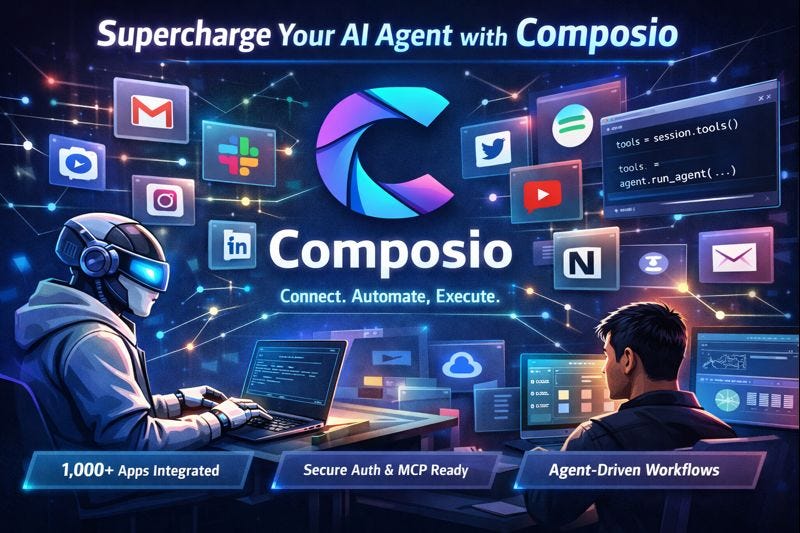
For me, I have been using Composio Dev for a lot of my social media and AI Agent automation. Composio makes it easier to set up a social media connection to AI agents and AI Agentic systems. See, Composio is one of those tools that actually makes AI agents feel useful. Instead of just chatting about what an agent could do, it gives your agent the ability to do real work across 1,000+ apps with just-in-time tool calls, secure delegated auth, sandboxed execution, and MCP support.
For me, the big win is simple: it makes it easy to connect social media tools, automate repetitive workflows, and let an agent handle the messy parts of execution. Instead of manually jumping between platforms, I can connect the tools once and let the system handle the rest.
For social media, this is where Composio starts to feel powerful. I can use it to help an AI agent connect to platforms, generate platform-specific content, and execute workflows across posting, scheduling, and distribution. Composio also supports MCP and works with frameworks and clients like Claude Code, Cursor, and other MCP clients, which makes it easier to plug into an existing stack without rebuilding everything from scratch.
HOW TO SET UP AND CONNECT TO YOUR SOCIAL MEDIA PLATFORMS
Basic setup would be to log in or set up accounts for any of these platforms and or Composio. Once you get an account,
(Disclaimer, composio has added a lot more features so please do not get confused or discouraged when trying to access the main features or page for connecting accounts.)
The main feature would be the platform to start
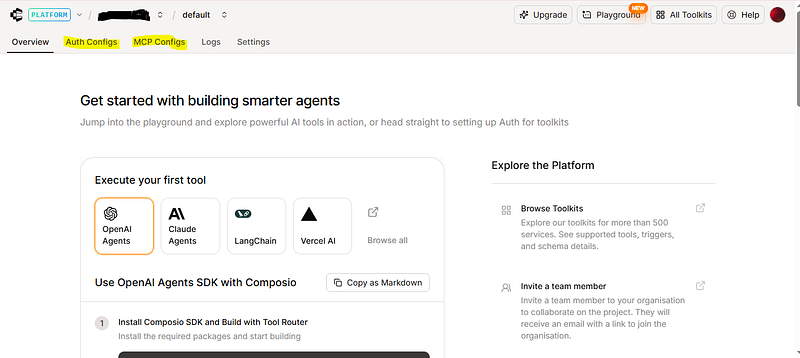
https://platform.composio.dev/ .
From here, you can easily go to Auth Configure to start connecting your accounts or connecting accounts with MCP. With this Composio set up, you will now mainly use the User test ID, install the AI agents system that comes with it, or when using. Then you give it the actual tool code.
Example in Python for MCP with Google Docs account:
from composio import Composio

composio = Composio(api_key="YOUR COMPOSIO API KEY")
external_user_id = "YOUR USER ID KEY"

session = composio.create(user_id=external_user_id, toolkits=["googledocs"])

print(session.mcp)
You can do this for each individual account or connect it to all. This makes it useful for a “skill” like social-media-distribution, where the agent takes one content asset and adapts it across platforms. First lets us cover the point of using Composio or the other platforms.
How and why are we using these platforms?
To keep it simple: there are a few ways to automate social media, but I’m focusing on making it truly easy for non-developers, non-tech-savvy users, and “vibe coders.”
The traditional way is to go to each platform (Facebook, LinkedIn, Pinterest, etc.), create a developer account, get their direct social media APIs, set up authentication, redirects, sessions, and then hand everything over to a coding AI system or AI agent. This requires a lot of technical know-how, often costs money, and gives the AI full direct access to your accounts — including sensitive areas like monetization and payments — through your API keys.
With certain platforms like OpenClaw, you instead give the tool session or browser control. It accesses your existing logged-in accounts directly on your computer. The problem is that this still demands some tech skills, works best on a laptop or desktop, and is much harder for everyday people — especially since about 65% of internet users worldwide are mobile-only.
To bypass all these issues, platforms like the one we’re using now (Composio) act as a secure middleman between you and your data. The connection process is much simpler: you just click to connect and set it up.
The biggest advantage is that you’re not giving away your direct social media accounts or full API keys. You can easily limit and control the access scopes — what the AI agents can and cannot do. This greatly reduces security risks compared to handing over main API keys that grant broad, unrestricted access.
Secure Setup in Claude Cowork / Claude Code / Claude Desktop
Claude Cowork and Claude Code support MCP natively (added in 2026 updates). There are two common ways:
Method A: Built-in Connectors / MCP List (Easiest for Claude Desktop/Cowork)
- Open Claude (Desktop or Cowork interface).
- Go to MCP / Tools / Connectors section (or search for “Add MCP server”).
- Add new MCP server:
- Name: composio
- URL: https://connect.composio.dev/mcp
- Header: x-consumer-api-key: ck_your_key_here
4. Save → Claude will discover all your enabled toolkits (X, LinkedIn, etc.).
5. When first used, Claude may prompt you to authenticate platforms again (but it uses the ones already connected in Composio).
Method B: Via Project / .mcp.json or CLAUDE.md (For Claude Code)
- In your project folder, create or edit mcp.json (or add to CLAUDE.md rules):
{
  "servers": [
    {
      "name": "composio",
      "url": "https://connect.composio.dev/mcp",
      "headers": {
        "x-consumer-api-key": "ck_your_key_here"
      }
    }
  ]
}
- Restart the Claude Code session.
Security for Claude:
- Never paste the ck_ key into chat prompts — it can leak in context windows or logs.
- Use Claude’s project-based MCP config so the key lives only in the local project file (not in global history).
- For Computer Use (screen control fallback), no keys are needed — it uses your browser cookies.
- Run Claude Desktop on a machine with good disk encryption (FileVault / BitLocker).
- If using Cursor (which pairs with Claude Code), set MCP the same way in Cursor settings.
Secure Setup in OpenClaw (Persistent Background Agent)
Recommended & Easiest Method (Official Plugin — Most Secure)
- Install the official Composio plugin:
- Bash
openclaw plugins install @composio/openclaw-plugin
2. Set the key using config (this stores it encrypted in OpenClaw’s internal config, not plain text in prompts):
Bash
openclaw config set plugins.entries.composio.config.consumerKey "ck_your_actual_key_here"
3. Restart the gateway:
Bash
openclaw gateway restart
4. (Optional but recommended) Add the MCP server manually via prompt if the plugin doesn’t auto-register:
In OpenClaw chat: “Add a new MCP server called ‘composio’ with transport type HTTP. Use the URL https://connect.composio.dev/mcp and header x-consumer-api-key: ck_your_key_here”
Extra Security Best Practices for OpenClaw:
- Run OpenClaw in Docker with limited privileges (never mount docker.sock).
- Bind gateway to 127.0.0.1 only (localhost) — never expose to public internet.
- Use environment variables or a secrets manager (like Bitwarden, HashiCorp Vault, or macOS Keychain) for the ck_ key instead of typing it directly. Tools like claw-vault can inject secrets at runtime and strip them from config files.
- Set tool allowlists in openclaw.json so the agent can only call social posting actions.
- Rotate the Composio key every 30–90 days.
- Never put the key in skill files, prompts, or version control.
Once set, your OpenClaw agent can use the skills we created earlier (e.g., composio_x_post, composio_linkedin_post) by name — no extra keys needed.
Quick Test Prompt (After Setup)
In OpenClaw or Claude Cowork:
“Using composio_x_post and composio_linkedin_post, create and schedule a cross-post about AI agents for tomorrow morning. Make X version punchy and LinkedIn version professional.”
Now here is a sample skill to use and test:
Platform: Upload-Post
Skill.md FIle
name: blotato_linkedin_post
description: Generate + post professional content to LinkedIn via Blotato MCP/API.
tools:
  - blotato_api
parameters:
  content: string
  image_url: string (optional)
---
# Blotato LinkedIn Skill
1. Use Blotato MCP or API key (affiliate).
2. Platform = "linkedin".
3. Optimize for professional tone.
4. Return post confirmation + analytics preview.Copy
We have a full skill suite for Composio in our Community and Gumroad digital store platform. These skills now come with Security Scan and are built to be used for Pinterest; you will need to use another platform besides Composio.
Here is the link: https://futuristicwealth.gumroad.com/l/social-media-automation
Final Thoughts
We’re entering a world where AI agents, automation tools, and open-source systems are moving faster than most people can keep up with.
The winners aren’t the ones who watch…
They’re the ones who build, test, and ship.
If you’ve made it this far, don’t just read this and move on — actually start stacking your skills and building real systems.
Want to go deeper?
Grab the full skill package here (priced at just $9.99 or pay what you want):
👉 https://futuristicwealth.gumroad.com/
Book a 1-on-1 AI consultation:
👉 https://cal.com/bookme-daniel/ai-consultation-smb
Join the ecosystem + updates:
👉 https://buymeacoffee.com/coinvest
👉 https://linktr.ee/omniai
🧠 Build smarter. Automate faster. Stay ahead.
#AI #Automation #AIAgents #BuildInPublic #NoCode #LowCode #FutureOfWork #TechStack #IndieHackers #DigitalProducts #CreatorEconomy #SideHustle #OpenSourceAI






