
I find cryptocurrency and the technology behind it fascinating. Because of this I am always searching for and trying new products to make this easier and more rewarding. This search brought me to the Atomic Wallet. The Atomic Wallet stands out because of its many assets available, its built in exchange feature, and the ability to stake a number of coins in one place. To truly get a feel for the Atomic Wallet and to give you an overview of some of its features, I thought I’d try it out for myself.
Getting Started
Getting started was an easy and straightforward process. Once I download the app I was asked if I wanted to create a new wallet or restore a wallet. To create a wallet and I made a password (to access the app) and was give the mnemonic phrase or the wallet (very important for me to keep safe and secure). The wallet contains a large number of wallets for a variety of the advertised 300+ tokens, including everything from Bitcoin and Ethereum to Tezos and Tron.
Once the wallet was set up and ready to go, I was greeted by 5 tabs – Wallets, History, Exchange, Buy, and Staking. I was surprised by the large number of coins/tokens that are supported. For this overview, I am interested in testing out the exchange and staking features of the Atomic Wallet.
Exchange
To get started I received around $25 worth of Bitcoin from a rewards program I use. To test out the exchange feature, I decided to try out a token that knew I could try staking with (Cosmos, Tezos, Tron, etc. are available), so I decided to exchange 0.001 BTC for Cosmos (Atom). On the exchange I entered the amount of Bitcoin I wanted to send, it quoted me the price, and then after I submitted the order it gave me a few seconds to cancel before officially submitting. It gave me a 5 to 20 minute estimate before the order was officially completed and it came comfortably within that range at 18 minutes from the time I submitted until receiving my ATOM tokens. One thing I did notice was that whatever network or exchange fees were charged were included with the price, but not directly shown.
Staking
Under the staking tab there are a number of tokens available for staking and their yearly staking yield. Clicking on each of these tokens gives a short overview of your staking balance and clicking the “Stake” button gives you information on how the staking would work for that token. For example if I click on the BitTorrent token, it explains how and when I could receive the token as an airdrop.
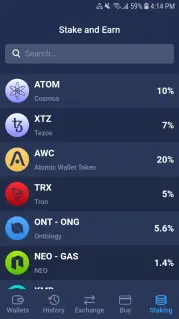
For this test, I decided to use the Cosmos I received earlier from the exchange. I received a little over 3.08 ATOM from the exchange process, went over to the Staking tab, clicked on Cosmos with its estimated 10% yield and got to work. It was a super easy process and I was off to the races in just a few minutes of clicking through the staking options (after doing a bit of research on the staking process). We’ll see in a couple of days how receiving the staking rewards and unstaking actually works.
Conclusion
Overall I found the Atomic Wallet very user friendly. Compared to other wallets I have tested out, it appears they are especially focused on looking for ways to make it even better. The exchange was fast, easy, and included a wide range of coin and token choices, and the staking process was very straightforward. I look forward to testing out and following new features that Atomic Wallet develops. I hope to update you all again in the future.






