Photo-Manipulation

Quick Creation Process GIF
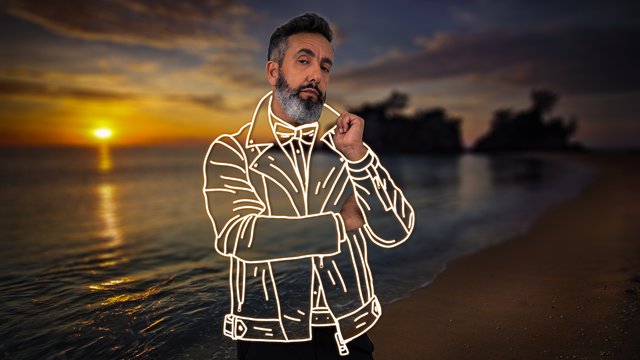
In this cool Photoshop Artwork, I have created this invisible clothes effect using line art. This effect will be more highlighted if the subject is wearing a heavy jacket having a lot of wrinkles and details. Place it on the dark background so the white lines will be more visible and our scene will look more dramatic. Give enough time to draw the details on the clothes.
So, let us now begin the creation process steps in brief. After the steps, I will also give the whole YouTube Tutorial link so you can learn all the techniques I used in it and create this artwork.
First, let me share the original stock images used in this effect.
Stock Image
Source Link
 http://bit.ly/31hxOOA
 http://bit.ly/2UmKD8R
Step 1. Open the sunset background stock image in Photoshop and apply the tilt-shift blur effect to it to add the depth of field in the image.

Step 2. Place the model over this layer and remove the background from it using the quick selection tool.

Step 3. Draw the outlines of the clothes using the brush tool on the model's jacket.

Step 4. Now add the outer glow and drop shadow on this line art.

Step 5. Now remove the jacket of the model with the masking.

Step 6. In the end, merge all the layers into one layer and apply the camera raw filter to it.

And we are done with this cool invisible clothes Photo-Manipulation Artwork.
Watch The Detailed Tutorial On YouTube Here..
I am a professional digital artist, photo-editor and motion designer having experience of 5 years. If you also want these cool effects and creative logo animations for your text, logo or graphics, I will design them for you at very reasonable prices. You may contact me on telegram, discord or Fiverr. Here are my contact ids for these social handles.
TELEGRAM : @gauravrocksg DISCORD : @rocksg#4832
FIVERR : https://www.fiverr.com/grocksg/ (Fiverr is a marketplace for the freelancer, you can watch my portfolio there and past works I have done for clients and place your own orders, it is very secure and safe)