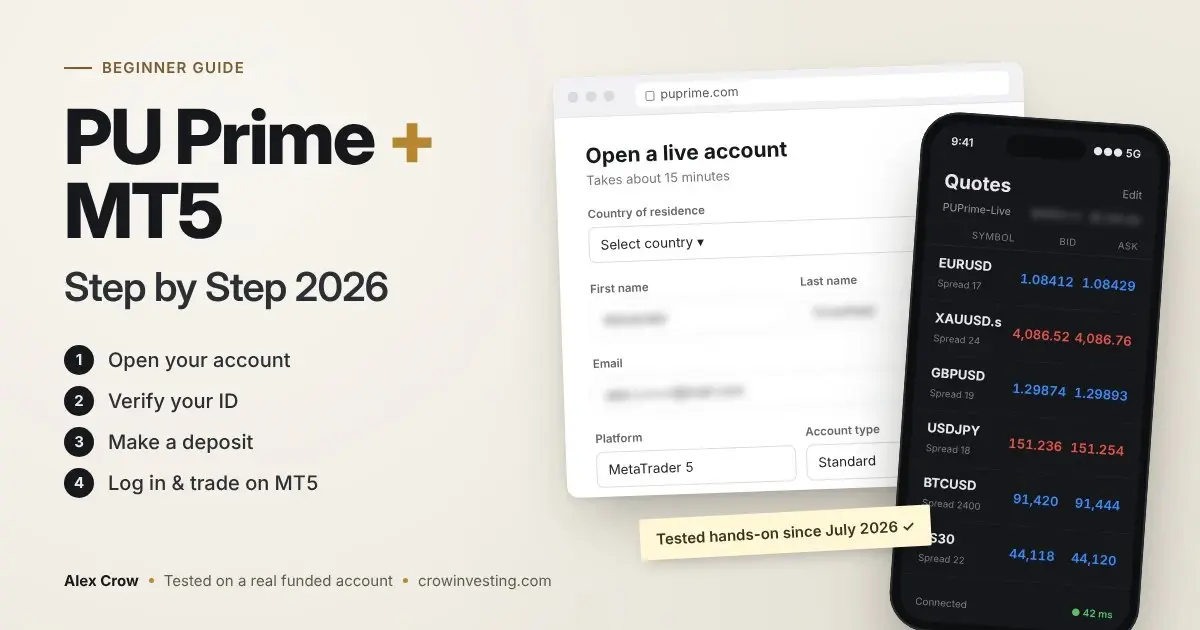
Opening a PU Prime account takes about 15–20 minutes if you have your ID and a recent utility bill ready. The steps:
Register in the Client Portal.
Verify your identity.
Open an MT5 trading account.
Make a deposit (from $50 on a Standard account).
Log in to MetaTrader 5 with the separate login and server name that PU Prime emails you.
Last updated: 21 November 2026 · By Alex Crow,
I went through this myself in July 2026 and have traded gold and EUR/USD on the account since. Below is every step, the screens you'll see, and the small things that tripped me up.
Disclosure: This guide contains an affiliate link. If you sign up through it, I may earn a commission at no extra cost to you. I opened and funded my own PU Prime account to write this, and my opinions are my own.
Before You Start: What You Need
Photo ID: passport, national ID card or driving licence
Proof of address: a utility bill or bank statement with your name and address (recent; the portal shows which dates it accepts)
A phone camera for the selfie check
A deposit method: card, Apple Pay, crypto or a local method (options depend on your country)
15–20 minutes
Availability: PU Prime does not accept clients from the United States and several other countries. The PU Prime company that holds your account also depends on where you live, and that decides your leverage, protections and complaint options. Check the restricted-country list on the official site before you sign up.
Step 1: Create Your PU Prime Account
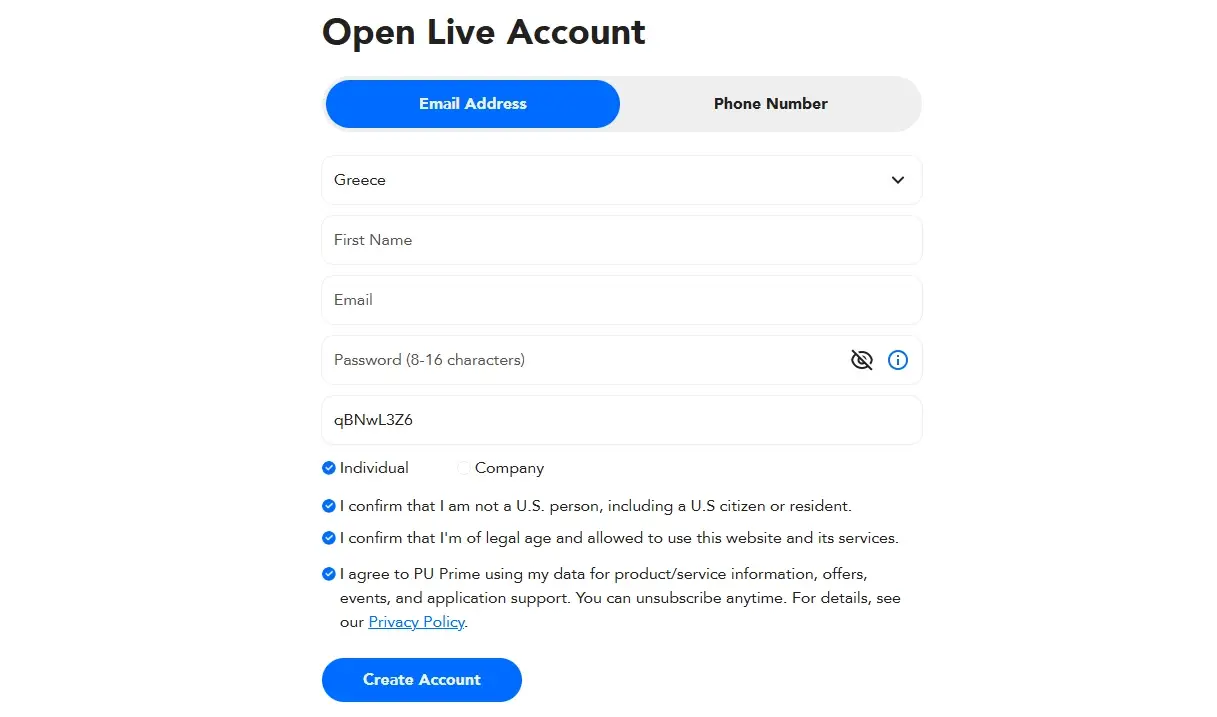
Type puprime.com into your browser yourself. Don't use a link from a random ad or Telegram message, because cloned broker sites exist. Click Open Account and fill in your country of residence, name, email, phone number and a password.
If you sign up through my PU Prime partner link (affiliate link), the partner code fills in automatically. You can also type it by hand: qBNwL3Z6
One detail people skip: the country you pick decides which PU Prime company you sign up with.
Mine was PU Prime Ltd, regulated by the FSC in Mauritius. The company name appears in the client agreement you accept at the end. Read it once, because it matters later if you ever need to file a complaint.
Step 2: Choose Your Trading Account (Platform, Type, Leverage)
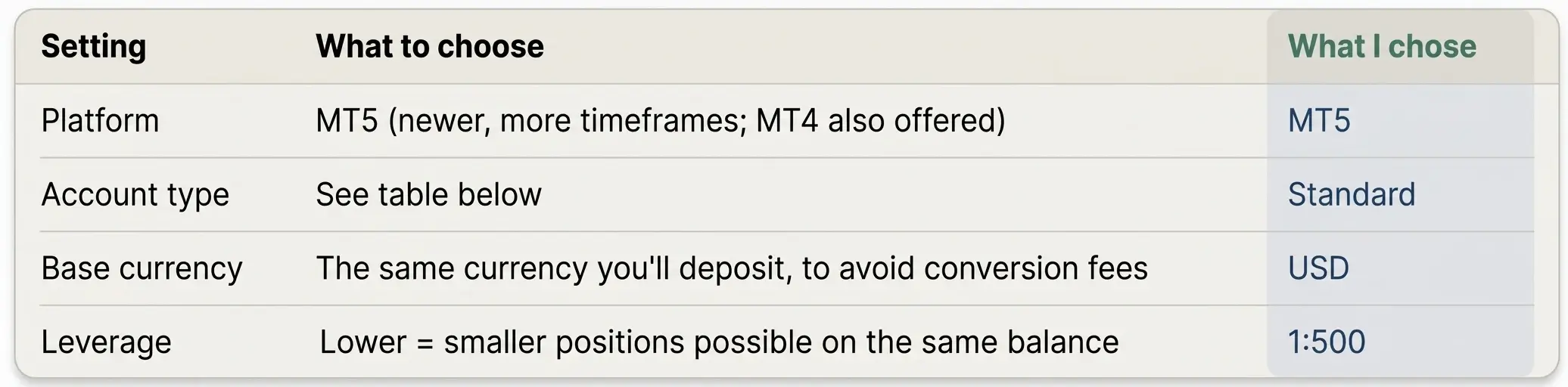
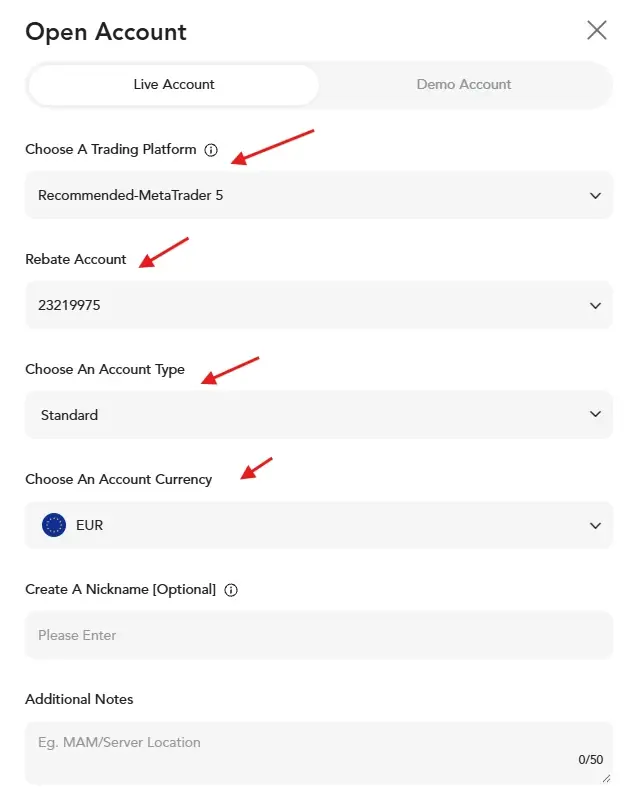
Inside the Client Portal you open a trading account. That's a separate step from the portal registration. You pick four things:
PU Prime account types (checked November 2026):
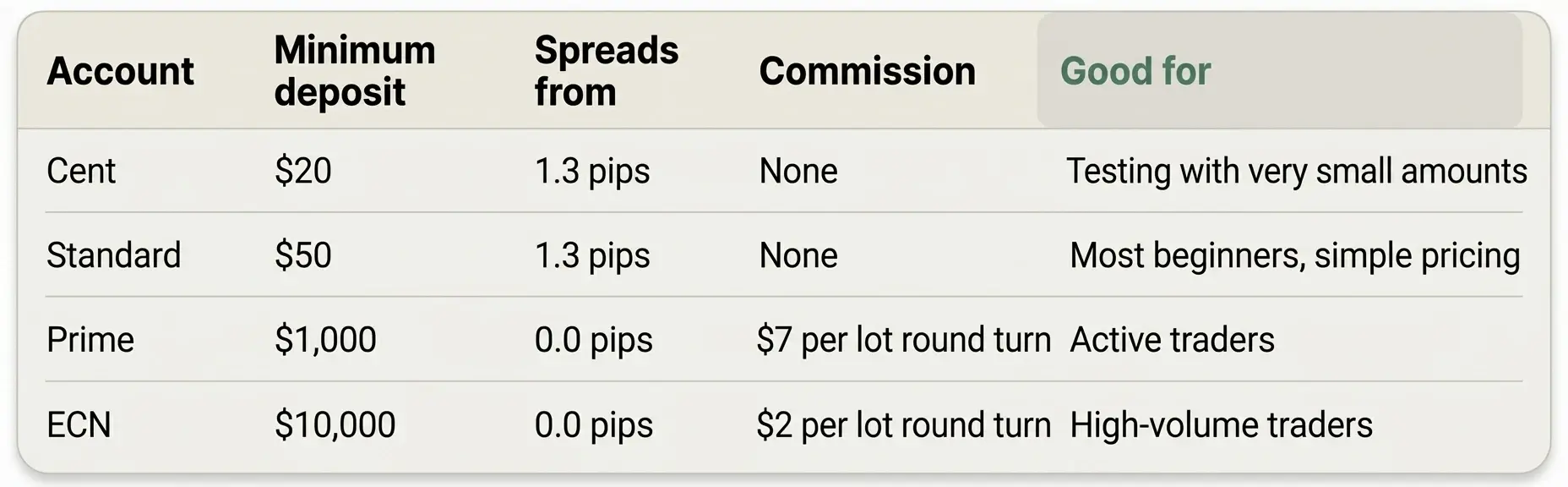
If you're new, Cent or Standard is enough. About leverage: 1:500 doesn't make a trade bigger by itself. What it does is let you open much bigger positions than your balance could normally carry, and that's how small accounts get wiped out fast.
I keep my lot sizes small. If you're not sure, choose lower leverage.
Step 3: Verify Your Identity (KYC)
Go to Verification in the Client Portal. You'll upload:
Your ID, front and back
A selfie (the portal guides you through it on your phone)
Your proof of address
My verification was approved very quickly. It can take longer at busy times. A few things help it go through first time:
All four corners of the document visible, no glare, no fingers over the text
The name on your account exactly as on your ID
An address document that's recent and shows your full name
You can't withdraw until you're fully verified. Do it before you deposit, not after.
Step 4: Make Your First Deposit
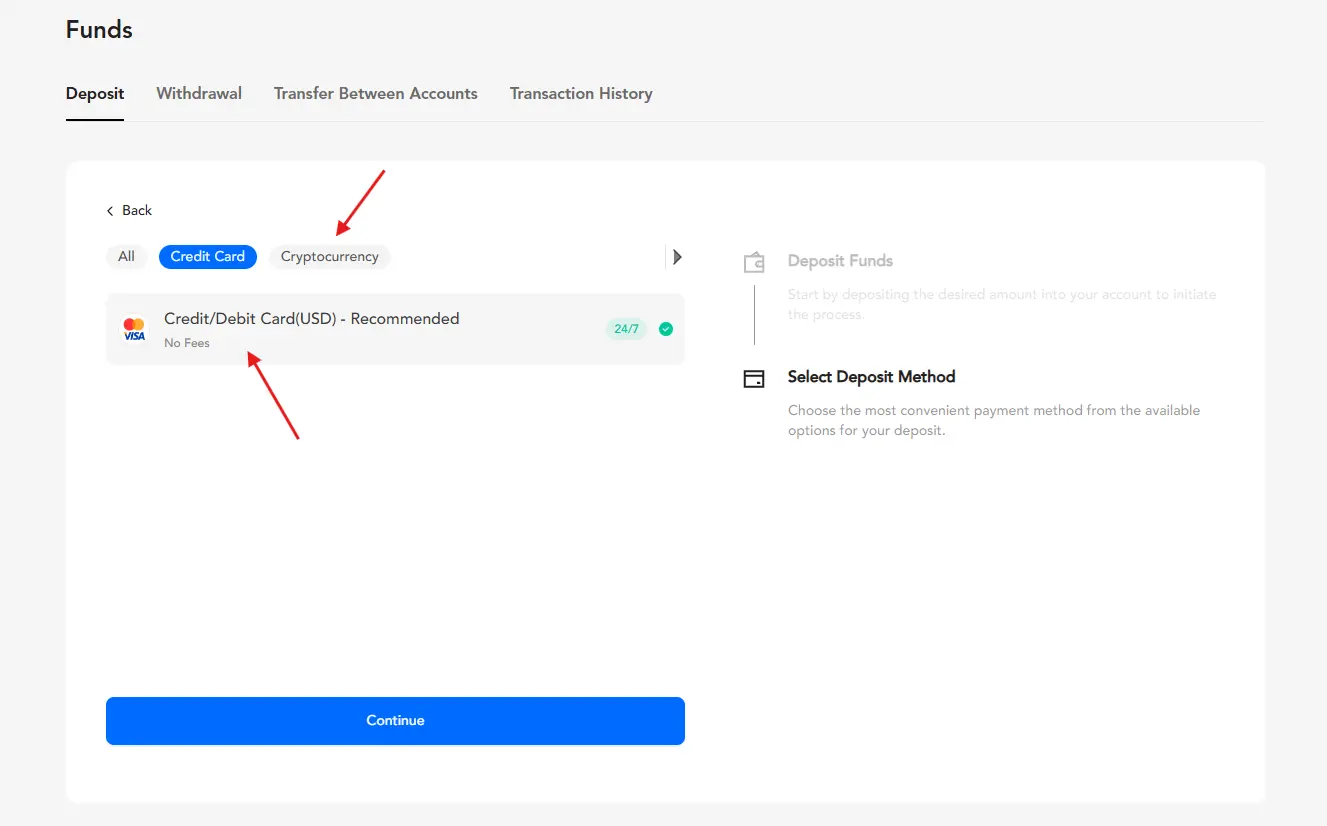
In the Client Portal, open Funds → Deposit, choose the trading account and pick a method. I tested two:
Apple Pay
USDC On Solana
If you deposit crypto:
Choose the same network in the portal and in your wallet (for example USDC on Solana on both sides). The wrong network is the most common way to lose a deposit.
Copy-paste the address and check the first and last 4 characters.
Send a small test amount first.
If you see a deposit bonus offer, read its terms before you accept it. Bonuses usually come with trading-volume conditions and can affect what you're able to withdraw.
Step 5: Find Your MT5 Login and Server Name
After you open the trading account, PU Prime emails you three things:
Login: your MT5 account number
Password: your trading password
Server: for example PUPrime-Live or PUPrime-Live 2
This is the mistake I see most: the MT5 login is not your Client Portal email and password. They're two different sets of credentials. Save the email, or put the details in a password manager.
Step 6: Connect PU Prime to MT5 on Desktop
Download MetaTrader 5 from PU Prime's platforms page or from MetaQuotes.
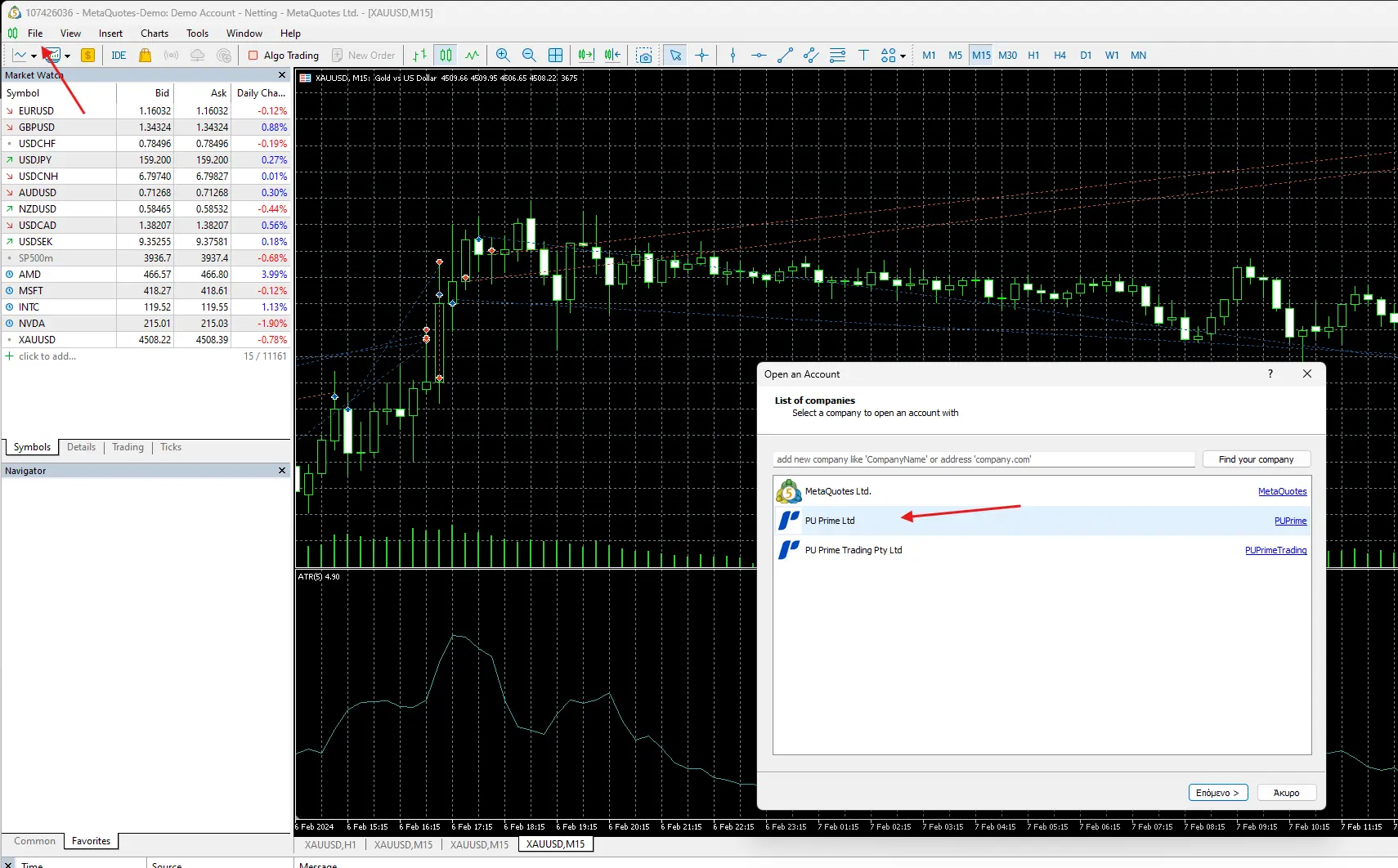
Open MT5 and go to File → Open an Account.
In the server field, type "PU Prime" and select the exact server from your email.
Enter your login number and trading password, then click OK.
How to know it worked: the bottom-right corner shows a connection speed in milliseconds (for example "45 ms"), not "Invalid account" or "No connection". Prices in Market Watch start moving.
Step 7: Connect on Your Phone (iOS or Android)
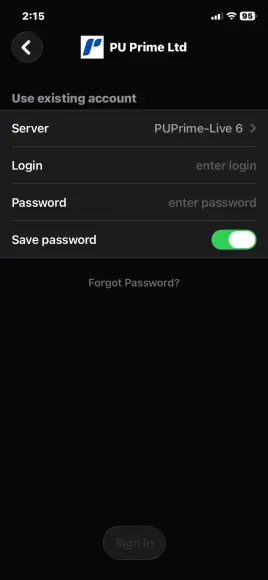
Install the MetaTrader 5 app.
Go to Settings → New Account (or Manage Accounts → +).
Search "PU Prime" and choose the same server as on desktop.
Log in with your MT5 number and trading password.
The PU Prime App is a separate app for deposits, withdrawals and copy trading. You trade on MT5 and manage money in the PU Prime app or portal.
Step 8: Your First Trade, Step by Step
Start with the smallest size and a stop loss. Your first trade is for learning the buttons, not for making money.
In Market Watch, right-click EURUSD and choose New Order (or press F9).
Set Volume to 0.01. On EUR/USD that's 1,000 units, worth roughly $0.10 per pip.
Fill in Stop Loss and Take Profit before you click anything else.
Click Buy by Market or Sell by Market.
The position appears in Toolbox → Trade, with live profit or loss. To close it, click the X at the end of the row.
Spreads I saw on my Standard account:
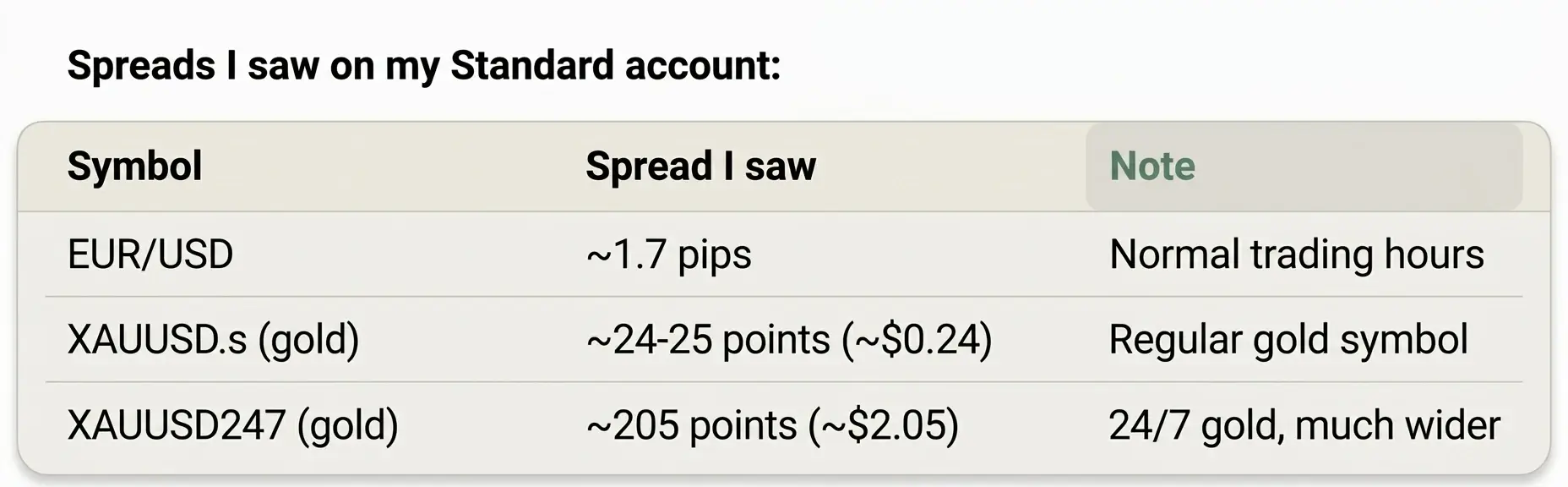
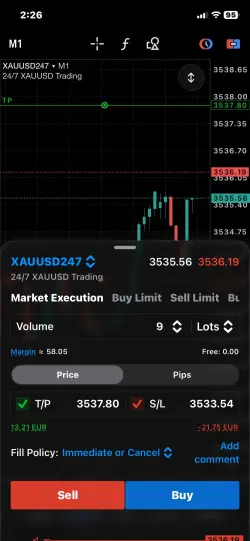
Gold tip: PU Prime lists two gold symbols. XAUUSD.s is regular gold. XAUUSD247 trades 24/7, including weekends, but in my checks its spread was about 8 times wider. For weekday trading, make sure the order window says XAUUSD.s before you click.
Step 9: How to Withdraw
In the Client Portal, open Funds → Withdraw, choose the trading account, the method and the amount. Brokers commonly ask you to withdraw back to the method you deposited with first, so plan your deposit method with that in mind.
My test: a USDC withdrawal on Solana reached my wallet in about one hour, with no PU Prime fee. Network or bank fees can still apply on your side.
Is It Worth Opening a PU Prime Account?
From my side, the setup was smooth: quick verification, instant Apple Pay deposit, a crypto withdrawal in about an hour, and MT5 worked without issues.
The trade-off: most international clients, me included, sign up with an offshore PU Prime company. Offshore entities give lighter protection than brokers regulated in places like the UK or Australia, and several regulators have published warnings about PU Prime. I cover all of that, plus fees, support and why I rated it 4.0 and not higher,.
If you're completely new to forex, read how to start forex trading first and practise on a demo account.
Good fit if you… want MT5, low minimum deposits, and fast crypto funding.
Think twice if you… need a top-tier regulator or government-backed compensation, or you live in a restricted country.
FAQ
What is the minimum deposit for PU Prime?
$20 for a Cent account, $50 for Standard, $1,000 for Prime and $10,000 for ECN (checked November 2026).
How long does PU Prime verification take?
Mine was approved very quickly. At busy times it can take longer, so verify before you deposit.
Is my MT5 password the same as my PU Prime login?
No. MT5 uses the account number and trading password from your account-opening email, not your Client Portal email and password.
What is the PU Prime MT5 server name?
It's in your account email, for example PUPrime-Live or PUPrime-Live 2. Demo accounts use a separate demo server.
Can I open a PU Prime demo account first?
Yes. Note that inactive MT5 demo accounts are archived after 60 days without a login.
Which PU Prime account is best for beginners?
Cent or Standard. Both have no commission and low minimum deposits.
Is PU Prime available in the US?
No. US residents aren't accepted, and other countries are restricted too. Check the official list.
Risk warning: CFDs are complex instruments and come with a high risk of losing money rapidly due to leverage. Between 70% and 89% of retail investor accounts lose money when trading CFDs. You should consider whether you understand how CFDs work and whether you can afford to take the high risk of losing your money.