The Cryptocurrency Degenerates (CDGS) NFT Art Project is live! Many blockchain NFT enthusiasts have requested simplified information on how to participate in the Mint. Although, COSMOS is an incredible ecosystem made up of many blockchains, many crypto and blockchain degens have not used it and therefore a learning curve is necessary to facilitate its use. Below in the article can be found a simplified tutorial on how to set up your PC or Phone to use the Cosmos ecosystem, and specifically participate in the CDGS Mint. The collection is made up of some amazing images and promises to provide long term utility benefits to CDGS NFT owners. Additionally, the project will help selected individuals move closer to achieving self-reliance and an improved quality of life.
CDGS Mint Site: https://cryptocurrencydegeneratesnft.xyz/
The collection can also be accessed via the Omniflix Marketplace: https://omniflix.market/collections
TUTORIAL (If you need a more detailed tutorial scroll to the bottom for link)
Step 1 - Install a Keplr Wallet
Watch the video which shows how to install the Keplr Wallet (PC & Phone). It is an easy process.
https://www.youtube.com/watch?v=-6-2JupRdpk
Step 2 - Send Atom to your Keplr Wallet
Once the Keplr Wallet is installed in your browser, then next step is to send some Atom to your Keplr Wallet
- Remember that the chain is COSMOS - when sending from an exchange.
A list of exchanges can be located at this link (Long List) https://messari.io/asset/cosmos/markets
Your wallet address can be found under your created account name - just click on it.
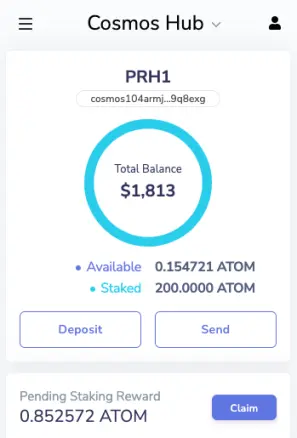
PRICE PER NFT - Approximately $10
Step 3 - Purchase JUNO token (On Osmosis)
- The NFT purchase currency is Juno so you need to buy some
- Connect to Osmosis to buy Juno https://app.osmosis.zone
- Go to "Assets" - Click Deposit next to ATOM - and deposit some of your Atom to buy Juno Token (leave some Atom for fees 0.1)
- Go to "Trade" - Swap your ATOM for JUNO (Use low transaction fees when approving for free fees on Osmosis)
- Return to "Assets" - Next to Juno (you will see Juno balance) click withdraw -- Withdraw all your Juno from Osmosis chain to Juno Chain on your Keplr (Follow the prompts as it may ask to add Juno chain if you have not used it before).
PRICE PER NFT: 4 Juno (Approximately $10)
You now have a small amount of Atom left in your COSMOS chain keplr wallet and you also have Juno in your Juno wallet.
Use the dropdown arrow in your Keplr to navigate to different blockchains:
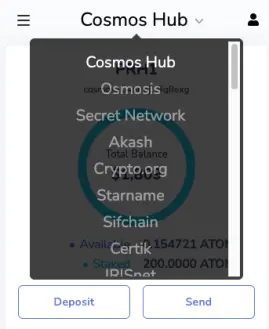
Step 4 - Join the CDGS Mint and complete a few steps / Make sure you Keplr is connected
- Connect to the Mint site https://cryptocurrencydegeneratesnft.xyz
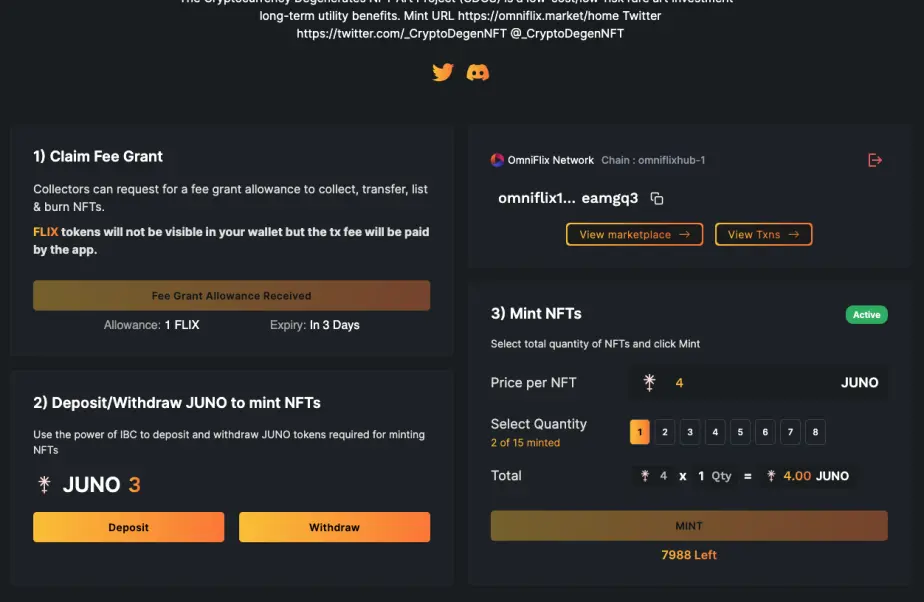
There are 3 steps - Just do them 1 by 1
- 1. Claim fee grant (this will place some Flix tokens in your wallet for fees - do not worry if you do not see them after claiming) - click and approve
- 2. Deposit Juno to be able to Mint // In the previous step you transferred Juno to your Keplr; they now need to be sent to Omniflix Chain) - click, select amount and approve
- 3. Mint NFTs - Choose the number you wish to mint and approve
Congratulations! - You have now minted an NFT or NFTs
Step 5 - View the NFT/s in Your Omniflix Wallet
Once you have minted an NFT the following screen will be in view - Click "View marketplace"
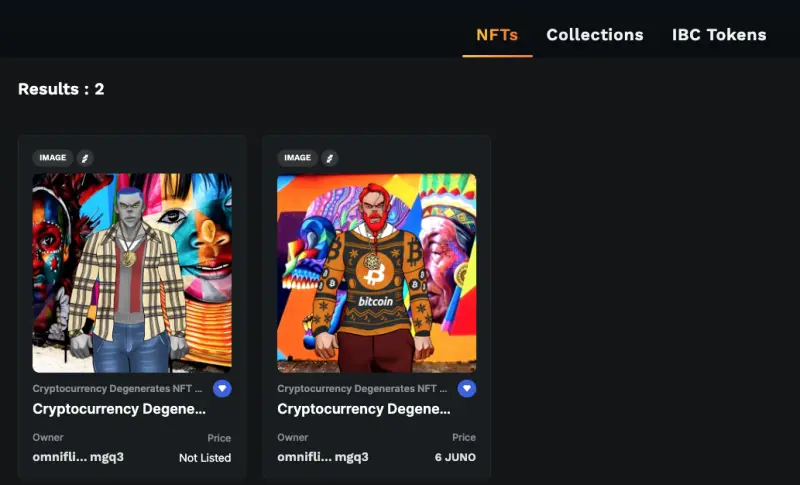
You will now be able to view the NFTs purchased in your Omniflix Wallet
Note
If you have any problems then contact support
Discord http://discord.gg/QD9XEbzBXz
Omniflix Telegram https://t.me/OmniFLixChat
Other Links
Twitter https://twitter.com/_CryptoDegenNFT
LONG TUTORIAL LINK