The story isn't as sexy as the title, but I thought it was good eye-catcher. Basically, this is another dribble about bringing a zombie computer back to life.
I was at the local ReSTORE thrift the other week, just checking the place out for what was available or interesting. Basically, ReSTORE is a construction-focused thrift operation; those folks with too much material left over and unwilling to re-use it or re-sell can just donate the materials and resources, and the ReSTORE folks sell it for big discount. It's a good way to find a lot of free construction and renovation materials if you're flexible. Inventory includes everything from tiles to windows to furniture to plumbing and so on, but they do take a lot of other stuff too. As it turned out, that's where my zombie was sitting.
Just about finished making my rounds and getting a feel for the overall offerings, I end in the miscellaneous section. Buried in a bunch of wiring, wi-fi modems and printers there sits an old Dell Optiplex mid-tower (not the cheapo slim version), covered in dust. A quick scan tells me it's a Windows 7 era version, probably from before they started farming out the sandwich PCs to the office types. That might have some promise, but I have no way of looking inside because it's sealed up. So, after rummaging a bit more and finding about two dozen books for free (easy resell on Pangobooks or Mercari), I find a staffer and ask if I can borrow their screwdriver to open the lid and see inside. Took a bit for him to find a Phillips (I should have just had one in my pocket but my work building security gets fussy with even spoons much less anything metal that you could poke something with), but eventually he comes back. Two screws off and the lid removed and I find a rabbit's nest of dust. However, buried deep inside is clearly four DDR chipsets, a CPU with a cooler on it, and a fatty hard drive along with the motherboard. Basically, some IT shop probably cleared the unit, deleted data and had this sitting for reallocation until it got timed out. So they out-cycled it and the PC found it's way to a thrift without ever being opened or gone through.
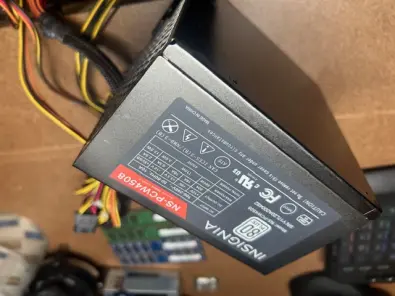
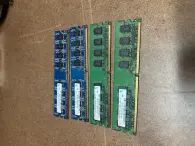
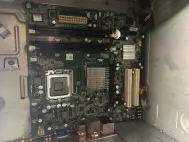
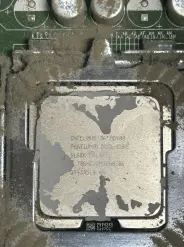
Dragging this find home, the first job was to just open up and see what I actually had. After some serious air-blowing and dustmigating (made up word) I finally was able to see the insides. Inventory: 1 Pentium dual-core CPU chip with matching cooler fan, 1 intel-format motherboard, 4 DDR 3 chips, but oddly 6GB in total (it ended up being a 2GB x 2 and 1GB x 2, weird), a clean 450W PSU, and a 650gb drive in decent condition.
Tried to boot the machine on its own, but the results made it obvious why the machine got tossed - video wasn't working. After isolating the problem, the motherboard was toast and a tosser. However, for $20, everything was in working order.
So, since I couldn't bring the zombie back to life as-is, it got cannibalized into another zombie I now had available (ended up with a spare after cannabilizing the good stuff from that spare into a DDR5 modern machine I built separately).
Now, popping the drive into an AMD-format motherboard it was a "simple" matter of sticking a new linux OS on it (Debian) and getting some value back. Oh dear, this is where the fund started. Turns out my spare didn't have a wi-fi modem built-in or a dongle, so Debian loaded with only the stripped-down CLI version. Now I had to figure out how to get it Internet in the garage. Tried it again with a dongle, but for some reason the install didn't want to cooperate after that, probably sensing network management at a foobar level was already loaded. So, now I had to plan B. Piggyback.
I had a few other PCs in the garage already wired and running. So, after digging around, I find a suitable patch cable and connect the ethernet of the zombie/cannibal package to a working PC and run off it's internet. Of course, in Linux, nothing is ever plug and play. Then I had to spend 30 minutes getting the host PC to recognize the connection, allow it's traffic and give the zombie/cannibal an IP address that would stick and be remembered. Once that defaults were defined, sticking and reliable with some minor work in Nano editor and bash, I had a working internet connection on the zombie/cannibal. Add in another hour loading my suite of standard apps via APT pulls, and finally getting GNOME set up properly, zombie/cannibal is purring like a kitten.
The whole resurrection was a bit of a 4-hour pain, but for me these jaunts are a bit like an archaeology project getting old tech to work again in viable form. Linux is great for that, but it takes some technical know-how beyond just plug and play. As for the rest of the parts, I have a spare intel-CPU now to sell as well as some old DDR3 chips someone might need, so my guess is I'll probably double my initial $20 spend by the time everything is done.