
The incredibly tedious and slow process of making tileable hexagonal grid textures..
I'm posting this as a reminder to myself to never attempt to create tileable hexagonal grid textures like this again.
Last couple of days I have been working on a set of tileable hexagonal grid textures with Illustrator to use as floors/streets for my Unity arcade tank game project.
It has been a incredibly tedious and slow process that often made me feel like hopelessly trying to stick a thread trough the eye of a needle...
The workflow that I'm using is that I have one large Illustrator document with a grid of a hundred artboards: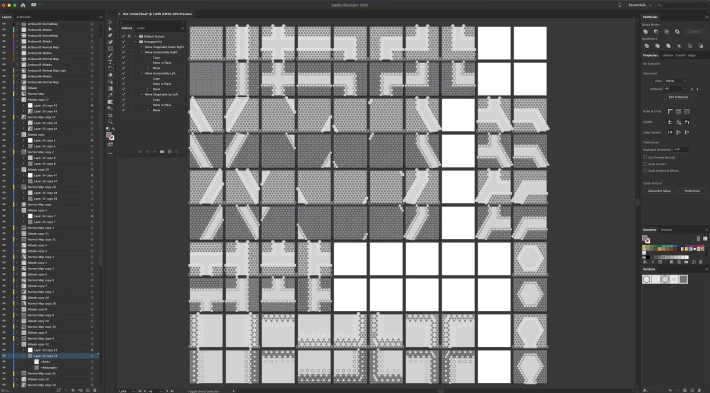
In Unity I made a game object with one hundred child quads tiled in the same way as the artboards in Illustrator. Each Quad has it's own material and already has the all-in-one-time exported texture from the same artboards applied to it.
This way when I made changes to the textures in illustrator it will immediately be updated in Unity, so I can immediately see how it looks and if it works:
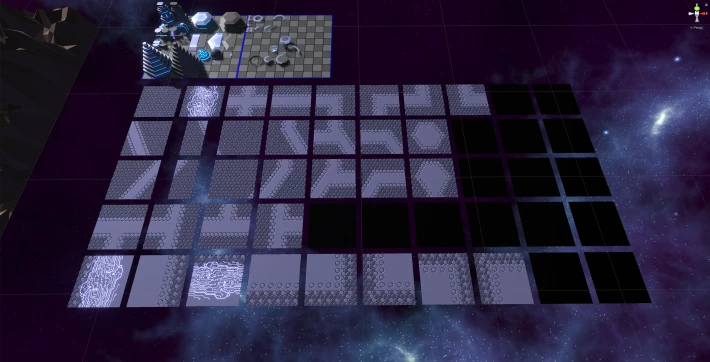
So all in all a pretty efficient workflow.
The problem with these kind of textures with hexagons is that hexagons aren't square. I could just scale them and make them square but that doesn't look nice. Another way to make them fit a square would be to have a little bit of space between every hexagon on one axis, but this also doesn't look nice in my opinion and the problem with those approaches is that I'm using the textures for floor tiles of the maps that I'm creating so I want to be able to place hexagonal 3D-objects on top of them and not having to deal with spacings in the grid or square scaled hexagons.
The partial solution that I'm using is that I'm using exactly 14 rows and 12 columns of hexagons for every texture. This way there will only be a small error on every 14th row and 12th column:
Another problem with creating textures like this is that hexagons are only symmetrical on one axis so not every street pattern can just be mirrored or rotated very easily, forcing me to have to create four variations of basically every texture.
One weird thing I noticed with Illustrator is that it doesn't matter if I use instances of hexagonal Symbols (Symbols in Illustrator are like prefabs in Unity) or just plain copies for the file size of the Illustrator document, which I would expect since they're just instances of the Symbols.
Well I started this as an experiment to see what the problems would be, and I have learned a lot from it. I decided to try to finish making this one pack and then move on to something more easy,.. like textures that only have a couple hexagons in the middle or something.
I wanted to stop making them pretty early on during the process but then again.. it does look really nice in game!: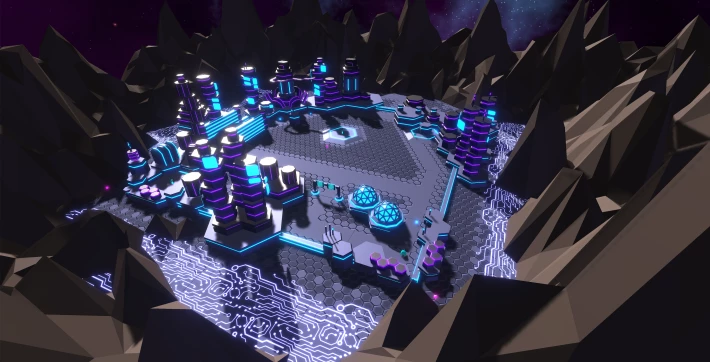
Only a couple more to go..
..Squeek..
For more about my work and for Unity tutorials visit my blog at: https://timcoster.com






