Alien Worlds

Alien Worlds. How to launch on iPhone?

By Ciceron | Alien Worlds. | 19 Apr 2021


Hey, everybody

I want to tall you how launch Alien Worlds on iPhone.
There are 2 ways to solve.

The first method:
1) Go to the iPhone settings
2) Select Safari
3) Disable "Block Pop-ups"
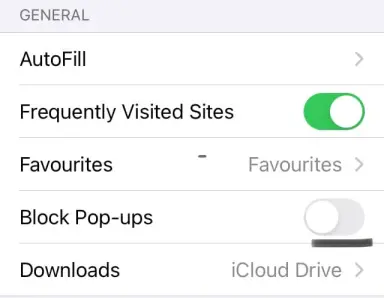
21f27e56585e800757b35742c58c178be49e70ac8c07a86b852740303c1fc6ef.jpg
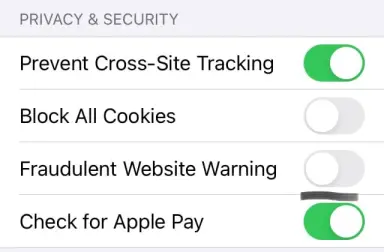
4) Disable "Website Warning"
f2a77cc816c082d476b4fbf277133aedb3ceb5557055bd4e950ad7f3b3c3d1f9.jpg

Use desktop mode to use portrait mode on phone or tip it landscape when you log in to the Alien Worlds.
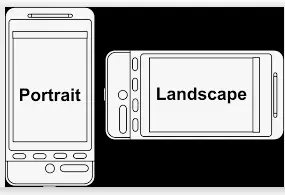
f133e2564caab47e08e78eda8156c4af0651ede0d3aa083469b1f09ce712a80d.png


The second method is easier, but I did not succeed. You need to log in to the Alien Worlds via Chrome.

Take my advice. Good luck!

Check out my other articles:

Alien Worlds. How to buy NFT's at a low price

Alien Worlds. How to stake NFT's

How do you rate this article?

7


Ciceron
Ciceron

I am best of all!


Alien Worlds.
Alien Worlds.

Hi everyone. I always wanted to take part in the development of some cool project and I chose Alien Worlds. Here I will post posts that I believe it should help other players.

Publish0x

Send a $0.01 microtip in crypto to the author, and earn yourself as you read!

20% to author / 80% to me.
We pay the tips from our rewards pool.