
So you're preparing to send an ETH token to your Metamask wallet but concerned you can't see it listed or you have already sent a token to your Metamask wallet and panicking there's no sign of it.
Metamask can support ETH tokens and also BSC (Binance Smart Chain) tokens. For this one though we will stick to ETH.
For this example we will use Band Protocol token. If you want to try this out and earn some free BAND then check my other article here.
1: Find your token on Coingecko here: https://www.coingecko.com/en/coins/band-protocol
2: Once you're on the main page for the token you will see this section of the site. 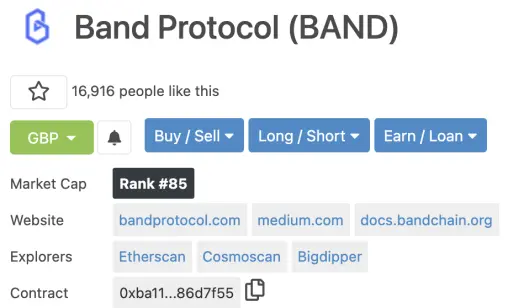
3: Above image you can see there's a direct copy / paste icon next to 'Contract'. If you're comfortable trusting the link you can go ahead and copy this section. Or if you prefer to check you can always select 'Etherscan' next to the Explorers section for above example that takes you to https://etherscan.io/token/0xba11d00c5f74255f56a5e366f4f77f5a186d7f55
4: You now have the contract 0xba11d00c5f74255f56a5e366f4f77f5a186d7f55
Tip: Always check around to make sure the contract is correct such as Etherscan or the official site for the token.
5: Head to Metamask wallet and select the correct account you have or plan to send to. Make sure you have 'assets' selected on the menu then scroll to the bottom of the app to find 'Add Token' 
6: You should then see the 'search' menu selected, select the 'Custom Token' menu as below.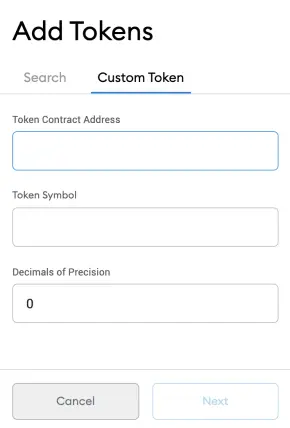
7: Now you're ready to paste the token contract from step 4 in the 'Token Contract Address' input box. Here it is again 0xba11d00c5f74255f56a5e366f4f77f5a186d7f55
8: Once pasted you will then see Metamask has populated the Token Symbol and Decimals of Precision sections for you.
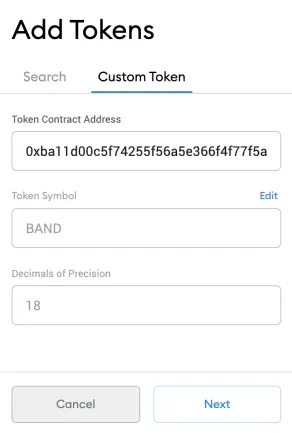
9: Hit the Next button.
10: You will now see a summary of the token you're about to add to your wallet. Hit 'Add Tokens'.
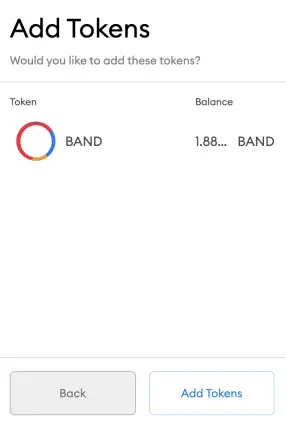
11: You will now see the newly added token with either $0 value or higher if you have already sent the token.
Notes:
- Some steps may vary depending on the Browser, Operating system or App version you're using. Above was done on Brave Browser Metamask extention.
- Most cases you should be able to find your token using the inbuilt search method. However newer tokens may not appear and need to be added manually as described in this article.
Hope this helps you out.







