
Prelude: The Terra Ecosystem

For those who don't know, the Terra Ecosystem is one of the most exciting integrated DeFi spaces out there. It all takes place in the same blockchain, and can integrate with virtually all others. You can earn 20% APY fixed rate on UST (stablecoin) by depositing on Anchor Protocol, trade or pool synthethic versions of stonks like Tesla or even other coins like ETH on Mirror Protocol. It has a launchpad in Pylon Protocol and a Mirror/Anchor Yield optimizer in SPEC Protocol, not to mention its CHAI Dapp which allows for cheap and quick merchant payments.
The entire network is based on the LUNA-UST pairing, in which the value of the UST (algorithmic stablecoin) is pegged to the dollar by burning and minting LUNA accordingly by arbitrage traders. UST is at the center of it all, and is used to pay for all transaction fees in all Terra protocols. Note that an algorithmic stablecoin like UST is different to asset-backed tokens like USDC, USDT, BUSD, which are currently being targeted by the SEC as of August 2021.
Why go from BUSD/USDC/USDT to UST?
Now, if you want to try Terra, you first need to get your hands on some LUNA or some UST. It is possible to buy either of them in exchanges like KuCoin, Binance or Coinbase, but some of us already have the bulk of our crypto liquidity in stablecoins, so we are going to use this as our starting point.
Please note that this is the best method I have found so far, but there may be other simpler ways.
In a nutshell, this method involves transferring your stablecoins into the Binance Smart Chain (BSC), where they are swapped for UST on Nerve.fi and then transferred to the Terra Blockchain using the Terrabridge.
Step-by-Step
1. Add the Binance Smart Chain (BSC) Network to your Metamask Wallet:
If you don't have a Metamask Wallet, your first job would be to download the browser extension here.
Metamask works on Etherium by default, so the BSC must be added manually as per below.
Metamask --> Settings --> Add Network --> [Fill the dialogs as per the screenshot below]
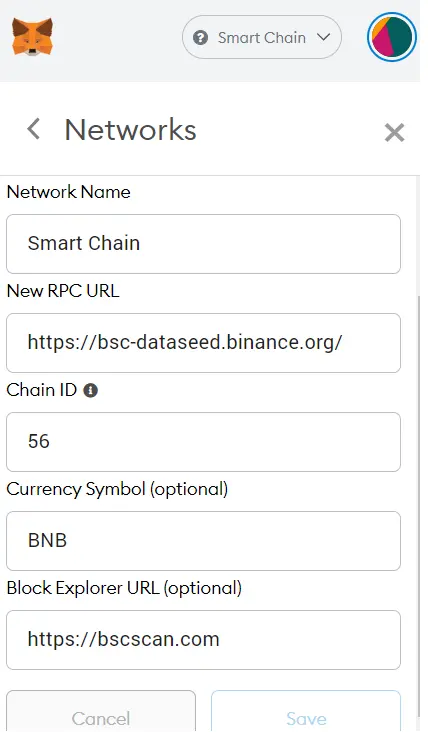
Once Saved you can select the Smart Chain network from the drop down list and voila, you are connected to the BSC.
You will notice that BNB is the default currency for the network.
2. Add USDC, BUSD or USDT, and Wrapped UST as tokens in the BSC network
Now that we are connected to the BSC network in Metamask, we also want to add the tokens as follows:
Add Token --> [Fill in the Token Contract Address; the other dialogs auto-fill] --> Next.
The addresses for each are as follows:
BUSD: 0xe9e7cea3dedca5984780bafc599bd69add087d56
USDT: 0x55d398326f99059ff775485246999027b3197955
USDC: 0x8ac76a51cc950d9822d68b83fe1ad97b32cd580d
Wrapped UST: 0x23396cf899ca06c4472205fc903bdb4de249d6fc
These Token Contract Addresses can also be found on CoinGecko. Your wallet should look something like this now:
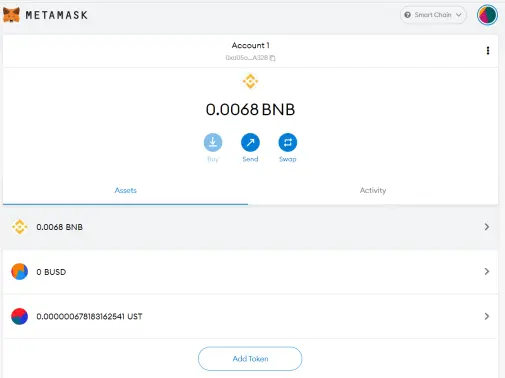
3. Transfer your BUSD/USDC/USDT, as well as BNB into your Metamask Wallet.
Go to your exchange and withdraw the stablecoin you want to exchange, as well as some BNB for gas fees. Add your Metamask wallet as destination. Note that your Metamask Wallet address remains unchanged regardless of the Network you are using (Etherium, BSC, etc).
Make sure you are withdrawing into the BSC Network, as a BEP-20 token. Don't be confused by BEP-2 which belongs to the Binance Chain (BC).
Remember that the Binance Smart Chain (BSC) gas-fees paid in BNB are tiny compared to Etherium; the minimum withdrawal of 0.01 BNB that Binance allows is more than sufficient for a few exchanges.
4. Use Nerve.fi to convert your BUSD/USDC/USDT into UST within the Binance Smart Chain (BSC)
Go to Nerve.fi and connect your metamask wallet. On the Swap tab, just select the stablecoin-UST pair that you require and Execute the Swap.
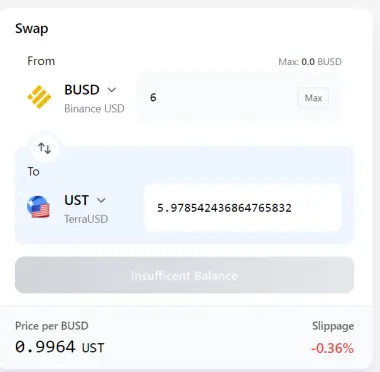
Your Metamask browser extension will then prompt you to sign the smart contracts and charge you the necessary BNB gas fees (a few cents!).
Your new Wrapped UST tokens will appear in Metamask shortly after.
5. Use Terrabridge to transfer your Binance Smart Chain (BSC) Wrapped UST into Terra UST
Now for the final step, open Terrabridge and connect your Metamask Wallet.
Select 'From BSC' and 'To Terra', and select 'UST' as asset and inset how much you want to transfer over into Terra.
Add a Terra Wallet address as destination (If you don't have one already, create yourself a TerraStation Wallet to manage your Terra blockchain assets; No KYC required).
And Voila! within a few minutes you will be ready to use your UST in all of the amazing Terra Protocols.
Other articles by yours truly:
FOR TERRA FANS | $MINE Tokenomics | Bullish or Bearish...?
FOR TERRA FANS | Pylon Gateway Explained | + link to best resources
Does Crypto Ownership depend on Internet Access?? 144 countries compared!!
Does FIAT Inflation lead to Crypto Adoption? 128 countries compared!
124 Countries Ranked by their Green and Cheap Crypto Mining potential
Profitability of mining Monero (XMR) on an ancient laptop
Disclaimer:
Also, non of the content of this writing is or should be considered financial or investment advise. I am no financial advisor, I am merely a content writer using freely available data and information to produce the best OC I can come up with for entertainment purposes. Sources for the images displayed can be found in the references below.
n.b. Crypto manouver learnt from Fish Market Academy's youtube channel (link below).






