
Quick note: This is a bit different to the things I normally write but I've been teaching myself how to interact with the WAX blockchain in Python and thought it would be worth sharing. I understand Python is a rather unpopular language for this (Most people tend to use C++, C#, Javascript, etc.) but I've been trying to learn Python anyway and this seemed like a fun way to get some practice in.
What to expect
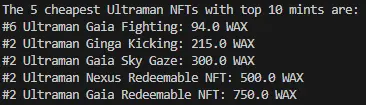
Below is a screenshot of the final result you can expect by the end of this post. Essentially it draws data from the atomicassets API and displays the provided data in a readable way. I'm a huge Ultraman fan so the screenshot below searches for the 5 cheapest NFTs with mint numbers in the top 10 from the ultraman.bk collection.
Getting started
I'll be assuming you already have a platform to write and run your code on. I use VS Code and I'd recommend it to anyone else that's new to coding. There are plenty of videos on Youtube that can help get you setup and good to start writing and running your first script. You will need to install the library 'requests' for this project. For help with this you can go to your terminal and run the command:
python -m pip install requestsAlternatively you can find more information at pypi.org/project/requests/. This is a very common library and you will find it useful in many future projects.
Step 1: Importing libraries
As stated above, for the sake of this project we only need one library and that will be the 'requests' library. This will allow us to send HTTP requests easily (simply put it lets us interact with urls). This will be the first line in our script and to do this, all you need to do is type in:
import requests
Step 2: Interacting with the API
This is going to be a rather long step so have a drink of water and strap in. The first step is going to be getting the url to interact with the API. I'll list out the steps below but for those of you who are lazy (I don't blame you but it doesn't hurt to learn this things) just skip down and you can copy my link and change the inputs to suit what you're looking for.
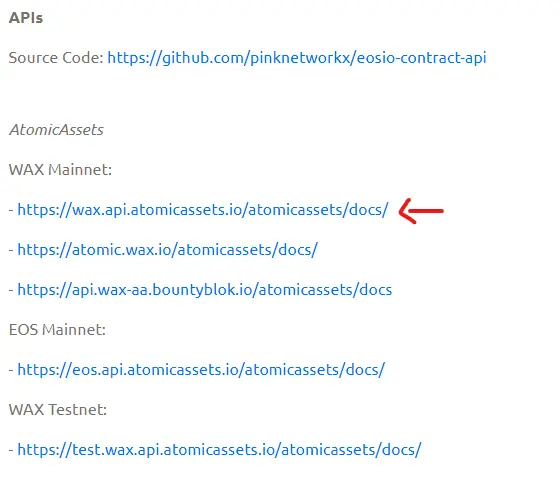
- 2.1: Finding the AtomicAssets development resourcesStart by googling "atomicassets developer resources" and click on the first link. It should take you to https://support.pink.gg/hc/en-us/articles/4405478859922-Developer-Resources. From here, scroll down to the 'APIs' section. You should see something like the image below and then click on the link indicated (https://wax.api.atomicassets.io/docs/)
- 2.2: Finding the relevant linkAt the top of the page, you should see a link under 'Servers', as shown below.
 Keep note of this as we will need this to be the start of our link. You'll then need to scroll until you find the 'Sales' section, as shown below.
 Now what we need to do, is append this to the server above. This will give us "https://wax.api.atomicassets.io/atomicmarket/v2/sales". This will form the beginning of our url, however we still need to provide certain inputs to ensure that we only get the information that we want.
- 2.3: Getting active listings and not completed sales
To ensure that we only get active listings and not sales that have already been completed, all we need to do is append "?state=1" to the end of the above link. You should now have "https://wax.api.atomicassets.io/atomicmarket/v2/sales?state=1".
- 2.4: Inputting our desired variables
If you expand the dropdown for the first sales API you will find a variety of variables that can be changed such as collection_name and min_price. To add these to our link, you'll need to use the format "&<variable name>=<variable>". This syntax may be confusing to some of you so please refer to the example of "&collection_name=ultraman.bk". Here the variable name is 'collection_name' and the variable is 'ultraman.bk'. To add more than one variable simply add it on after the previous variable, ensuring that you include the '&'. Some variables you may find useful include:- collection_name -> name of collection you are searching for
- limit -> as the name implies, this limits the number of results
- sort -> as the name implies, this sorts the results
- order -> very useful in conjunction with sort, determines how they are sorted (ascending/descending order)
- max_template_mint -> maximum mint of results shown
- 2.5: Final link
From all this, you should have a link looking something like mine, which is "https://wax.api.atomicassets.io/atomicmarket/v2/sales?state=1&collection_name=ultraman.bk&page=1&limit=5&order=asc&sort=price&max_template_mint=10"
Step 3: Implementing this url into our code
If you've made it this far, great job. Maybe it just felt long to type but step 2 seemed pretty long so making it this far is an awesome achievement, especially if you're a beginner coder (like me just a few days ago).
Implementing the url is super simple, all you have to do is add a new line and format it the same way I have below. We then want to request data from this link so we use our 'requests' library to get this data. You should now have code looking something like mine below:
import requests

url = "https://wax.api.atomicassets.io/atomicmarket/v2/sales?state=1&collection_name=ultraman.bk&page=1&limit=5&order=asc&sort=price&max_template_mint=10"

response = requests.get(url)
We then check if the request was successful by checking if it has a status_code of 200 (back at the atomicassets API page you will find that it states that it will return 200 if it is a success). If it is successful, we then save the response in json format, as this will allow us to extract data relatively easily. In the event that it is not successful, we simply exit the script however you shouldn't expect this to occur. Adding this in, you will have the following:
import requests

url = "https://wax.api.atomicassets.io/atomicmarket/v2/sales?state=1&collection_name=ultraman.bk&page=1&limit=5&order=asc&sort=price&max_template_mint=10"

response = requests.get(url)

if response.status_code == 200:
    datareturned = response.json()
else:
    print("Error")
    quit()
Step 4: Getting the data we need
To get the relevant data, it is first useful to understand how the data will appear. You can do this by opening the link yourself and looking at the response. While it may look like a mess, it is actually very well structured and makes it very easy to extract data. Below is the format that I get from my link (I only took one of the 5 results so it isn't too long):
{"success":true,"data":[{"market_contract":"atomicmarket","assets_contract":"atomicassets","sale_id":"146762250","seller":"fjyru.wam","buyer":null,"offer_id":"151848071","price":{"token_contract":"eosio.token","token_symbol":"WAX","token_precision":8,"median":null,"amount":"9400000000"},"listing_price":"9400000000","listing_symbol":"WAX","assets":[{"contract":"atomicassets","asset_id":"1099862158177","owner":"fjyru.wam","is_transferable":true,"is_burnable":true,"collection":{"collection_name":"ultraman.bk","name":"Ultraman Phygital x Beast Kingdom","img":"QmSofn2BcrTU5irq2L2A4S86AvMXbBXWUKXEtytJzjZ1Jy","images":"{\"banner_1920x500\":\"QmcFRGosTXQ29KnMwegRex7i9DYmzXMzRJJroMzut6V2Rn\",\"logo_512x512\":\"QmYbsd3rkWKeZyRcofrm5zJcmSYgcwK5q9cthjWmhdJq8z\"}","author":"ultraman.bk","allow_notify":true,"authorized_accounts":["ultraman.bk","primarysale1","beastkngpool"],"notify_accounts":[],"market_fee":0.06,"created_at_block":"224093301","created_at_time":"1673513911000"},"schema":{"schema_name":"series1","format":[{"name":"name","type":"string"},{"name":"img","type":"image"},{"name":"video","type":"string"},{"name":"backimg","type":"image"},{"name":"cardid","type":"uint64"},{"name":"character","type":"string"},{"name":"rarity","type":"string"},{"name":"variant","type":"string"},{"name":"legal","type":"string"},{"name":"eula","type":"string"}],"created_at_block":"228418673","created_at_time":"1675677156500"},"template":{"template_id":"656980","max_supply":"7200","is_transferable":true,"is_burnable":true,"issued_supply":"5520","immutable_data":{"img":"QmeK67u5rJyQ4svFfheRq7y5ei42G77xiBHi62LVHuFFRS","eula":"https://ipfs.io/ipfs/QmQsztgpAMBM8D8cnodLxRrUp8RYNt4CMMpj5h2tDSmqW3","name":"Ultraman Gaia Fighting","legal":"©TPC ©UZ・TX","cardid":"5","rarity":"Common","backimg":"QmQpaXRgaEiQ4Au5dTGviubLER4exsxek8wrUX2XxCP1jE","variant":"Static Blue Ray","character":"Gaia"},"created_at_time":"1675677492000","created_at_block":"228419344"},"mutable_data":{},"immutable_data":{},"template_mint":"6","backed_tokens":[],"burned_by_account":null,"burned_at_block":null,"burned_at_time":null,"updated_at_block":"275406535","updated_at_time":"1699174674500","transferred_at_block":"275406535","transferred_at_time":"1699174674500","minted_at_block":"232250401","minted_at_time":"1677594318000","sales":[],"auctions":[],"prices":[{"market_contract":"atomicmarket","token":{"token_symbol":"WAX","token_precision":8,"token_contract":"eosio.token"},"median":"61823895","average":"112676598","suggested_median":"130000000","suggested_average":"130728106","min":"15000000","max":"10000000000","sales":"584"}],"template_buyoffers":[],"data":{"img":"QmeK67u5rJyQ4svFfheRq7y5ei42G77xiBHi62LVHuFFRS","eula":"https://ipfs.io/ipfs/QmQsztgpAMBM8D8cnodLxRrUp8RYNt4CMMpj5h2tDSmqW3","name":"Ultraman Gaia Fighting","legal":"©TPC ©UZ・TX","cardid":"5","rarity":"Common","backimg":"QmQpaXRgaEiQ4Au5dTGviubLER4exsxek8wrUX2XxCP1jE","variant":"Static Blue Ray","character":"Gaia"},"name":"Ultraman Gaia Fighting"}],"maker_marketplace":"","taker_marketplace":null,"collection_name":"ultraman.bk","collection":{"collection_name":"ultraman.bk","name":"Ultraman Phygital x Beast Kingdom","img":"QmSofn2BcrTU5irq2L2A4S86AvMXbBXWUKXEtytJzjZ1Jy","images":"{\"banner_1920x500\":\"QmcFRGosTXQ29KnMwegRex7i9DYmzXMzRJJroMzut6V2Rn\",\"logo_512x512\":\"QmYbsd3rkWKeZyRcofrm5zJcmSYgcwK5q9cthjWmhdJq8z\"}","author":"ultraman.bk","allow_notify":true,"authorized_accounts":["ultraman.bk","primarysale1","beastkngpool"],"notify_accounts":[],"market_fee":0.06,"created_at_block":"224093301","created_at_time":"1673513911000"},"is_seller_contract":false,"updated_at_block":"275672175","updated_at_time":"1699307524500","created_at_block":"275672175","created_at_time":"1699307524500","ordinality":"1","state":1}First, we clearly see that the call was a success. Next we have the "data" section. To extract information from this we will use a loop. In Python, the way we do this is:
for item in datareturned['data']:
    ...
This essentially goes through 'datareturned' (our json data) and for each section of 'data', it names it 'item' and lets us do what we want with it. Now this next part may require you to personally go through your own json data to pick out what you need but personally what I need, is then in the 'assets' section. I then need to loop through each piece of data in 'assets' to get what I need, so I will create another loop. However this time I will use .get() to retrieve the information I need. Doing this gives me:
for item in data['data']:
    for asset in item.get('assets'):
        ...
Depending on how many layers your data has you may find it easier to create more loops however in my case, most of what I need is now easily accessible. Honestly, the best way for you to understand where to get the exact data is probably by examining my code and then looking through the json data I posted above to see how I accessed it. If you are still struggling, ChatGPT is extremely helpful and has little difficulty picking out the data you need and showing how to acquire it. If you'd prefer to do more than just ask ChatGPT however, you can also ask it to reformat the json data into a more readable view (makes better use of whitespace) and you will be able to pick it out easier. Continuing to use .get(), I then have:
for item in data['data']:
    for asset in item.get('assets'):
        # Access the 'template' dictionary within each asset
        template = asset.get('template')

        # Access 'immutable_data' within the template and get 'name'
        name = template.get('immutable_data').get('name')

        # Access 'template_mint' within the asset
        template_mint = asset.get('template_mint')

    # Get price in WAX
    amount = str(int(item.get('price', {}).get('amount', '')) / 100000000)
You may notice the way I get the price in WAX is a bit funky, if you look in the json data yourself you will find that it does not include decimal points, so to get the actual price it needs to be divided by 100000000. Now this is all great and I have all of the data that I want to know, however how do I actually view it?
Step 5: Viewing the data
I personally start by giving myself a small title to make it clear what data I am acquiring, so above my 'for' loop I placed the following statement:
print("The 5 cheapest Ultraman NFTs with top 10 mints are: ")How you want to format the actual data is up to you, I personally chose to print it using the format below:
print("#" + template_mint + " " + name + ":" + " " + amount + " WAX")This prints the mint number, followed by the name of the NFT and then the price in WAX, however this is completely up to you and you can format it however you wish. If you actually want to keep the data, you can also export it into (as an example) a .csv file so you can view it in a program such as Excel however I won't be showing how to do that in this post. If you are interested, there are many tutorials online and on Youtube on how to do this or you can also comment below and I can explain and offer code that might help out.
Conclusion:
But for now, that's all that needs to be done. You should now have your code looking something like this:
import requests

url = "https://wax.api.atomicassets.io/atomicmarket/v2/sales?state=1&collection_name=ultraman.bk&page=1&limit=5&order=asc&sort=price&max_template_mint=10"

response = requests.get(url)

if response.status_code == 200: #checks if response was success
    data = response.json()
else:
    print("Error")
    quit()

print("The 5 cheapest Ultraman NFTs with top 10 mints are: ")

for item in data['data']:
    for asset in item.get('assets'):
        # Access the 'template' dictionary within each asset
        template = asset.get('template')

        # Access 'immutable_data' within the template and get 'name'
        name = template.get('immutable_data').get('name')

        # Access 'template_mint' within the asset
        template_mint = asset.get('template_mint')

    # Get price in WAX
    amount = str(int(item.get('price', {}).get('amount', '')) / 100000000)

    print("#" + template_mint + " " + name + ":" + " " + amount + " WAX")
If you had trouble up to this point it is worth copying my code and messing around with the different inputs to get a better idea for how they work and if you still have trouble, ChatGPT (despite its reputation) is actually very useful for helping with something like this. Otherwise, feel free to comment any questions below and I'll help out if I can but do keep in mind that I too am quite a beginner.
To anyone/everyone that actually read all the way down to here, I appreciate you reading this and I hope it was at least somewhat interesting. I've been messing around with some different ways to interact with the WAX blockchain using Python and if other people are interested I had a lot of fun writing this out and would happily do it again for a different project. Furthermore if anyone has other projects they either recommend or want to see done let me know :)
Other than that, thanks again for reading and I hope you enjoyed :)






