
hey mates!
In my previous post, I explained the "KuCoin trading view, spot limit, and market", and today, let's talk about the "KuCoin trading view, Stop-Limit Orders". Now that PublishOx has an agreement with KuCoin, maybe it's time to review how to do trading in this platform.
Let's go to the trading view, select a pair to trade with, for example, our beloved AMPL and USDT. Once it's done, go to the right bottom, select Spot, and the label Stop Limit. You will see a window like this:
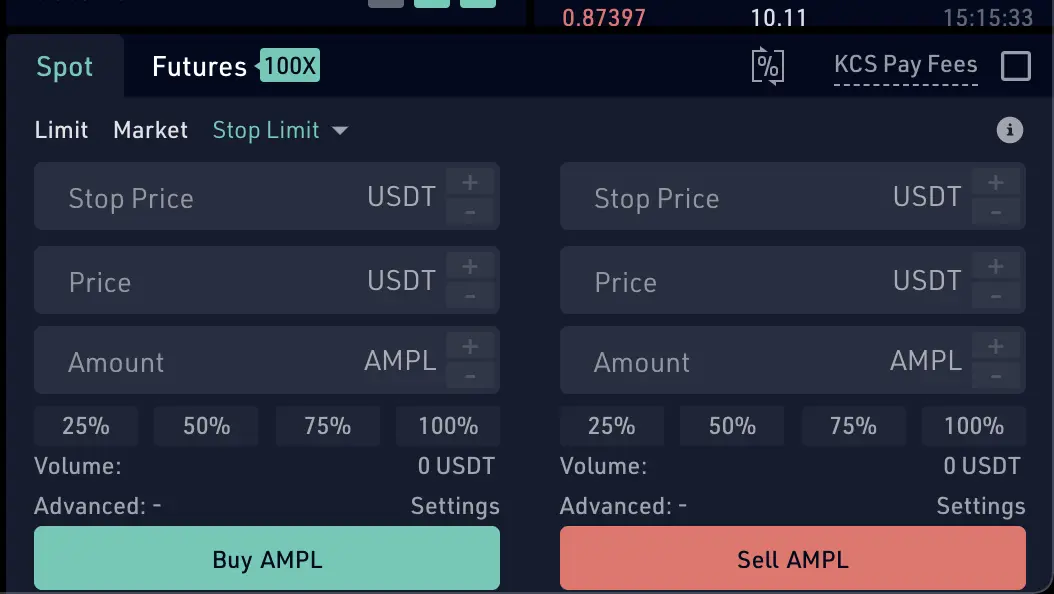
Buying case into Spot Stop-limit option
As you can see in the picture, you have to fill three fields:
- stop price: it's the condition, once the condition is met, the order is ready to be executed.
- price: it's the price at which you want to buy once the "stop price is met".
- amount: it's the amount of AMPL's in this case that you want to buy.
So to understand it, more or less, the "Spot Stop-limit option" is a scheduled or programmed order. When the condition is met, the order is ready to be executed as a simple "Spot limit order" (explained in my previous post)
For example, assume that AMPL is trading at $1 and a trader wants to buy it once the AMPL begins to increase the value. The trader set up a "stop-limit" order to buy with the stop price at $1.1 and the limit price at $1.2. If the price of AMPL moves above $1.1, which is our stop price, the order is activated and turns into a limit order. As long as the order can be filled under $1.2, which is the limit price, the trade will be filled. If the stock gaps above $1.2, the order will not be filled.
Selling case into Spot Stop-limit option
As you can see in the picture, you have to fill three fields:
- stop price: it's the condition, once the condition is met, the order is ready to be executed.
- price: it's the price at which you want to sell once the "stop price is met".
- amount: it's the amount of AMPL's in this case that you want to sell.
As you can see the sell option is the same than the buy option.
To keep into account:
- Buy "stop-limit" orders are seting up above the market price at the time of the order. You want to buy if the price is increasing from a specific threhold.
- Sell "stop-limit" orders are seting up below the market price at the time of the order. You want to sell if the price drop down to a specific threhold.
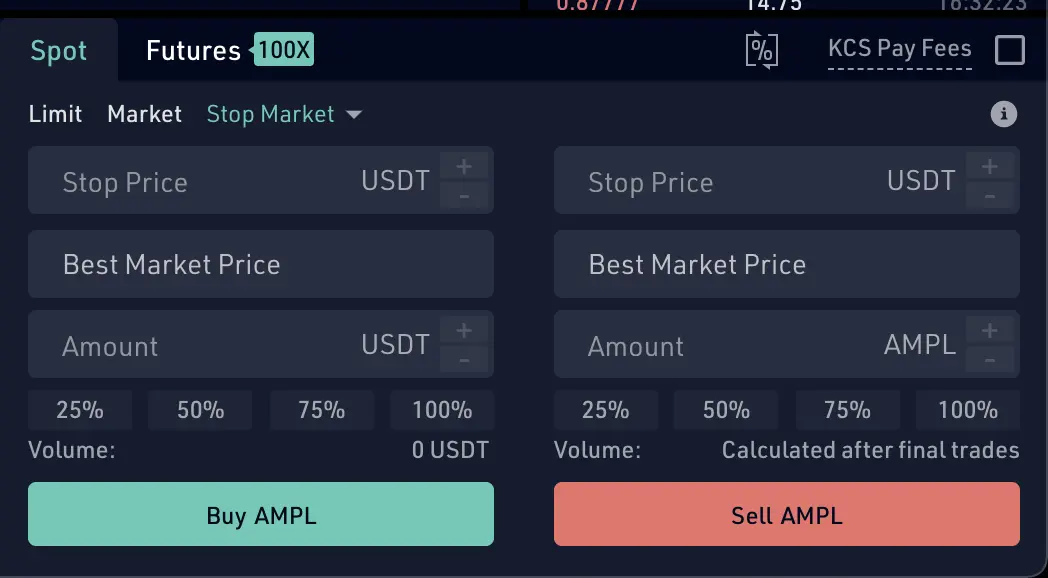
Buying/Selling case into Spot Stop-market option
Practically this option is the same as previously explained, but if you realize, the "price" field is replaced for "the best market price". So when the stop-price condition is met, then an order is ready to be executed with "the best market price" at that moment. So here you don't set up the "price" instead, you rely on "the best market price" to buy or sell.
Final thoughts
That's all for now. In this post, I have explained the most basic ways to do trading, using the scheduled/programmed orders: "Stop-Limit Orders" in kuCoin. I hope this info can help you in a near future.
Let me your comments below.
Regards :)
Advantages programs:
- kuCoin create a new users account to earn: https://www.kucoin.com/ucenter/signup?rcode=rJ8UEU9
- Try Binance here https://www.binance.com/en/register?ref=5995667 and earn a 10%
- I love Pipeflare faucet airdrops, easy and without any ads. Try Pipeflare here https://pipeflare.io/r/5uxs
- I love Globalhive faucet airdrops, easy and without any ads. Try Globalhive here https://globalhive.io/r/93797
- use presearch instead of google to earn PRE tokens: https://presearch.org/signup?rid=2050229
-
Register in Coinsmart and Get 15$ CAD (Canadian dollars) when verifying your user account and deposit 100$ CAD.
- The $15 credit will be added within 5 business days after the funding minimum has been met.
- Digital currency funding does not count towards the CAD minimum.
Easy!








