
In this article From Donations to Subscriptions: The Benefits of Crypto Payments for Influencers, we discussed how important it could be for digital creators to start practicing accepting cryptocurrency payments, because it will be inevitable in a few years. There are a whole host of advantages: from increased revenue for the creator (the ability to receive microtransactions starting at a few dollars), to privacy (think subscriptions or donations where a follower is reluctant to make them for privacy reasons because they don't want to leave their name and surname, typical of PayPal and credit cards), ease of use (once you get the hang of it), greater security (no need to link credit cards), and the ability to reach an international audience (the crypto world knows no borders. Imagine a follower in Dubai o New York who wants to make a quick Bitcoin donation, reads your address and sends you the payment in 3 seconds). Furthermore, and most importantly, there are no funds blocked by third parties. Your wallet where you receive crypto can't be blocked by anyone, nor can they freeze your funds. Let's look at how a wallet works and how to receive payments.
WALLET FOR RECEIVING PAYMENTS
The wallet can be created in seconds and the process is always the same (once you launch the extension on your smartphone or computer, simply click "create new wallet" and set a password). This guide is intended for both creators and those who intend to pay with cryptocurrencies.
Both must:
1) Download a wallet: Metamask (on the creator side, you can choose to receive payments using solutions that are virtually transaction-free, such as the Arbitrum, Optimism and BNB Chain chains. That is, you can accept USDC or USDT on Arbitrum if you don't want price fluctuations or ETH on the Arbitrum, Optimism and other networks), Phantom (if you want to receive payments in SOL or USDC or USDT on the Solana chain) or Wallet Of Satoshi (for Lightning Network).
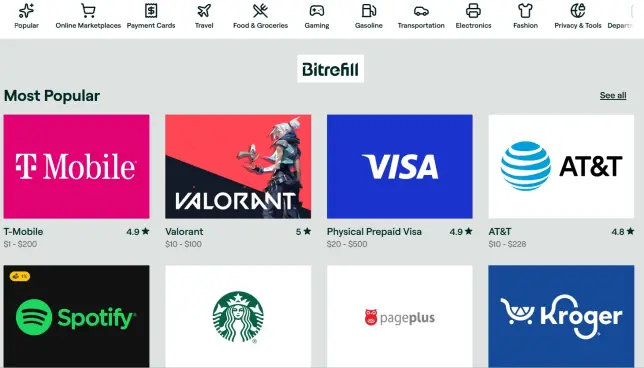
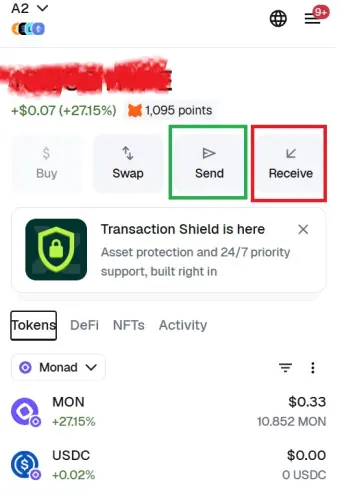
2) On the creator side, once the wallet is installed and the 24-word seed is saved (which is like a password; remember to save it because it's essential for recovering funds if necessary), you'll have a receiving address (you can also use the QR code to receive the payment) that serves the same purpose as a PayPal email, and a "send" button to move the funds to another address. This can be used to make a payment in person, especially abroad (where crypto payments are supported), to buy online, for example on Bitrefill (photo) or to move funds to exchanges like Binance to sell in euro/dollar/pound.
HOW TO SEND FUNDS
Once the wallet is installed (the 24-word seed and password saved), anyone who needs to make a payment must obviously send the requested funds to the creator's address. If the creator requests $10 worth of ETH on the Arbitrum network, they'll need to send those funds using ETH on the Arbitrum network. Where can I buy them? Using an exchange like Binance (you make a wire transfer in euros to the exchange, buy ETH with your euro, and withdraw from Binance to your Metamask address starting with "0x"). If you withdrew funds from Binance on the Arbitrum network to your Metamask and need to send them to another creator who wants them on the Optimism network, you can use a bridge to move them from Arbitrum to Optimism and then send them to their address. Remember that the Metamask receiving address is always the same for each network.
DIFFERENT CHAINS
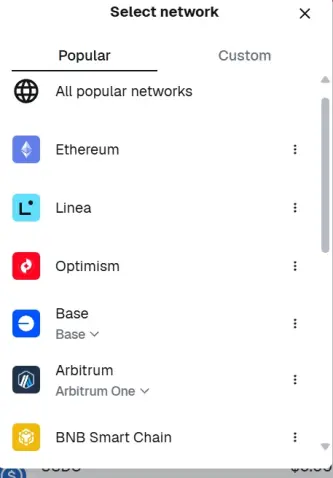
As mentioned, there are many different chains on Metamask (called EVMs; they are scalability solutions, most of them "clones" of Ethereum, which is the main chain on Metamask). You can request funds on one network or another: Ethereum, Arbitrum, Optimism, BNB Chain, etc.
Then there are "external" chains like Bitcoin (the most secure and decentralized), Solana (Phantom wallet), etc. These networks can be compared to Visa, Mastercard, PayPal, Revolut, Stripe, etc. Each chain has separate funds. If you receive 10 USDC ($10 = €9) on the Arbitrum network, you'll receive it on that chain (and not on Ethereum or Optimism). However, there's no difference between receiving 10 USDC ($10 = €9) on the Optimism network. Your wallet's receiving address (Metamask) is always the same and always begins with 0x (i.e., by providing it, you'll receive funds on Arbitrum, Optimism, Ethereum, etc., depending on where your follower decides to be paid).
If you want to receive funds on Solana (Phantom), the address uses initial letters like 1cw, 5ww, 3uu, etc. Why are there different chains? Transactions on Bitcoin and Ethereum are more expensive (sending funds can cost as little as $0.80 or $1), so using scalability solutions like Solana, Arbitrum, and the Lightning Network, you can move funds for less than $0.01. ETH or BTC cryptocurrencies are present on each of these chains (you'll find ETH on the Arbitrum network, ETH on the Optimism network, ETH on the Ethereum network, etc.).
To recap:
-Bitcoin: Bitcoin itself, Lightning Network.
-Ethereum (EVM): Ethereum itself, Base, Arbitrum, Optimism, Linea, Zksync, BNB Chain, etc.
-Solana.
GAS TOKENS AND EXCHANGES
To send funds to another person, you'll need the chain's gas token. On the Ethereum chains (and its variants Arbitrum, Optimism, Linea, etc.), the gas token is always ETH. On the BNB Chain, the gas token is BNB. On the Solana chain, the gas token is SOL. On the Bitcoin network, the gas token is BTC. Regardless of the chain you use, I recommend keeping at least $3-4 of the gas token (almost always ETH) in your balance. If you have $20 worth of ETH on the Arbitrum network in your wallet and need to send $15 USDC ($15) to make a payment, you can use Uniswap or Relay to exchange $15 ETH for $15 USDC (you'll pay a $0.01 fee in ETH).
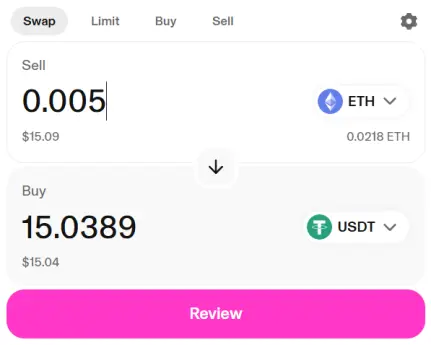
If you are using Solana (Phantom Wallet), you can perform swaps at Jupiter Aggregator. Always remember to leave a few dollars of ETH in your wallet because you'll need it to move funds or make conversions. If you send 17 USDC (Arbitrum network) to another Arbitrum network address, you'll pay 17 USDC (sending) + $0.01 worth of ETH (if you don't have that $0.01 worth of ETH, you can't send funds because it represents the transaction fee). The transaction fee doesn't depend on the amount you send. If you send $1 million, you'll always pay about $0.01.
To recap:
-Bitcoin: BTC (gas token).
-Ethereum (EVM): ETH (gas token) in Arbitrum, Optimism, etc.
-Solana: SOL (gas token).
-BNB Chain: BNB (gas token).
BRIDGES TO MOVE FUNDS FROM ONE CHAIN TO ANOTHER WITHOUT USING AN EXCHANGE
As mentioned above, you can "convert" ETH (Arbitrum network) to ETH (Optimism network) according to your needs, using bridges such as Jumper, Stargate, Relay, etc. Simply have $30 worth of ETH and want to send $15 to the Optimism network. Go to one of those bridges, set the amount and choose the source chain (where you have the $30 worth of ETH) and the destination chain (where you want to receive the funds). They will always remain in your Metamask wallet but will move from chain A to chain B.
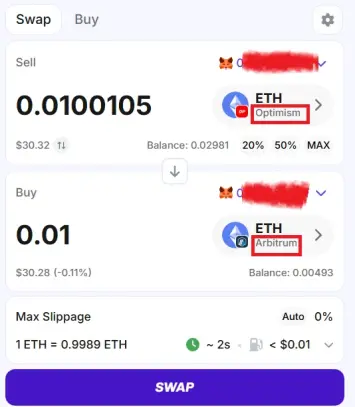
If, however, you simply need to send Arbitrum network ETH (your address) to Arbitrum network ETH (creator address or that of a friend), simply paste the address, choose the amount, and hit the "send" button on Metamask.
SECURITY QUESTION: SEED
When you install the Metamask or Phantom wallet, a 24-word seed is generated. These are essential for restoring your wallet in the event of theft or damage to your device. Save these words in the correct order and in a safe place because no one will be able to help you recover them if needed. You will never be asked for these 24 words again, unless you are forced to restore the wallet on another device. Remember that you own your funds thanks to these 24 words. You can also burn your device or lose it... by reinstalling Metamask on a new device and clicking "I already have a seed," importing the 24 words (from the previous wallet), you will recover your funds. Without them, there is no way to recover the funds that were present.
Are you interested in ways to earn crypto bonus? Check it out here: Some Sites To Earn Crypto Bonus (Old & New)






