
Smart contracts are digital contracts or programs, a set of instructions stored on a blockchain that is automatically executed when predetermined terms and conditions are met.
1 Million Dollar Bet
E.g, On March 17th, 2023, former CTO of Coinbase, Balaji Srinivasan, placed a bet worth $1 million on the future Bitcoin (BTC) price during a bearish market. He accepted a tweet from James Medlock, who said he would bet anyone $1 million that the US does not enter hyperinflation. Srinivasan said he would take that bet and asked Medlock to buy one Bitcoin. He promised to send $1 million if he loses after 90 days. What if he didn't respect the promise? Can this happen? Yes, What is the solution, then? Smart contracts can help in this scenario by creating a trustless and transparent way to settle the bet between Srinivasan and Medlock. Instead of relying on their word or a third party, they could use a smart contract that would automatically execute the payment based on the price of Bitcoin at a specific date. The smart contract also ensures the funds are locked and secured until the bet is resolved. The smart contract could also use an Oracle service to get accurate and reliable price data from an external source. This way, both parties could be confident that the bet is fair and verifiable.
Let's look at some of the benefits of smart contracts:
- Speed, efficiency, and accuracy: Once a condition is met (i.e., price of BTC < 1 million), the contract is executed immediately. There are no paperwork or manual errors involved, thus transferring the money from Srinivasan to Medlock without any hassle.
- Trust and transparency: The records of transactions are available to every participant of the network, the platform where the smart contracts are executed. As described, Smart Contracts are programs that need to run for them to be meaningful, and to run, they'll need resources that the World Computer, Ethereum, can provide.
- Security: No one can change the terms and conditions of the Smart Contract once they have been deployed to the Blockchain; it is not possible for anyone, let alone Srinivasan, to sneak up and change the bet amount from 1 million to 1 hundred dollars. The participants of the network will detect any malicious behavior.
The above example is one of the many applications where smart contracts can play an important role, let's look at some more examples to understand it better:
- Insurance: Smart contracts can automate the claims process and verify the validity of claims based on the data and evidence.
- Voting: Smart contracts can ensure secure and transparent voting by recording and verifying votes on a blockchain.
- Identity management: Smart contracts can store and manage personal data and credentials on a blockchain, allowing users to control their identity and access rights.
- Crowdfunding Campaign: Smart Contract can collect funds from backers and release them to the project creator when a specific goal is met. The program refunds the backers if the goal is not met by a deadline.

Let's go ahead and build a Hello World of Smart Contracts.
Hello World.
Smart contracts are programs; one should choose a programming language to create one. We'll be using Solidity language to create our HelloWorld.sol contract.
// SPDX-License-Identifier: MIT
pragma solidity ^0.8.0;

contract HelloWorld {
  string public message;

constructor() {
  message = "Hello, World!";
  }

function getMessage() public view returns (string memory) {
   return message;
 }

function setMessage(string memory newMessage) public {
   message = newMessage;
  }
}
Let's understand each line of the code one by one:
- The contract is named
HelloWorld. Note:contractis a keyword, just like class is a keyword in Java. - It has a state variable message of type string that stores the greeting message.
- The constructor function is executed once during contract deployment. It sets the initial value of the message to "Hello, World!".
- The
getMessagefunction is a public view function that allows other contracts or users to retrieve the value of a message. - The
setMessagefunction is a public function that allows other contracts or users to update the value of the message by providing a new string.
Deploy Smart Contracts
To deploy and interact with this smart contract, you must use a development environment, such as Remix IDE, or a framework like Truffle. These tools provide an interface to deploy the contract to a test network or the Ethereum mainnet and interact with its functions and state variables. This might look scary initially, but don't worry; I'll walk you through the process.
Note: Images are provided before each step; please take them as a reference.
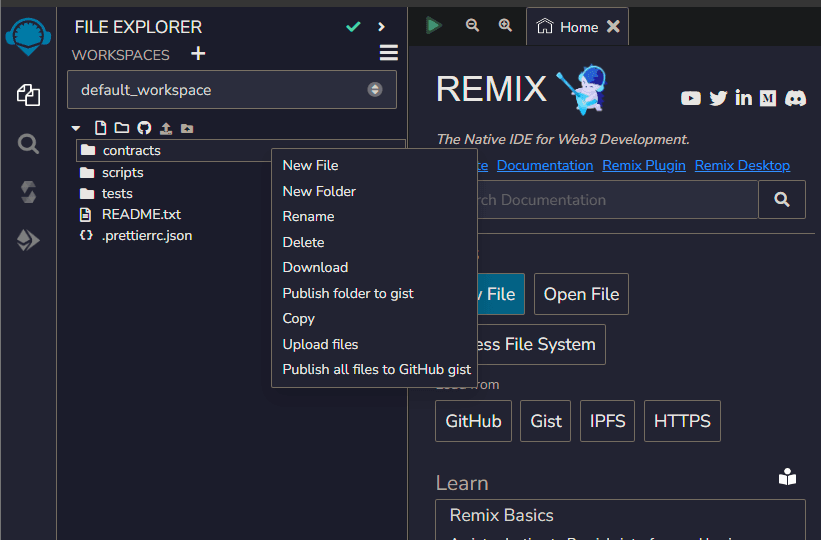
STEP 1: ACCESS REMIX IDE
- Open your web browser and visit the Remix IDE website: https://remix.ethereum.org/
- Ensure that you have a compatible web browser like Chrome or Firefox.
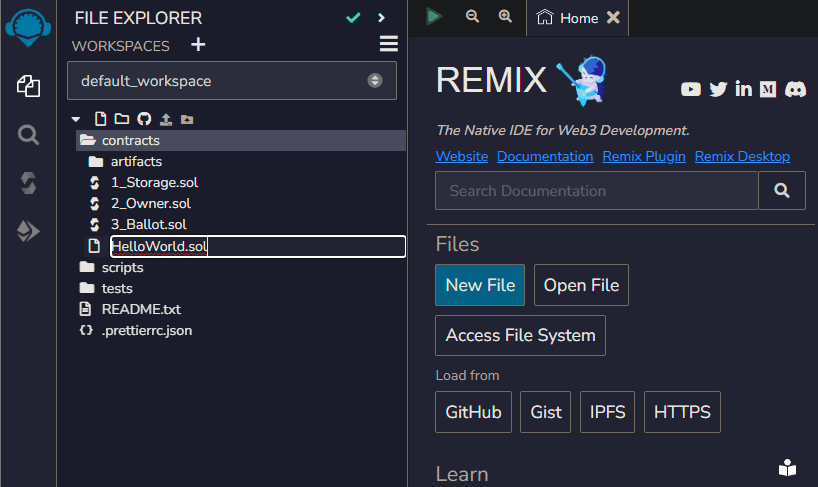
STEP 2: CREATE A NEW FILE
- On the Remix IDE homepage, click on the file icon, or click on contracts and right-click to get the option shown in the above figure.
- Name the file with a .sol extension, for example, HelloWorld.sol
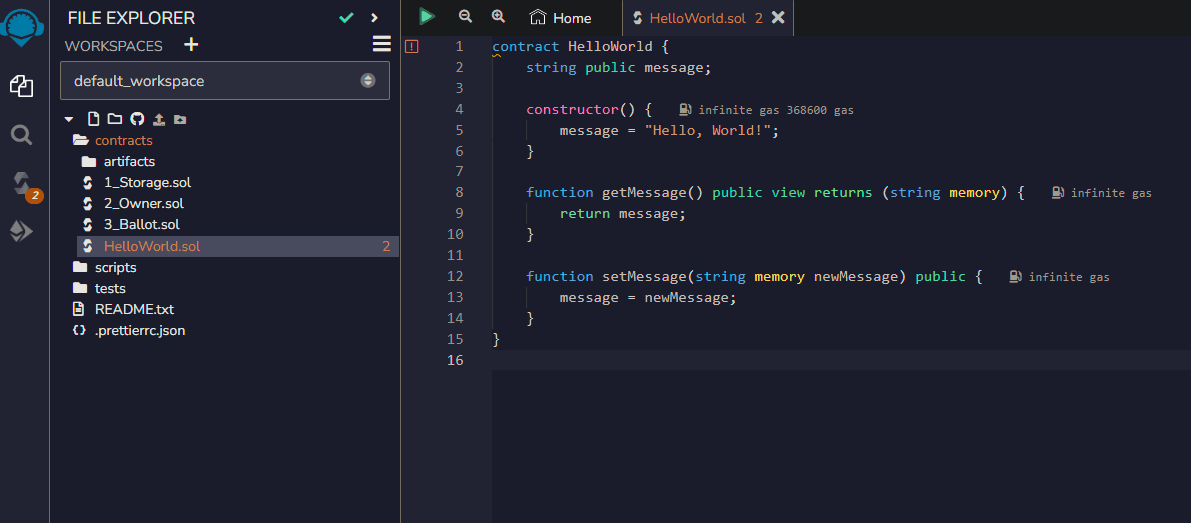
STEP 3: WRITE THE SMART CONTRACT CODE
- Copy and paste the HelloWorld content into the newly created file.
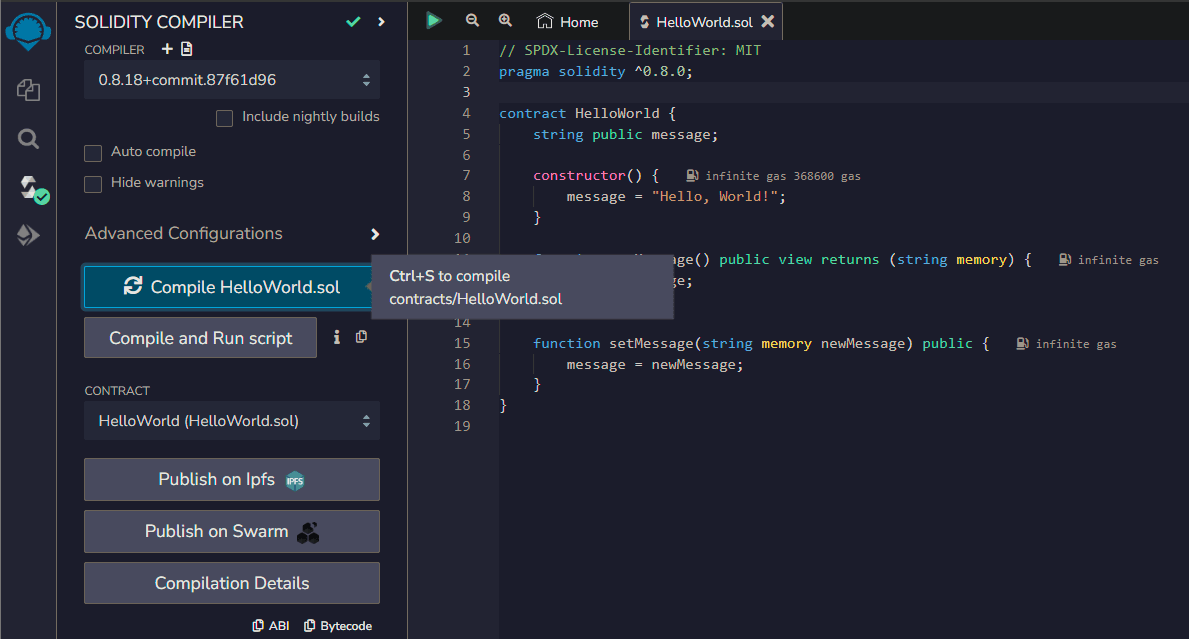
STEP 4: COMPILE THE SMART CONTRACT
- In the Solidity Compiler section of Remix IDE, select the appropriate version of Solidity for your contract (e.g., 0.8.0).
- Click the Compile HelloWorld.sol button to compile your smart contract code. Make sure there are no compilation errors.
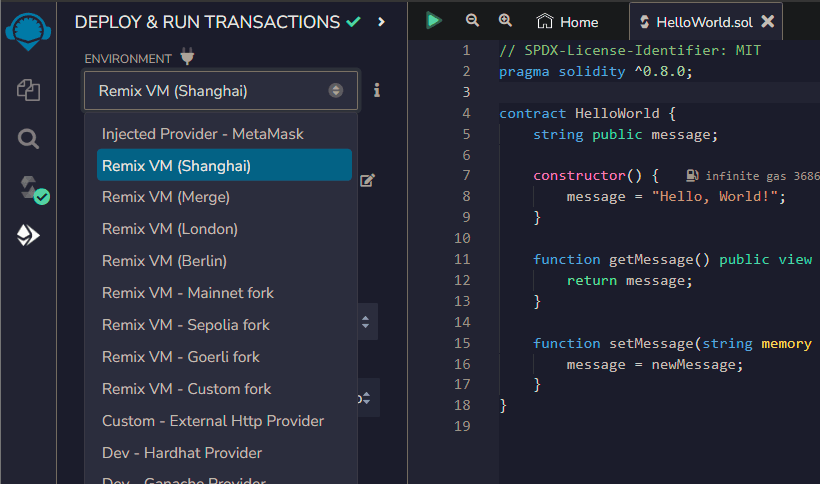
STEP 5: DEPLOY THE SMART CONTRACT
- In the Deploy & Run Transactions section, select the "Injected Web3" environment from the Environment dropdown if you have Metamask (Don't forget to switch to a test network). This will allow you to connect to your Ethereum wallet. If you don't have Metamask installed for some reason, simply select one of the Remix VM, e.g., Remix VM Shanghai. They will give you a disposable account with some test Ethers.
Note: I recommend using Remix VM for this and not Metamask.
- Click on the "Deploy" button next to the HelloWorld contract.
- You'll see some logs in the Remix Terminal window containing these details with a green checkbox.
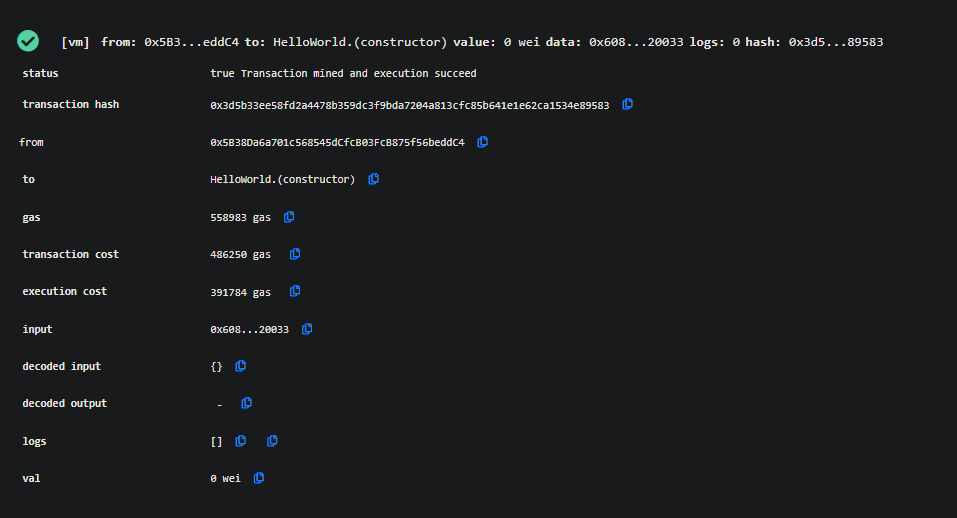
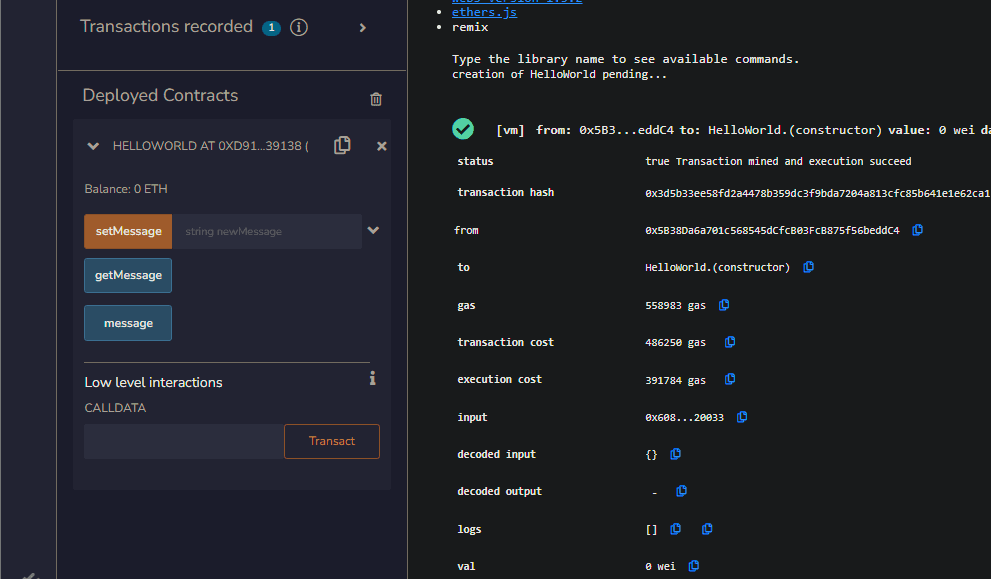
STEP 6: INTERACT WITH THE DEPLOYED CONTRACT
- After the contract is deployed, Remix IDE will display information about the deployment, including the contract's address.
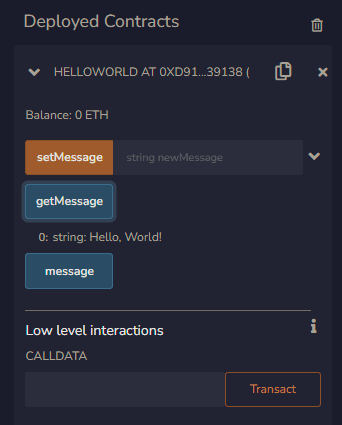
- You can now interact with the contract using the available functions. In the Deployed Contracts section, expand the contract and access its functions.
- You can call the getMessage function to retrieve the greeting message or use the setMessage function to update it.
Congratulations! You have successfully deployed and interacted with your first smart contract using Remix IDE.
Thank you for taking the time to read my article. If you found this article valuable, I would greatly appreciate it if you could follow me on Medium and leave a comment here.
For more such articles, you could also visit :
My Personal website: https://www.0xkishan.com/
My Medium: https://0xkishan.medium.com/
My Twitter: https://twitter.com/0xkishankumar

You might also like the following articles:
- SegWit: What Is It and How Does It Make Bitcoin Faster and Cheaper?
- Why do all transactions and addresses on the blockchain have the prefix 0x?
- What does Hashrate mean in the Bitcoin Network?
Thank you!






