
Since I got banned from using Night Café for feeding the generative AI prompts that resulted in adult/NSFW content (which would get blurred beyond all recognition), I've been using NeuralBlender. It works well enough, most of the time. However, it does tend to frequently make faces (particularly eyes and mouths) look somewhat unnatural/odd at best. At worst, I get duplicate body parts (from an extra finger to whole duplicate torsos, with heads and limbs) in the output. (In all the several hundred images I've had result, only twice has it produced a three-breasted woman. Quadruple-breasted is more common, possibly with extra shoulders and arms between.)
Anyway, it left something to be desired. It turns out that that thing is a variational autoencoder (VAE). From what I understand, what a VAE does is monitor output from the generative AI, detecting and correcting anomalies (the undesirable quirks that show up in some of the images I get from NeuralBlender). It's controlled by what's known as a "negative prompt". Whereas the main prompt describes what you want to see, you type into the negative prompt everything you don't want to appear in your output, such as "extra limb" and "ugly face". That list gets quite long, as can be seen in the below code snippet. (I don't think that NeuralBlender uses a VAE, since it has no "negative prompt" input on the Website as far as I can tell, at least not on the free tier. Oy vey!)
"negative_prompt": "extra fingers, mutated hands, poorly drawn hands, poorly drawn face, deformed, ugly, blurry, bad anatomy ..." # etc.
I happened to be looking through some groups dedicated to AI-generated art on one of the antisocial media Websites on which I have an account when I found a hyper-real image that is almost impossible to distinguish from a photo without reading the caption. (It was created using a Stable Diffusion algorithm called EpicReal and it lives up to its name.) The artist whom posted it is using a site called Hugging Face. It provides an API for using it through Python, with an access token that you can only get by creating a user account and then generating one. Fortunately, you can do that for free or go the paid route (the latter so far seeming unnecessary).
It took me a while to figure out how to actually generate and save JPEG image files at a decent enough quality that I can upscale them without too much noticeable artifacting, but I eventually got there. (The images from NB are about 512x720px, which allows me to upscale to about 900x1035 at most before artifacting becomes a problem. In contrast to that, I can upscale images from Hugging Face to about 1450x1375 at most, although I do have to do some antialiasing and noise reduction in GIMP to reduce artifacting, so I lose some detail. Still, it's way better than the default 512x512 that just looked terrible if I tried to upscale to even 720x720.) To save anyone else whom is interested the trouble of figuring out the rather unhelpful and limited documentation, my Python code is below. (You'll need to substitute in the model ID and your API Key in the appropriate places, designated by multiple X characters.)
#!/usr/bin/env python3# Hugging Face API for Barbie dolls, using model ID of
# "stablediffusionapi/barbieunstablecivit"
import ioimport mathimport timefrom sys import argv, stderrfrom os import path as ospath
try: import requestsexcept ImportError: print(
"Requests module is required, but not found. Please install it!",
   file=stderr
) exit(1)try: from PIL import Image, UnidentifiedImageErrorexcept ImportError: try: from Pillow import Image except ImportError: print(
"PIL/Pillow module is required, but not found. Please install it!",
file=stderr
) exit(1)
# Find this on the "Models" page for Hugging FaceMODEL_ID = "stablediffusionapi/barbieunstablecivit"API_URL = "https://api-inference.huggingface.co/models/" + MODEL_ID
# Hugging Face Hub Token required for auth; starts with "hf_"headers = {"Authorization": "Bearer hf_XXXXXXXXXXX"}
def query(payload): """This gets and returns the image data from the API""" response = requests.post(API_URL, headers=headers, json=payload) return response.contentnegative_p = [ "painting", "extra fingers", "mutated hands", "poorly drawn hands",
"poorly drawn face", "deformed", "ugly", "blurry", "bad anatomy",
"bad proportions", "extra limbs", "cloned face", "glitchy",
"double torso", "extra arms", "extra hands", "mangled fingers", "missing lips", "ugly face", "distorted face", "extra legs",
"extra feet"] # optional: "painting", "anime", "skinny"
try: image_bytes = query({ # Don't go too large for the dimensions or you'll start getting
# errors in the images. Rather opt for a small image with low
# compression and resize/upscale with PIL and/or GIMP. Default is 512x512. "inputs": argv[1], "width": "720", "height": "720", "upscale": "yes", "negative_prompt": ", ".join(negative_p).trim(),
"options": {"wait_for_model": True} })
# You can access the image with PIL.Image for example with Image.open(io.BytesIO(image_bytes)) as img: # adjust the height and width of the image from ~512px to
~780px # Should probably reduce this slightly to decrease artifacts
# and rely on GIMP instead new_height = math.ceil(img.size[0] * 1.58) new_width = math.ceil(img.size[1] * 1.58) # Image is a JPEG by default. Can add code to convert to PNG out_path = ospath.join(argv[2], argv[1] + ".jpeg")
# description of image is used as file name if len(argv[1]) > 150: # truncate with ellipsis half_len = math.floor((len(argv[1]) - 12) / 2.0) out_path = ospath.join(
argv[2], argv[1][:half_len] + "..." + argv[1][-25:]
+ ".jpeg"
)
print("Path for file to save: " + path) # Resize with antialiasing bigger_img = img.resize(
(new_width, new_height), Image.Resampling.LANCZOS
)
rgb_img = bigger_img.convert("RGB") bigger_img.save(path, quality=98) # write out the JPG file print("The size of the image after saving: ", end = "") print(ospath.getsize(path), end = "") print(" bytes")except UnidentifiedImageError: print(
"The API Failed to generate or save the image! Please wait "
+ "to try again, possibly with a shorter description.",
file=stderr
)except OSError: print("Failed to save the file!", file=stderr)
# should be async/flushed, since it actually outputs after sleepingprint("Now sleeping for ten seconds, to rate-limit requests ...") time.sleep(10)print("You may now make another request.")
My apologies for the bad formatting of the above, despite my best efforts. The code editor isn't conducive to displaying it properly. I should probably make it available as a gist for anyone whom couldn't be bothered to copy and correct it.
One thing that is for certain is that Hugging Face makes a marked difference compared to NeuralBlender when generating Barbie dolls. While NeuralBlender generates ones that look a lot like Mattels, what I'm using still retains the look of a doll, but is a lot sexier, IMO. Yes, I could have used an alternate modeller (perhaps LORA) that produces output that's closer to Mattel's dolls, but where's the fun in that when I get content like the below?
 An early example, from before I figured out how to specify the size and quality of images I get from the API. Trying to get NeuralBlender to produce something similar is almost impossible and highly error-prone.
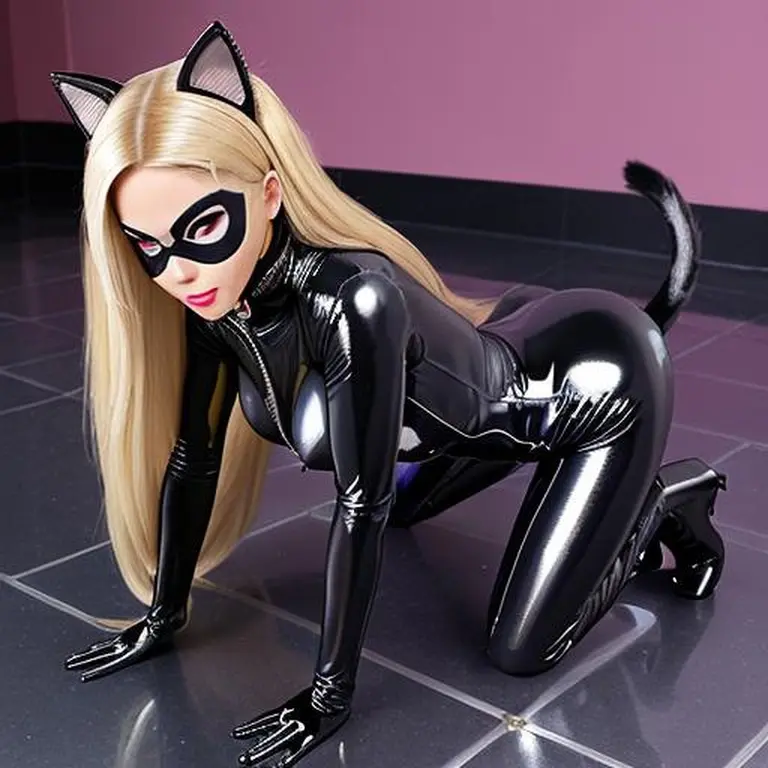
Consider this image, for example. I don't even know for how long I've been trying to get NeuralBlender to produce this pose. Hugging Face has done it for me in about the first twenty-four hours of usage.
Thumbnail image: poster's own artwork, generated with Hugging Face






