Hey friends 👋
I’m a big fan of PoolTogether. In case you haven’t heard, this cross chain protocol combines prize-linked savings and DeFi to make something that’s low risk, user friendly, and asymmetrically rewarding 🎰
Basically, how it works is users deposit cryptocurrency into a pool, a bit like a savings account, because the whole pool is gaining interest on a yield platform like Aave. Only instead of paying out each user a small percentage individually, the interest forms a prize pool and is paid out to one or more winners per week (or in some cases per day!) 🎁
This may sound a bit like a lottery, but there’s one key distinction: you don’t ever lose your deposit 🙌
You see in a lottery, you buy a ticket for a chance to win, and truth be told, you have almost no chance whatsoever of actually winning. As a result, lotteries rake in billions in profits, pretending to give back through charitable initiatives and media campaigns about the winners and how their lives were changed. But simply put, you gave up your money for a chance at a prize; a ticket 🎟
In a no-loss lottery, you don’t buy the tickets. Your tickets are deposit receipt tokens that never expire meaning you’re automatically entered into every consecutive draw. Once you’re ready to withdraw, you can return your tickets and get back 100% (or any fraction you choose) of your deposit. So in effect, you have set aside your money in a kind of savings account. This is why it’s called prize savings and that while the nickname “no loss lottery” is understandably popular, it is ultimately a misnomer 🤓
So now that we’ve had a little refresher, let’s move on to the main attraction 🎪
Prizes on Prizes
Most prize pools on PoolTogether function similarly. All the depositors contribute to the pool to earn a chance to win the interest from the pool. In some cases, like on the Celo pools (cUSD and cEUR), you also earn rewards furnished by the sponsors 💰
But there is a cool feature though that is employed on some of the pools. On top of any interest earned, sponsors can provide what’s called a Loot Box. This can contain more of the same token as the pool, another cryptocurrency altogether, or even NFTs.
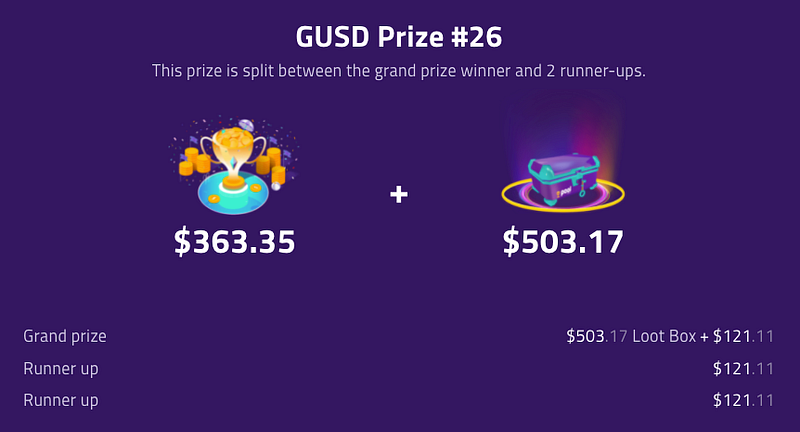
The folks over at Cryptex Finance decided to take advantage of this feature, and over a 12 week period they’re sponsoring the Gemini dollar (GUSD) pool. Each week one winner will take home 1.5 TCAP, worth over $500 at the time of writing 🙌 (Update: this promotion has come to an end)
And remember, that’s on top of the pool’s main prize of several hundred dollars, split equally between the grand prize winner and two runners up.
Now that all sounds exciting, but you may be asking yourself…
What is TCAP?
Simply put, TCAP is a crypto index fund 📈
Its creators over at Cryptex Finance describe it thusly:
TCAP gives holders real-time price exposure to total cryptocurrency market cap. It’s a new, 200% fully backed, fully collateralized asset that’s both audited and accurately representative of the entire cryptocurrency complex by total market capitalization.
200% you say? But how? And why? …And how?
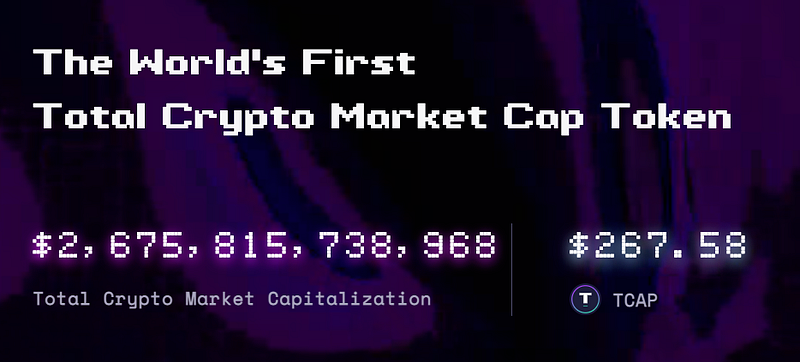
TCAP is synthetic. That means that rather than holding all of the underlying assets, it is instead over-collateralized with certain assets (in this case ETH and DAI), and pegged to a specific value: the median value of the total crypto market capitalization divided by $10 billion.
This might sound a bit strange but it’s actually essentially the same way the S&P 500 works.
In fact, as complex as this might seem at first glance, it’s rather straigtforward, and easy to understand if you read the whitepaper 📄
Furthermore, TCAP has a certain amount of credibility as it has been available on Gemini, the world’s most regulated exchange since earlier this year. In fact Gemini supports both TCAP and CTX, Cryptex Finance’s governance token.
It’s no surprise then that Cryptex chose to sponsor the GUSD pool as a sort of cross promotion of sorts 🤝
Gemini Dollar
GUSD is an impressive stablecoin that for whatever reason goes largely unmentioned in most conversations around DeFi. Backed 1:1 by fully audited reserves and always convertible for exactly one US dollar at Gemini, this stablecoin has yet another benefit for Gemini users…

That’s right if you buy or sell GUSD on Gemini there are no fees. No fees for buying nor selling, and (one of my favourite features of Gemini) you get 10 free withdrawals per month 🙌 So if you are in the US, and want to acquire GUSD, this is definitely the method I recommend.
Use my referral if you’re new to Gemini and you’ll get $10 when you trade your first $100
Now it’s worth noting that you can’t buy GUSD on Gemini in Canada. I haven’t been able to find a clear answer for this, but I know there is also an issue with USDC on Coinbase in Canada so I assume it’s a regulatory issue 👮
Fortunately there are workarounds. Users in Canada and many other countries can simply use Crypto.com to acquire GUSD.
And then there is the option of using a DEX to swap for GUSD. This can be a bit expensive depending on gas fees, but it is fast and easy and does not require any additional accounts to be created ⚖️
Walkthrough
So let’s run through the process of acquiring GUSD and depositing into the GUSD pool on PoolTogether 👨🏫
Step 0: You need a Web3 Wallet
To access the wonderful world of decentralized apps (or dApps) you will need an Ethereum wallet. There are multiple options out there, and you may want to do your own research before deciding which one. What matters most here is that your wallet supports WalletConnect and can connect to the Ethereum Network. For the purpose of this guide, we will be using MetaMask.
Now rather than writing the same technical info that can be found anywhere, I am going to direct you to two very trustworthy guides that you can follow to get this set up. Sound good? 🤝
Setting up MetaMask is fairly simple, but if you want a little bit of a walkthrough, here’s a video I found that I feel comfortable recommending.
Step 1: Get some GUSD
The ideal amount for this is upwards of $1000 ($2500–5000 would be best). Gas fees on Ethereum can be quite costly and so depositors will likely want to have an amount deposited that is worth withdrawing. Now, you can deposit less, and you could still win. After all there is a whole website of people who’ve won big with small deposits 🐟
The best way to get GUSD if you’re in the US or anywhere else that supports it is Gemini.
Use my referral if you don’t already have an account and we’ll both get $10 of free Bitcoin.
If you buy on Gemini, you’ll pay no fees and you’ll be able to withdraw to Metamask.
If you can’t buy on Gemini, you still have a few options:
🅰️ Use the Crypto.com app. The process for this is similar to buying any other token on the app and withdrawing to your wallet. Unfortunately, unlike Gemini, Crypto.com charges for withdrawals to Ethereum. At the time of writing, the fee to withdraw is 8 GUSD. You can confirm the current rates via the fee schedule.
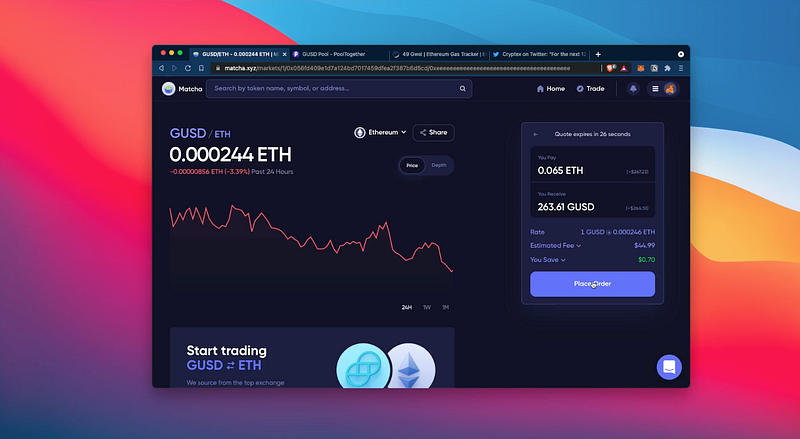
🅱️ Swap another Cryptocurrency for GUSD using a decentralized exchange (DEX). My personal favourite option is Matcha. This is a DEX aggregator that helps you find the best price. Another benefit of using a DEX aggregator like Matcha is that you only need to approve access to the token once but you get access to multiple exchanges.
Over on Matcha, search for GUSD, choose the token you want to trade, I used ETH. I personally prefer to use ETH for a lot of my trades because the most common pair for liquidity pools is with ETH, so it’s less expensive than trading another token that may require multiple swaps behind the scenes.
Regardless of which DEX or which token you use, the process will look more or less the same:
- Check gas and wait until it’s within a reasonable range (Lately 70–100 is a low average)
- Approve access to your token
- Click Place Order
When the transaction is complete, you’ll see a notification on your wallet as well as an indication on the website.
Now you have your GUSD, you’re ready to move on to the next step.
Step 2: Deposit into PoolTogether
If you’ve watched any of my other videos about PoolTogether, this process will feel pretty familiar. I’ll walk you through the steps below, but you can also check out this video which demonstrates depositing into the POOL pool on Ethereum. It’s basically the same.
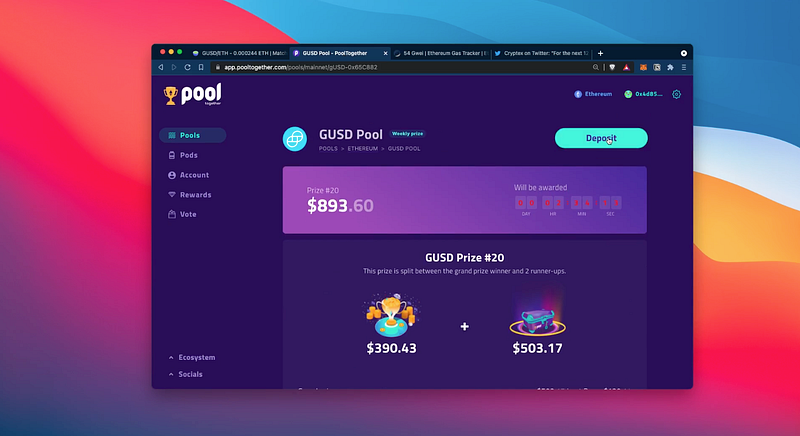
- Head over to PoolTogether and click on the GUSD pool. Connect your wallet in the top right corner, and then click Deposit
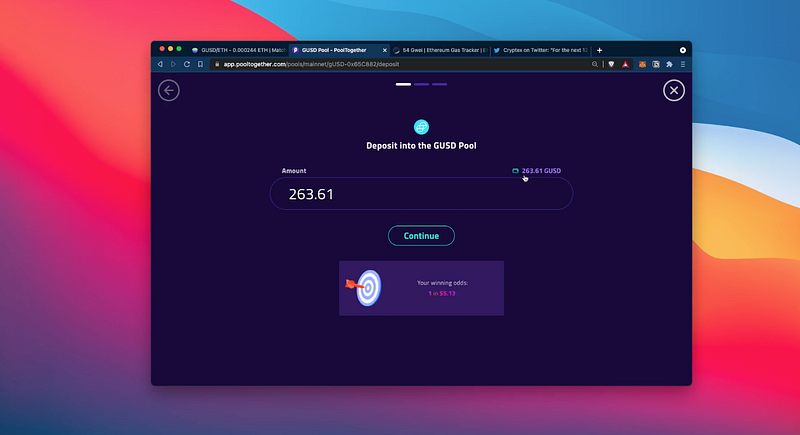
2. On the deposit page, you can manually enter the amount to deposit or click the little wallet icon to select the maximum.
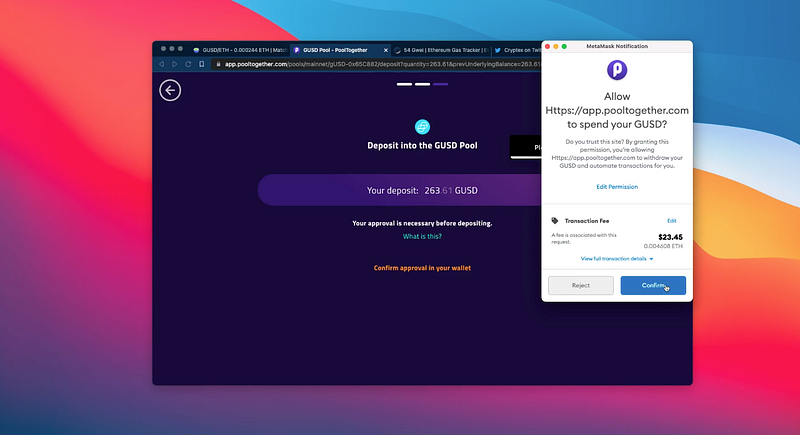
3. Click approve and sign the transaction to allow PoolTogether to access your GUSD. Once again you may want to monitor current gas prices.
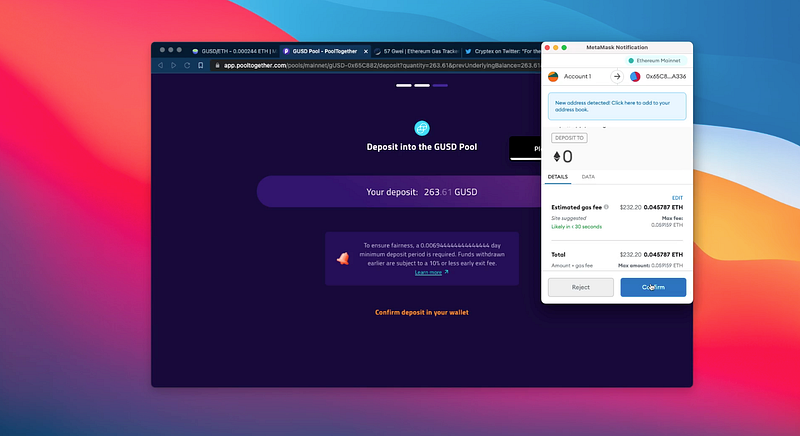
4. After you’ve approved that transacction, you can click deposit, and confirm the transaction on your wallet.
NOTE: this transaction will be quite expensive. Deposits on Ethereum generally are, and something about the GUSD token makes it more expensive than others. As I mentioned before you will want to be depositing at least $1000 or the opportunity cost of withdrawing in the future may lead you to abandon your deposit. Of course, forgetting about your deposit for a while is kind of the perfect strategy, and the hope is that you’ll win eventually and that the win will more than cover your gas fees 🤞
Once the transaction confirms, you should see the confetti graphic to let you know you’re officially deposited into the pool. Click Add PGUSD to Wallet so that you can view the tokens in your metamask.
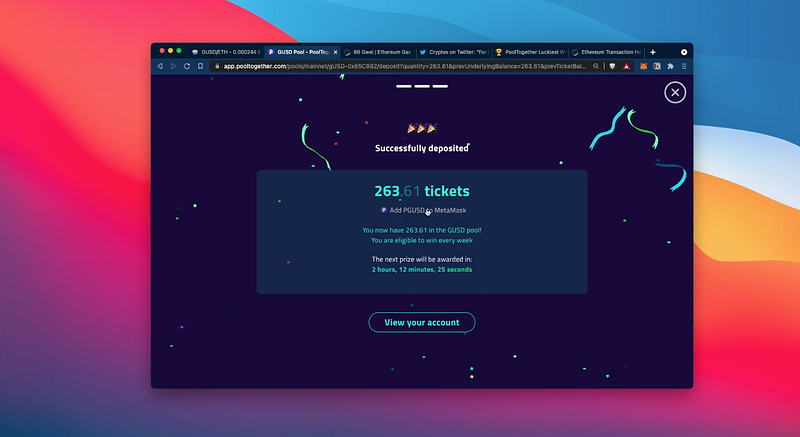
Just like that you’re entered into the pool with a chance to win prizes each week including that incredible TCAP Loot Box 🎉
This won’t be for everyone as gas fees can be quite prohibitive, but that also means you’ll have fewer competitors. And if you buy your GUSD on Gemini you’ll already be saving a lot 💸
If this isn’t for you, there’s still a few options:
If you still want to explore prize-linked savings but can’t afford these high fees, try PoolTogether v4 on Polygon.
If you want access to TCAP and prefer to buy directly, you can do so on Gemini. And if you’re new to Gemini, use my referral for $10 of free Bitcoin when you spend $100 or more 🎁
So there you have it. One more way to save and a pretty nice incentive to do so.
Let me know what you think of TCAP, GUSD, and this particular collaboration in the comments below.
And until next time 👋
Thumbs Up
This post is brought to you thanks to a grant from PoolTogether
As always the opinions expressed are my own, I do not work with projects I don’t believe in, and I implore you to do your own research before investing. If you have any questions, feel free to comment below or tweet at me. If you liked what you read, considering tipping to thumbsupfinance.eth or thumbsupfinance.crypto. I’ve done a thread about how to do this 💖






