
Traditional passwords managers are not secure, because they violate the main principle of risk management (“do not keep all eggs in a single basket”) and have a single point of failure problem (if a master password or an encryption of a file where all passwords are stored is broken then all passwords are compromised). In addition to these two problems, traditional passwords managers are not simple and convenient for non-tech savvy people. These passwords managers need to be installed, updated, upgraded, synchronized over different devices, etc.
For the reasons above, many non-tech savvy users prefer to use physical passwords notebooks. See, for example [1]. Users need to keep these notebooks near to have abilities to access the passwords, when they need them. In addition to inconveniences, there are security problems with such notebooks. Imagine that your physical passwords notebook was lost or stolen or damaged or confiscated, etc.
More secure and convenient way for non-tech savvy users is to use virtual passwords notebooks, instead of physical passwords notebooks. Virtual passwords notebooks do not exist in the real world, outside of a time interval on which they are created and used. For this reason they are very secure. They can not be lost, broken, damaged or confiscated. All pages of a virtual passwords notebook are indexed by a key word/phrase and a date, which is very convenient for users.
In this post, we consider a simple way how to make virtual passwords notebooks with public dynamical passwords generators (DPGs). See [2-8]. Suppose, a user needs to manage multiple strong and unique passwords for the following groups: traditional finance, cryptos, devices, electronic locks.
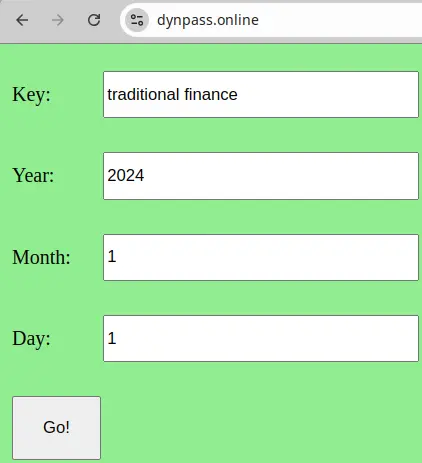
To create the first virtual page we use the phrase “traditional finance” as a key and 2024/1/1 as a date.
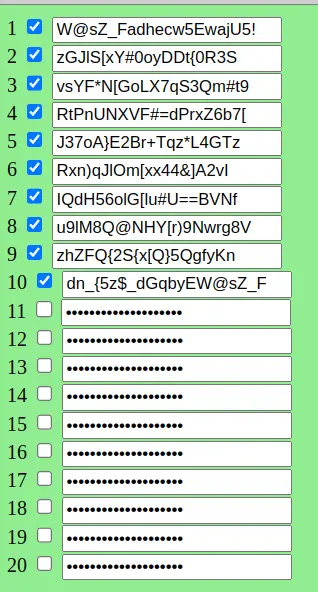
After clicking on the “Go!” button we get 20 strings from which we can construct our passwords. In the simplest case, we can use the strings as passwords and login into the desired accounts. After closing the web browser, assuming the browser does not save the viewed pages, the virtual page does not exist in the real world, therefore the passwords can not be hacked.
To create the second virtual page we use the word “cryptos” as a key and 2024/1/1 as a date.
To create the third virtual page we use the word “devices” as a key and 2024/1/1 as a date.
To create the fourth virtual page we use the phrase “electronic locks” as a key and 2024/1/1 as a date.
If there will be a need to change all passwords periodically then we can do it in a simple and fast way, by changing the date. DPGs can be accessed from any device connected to internet, including mobile phones (see [8]). Those, who want an offline variant can get it from this link:
https://www.dynpass.online/dpp/files/dp.zip
In this simple and secure way, users can manage multiple unique and strong passwords for multiple accounts, devices, electronic locks, etc.
For better security, private DPGs are recommended.
References:
[1] https://www.linkedin.com/pulse/analog-advantage-why-password-notebook-might-outshine-morillo
https://security.stackexchange.com/questions/175075/password-manager-vs-password-book
https://www.passcamp.com/blog/is-it-that-bad-to-write-down-a-password/
https://askleo.com/no-dont-write-down-passwords/
https://www.schneier.com/blog/archives/2005/06/write_down_your.html





