
Contents
This guide outlines the steps on how to to trade $AMU on QuipuSwap and earn $AMU on Crunchy.Network. The steps include:
- Choosing a DeFi Tezos wallet
- Trading $AMU on QuipuSwap
- Earning $AMU on Crunchy.Network
Creating a DeFi Tezos wallet
1. Please first create a DeFi Tezos wallet. There are many wallets to chose from, but you cannot use ETH-based wallets like MetaMask or TrustWallet. My recommendations are below:
- Kukai Wallet: https://wallet.kukai.app/ Browser wallet created in connection with Tezos, great all-around wallet where you can view both tokens and NFTs in your wallet
- Temple Wallet: https://templewallet.com/ Mobile wallet that is generally accepted everywhere
(You can also find a complete list of wallets whenever you click the "log-in" button on a website. Always do your own research on each wallet, and NEVER share your personal keys to anyone!)
2. Fund your wallet with Tezos. This is absolutely your preference. You can purchase directly from many wallets or trade on a CEX/DEX and send to your wallet address.
3. You are now ready to trade on QuipuSwap.
Trading $AMU on QuipuSwap
1. Visit QuipuSwap using a web browser of your choice: https://quipuswap.com/swap/tez-KT1DEzGbPCWTvhTtSUgBGBYsZQFhoAfN2RJn_0
2. Click "Connect "wallet."

3. Select either "Temple wallet" to connect to your installed Temple wallet, or "Other wallets" for a complete list of all Beacon-supported wallets with which to sign in. Beacon is the dApp used to connect Tezos wallets with platforms. Approve the permission request in your wallet and follow any directions associated with your wallet. You should receive an alert pop-up that permissions were granted on QuipuSwap.
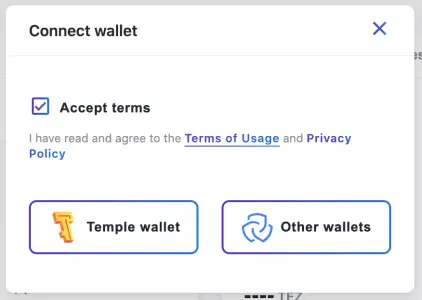
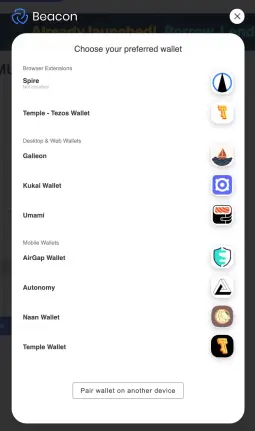
4. Once completed, you are ready to trade $AMU against Tezos or any other Tezos token. Enter the amount of tokens you wish to swap and click "Swap."
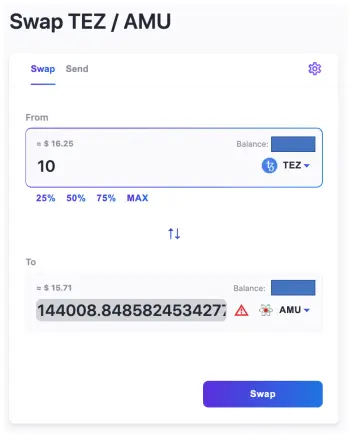
Unlike MetaMask or TrustWallet, you don't have to import custom tokens. Once you swap for $AMU and the blockchain confirms the transaction, your wallet should recognize the FA2 token and display it under financial assets.
5. You are now ready to earn $AMU on Crunchy.Network.
Earning $AMU on Crunchy.Network Farming Pools
1. Visit the Crunchy.Network Farming Pools using a web browser of your choice at: https://app.crunchy.network/#/farms?q=amu
2. Click "Connect Wallet"
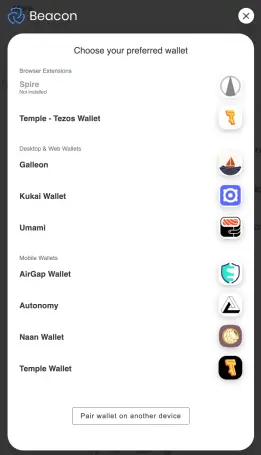
3. Choose your wallet from the Beacon dApp menu and follow instructions on your wallet to approve permission for Crunchy.Network to manage your tokens. You should receive an alert pop-up that permissions were granted on Crunchy.Network.
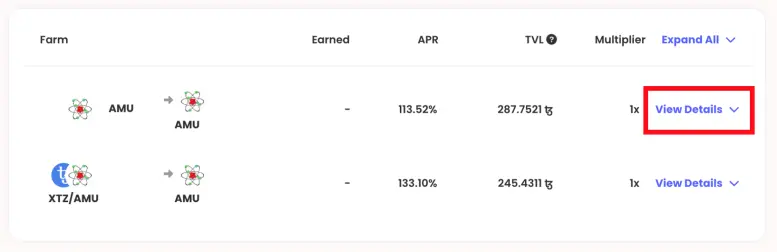
4. Click the "View Details" drop down to see information for the $AMU->$AMU farming pool.
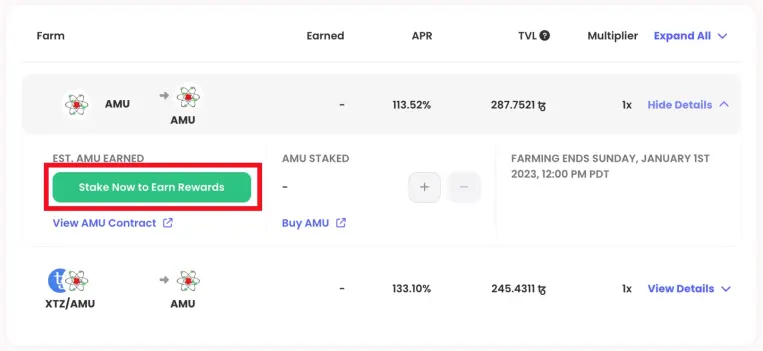
5. Click "Stake Now to Earn Rewards" and a pop-up window will show up to stake your $AMU tokens.
6. Enter the amount of $AMU you wish to add to the pool. You will be able to see your staked tokens as a proportion of the entire pool. Your earnings are influenced by the proportion of your contributions to the farming pool i.e. if your staked tokens is 10% of the entire pool, you will earn 10% of the distributed $AMU per unit time.
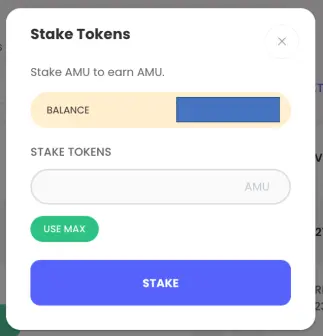
Click "STAKE" and approve the transaction in your Tezos wallet. It will cost approximately 0.31 Tez in gas and storage costs to create the smart contract and fund the pool.
7. After the $AMU is staked in the farming pool and confirmed on the blockchain, you should be see your rewards in real time. You can claim your rewards and restake at any time. Congratulations on earning $AMU!
Further Reading
- BakR_D0mains Wiki: https://bakrd0mains.gitbook.io/wiki/
- BakR_D0mains NFTs: https://bakrd0mains.gitbook.io/wiki/nft-projects
- Atomic Mass Unit $AMU Token: https://bakrd0mains.gitbook.io/wiki/amu-token






