
Give a dog a bone, give a dog a home. There's has been a lot of buzz about SPOT ever since it was announced as the third tipping token here on Publish0x. A lot of people, myself included, were confused about what to do it. I figured I'd make this simple step-by-step guide to share how you can withdraw SPOT to Trust Wallet.
First, open up the app on your phone. Click on the toggle icon in the top right corner to pull up the token search.

Click on the plus button in the upper right corner to add a new token.

Make sure you have ETHEREUM selected as the network, as SPOT is an ERC-20 token.

Add the contract address exactly as follows: 0xc1f33e0cf7e40a67375007104b929e49a581bafe
This will automatically pull up SPOT, its symbol, and add the decimal value (9) for you
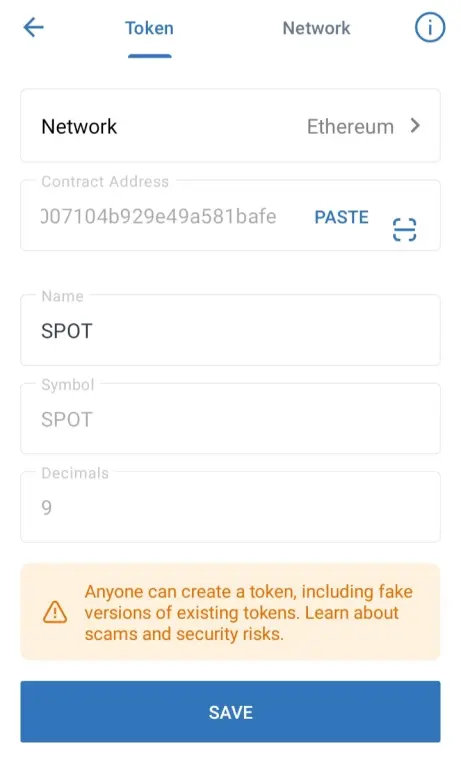
You can now add SPOT to your Trust Wallet; just paste the address in under settings, on-chain address for SPOT, in your Publish0x account.

From here, you can do as you wish with your SPOT tokens:
- Hodl
- Mint on the SPOT App
- Redeem for AMPL on the Spot App
Sit, boy, sit! Good SPOT!

Hopefully this has been an informative post. For more about SPOT, check out the white paper.
What has been your experience with SPOT so far?
The original Bitcoin faucet is long gone, but there are still ways to collect some free crypto:
-
Sign up here on Publish0x, if you haven't already, to earn free crypto for reading & writing content.
-
Join Cointiply and roll the faucet every hour, view PTC ads, take surveys to earn free Bitcoin, Litecoin, Dogecoin, or Dash.
-
Make an account at read.cash and earn Bitcoin Cash (BCH) tips for writing short posts or full articles.
-
Downoad the Bitcoin Cash Giveaway to collect some free BCH sats, paid out weekly.
-
Check out Yescoiner to easily collect some satoshis; no nonsense -- just solve a captcha. Low payout, slow drip here.






