
What is staking?
The concept behind staking is a bit like hibernation. Or a savings account.
First, you freeze the tokens through "staking", choose a voting proxy for the voting power that your staked tokens grant you, and you'll be rewarded with a slow trickle of WAX tokens in return.
Pretty great, right?!
Ok, to get started you'll need a WAX account and a bit of WAX tokens in it. You can learn how to register for a WAX account here.
Step 1: Login to Your Wax Cloud Wallet
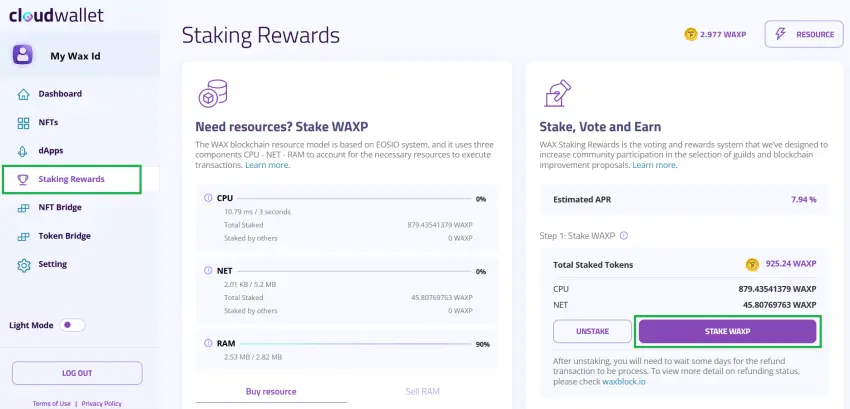
Go to MyCloudWallet.com and login.
(Alternatively, you can go to https://waxblock.io/ if you have a different wallet type. When we use Anchor Wallet, we'll go to Waxblock.io to stake and claim rewards.)
Step 2: Click Staking Rewards
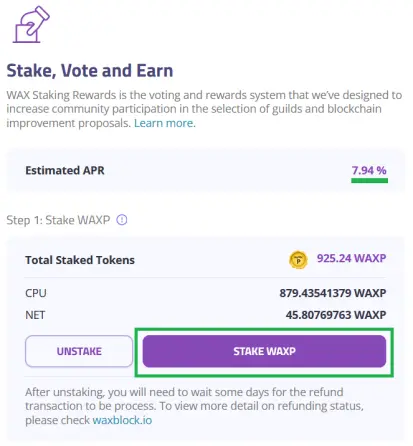
Once you click Staking Rewards, you'll see all your WAX wallet stats like CPU, NET, RAM. For now, we just need to click the Stake WAXP button. Choose how much WAX you would like to stake.
For your first time staking, set a few WAX tokens to stake just to try it out!
Step 3: Choose a Voting Proxy
A voting proxy is someone who will set your votes for you. You can pick any proxy from the drop down. No worries! You can't go wrong as you can always set a different proxy at any time.
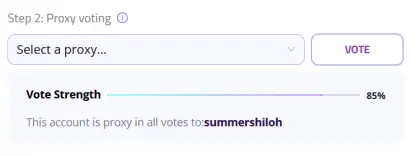
Step 4: Sign the Transaction
Once you've staked some WAX and selected your voting proxy, you just need to sign the transaction on the blockchain. The pop up window will appear once you click Vote, so be sure to complete this last step or the transaction won't go through!
Step 5: Claim Rewards
Claim your rewards regularly. You will see them adding up gradually day by day.






