
Today, I wanted to share with you a tool that I've been using for a while, and that I think may be of use to more and more people as teleworking is getting more and more popular in the corona world.
That tool is SignRequest.
As some of you know, I'm a freelance filmmaker and video editor, and this means I can technically go an entire mission without ever physically meeting my clients: they send me the footage, we talk about what they want and I do it. But I still need them to sign whatever estimate or contract I edit for them, and that's where SignRequest comes into play.
TL;DR
In a few words, SignRequest is an online tool allowing you to upload some documents, decide where you want your client to sign on the page and send it to them. They will then receive an email with a link to the website, and they can sign the document, from their phone or computer, and both parties can then save the signed document. No need to print or mail anything. This is definitely a time and money saver, as well as an opportunity to reach more clients as the procedure is simplified.
Now let me detail some of the available features.
Signing documents
When you upload a file, you can then decide what interaction the recipient(s) and/or yourself will have to have with it. By clicking anywhere on the document, you can choose between four options: sign, input the date, type some text or check a checkbox, and you can do this anywhere, as many times as you want and for as many parties as you want.
You can also save one or more signatures in your account, either by typing them, "drawing" them or uploading a picture, thus allowing you to add your signature to your documents directly from the website.
Once you've decided who needs to sign where on all the documents, you can customise the body/subject of the email, and then click send, it's that easy.
The recipient(s) will then receive an email from SignRequest , and they will be guided all along. They do not need to have an account. They will be taken to a page with your document, and the website will show them where they have to sign, type some text or whatever you decided. They then click on "Finalize" and the signed document is sent as a PDF to all parties, along with a signing log which gives more details about the document and the interactions.
Integration with external apps
One of the best features of SignRequest is its integration with external apps. You can connect a dozen different apps to it, like DropBox or Google Drive for instance, and they keep making this environment grow.
As my readers probably know, I'm not into Google, but I do have my DropBox connected to it. This allows me to pick which document I want to send a client directly from my DropBox, and then, when the documents are signed, they are saved in a specific folder in the DropBox, along with the signing log. This is a major time saver for me, as I'm sure it will be for you.
You can also connect SignRequest to Zapier, a centralised hub of sorts, which gives you the possibility to connect basically anything with anything else. Now, the possibilities are endless. Do you want your favorite song to be played on Spotify as soon as a client signs a contract? Well now you can do it! But you could also probably connect it to a Jira, a Trello, or whatever tool you're using in your company.
Pricing
Okay, let's talk money. Their plans are very affordable, and definitely worth it when you consider the time and cash this website will make you save.
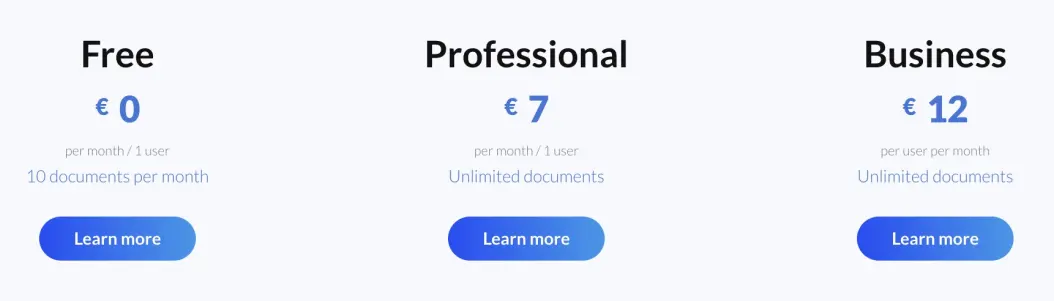
As you can see in the picture above, you have a free plan, that allows you to send 10 documents per month, which is enough if you're starting out, or if you just want to try SignRequest for a bit. This is not a free trial, it's a forever free plan. Then the paid plans give you more options, more customization, unlimited documents, more customer support and so on, for only 7€ or 12€ a month. These two come with 14-day free trials. And then, if none of the standard plans fit your needs, you can also contact them to create a custom one for your company.
And they're even starting a referral program, which is still in Beta for now, and it aims at giving you, the referrer, 25% of whatever they're making from your referrals. So, if you have 10 referrals using the Business plan, you're making an extra 30€ a month, sweet right?
Here is my referral link, if you want to try the app and want to support my writing, please consider using it: https://signrequest.com/ref/VW85V39R/
Legality and security
You may be wondering if an electronically signed document holds as much value as a paper one. Guess what? It does! And with the signing log, you actually have even more security added to your contracts, as it definitely proved who signed it, when etc. From a legal standpoint, a document signed with SignRequest is as good as a paper one, it's just cheaper and more convenient.
And if you fear about the security of your data, know that SignRequest is based in the Netherlands, and is subject to the strict GDPR rules of the European Union. Your data and documents are stored safely and will never be sold or disclosed to anyone. And regarding your clients, only an email address is required for them to interact with the website, so nothing to fear there either. And don't worry about the language, the app is 100% online and available in 15 languages, so you can work with all your clients anywhere in the world without a problem.
You can also choose to add a password to your document, so that, even if the email is somehow intercepted, the documents can't be accessed.
So there you have it, that was a brief overview of this great tool that is SignRequest. There are a lot more cool features, such as templates, reminders, customization, API and more that I encourage you to go check out. I might write an even more detailed article about all that later if you're interested. This is definitely a time saver, a money saver and a headache saver for me, as I'm sure it will be for you. And it allows me to spend more time on doing actually paid work that I enjoy rather than wasting time dealing with bureaucracy and papers.
Thanks for reading, let me know in the comments if you want me to talk about other cool tools I use to make my freelancing life easier!
Until next time, stay creative! See you!
---
Any kind of support, even a simple "like", is truly appreciated and helps me grow and create more quality content for you to enjoy.
Buy Me A Coffee: https://www.buymeacoffee.com/piliz
Youtube: https://www.youtube.com/c/PierreLizetVideo
Twitter: https://twitter.com/PierreLizet
Instagram: https://www.instagram.com/pierre__lizet
Enjoy one free random stock (no deposit required) by signing up here: https://join.robinhood.com/nathaln-81f11a
And if you are new to Publish0x, it is a blogging platform where you get paid for reading articles! You can join using this link to support me: https://www.publish0x.com?a=Vyb8NjLevA






