
Colorizing black and white photos is not something new, but having it done by an artificial intelligence surely makes the task easier!
DeOldify is a machine learning tool that takes a black and white photo or video as input and colorizes it in a matter of seconds! It's not perfect, and an artist colorization is always going to look cleaner, neater and more accurate, but, for a software, it truly does an amazing job. And the best part? It's open source, so you can find the code on GitHub and run it yourself (if you have some extremely powerful hardware)!
I'm no expert in machine learning, so I won't try to explain the whats and hows of how it works, but it is basically "fed" thousands of images so it can learn what specific elements should look like in color, and then try to apply what it learned to black and white images that you upload.
But pictures speak louder than words, especially with something like this, so here's what DeOldify did to this 1914 photo of my great-grandfather:
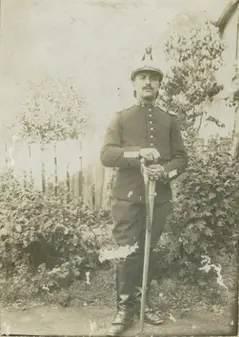
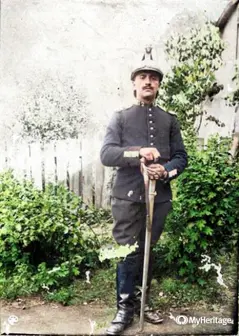
The top left of the original image is completely blown out, so I wasn't expecting any miracle there, but the rest of it is pretty impressive, isn't it?
Since I discovered this tool, I've been playing around with it and it's such an incredible feeling to see members of my family, whether I had met them or not, "come back to life".
There are different ways available for you to try it yourselves (sorted from easy to hard):
- Go to https://deepai.org/machine-learning-model/colorizer and simply upload your photo, DeepAI will do the rest
- Create an account on MyHeritage, this is where you'll find the most stable version, that gives the best performances. You can even improve the quality of your photos as well as colorizing them and it generally looks very good (even though sometimes some faces might look a bit "video game-y", since it basically does a CG facial reconstruction)
- Go to https://colab.research.google.com/github/jantic/DeOldify/blob/master/ImageColorizerColab.ipynb and follow the instructions
- Download the code and run it on your computer https://github.com/jantic/DeOldify
All of these are free (MyHeritage allows you to colorise a dozen photos in the free version, and an unlimited number with a paid subscription), so I encourage you to go look for old family or national treasures and see what they actually looked like back then!
I haven't tried the video colorizations yet but I've seen some on their website and on Twitter and it's as impressive as the pictures.
That's it for today, thanks for reading and I'll talk to you soon!
---
If you enjoy this content, please consider following me here and on my different social media, to show your support. It is really appreciated and helps me grow and create more enjoyable and good quality content:
Youtube: https://www.youtube.com/channel/UC8bBNDVVmXBRHb6qJP9ZMWA
Twitter: https://twitter.com/PierreLizet
Instagram: https://www.instagram.com/plizet.video
And if you are new to Publish0x, it is a blogging platform where you get paid for reading articles! You can join using this link to help me reach my financial goals: https://www.publish0x.com?a=Vyb8NjLevA






