Hello,
We all know extensions gender of Youtube Screenshots to take screenshots during viewing a Youtube video. This works easily if the video doesn't contains a lot of details but unfortenally it becomes a hard task if the video is pure technical.
Pause the video each 3 or 5 seconds to take screenshots doesn't differs from a person clicking on ads on coinpayu. Even you will never understand nothing and also it becomes a very boring task add to head ache.
The action doesn't differs a lot from stopping youtube video to screenshot the captions however it exists tools like merlin to do the staff then later you save to TXT and then print it with PDF 24.
Let's take an example: Max Business School where you learn about Wordpress and then you need to follow guidelines and host under DreamHost to get Digital Marketing certification from Max Scoot by the end of the course on this created post.
In this step we need Save Form Helper so we download the video.

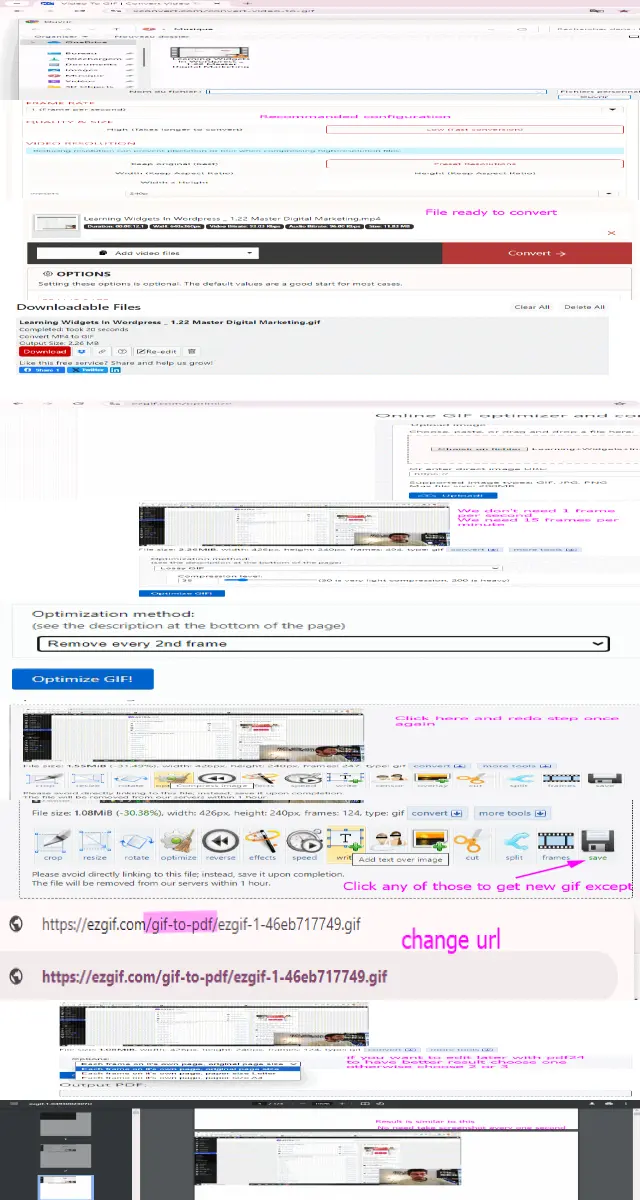
After that you go to site shown on the screenshot.
I cannot label it here may be the site URL seems to be prohibited from Publish0X but you will find on the photo associated.
We do not need 15 frames per second and 720p resolution. We need 1 frame per second and 240p resoultion. Youtube videos are generally 360p means like 640*360.
After that we go to ezgif and optimize. A screenshot every 4 seconds seems a reasonable rate.
You remove each 2nd frame twice. So that you will get 15 screenshots every 1 minute. You could redo the process once again to get 8 screenshot per 1 minute if there is no much details.
After that you reclick on any button under gif except save and then change URL to gif-to-pdf and download. You could avoid ezgif convert to A4 and use PDF24 tool so you choose first one.