
Most of us have left Microsoft Internet Explorer long back when Google landed on the browser scene more than 10 years ago. But since Google has replaced Microsoft in the browser monopoly, i have been so skeptical of chrome now a days due to Google's tracking, data collection practices, and monopoly with its mobile OS Android.
I was thinking the other day what Google has made the so called "Open Source" Android OS into? Nothing but a walled garden like apple's iOS by restricting all of the core and essential features of the OS by coupling almost all of a smartphone's essential service with Google Play Services. I came to realize this even more in the process of getting rid of the Google Play Services from my primary android device. I mean something as simple as reading a QRCode is baked into the Google Play Services, and is not a part of the Android OS. Prime example is many apps that are unable to read a QRCode when their scanner is pointed to codes, complaining that your device does not support Play Services. And you would just wait endlessly at the scanner screen thinking, something is wrong with the QRCode which is not the case, Google is whats wrong here! Also, even brave browser though works without the play services, its scanner also depends on the inbuilt functionality in Google Play Services, where it cant scan the QR code of the sync setup process when i point my android phone to the code, which is really sad. I hope brave changes this.
It all started off with the "Dont be Evil" moto .. which got replaced by "Do the right thing." which basically means whats right for google, and not for its free users, which feed Google with all of their data.
So this post is about Browser. Ill keep it short as you can read other features of the Brave Browser elsewhere, but i would highlight few advantages of the Brave browser which are not evident at first glance to everyone.
- The Sync - The way brave has implemented the sync is P2P. Which means all your bookmarks, history, open tabs if you choose to sync all these, are never hosted anywhere like chrome does. When you setup the sync, brave gives you a super high secure passphrase containing 24 words. This is used to encrypt all your data client side on your machine, before any other device that you pair up to the sync-chain can talk to download any changes. And to add the other device to the sync-chain, it has to provide the same seed or QR-code if you need to add a mobile device. This approach explains a lot of the intentions of the people behind the browser. One thing to not though about this approach is that this is actually a sync solution and not a backup solution, since your data always lives on your local devices, and does not gets uploaded/hosted to some cloud as it is in the case of chrome or for that matter even firefox.
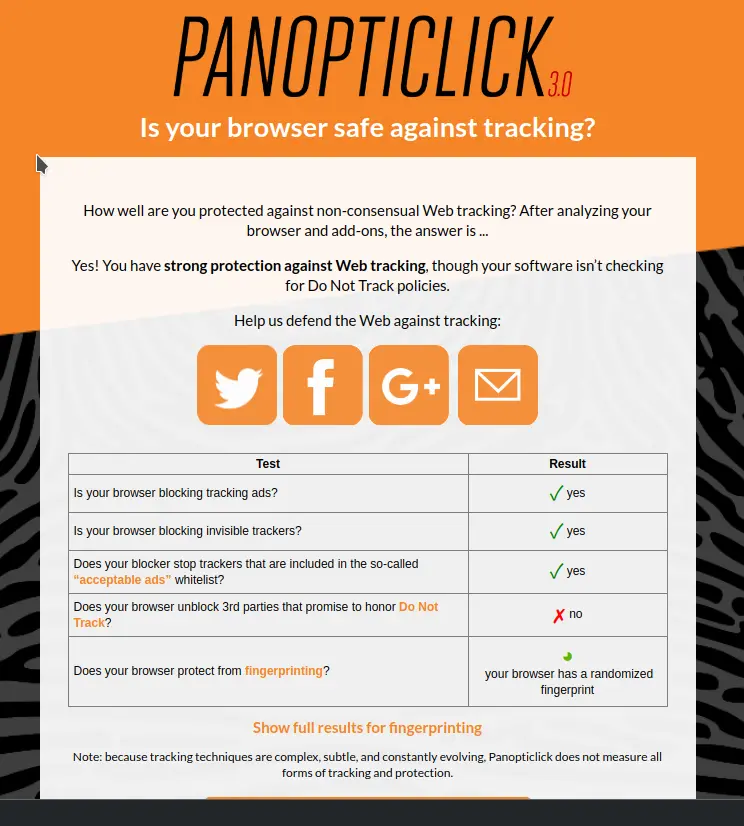
- The default privacy features - Brave browser does something unique that no other browser does in my research. It essentially disables all fingerprinting withing the browser without any extra add-ons. I guess there would be some addons available for other browsers like chrome or firefox, but again, just that this approach is built-in and out-of-the-box, it explains a lot about the intentions here. To summarize, what fingerprinting is , have you ever wondered, how in your work m/c you do some google search about something(without being logged in to your personal google account) and still see ads related to that search start appearing to your other devices like your personal m/c at home or even your mobile devices? This is browser fingerprinting. So brave basically renders all the fingerprinting tricks employed by all the analytics and ad networks basically useless! To check for yourself, on brave browser, head over to https://panopticlick.eff.org/ and hit Test Me. Here is a sample from the brave browser.
- Speed - This is though is advertized on Brave website but i am mentioning this here as i have really experienced this that the websites are indeed very fast to load, due to all the default options that brave browser comes out of the box. You would really feel the difference on a mobile phone the most,as compared to desktop since they are not so powerfull as compared to desktop machines. If you happen to use some smartphone thats not a flagship [like me], this experience would be magical!
Thanks for stopping by and paying attention.
Be Brave!
P.S I would love to share my experience of getting rid of Google Play Services on my primary android device in my future post in my blog here. Stay tuned!






