
Hello
First of all, If You don't know about Qortal I will refer You to :
Ok so let us start :
You need VPS server and log in to that server for example with putty
After log in :
apt updatenext steps are :
cd /
cd home
adduser *YourUsename*
set password for new user and just skip rest by hitting Enter at the end Y for Yes and let's go to the next step:
usermod -aG sudo *yourusername*
apt-get install openjdk-11-jdk
apt-get install unzip
after installing all of that You can go to folder that is named same like Your Username by :
cd Yourusernamewhen You in :
wget https://github.com/Qortal/qortal/releases/download/v1.2.2/qortal-1.2.2.zip
unzip qortal-1.2.2.zip
cd qortal
chmod 0777 run.sh
su YourUsername
./run.sh
You should get the info that all is running and info about pid.
Now close putty.
Download Qortal UI here
Install it and open it.
Hidden tasks on right bottom corner contains now qortal UI
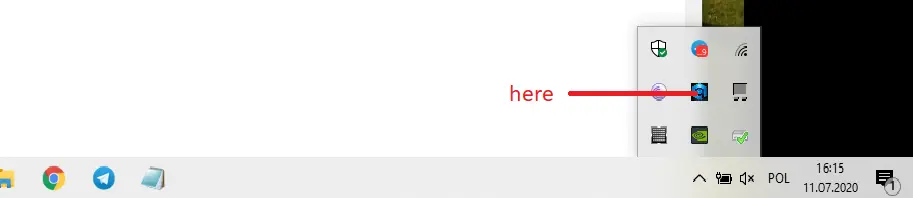
Right-click and open IT
This will open web-based UI after that
Right-click again and hit exit.
LEAVE WEB-BASED UI OPEN BUT DONT LOG IN
Now let's go back and open putty on session screen in hostname put Your VPS IP and don't open it
in menu navigate to SSH-Tunnels
You need to fill port and destination:
Source port is 12391
Destination is 127.0.0.1:12391
in the end, click add
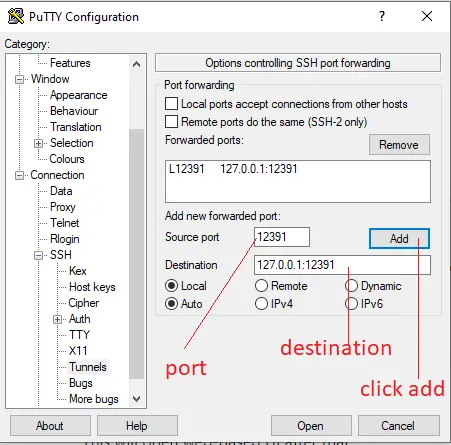
When all done click Open and log in to Your Vps like always.
Leave putty opened and go to the website where You will Log in to Your Qortal account.
Simply import wallet and Log in with password don't mess with any gear
If all is correct You will see Syncing on the bottom left side.
After that, You don't need an open UI app for each login time.
Just type the website address in the browser or save it and log that way but before always open tunnel in putty.
Enjoy
Any Qort donation accepted :)
QXToRTurbYuVcJ43AGbW9oEpgTmZJ3phEa





