Understanding the Coding Phenomenon Named After The Simpsons’ Most Persistent Character

If you’ve scrolled through tech Twitter recently, you’ve likely encountered mentions of “Ralph Wiggum” alongside screenshots of AI agents churning through code for hours. The name might sound like a joke — and it kind of is — but Ralph Wiggum represents a genuine shift in how developers are using AI coding assistants. This isn’t about asking ChatGPT to write a function anymore. This is about letting an AI agent loose on your codebase overnight and waking up to completed work.
What Is Ralph Wiggum?
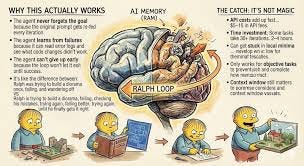
Ralph Wiggum is an official Claude Code plugin that implements a simple but powerful concept: a persistent loop that keeps an AI agent working until a task is genuinely complete.
Named after the lovably persistent character from The Simpsons who keeps trying despite constant failure, the technique embodies a philosophy: let the AI fail, learn from failures, and iterate until it succeeds.
The Core Concept
As Geoffrey Huntley, who popularized the technique, puts it: “Ralph is a Bash loop.”
In its purest form, it’s this simple:
while :; do
cat PROMPT.md | claude-code
done
That’s it. A continuous loop that feeds a prompt to Claude Code, lets it work, captures the results (including errors), and feeds everything back in for another iteration.
The official Anthropic plugin packages this concept with safety controls and better ergonomics, but the core idea remains: create a self-referential feedback loop where the AI sees its previous work and iteratively improves it.
How Does Ralph Actually Work?
The Ralph Wiggum plugin uses a clever mechanism called a Stop Hook that intercepts Claude’s exit attempts:
The Process:
You run the command once:
/ralph-loop “Your task description” — max-iterations 20 — completion-promise “DONE”
Claude Code works on the task — reading files, writing code, running tests, whatever the prompt requires
Claude tries to exit when it thinks it’s finished
The Stop Hook intercepts — blocks the exit and checks if the completion criteria are met
If not complete, the hook feeds the same prompt back to Claude, along with:
All the files that were just modified
Git history showing what changed
Error logs from failed tests or builds
The current state of the codebase
Repeat — Claude sees what it did, what went wrong, and tries again with that context
Continue until either:
The completion promise is found in Claude’s output
(e.g., <promise>COMPLETE</promise>)
The maximum iteration limit is reached
You manually cancel the loop
This creates what developers call a “self-referential feedback loop” — each iteration builds on the previous one, learning from failures and refining the approach.
Why Do You Need Ralph Wiggum?
Traditional AI coding workflows have a fundamental problem: premature exits. Claude might:
- Declare victory after writing code that doesn’t compile
- Mark a task “complete” when tests are still failing
- Give up when encountering the first difficult error
- Settle for “good enough” instead of actually done
Ralph solves this by changing the unit of work. Instead of treating each interaction as independent, Ralph treats the entire task as a single unit that must genuinely pass all success criteria.
Real-World Results
The technique has produced impressive outcomes:
- YC Hackathon team: Shipped 6 complete repositories overnight for $297 in API costs (a task estimated at $50,000 in contractor fees)
- Geoffrey Huntley: Ran Ralph for 3 months to create a completely new programming language from scratch
- Production refactors: Developers report using Ralph to refactor entire codebases to new standards in 6–8 hours of autonomous work
- Test coverage: Teams use Ralph to automatically write comprehensive test suites achieving 80%+ coverage
When Should You Use Ralph?
Ralph excels at mechanical, verifiable tasks with clear success criteria:
Ideal Use Cases:
Legacy Code Refactoring
/ralph-loop “Refactor entire codebase to match REACT_CODING_STANDARDS.md.
All components must follow the documented patterns.
Output <promise>REFACTOR_COMPLETE</promise> when done.”
— max-iterations 50
Test Coverage
/ralph-loop “Add comprehensive tests for all API endpoints.
Requirements:
- Test all CRUD operations
- Test error cases
- Coverage must be >80%
- All tests must pass
Output <promise>TESTS_COMPLETE</promise> when all criteria met.”
— max-iterations 30
Migration Projects
/ralph-loop “Migrate all Jest tests to Vitest.
Success criteria:
- All tests converted
- All tests passing
- No Jest dependencies remain
- Build succeeds
Output <promise>MIGRATION_DONE</promise>.”
— max-iterations 40
Greenfield Applications
/ralph-loop “Build a REST API for todos following TDD:
1. Write failing tests
2. Implement feature
3. Run tests
4. Fix failures
5. Refactor
Requirements:
- All CRUD endpoints working
- Input validation
- 80%+ test coverage
- API documentation in README
Output <promise>COMPLETE</promise> when done.”
— max-iterations 50
When NOT to Use Ralph:
Ralph is not appropriate for:
- Judgment-heavy work — Architectural decisions, UX design, business logic requiring domain expertise
- Fuzzy requirements — Tasks without clear, verifiable success criteria
- Creative work — Writing that requires human nuance and editorial judgment
- Security-critical code — Anything requiring careful security review
- Exploratory work — Research tasks where the goal itself is unclear
How to Use Ralph Safely
The power of autonomous loops comes with risks. Here’s how to use Ralph responsibly:
1. Always Set Iteration Limits
Never run Ralph without a maximum iteration count:
— max-iterations 20 # Recommended for most tasks
This is your primary safety mechanism. The — completion-promise flag uses exact string matching and can be unreliable — treat iteration limits as your real safety net.
2. Write Precise Success Criteria
Good Ralph prompts include:
- Specific requirements — What needs to be built
- Verifiable conditions — How to know it’s actually done
- Failure handling — What to do if stuck
Example of a well-structured prompt:
Implement user authentication with JWT.
Requirements:
- Login endpoint (/api/auth/login)
- Register endpoint (/api/auth/register)
- Token verification middleware
- Password hashing with bcrypt
- Input validation
Success criteria:
- All endpoints functional
- Integration tests passing
- No security warnings from linter
- Documentation in API.md
If stuck after 15 iterations:
- Document blocking issues
- List what was attempted
- Suggest alternative approaches
Output <promise>AUTH_COMPLETE</promise> when all criteria met.
3. Use Sandboxed Environments
Ralph often requires the — dangerously-skip-permissions flag, giving Claude full terminal access. Always run Ralph in isolated environments:
- Disposable cloud VMs
- Docker containers
- Separate development branches
- Fresh git repositories
Never run Ralph with full permissions on your main development machine with important data.
4. Start Small and Iterate
The Ralph philosophy is “deterministically bad” — it’s better to fail predictably than succeed unpredictably.
- Start with a loose prompt and let Ralph attempt it
- When it fails, identify what went wrong
- Refine your success criteria
- Add more specific requirements
- Try again
Each failure teaches you what guardrails to add to your prompt.
5. Monitor Progress
For long-running tasks, use monitoring:
ralph — monitor # Bash loop version
Or check progress periodically and be ready to cancel if Ralph goes off track.
The Philosophy: Failures Are Data
The official Anthropic implementation emphasizes a key principle: “Failures Are Data.”
When Claude fails, the Stop Hook:
- Captures the failure as structured data
- Feeds it back into the context
- Lets Claude analyze what went wrong
- Allows another attempt with that knowledge
This inverts the traditional AI workflow. Instead of carefully guiding Claude step-by-step, you:
- Define success criteria upfront
- Let the agent iterate toward them
- Treat failures as valuable feedback
- Refine prompts based on failure patterns
The skill shifts from “directing Claude” to “writing prompts that converge toward correct solutions.”
Two Versions of Ralph
There are actually two implementations:
Original Bash Loop (Geoffrey Huntley)
The “OG” version is a simple bash script:
while :; do
cat PROMPT.md | claude-code
done
Pros:
- Simple and transparent
- Works with any CLI agent (not just Claude)
- Complete control over the loop
Cons:
- Requires manual setup
- No built-in safety controls
- More manual monitoring needed
Official Anthropic Plugin
The official plugin uses internal Stop Hooks:
/ralph-loop “Task…” — max-iterations 20 — completion-promise “DONE”
Pros:
- Integrated safety controls
- Better ergonomics
- Built-in iteration limits
- Session tracking
Cons:
- Some users report it can be finicky
- Requires specific Claude Code version
- Less transparent than bash loop
Both work. Choose based on your comfort level with bash scripting versus integrated tooling.
Real-World Example: Overnight Refactoring
Here’s how one engineer used Ralph for a production refactor:
- Spent 30 minutes creating REACT_CODING_STANDARDS.md with Claude
- Spent 30 minutes refining the standards with a React expert
Launched Ralph with this prompt:
Review the entire codebase against REACT_CODING_STANDARDS.md.Create a REACT_REFACTOR_PLAN.md with all violations.Then fix all violations systematically.Success criteria:- All code matches standards- All tests still passing- No linter errors- Documentation updatedOutput <promise>REFACTOR_COMPLETE</promise> when done.
- Let it run for 6 hours overnight
- Reviewed the results in the morning — complete refactor ready for team review
Total human time: 1 hour of prompt engineering. Result: Clean, standards-compliant codebase.
Getting Started
Installing the Plugin
In Claude Code:
/plugin install ralph-wiggum
Your First Ralph Loop
Start with something simple and low-risk:
/ralph-loop “Add JSDoc comments to all functions in src/utils.
Requirements:
- Document parameters
- Document return values
- Include usage examples
- Run linter to verify format
Output <promise>DOCS_COMPLETE</promise> when done.”
— max-iterations 10
Watch what happens. Learn from the experience. Iterate on your prompt-writing skills.
The Bottom Line
Ralph Wiggum represents a shift in how we think about AI coding assistance:
From: Careful step-by-step guidance
To: Define-and-iterate autonomy
From: AI as a pair programmer
To: AI as a persistent worker
From: Interactive back-and-forth
To: Overnight batch processing
The technique won’t replace thoughtful software engineering — judgment, architecture, and creativity still require humans. But for the mechanical, verifiable, and grindable parts of coding?
Ralph might just change how much you can ship.
As Geoffrey Huntley puts it: “Ralph can replace the majority of outsourcing at most companies for greenfield projects.”
Whether that’s hype or reality, one thing is certain: developers are shipping real projects using persistent AI loops, and the technique is here to stay.
Resources
Start small, set iteration limits, embrace failures as data, and see what Ralph can build for you overnight.
Need someone on your team that knows this and actually has trial and error with development with AI, then Subscribe Contact or book a consultation: HERE
RESOURCES AND AI TOOLS WITH DISCOUNT
BEAT CREDIT REPAIR WITH AI
https://consumerai.info — AI Agents with consumer Law $10
AVA Finance
AVA is a credit-building platform that focuses on on-time payment reporting, not interest-heavy debt.
👉 https://meetava.sjv.io/anDyvY
Rent Reporting (RentReporters)
Helps renters build credit by reporting on-time rent payments to major credit bureaus — useful for thin or rebuilding files.
👉 https://prf.hn/click/camref:1101l3G9fN
🌐 Hostinger — Web Hosting & Domains
- 🖥️ Affordable hosting for websites & apps
👉 https://hostinger.com/horizons?REFERRALCODE=VMKMILDHI76M
🔁 n8n — Workflow Automation
- ⚙️ Automate apps, APIs, and AI workflows
👉 https://n8n.partnerlinks.io/pxw8nlb4iwfh
🌍 Bright Data — Proxies & Web Data
- 🧠 Data collection, scraping, proxies
👉 https://get.brightdata.com/xafa5cizt3zw
🎬 VEED — Video Editing
- 🎥 Online video editing & captions
👉 https://veed.cello.so/Y4hEgduDP5L
🤖 ManyChat — Messaging Automation
- 💬 Instagram, Messenger, WhatsApp bots
👉 https://manychat.partnerlinks.io/t9nehj0w7tmz-wki14
🗣️ ElevenLabs — AI Voice & Audio
- 🎙️ AI voiceovers & speech generation
👉 https://try.elevenlabs.io/2dh4kqbqw25i
📞 OpenPhone — Business Phone System
- ☎️ Calls, texts, CRM-friendly numbers
👉 https://get.openphone.com/u8t88cu9allj
🎓 The Leap — Creator Monetization
- 📚 Courses, newsletters, digital products
👉 https://join.theleap.co/FyY11sd1KY






