
Forget manual spreadsheets -- here's how to access your Coinbase Pro portfolio using Python and the Coinbase Pro API.
Background and motivation
Coinbase and Coinbase Pro display the bare minimum portfolio information in their web portals. Users must make their own tools to track their investment progress or trust third-party websites -- often behind paywalls -- with their API keys. I want complete control over my portfolio, so I decided to write my own portfolio management software in Python.
Part 1 of "How to write your own Coinbase Pro portfolio manager" discusses unauthenticated API queries. Unauthenticated queries fetch user-agnostic Coinbase data like market price history. Authenticated queries however allow users to retrieve data from their personal accounts and interact with the market via trades.
It took me a while to figure out how to make authenticated API queries. I'm happy to summarize the process I developed for the community at large. There are definitely other ways to authenticate API queries, and there might be unidentified issues in my process -- comment at the post's end with suggestions.
My software environment
I'm implementing my portfolio tracker in Anaconda's Python 3 environment. My computer platform is Linux Mint, using a Bash shell.
API queries in Python
All my API queries follow the same basic format. First we need to define the endpoint -- a base URL that all Coinbase Pro API queries include. I'll also load the majority of my modules here too.
import numpy as np
import pandas as pd
from subprocess import Popen, PIPE
import json
from datetime import datetime

# Coinbase Pro API endpoint:
endpoint = "https://api.exchange.coinbase.com"
Let's first do a simple query -- get a list of available market pairs -- to demonstrate the template I use for all my queries. Coinbase Pro's API doc instructions are implemented in Python below using the subprocess module.
# Get all Coinbase Pro trading pairs:
cmd = [
    "curl",
    "%s/products"%endpoint,
    "--header",
    "Accept: application/json",
    "--header",
    "Content-Type: application/json",
    ]
p = Popen(cmd,stdout=PIPE,stderr=PIPE)
stdout,stderr = p.communicate()

# parse stdout json data:
products_query = json.loads(stdout)

# display to user:
print(products_query[0])

# output:
# {'id': 'BTRST-USD',
# 'base_currency': 'BTRST',
# 'quote_currency': 'USD',
# 'base_min_size': '0.07',
# 'base_max_size': '250000',
# ...
# etc
A few things happen in the code snippet above:
- I define a Python list called "cmd" -- a list of commands that are equivalent to what the user would enter into a bash terminal.
- The second item in "cmd" is the full API endpoint described by the "products" API doc -- https://api.exchange.coinbase.com/products. You can actually enter this into a web browser since it doesn't require authentication and receive a wall of text representing the output.
- After some subprocess magic we get a list of Python dictionaries that each contain a market pair and its information. I copied the first Python dictionary -- in this case, a description of the BTRST-USD market pair -- as several comment lines.
Authentication step 1: the API key
Authenticated API queries require three pieces of information to access a user's account:
- an API key
- An API secret
- An API passphrase
Directions on how to get your API key information, and the details behind its use in authentication, could be a post by itself. Luckily, Coinbase's user docs are straightforward -- below are two webpages that provide direction:
- How to create an API key: https://help.coinbase.com/en/pro/other-topics/api/how-do-i-create-an-api-key-for-coinbase-pro
- API authorization and authentication details: https://docs.cloud.coinbase.com/exchange/docs/authorization-and-authentication
I store my API keys in files with ".secret" extensions to make sure I don't accidentally share them. You can store your keys however you want, but make sure you can read them into your Python environment. The code snippet below opens a .secret file containing the API key info for an example account I made for tool development.
with open("../bin/crypto-api-example-key.secret","r") as of:
    API_KEY = of.readline().rstrip()
    API_SECRET = of.readline().rstrip()
    API_PASSPHRASE = of.readline().rstrip()
Authentication step 2: endpoint headers
All authenticated API requests need four headers:
- CB-ACCESS-KEY: The API key as a string
- CB-ACCESS-SIGN: A base 64-encoded signature
- CB-ACCESS-TIMESTAMP: A timestamp for the request
- CB-ACCESS-PASSPHRASE: The API passphrase as a string
The CB-ACCESS-SIGN is the most complicated and I don't fully understand it myself, so I'll copy-paste the Coinbase API docs explanation below:
"The CB-ACCESS-SIGN header is generated by creating a sha256 HMAC using the base64-decoded secret key on the prehash string timestamp + method + requestPath + body (where + represents string concatenation) and base64-encode the output. The timestamp value is the same as the CB-ACCESS-TIMESTAMP header. The body is the request body string or omitted if there is no request body (typically for GET requests). The method should be UPPER CASE."
Definitely spend some time studying the Coinbase API docs page for a full explanation: https://docs.cloud.coinbase.com/exchange/docs/authorization-and-authentication
After a lot of trial and error and web forum searches, I created a Python function that creates CB-ACCESS-SIGN from several user-provided arguments.
# API authentification modules:
import time
import hmac
import hashlib
import base64

# signature generation function:
def timestamp_and_signature(
    method,
    api_secret,
    request_path,
    body,
    ):
    hmac_key = base64.b64decode(api_secret)
    timestamp = str(time.time())
    message = timestamp + method + request_path + body
    message = message.encode('ascii')
    signature = hmac.new(
        hmac_key,
        message,
        hashlib.sha256,
        )
    signature_b64 = base64.b64encode(
        signature.digest()
        ).decode('utf-8')
    return timestamp, signature_b64
Authentication step 3: putting it all together
Let's finally put everything together and query my example Coinbase Pro account's current holdings.
# create the timestamp and the signature:
accounts_url = "https://api.exchange.coinbase.com/accounts"
timestamp, sign = timestamp_and_signature(
    "GET",
    API_SECRET,
    "/accounts",
    "", #no body message necessary
    )

# define required commands that don't require
# authentication:
unauth_cmd = [
    "curl",
    accounts_url,
    "--header",
    "Accept: application/json",
    "--header",
    "Content-Type: application/json",
    ]

# define the required authentication commands:
auth_cmd = [
    "--header",
    "CB-ACCESS-KEY: %s"%API_KEY,
    "--header",
    "CB-ACCESS-SIGN: %s"%sign,
    "--header",
    "CB-ACCESS-TIMESTAMP: %s"%timestamp,
    "--header",
    "CB-ACCESS-PASSPHRASE: %s"%API_PASSPHRASE,
    ]

# submit request:
accounts_cmd = unauth_cmd + auth_cmd
p = Popen(accounts_cmd,stdout=PIPE,stderr=PIPE)
stdout,stderr = p.communicate()
accounts_output = json.loads(stdout)
"accounts_output" contains a list of Python dictionaries that each describe individual account holdings. We can filter out the account holdings with zero balance to get a simplified view.
# let's get the accounts with non-zero balances:
# function to do so:
def extract_balances(output):
    nonzero_accounts = []
    for account in output:
        balance = float(account["balance"])
        if balance > 0.0:
            nonzero_accounts.append(account)
    return nonzero_accounts

# actual extraction:
nonzero_accounts = extract_balances(accounts_output)
nonzero_accounts

# output:
# [{'id': '',
#  'currency': 'ATOM',
#  'balance': '0.0000660000000000',
#  'hold': '0.0000000000000000',
#  'available': '0.000066',
#  'profile_id': '',
#  'trading_enabled': True},
# {'id': '',
#  'currency': 'USDC',
#  'balance': '1.0082260000000000',
#  'hold': '0.0000000000000000',
#  'available': '1.008226',
#  'profile_id': '',
#  'trading_enabled': True},
# {'id': '',
#  'currency': 'XLM',
#  'balance': '2.0000000000000000',
#  'hold': '0.0000000000000000',
#  'available': '2',
#  'profile_id': '',
#  'trading_enabled': True}]
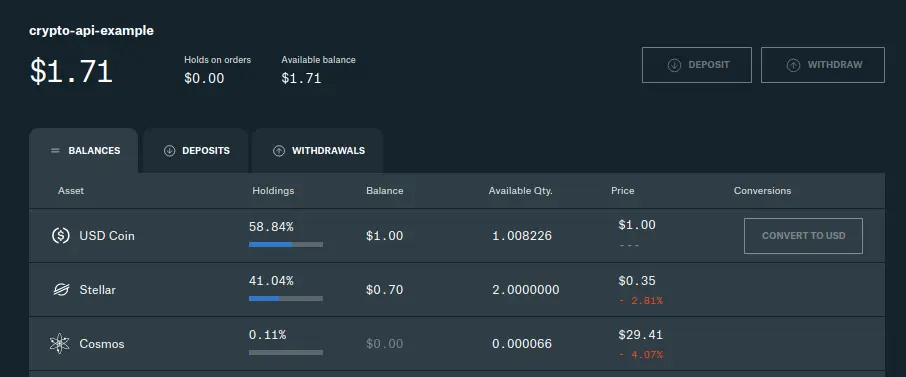
The API query's results show my sample Coinbase Pro portfolio has three non-zero crypto accounts:
- 0.000066 ATOM
- 1.008226 USDC
- 2.000000 XLM
This matches my Coinbase Pro account webpage.
Final thoughts
We successfully made an authenticated Coinbase Pro API query that returned a portfolio's current account balances. It took me a lot of learning, trial, and error, but the final Python code is fairly straightforward. I hope this helps anyone else trying to take more control of their cryptocurrency investments.
Drop comments on any critiques, suggestions, or questions you may have. Thanks for reading.
Thumbnail image by Ewan Kennedy on Unsplash.





