
So guys, "God Mode" is pretty old function in Windows that gives you direct access to multiple commands and settings at 1 window. It is pretty simple to enable it and with Microsoft scattering the Windows settings on multiple different places in the interface this can come very handy.
So what do you need to do. Go to the desktop and right-click on the empty space and select New-> Folder:
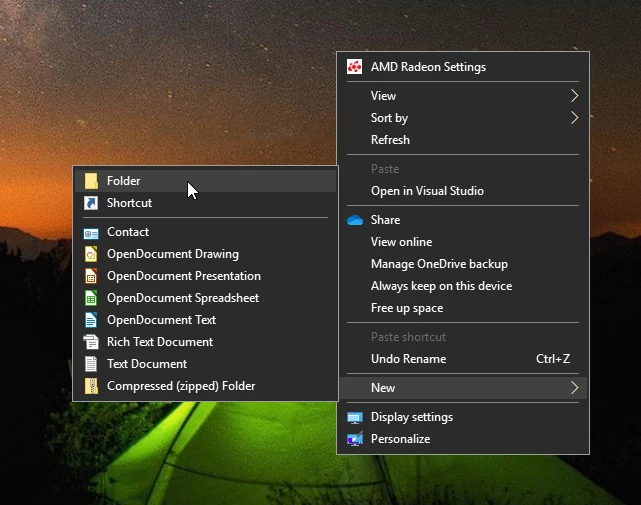
Once the folder is created you can rename it:
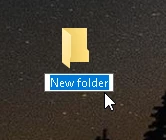
Replace "New folder" with this: "GodMode.{ED7BA470-8E54-465E-825C-99712043E01C}"
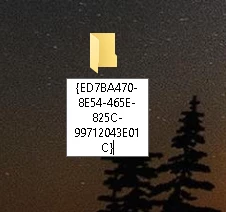
Press Enter. At the end you will get a "Control Panel"-type of Icon on the Desktop:

You can select it and rename it to whatever you want.
Click the icon, and a window will be opened with all the accessible options. Everything is organised by a Control Panel applet so you can search through the multiple categories, including Administrative Tools, Color Management, Devices And Printers, File History, Internet Options, Programs And Features, Security And Maintenance, Troubleshooting, User Accounts and many others.
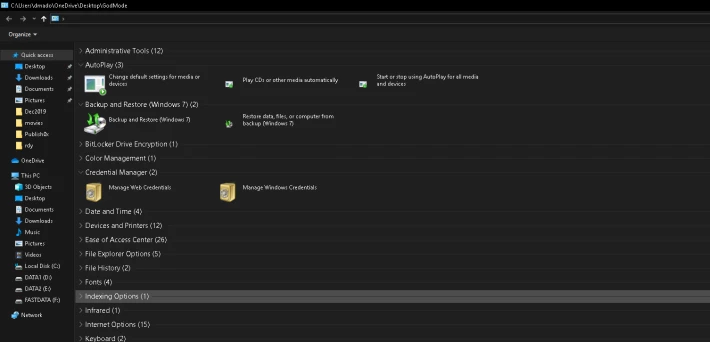
In the top right corner of the window you are able to use the search option and find whatever you need:

That is it guys. I hope this will be useful for some of you.






