
Welcome to Viterium — a non-custodial wallet app for Vite Blockchain launched in May 2022. Viterium is a full-featured wallet that provides easy access to DeFi apps on Vite. It has an amazing user interface and is rapidly gaining popularity among the Vite community. You can download the app via https://viterium.io/. Viterium is currently available for both Android and iOS devices.
Let’s get started in 5 quick and easy steps:
- Step 1: Download and Install on Mobile Device
- Step 2: Create/Import Wallet
- Step 3: Receive Crypto
- Step 4: Send Crypto
- Step 5: Explore Viterium App Features
Step 1: Download and Install on Mobile Device
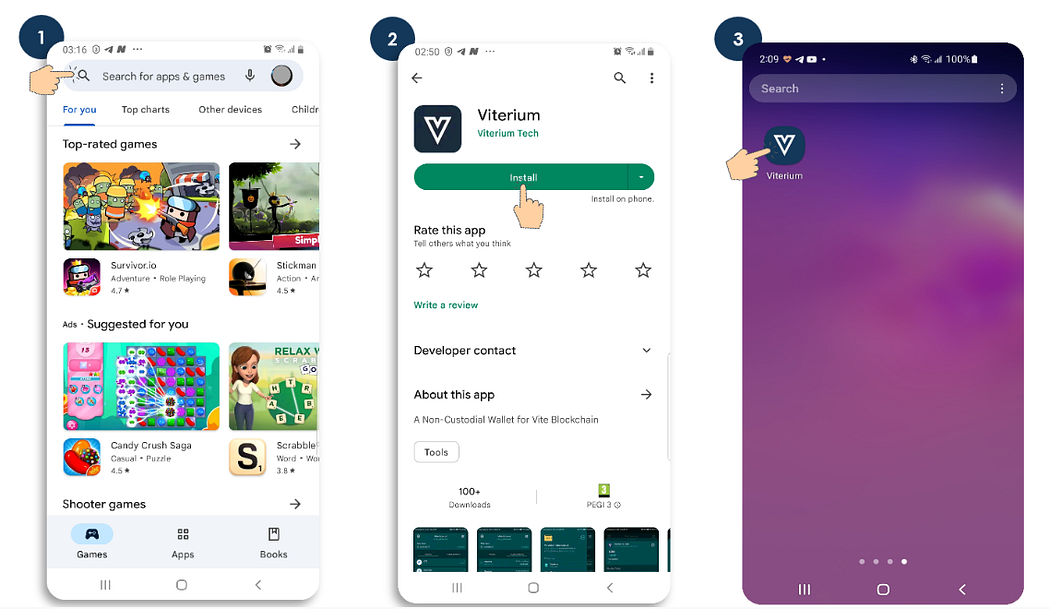
First, you need to search for the Viterium App on Google PlayStore (for android users) or App Store (for iOS users). You can also access these stores via https://viterium.io/. Second, install the application, then launch the Viterium app to proceed to the next steps.
Step 2: Create/Import Wallet
Import Old/Existing Wallet
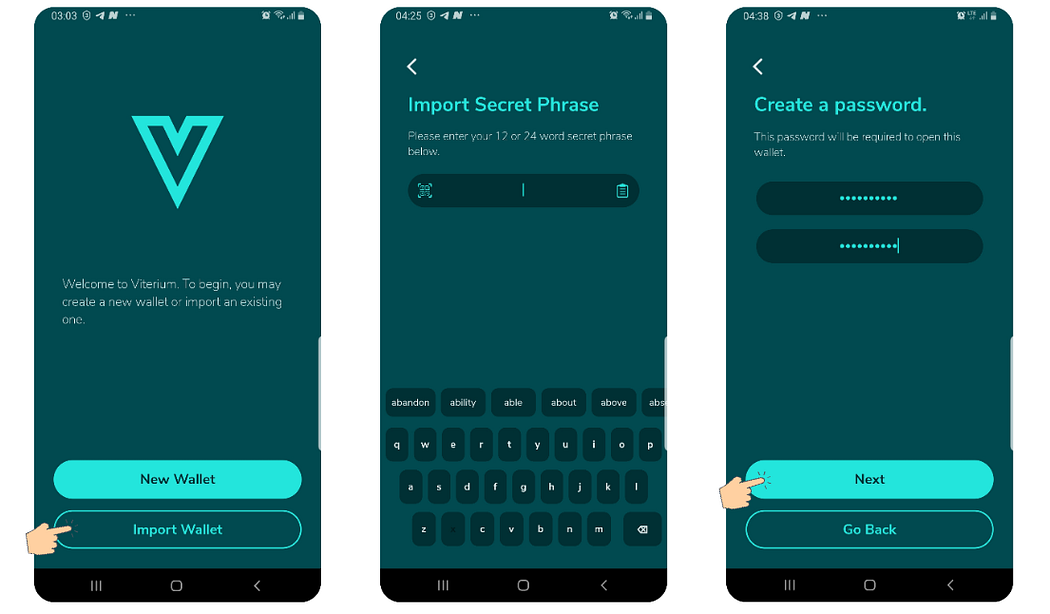
Viterium is fully compatible with existing Vite wallets and can be used alongside the Vite mobile app with the same seed (secret) phrase. Follow the steps below to import an existing wallet.
- Open the Viterium App, then select Import Wallet
- Input your secret phrase in the space provided
- Enter the wallet name then click Next. (A name for the wallet is required, can be anything to describe the wallet)
- Confirm if you require a password to open the wallet. If yes, create a password and select Next
- You will be prompted to create a PIN and confirm it
- You would have successfully imported your wallet after following the above steps
Create New Wallet
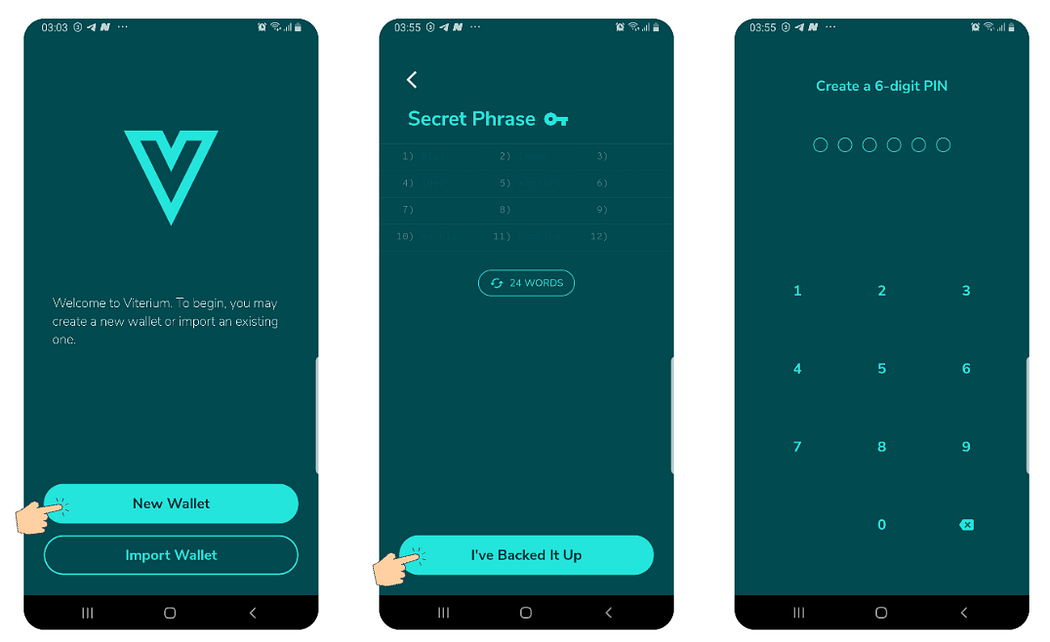
- After launching the Viterium App for the first time, select the New Wallet bar.
- Input your desired wallet name and click on Next
- Choose your preferred option; if you require a password to operate the wallet or not
- When you create your Viterium wallet, you will be given a Secret Recovery Phrase, and an account is automatically generated. (Important: Always back up your Secret Phrase in a secure place. Never give your Secret Phrase to anyone)
- As an added layer of security, you will be asked to create a PIN in order to access the wallet.
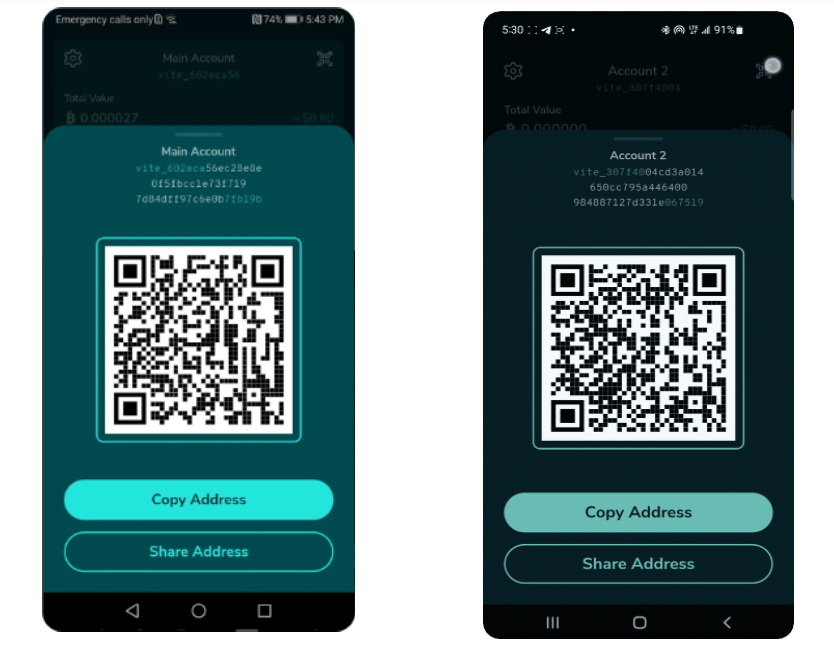
Step 3: Receive Crypto
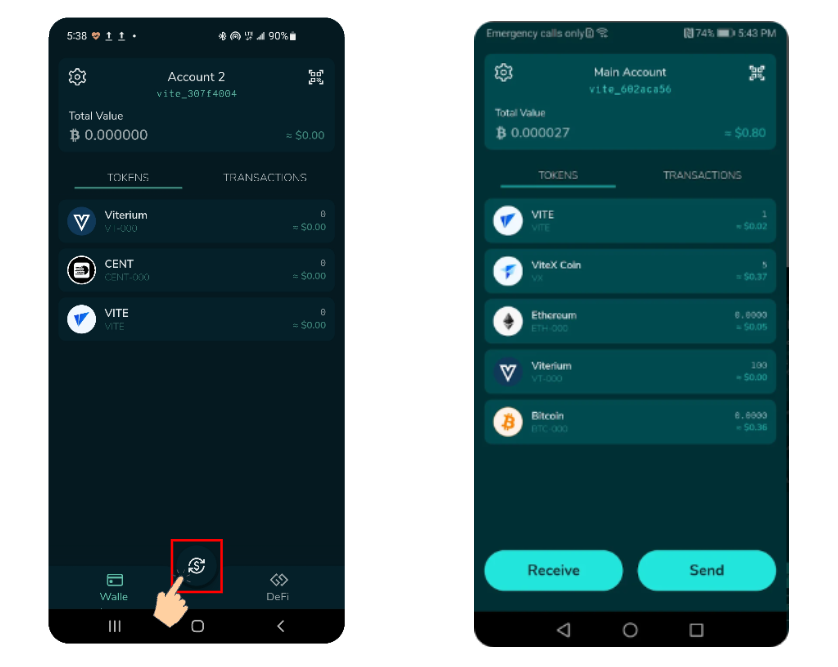
- Log in to your Viterium App
- Tap on the Currency Sign ($) as in the image below
- Tap Receive
- To receive the token, capture the QR code or copy the wallet address and share with the crypto sender
Step 4: Send Crypto
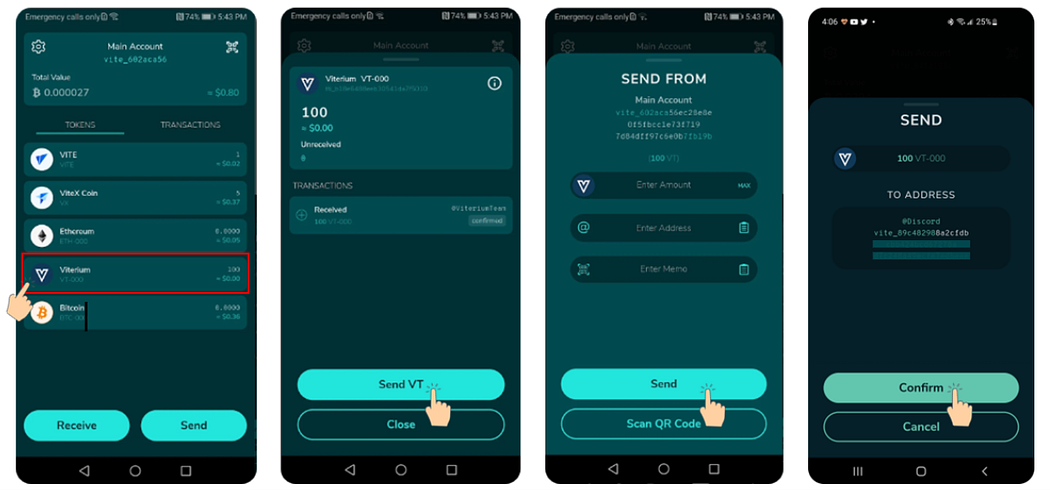
- Log in to your Viterium App
- Tap the cryptocurrency that you want to send
- Enter the number of tokens that you want to send, the wallet address of the recipient and memo, if required
- Tap Send to complete the process
Step 5: Explore Viterium App Features
Contacts
One unique feature of the Viterium App is the ability to save wallet addresses of friends and associates with whom you frequently transact. This relieves you of the burden of having to scan or enter their wallet address each time you need to send cryptocurrency to these individuals.
Follow the steps below to use this feature
- After logging into your Viterium App
- Tap the Settings (wheel) icon at the top-left corner of your screen
- Select Contact on the list
- Tap Add Contact to proceed
- Enter a Name and the wallet address then tap Add Contact to complete the process
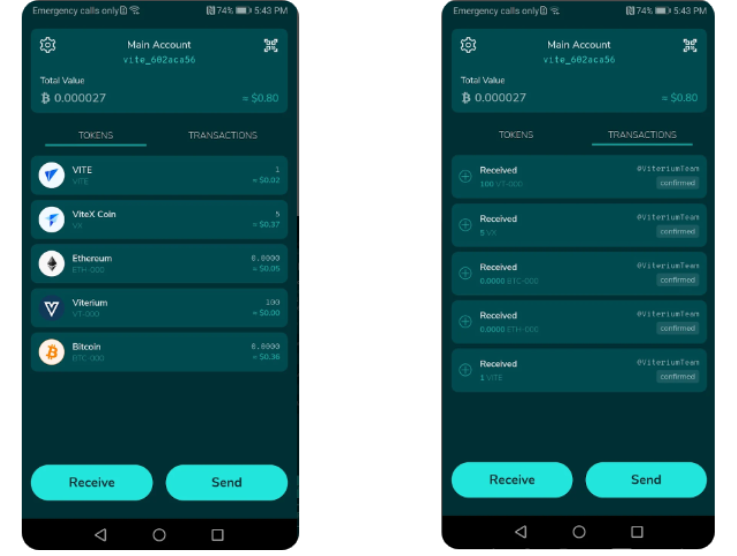
Tokens and Transactions Tabs
The tokens and transactions tabs allow you to view tokens in your wallet as well as your transaction history. When you receive tokens, they are automatically added. There is also a more advanced option for manually enabling/disabling/sorting tokens. This will be covered in a separate article. Your transaction history is automatically sorted such that the most recent transactions appear first.
Change Currency
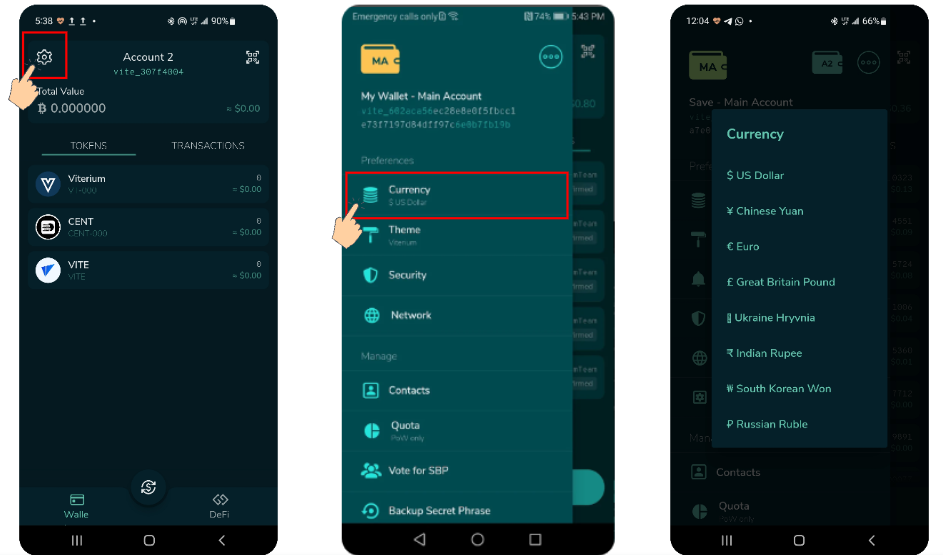
On the Viterium App, you can choose your preferred currency, as you would with most wallets. The currency is shown by default as “$ US Dollar.” On Viterium, changing your currency is simple. In this manner, you are able to calculate the value of your cryptocurrency in your own currency. To switch to the currency of your choice, follow the directions below.
- Log in to your Viterium App
- Tap the settings (wheel) icon at the top-left corner of your screen
- Select Currency on the list
- Choose your preferred currency from the available options
Change Theme
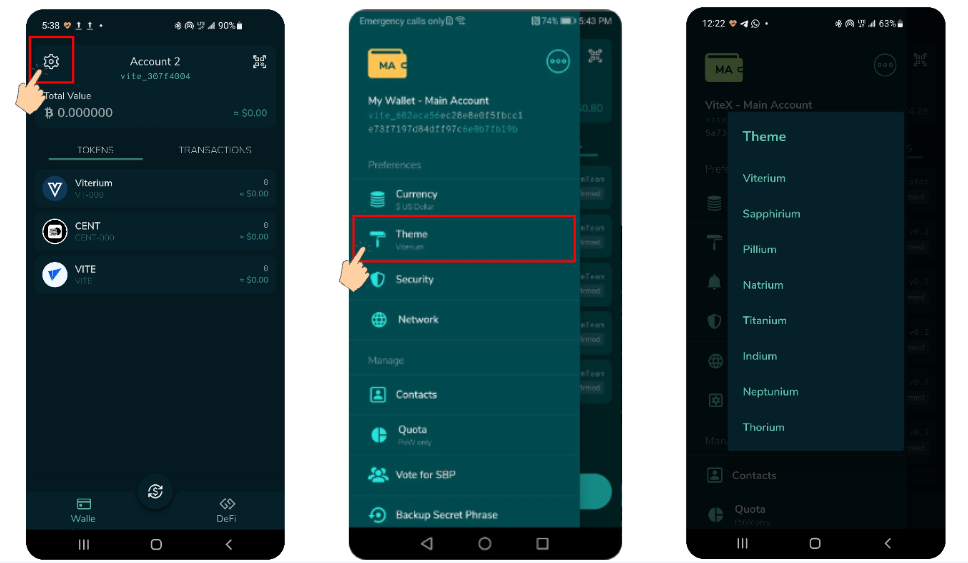
The Viterium App lets you select from a range of themes that allow users customize the appearance of the wallet, in contrast to other well-known wallet applications that only have two themes/modes (night and day).
To change the theme of the application,
- Log in to your Viterium App
- Tap the Settings (wheel) icon at the top-left corner of your screen
- Select Theme on the list
- Pick your preferred option from the offered choices.
Add New Account/Change Account in Wallet
Viterium allows users to create multiple accounts in the same wallet and switch between these accounts to perform daily transactions.
- Log in to your Viterium App
- Tap the Settings (wheel) icon at the top-left corner of your screen
- Tap the Three-Dot icon as in the image below
- Select Add Account to add a new account to the wallet
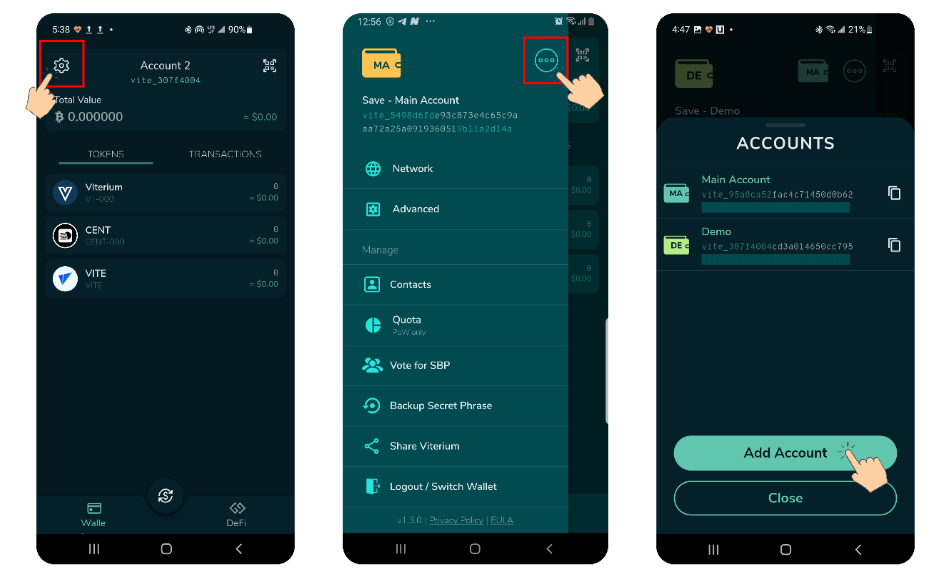
5. To switch from one wallet to another, tap the Settings icon
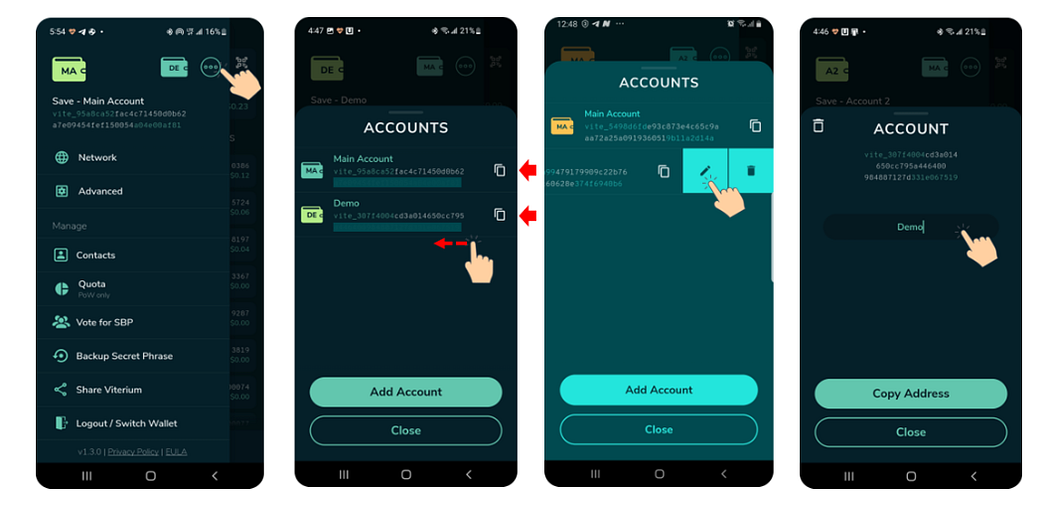
6. Tap the Three-Dot icon to reveal the list of accounts added to the wallet
7. Users can rename accounts by swiping left on account to be renamed
8. Select the Edit icon as in the image below and enter a new name in the name field
9. Tap Close to complete the process
Vote for SBP
One of the two types of nodes that power the Vite network are Snapshot Block Producers (SBPs). In the Vite network, the creation of snapshot blocks is handled by the SBPs. Holders of $VITE tokens are rewarded for voting an SBP, i.e., by staking their $VITE in their wallet. Follow the steps below to vote for an SBP:
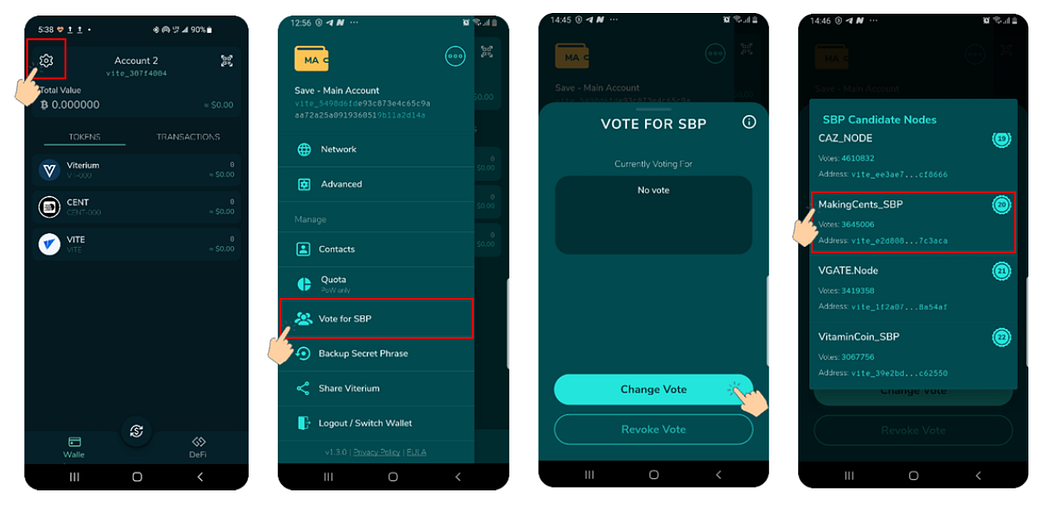
- Log in to your Viterium App
- Tap the Settings (wheel) icon at the top-left corner of your screen
- Select Vote for SBP on the list
- Tap the Change Vote bar
- Select your preferred SBP to earn rewards.
- Viterium SBP isn’t live yet. In the meantime, users can vote MakingCents_SBP. MakingCents_SBP is one of the top paying SBPs and is currently the only SBP that pays out rewards in 10 tokens, namely $VITE, $VITC, $VINU, $VIVA, $ViCat, $XNO, $SHIB, $DOGE, $VX and $CENT, with an APR of ~15%)
Conclusion
Viterium is a simple, beginner-friendly wallet that gives users quick access to DeFi apps on Vite. It has become one of the preferred wallets for the Vite ecosystem, for its ease of use and cool user interface.
If you’re new to cryptocurrency, be sure to check out Making Cents’ Discord channel to learn everything there is to know about blockchain and cryptocurrency, particularly the Vite ecosystem’s projects.
The next article will discuss advanced features of the Viterium App, such as support for multiple wallets, changing the Node/PoW server, getting quota, etc.
Important Links
Website: https://viterium.io/
Twitter: https://twitter.com/viterium
Discord: https://discord.gg/K6wshzkvqq
Github: https://github.com/viterium/viterium_wallet
FAQ: https://discord.gg/k3ePxAbvHf
Tokenomics: https://discord.gg/x9yNQfSrWK





