
Why is this so complicated?!
If you're not a programmer or digital native, blockchain technology can be frustrating sometimes,. Entering IP addresses by hand, handling cryptographic hash codes, and navigating user interfaces, that look like those from the early days of internet are still part of the daily business.
Right now there are thousands of different tokens on hundreds of chains. A quick example: You can't just send $MATIC you own as ERC-20 token on the Ethereum blockchain to your Polygon wallet, even though you would think so because of its name. Sending tokens between different networks requires the use of a bridge.
Especially when you're new to crypto, you find yourself in a jungle of possibilities. This can be scary, because any mistake could potentially mean the loss of your funds. After government regulations, accessibility is probably one of the biggest factors that keeps cryptocurrency from mass adoption.
Luckily more and more projects evolve which are trying to simplify the use of cryptocurrency. One of those projects is Chainlist.
About Chainlist & How to use it
Chainlist is an online tool that lists a huge range of different EVM (Ethereum Virtual Machine) networks. It currently supports 205 different chains, including testnets. This allows you to add any supported network to your wallet with only a couple of clicks. No need to copy and paste anything, and zero chance for error. The best thing: it's free and open source!
The process is easy and you really can't do anything wrong.
1. Click on Connect Wallet.
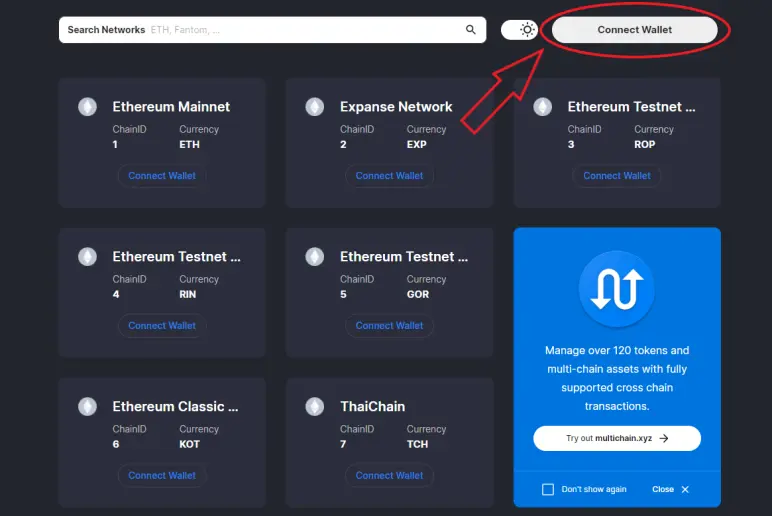
2. Enter the name of the network you want to add into the search bar and click on Connect Wallet.
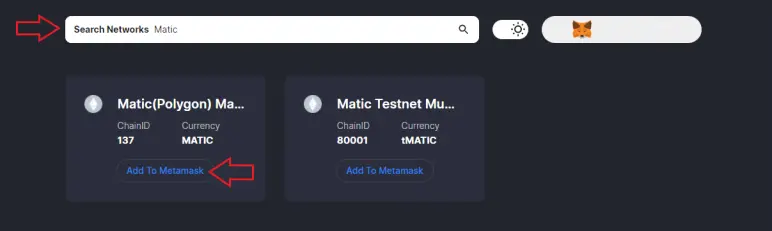
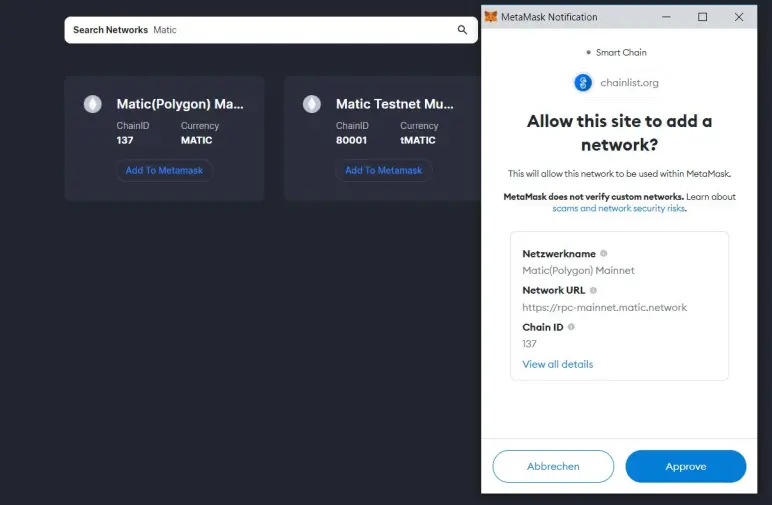
3. A notification of MetaMask will pop up. Click on Approve and you're done. It's really that simple. You can now switch to the newly added network within MetaMask.
Website: Chainlist.org
Source Code: Github
Finding this website really made things more simple for me, and I hope this helps you, too.
Have a great day,
Tjark
You can support me by using one of my referral links below. You have my word that I only advertise projects I believe in.
Binance (10% off trading fees)
Coinbase (10$ in Bitcoin after you buy or sell 100$ worth of crypto)
Publish0x (earn $iFARM and $AMPL reading blogs)
Presearch (Google-Alternative that pays for your searches. Get 25 $PRE for signing up.)
Ledger hardware wallet (I can't offer you a benefit on this one, but this is definately the safest way to store your coins & token)






