
Hey Publish0x community, long time no hear :)
Truth be told, I'm not a traveller and never have been.
But!..
For the last year I've been using WiFi Map almost constantly, considered to be a travellers' go to app.
The reason of choosing it comes to the fact that whenever I go outside and my mobile carrier lets me down with connection slowdowns, which can happen out of the blue anytime anywhere... Anyway, the WiFi Finder really helps me find a "healthy" hotspot and connect to the internet hassle-free.
That's the Captain-Obvious-to-the-rescue/goes-without-saying kind of stuff, I know.
But what if you wish to actually THANK that certain shining light of a person that shared their WiFi credentials with the rest of the community? That's where the tipping feature comes in handy.

No matter where you are located, as long as you have some $WIFI in your in-app wallet, you are good to go ;)
Tipping, i.e. kind of the same as you would tip a waiter in cafe or restaurant, depending on the country you're in and culture you belong to, in theory, should be the driving force of the app, and it is in a way.
Without any further bla-bla-bla, let me just show you how to thank (tip) any user step by step (for security purposes, sensitive info seen in the screenshots is blurred or formatted into strikethrough. Also, the following steps don't show how to connect to WiFi hotspots as this is as basic as it gets, anyone can figure it out themselves :-P. One more thing – these steps don't imply any kind of abuse of the tipping feature, respect the user community and the developers of the app):
1. Let's say you are already connected to a hotspot, so you can see something like this on a main page:

or you can tap the lower central button ("Map") and find your current location with the connected hotspot, it should show something like this:
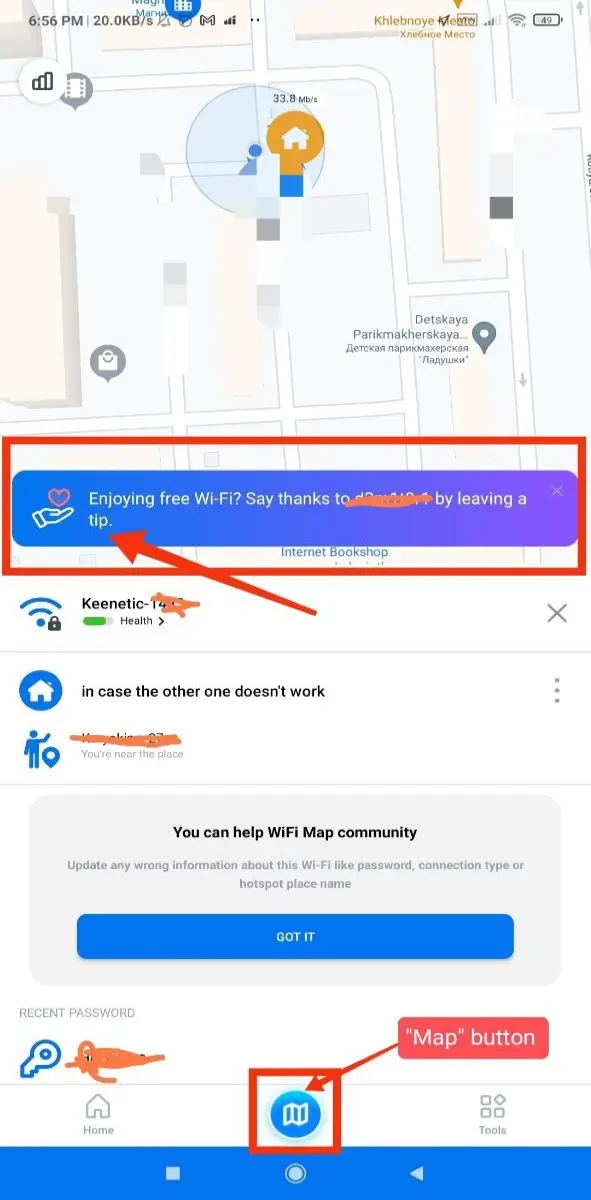
2. See the "Leave a tip" and "Enjoying free Wi-Fi?.." parts in the screenshots above? You can tap on any of them so the following screen opens:

👆 Here you can pick one of the tipping amounts to be sent to a user you wish to thank.
Once done, tap the "Continue" button.
3. After that, the following screen should open:

That is what a recipient sees :)

To make sure the tip is really in your wallet, just open it and see for yourself:

Here is the details screen:

That's cool and all, but what can I do with these $WIFI tokens?!
You sure can do the following with the tokens received as a tip or during the Airdrop:
1. Buy some eSIM data:


I don't have much tokens to pay, so no payment this time. 😅
2. You can withdraw the tokens to a fellow Polygon network wallet or exchanges like OKX, MEXC, Uniswap, etc. Just tap the Withdraw button:
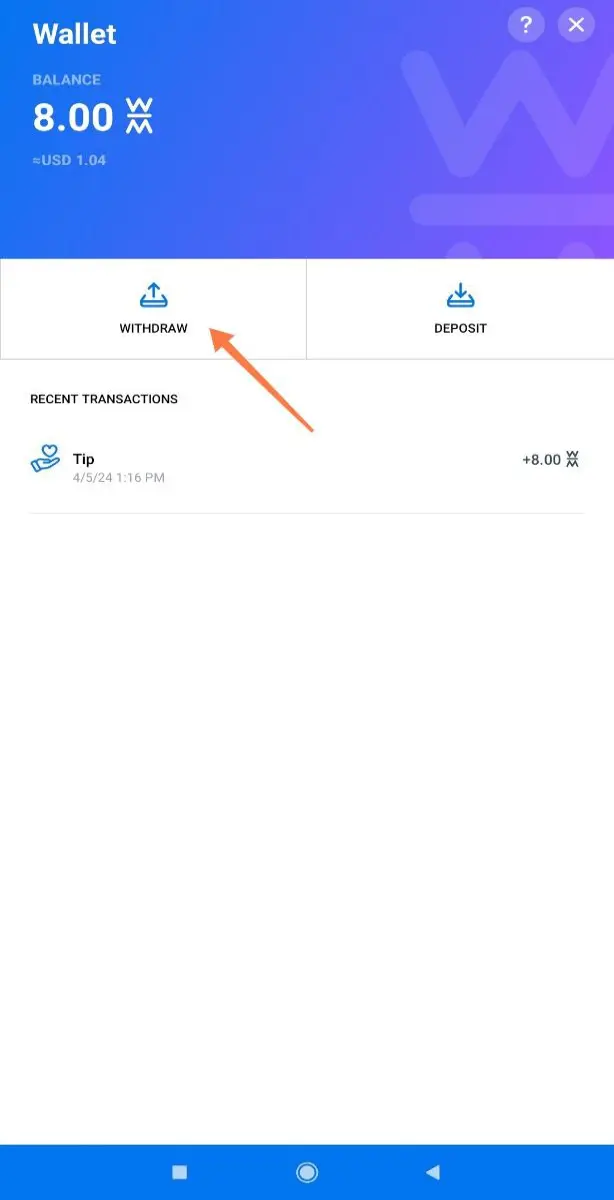
Then enter or paste the wallet address, and enter the desired amount for withdrawal. I don't have much in my wallet, so no withdrawal for me this time lol:

Once the tokens are withdrawn to, say, OKX, you can either spot trade them, stake them, or just convert to USDT and turn them into fiat (i.e. real money).
If you need a detailed account on how to do that, let me know in the comments.
NOTE: Please beware of scammers and always choose the right network for a wallet address, in this case it's Polygon.
'Till next time!






