
Although far from common, it is possible to buy Bitcoin with PayPal. Before I begin however, I would like to note that I do not think it is the best way to purchase Bitcoin. This is due to the fact that there are not that many exchanges that actually list PayPal as a buying option as well as the ones that do are quite costly. some transactions ending up costing upwards of 10% more than buying Bitcoin through other means. That said, people want what they want and some don’t mind paying a premium for such services. So in the spirit of arming those having this desire with the educative means needed, this post will bring together a collection of information regarding how to buy Bitcoin with PayPal.
Buying Bitcoin with PayPal options can be divided across both centralized and peer-to-peer exchanges. Some popular mainstream exchanges offering this option are eToro, VirWoX, Plus500, and Wirex. For those wishing to buy Bitcoin with PayPal through a peer-to-peer exchange, LocalBitcoins and Paxful both offer this option. Which is better will really be up to the individual user as time and service premiums might be prioritized differently for those looking to buy. This post will introduce all of the above and a few more in an effort to lay out for those interested in how to buy Bitcoin with PayPal (and vice versa) the most popular available options within the space at present.
Getting Bitcoins with PayPal on Centralized Exchanges
Due to the fact that PayPal is a long standing centralized business with mainstream financial affiliations, it has and will share information with governments regarding purchases. This makes buying Bitcoin with PayPal extremely complicated as Bitcoin by it’s very nature is a decentralized currency that although transparent when it comes to transactions, not so much when it comes to the people transacting. Essentially then, when buying Bitcoin or any other cryptocurrency with PayPal from a centralized exchange, you need to find an exchange that incorporates PayPal payment options for it’s members; meaning quite simply that going through KYC exchanges is a necessity. Here then are some of the exchanges that have opted to incorporate PayPal payment options into their exchanges.
Buy Bitcoin on eToro with PayPal
Of course, before you begin you will have to create an account. Keep in mind that in order to create an eToro account, regulatory requirements dictate that verification is a mandatory part of the process, so it is necessary to complete this step before you will be able to use the platform for PayPal or any other transaction types. Account verification entails uploading both POI (proof of identity) and POA (proof of address) documentation (source). This also means that it may be impossible for people of certain countries to register for an eToro account. If you are from one of the 60 countries that eToro does allow users from however, once this initial account creation and verification hurdle is complete, eToro offers some of the cheapest rates and a very simple process when it comes to how to instantly buy Bitcoin with PayPal with relative ease.
eToro also allows users to withdraw funds from their account back into PayPal. Due to regulatory compliance issues, eToro does not allow users from the U.S.A, Japan, South Korea and many other countries. For a complete list of countries that eToro does accept users from see the ‘Where does eToro Operate’ section from this article here.
Buy Bitcoin on Plus500 with PayPal
“Plus500 is a streamlined broker that focuses on trading in a wide range of financial markets with relatively low spreads and no commissions but without offering many extra services. Plus500 has been in the forex and CFD business since 2008. They are registered in the U.K. and licensed by the Financial Conduct Authority (FCA). The company offers access to a comprehensive product line including forex, stock indexes, equities, commodities, cryptocurrencies, ETF’s and options” (source).
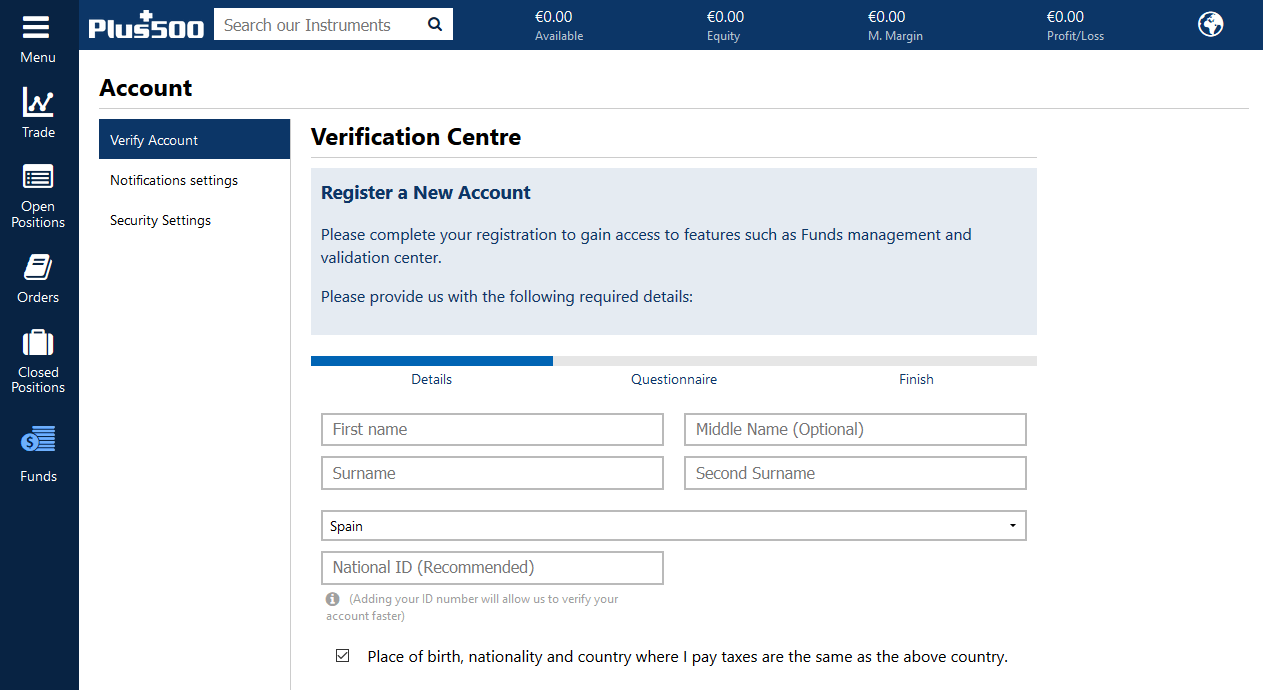
In order to begin trading on Plus500, you will first have to create, verify, and have your account approved before funds can be deposited.
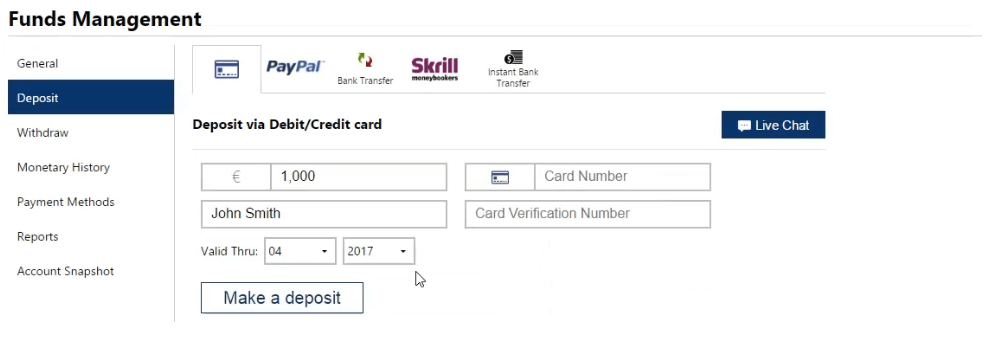
Options for depositing funds include bank transfers, credit and debit cards, as well as Paypal and Skrill accounts.
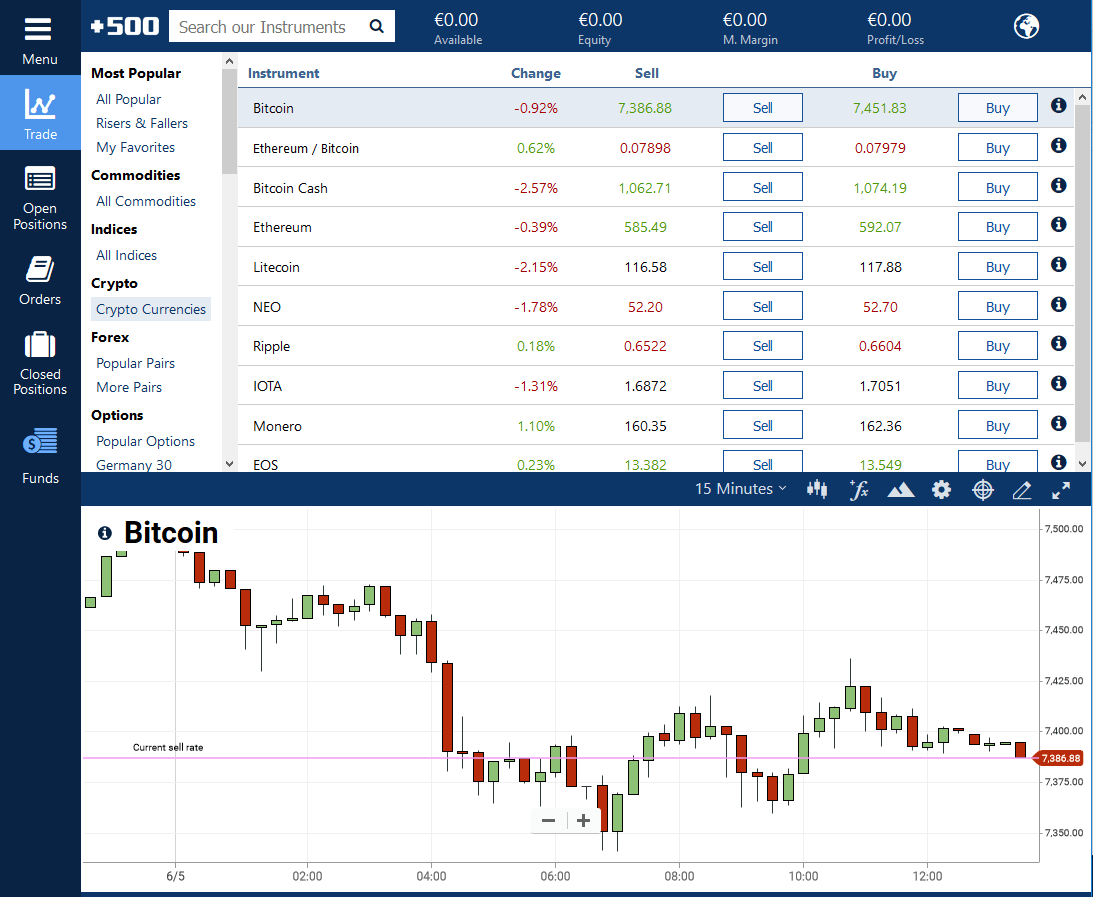
Upon the completion of funding your account, you can find and trade Bitcoin and other cryptos from the ‘trade’ menu under the subheading ‘Crypto Currencies’.
For more on how to go about creating an account, depositing funds, and trading complete with easy to understand instructions, please see Beginners Guide to Plus500: Complete Review.
-
Please note, the above screenshots were sourced from the previous link and do not represent real time data or prices

Buy Bitcoin on VirWoX with PayPal
“In business since end of 2007, VirWoX is today a leading independent exchange for trading virtual currencies, both in terms number of users (about 800,000), and trading volume (2012: 29 million Euro / 38 million US$)… In April 2011, VirWoX started accepting Bitcoin and enabled to trade bitcoins for Linden Dollars (both ways), which are in turn convertible to EUR, USD, GBP, CHF, and the other virtual currencies traded on VirWoX. Other payment methods (deposit and withdrawal) include PayPal, Credit/Debit Cards via Skrill, paysafecard, Ukash, SOFORTbanking, and bank transfers. VirWoX is run by the company Virtual World Services GmbH, which is located in Austria. The service is available in five languages (English, German, French, Spanish, Italian)” (https://en.bitcoin.it/wiki/VirWoX).
By depositing Bitcoin into a VirWoX account, converting them into SLL and from there selling them to USD, users have the ability to not only buy Bitcoins with PayPal, but also albeit indirectly, sell Bitcoins on the VirWoX exchange and then send those funds back to their PayPal account by clicking the ‘withdraw’ link on the left hand menu and sending them to your PayPal address.
Buy Bitcoin on Wirex with PayPal
Wirex is a prepaid Bitcoin and crypto visa card that allows users to link the online app used for charging the account with various credit cards and payment methods. In a way, buying Bitcoin with PayPal through Wirex is an indirect method as essentially what is happening is that you are funding your Wirex card with a PayPal account and then using those funds to buy the Bitcoin via the app. Linking your PayPal account also allows Wirex users to withdraw to a PayPal account as well as deposit. In order to go through this process it is first necessary to register through Wirex and order a card.
Upon receiving your card, simply head on over to your PayPal account and add the Wirex card in the PayPal ‘Money’ tab just as you would any other card.

Upon entering all the standard information such as name, address, etc. into the new card registration form, you must use a code sent to your Wirex app to confirm the card added to your PayPal account. From there you can withdraw funds by using the ‘Withdraw funds to your card’ option

“Wirex doesn’t charge any fee for this feature but PayPal will apply a fee of US$5 per transaction which it will deducted from the amount to be withdrawn. The minimum amount users can withdraw is US$10.” This process could take up to a week for the funds to be transferred before the funds are available to use for purchasing of Bitcoin.
- Image and citation sources
- For more on Wirex as well as other prepaid crypto debit cards, check out my previous post, Which Bitcoin Debit Card Is Right For You?
Getting Bitcoins with PayPal on Peer-to-Peer Exchanges
Buy Bitcoin on LocalBitcoins with PayPal
“LocalBitcoins is a bitcoin startup company based in Helsinki, Finland.Its service facilitates over-the-counter trading of local currency for bitcoins. Users post advertisements on the website, where they state exchange rates and payment methods for buying or selling bitcoins. Other users reply to these advertisements and agree to meet the person to buy bitcoins with cash or pay with online banking. LocalBitcoins has a reputation and feedback mechanism for users and an escrow and conflict-resolution service” (Everipedia).
To purchase Bitcoin on LocalBitcoins, the first step is to register for an account by choosing a username, entering your email, and creating a password. The next step is to use the search function to narrow down the choices. In this case for example, we have chosen to buy Bitcoin with PayPal in Canada by entering the appropriate information. Each of the search boxes is optional, so what you search for is completely up to you.

After the search has been completed, possible matches will show up below. The list will be organized with the cheapest appearing on the top of the list.

In the () beside each name you can see the reputation of each seller. Generally speaking, the reputation scale ranges from 100% being trusted sellers on the site while lower percentage scores indicate that there could be problems with others in past transactions they have partook in and may be scammers. It’s highly recommended to click on the name of the seller and have a look at their reputation details. This will give you an idea of how many trades and if the seller has had any disputes.

“From the list of advertisements, choose one from a trader with a good reputation score and a high amount of trades. The response time indicator shows if a trader replies within five minutes (green), within 30 minutes (yellow) or slower than 30 minutes (grey). You can click the ‘Buy’ button to view more information about an advertisement.”
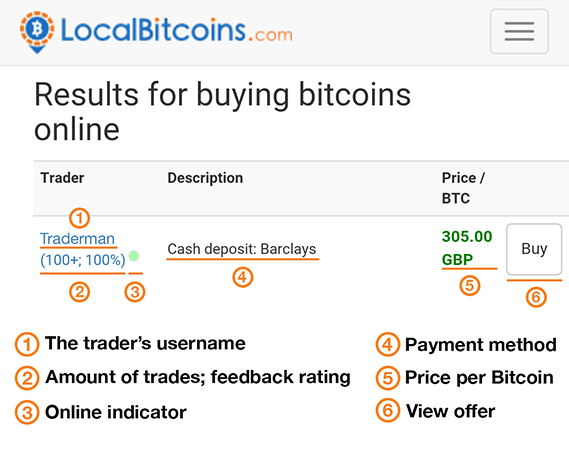
“After you press the ‘Buy’ button you’ll see more information about the advertisement, including the terms of the trade. Read through them before submitting the trade request, if you don’t agree with them you can go back to the previous page and choose another advertisement.”
To start the trade, confirm the amount of Bitcoin you wish to receive with the amount of money you wish to spend and enter a message to the sender. The amounts should be carried over from your previous search parameters automatically, bit it’s always best to double check these kinds of things. Also keep in mind, when it comes to Bitcoin, decimal orders are completely acceptable. In other words, there is no need to purchase a whole Bitcoin or even complete amount the seller is selling. The amount of Bitcoin you choose will be automatically converted to the price. So, if you 1 Bitcoin is 10,000 dollars in the add, then you could purchase 0.5 BTC for 5,000 dollars or 0.1 BTC for 1,000 if you so desired.
Be sure to read the Terms of Trade and make sure that you can comply with the sellers specialized requests. Depending upon the seller you may need to provide photo ID or a picture of you holding your ID. This should all be stated upfront so there should not be any surprises provided you have read the terms carefully. Also, be sure to only communicate with the seller on the LocalBitcoins website as this will keep everything that happens in the communication and during the trade transparent so should – knock on wood – something not go smoothly you have the proof you need to report bad actors.

After checking everything and verifying what you want to purchase, click the ‘Submit trade request’ button. The request will be sent to the seller and they will have a choice on whether to accept or reject entering into a trade with you. Timelines for this may vary depending upon when the seller has time to get to your request, but in general notification will arrive within the day. “Be sure you’re ready to pay when clicking the button, if you don’t pay before the payment window is over, the trade will be automatically cancelled.
“Once you have made the payment, click the ‘I have paid button’. Once the trader has verified that your payment has been received your Bitcoin will be released from escrow and they are instantly available in your LocalBitcoins wallet.”

It is very important because of the peer-to-peer nature of the service that LocalBitcoins offers that you protect yourself by only doing business with those sellers (and buyers) that have the highest reputation. Although nothing is a guarantee, this is the best way to ensure that you are protecting yourself as best you can against potential scammers.
*Source of all unmarked images and quoted text in this section above: https://localbitcoins.com/guides/how-to-buy-bitcoins
LocalBitcoins not only offers users the ability to buy Bitcoin with PayPal, but being a peer-to-peer network also the ability for users to sell Bitcoin to PayPal. The process is pretty much the same only flipped on its head, but should you have the desire for a quick step-by-step guide, LocalBitcoin’s How to Sell Bitcoin guide breaks it down in a simplistic and easy to understand way.
Buy Bitcoins on Paxful with PayPal
The Paxful peer-to-peer Bitcoin network allows users from almost any country worldwide to utilize over 300 various payment methods to buy Bitcoins OTC, one of which is a PayPal Bitcoin exchange support mechanism.
To use Paxful, the first step is to create an account if you have not already done so. This is a relatively simple process of clicking the ‘create account’ button on the top right of the Paxful homepage followed by entering a username, email address, and password into the form provided.

Upon completion of this step be sure to check your mail box for a verification message. After having done this, log into the account and set up your security (2FA and mobile options). In addition, those looking for a better deal on the exchange have the option to verify their personal information (name, birthdate, and identity document upload). Both of these steps can be done by selecting the relent tab on the left hand menu box after logging into the Paxful site.
In order to buy Bitcoin with Paxful, you will next need to narrow down your search parameters such as the currency, amount of BTC you wish to buy, and payment method.

After clicking the search button, scroll down the page to see the available listings. Your local area should be displayed in the menu bar at the top, but this can be changed if you want to search for sellers (or buyers) in other countries. The orders will appear in the column from cheapest to the most expensive.

Take your time to look at the list and see which terms are best for you. You can see basic information regarding what is required above, as well as the rating of the seller (or buyer) in green to the left. By clicking on the users name you can see other offers for other currencies available by the seller, as well as a little extra information. When you have found something that you think you might be happy with, click the buy icon on the left and you will be brought to the next screen where you can further read the terms and conditions of the seller. It is really important that you read through these terms and understand them completely before you proceed any further. Different sellers will have different conditions that need to be met, so for example, should you wish to buy Bitcoin with PayPal with no id, then you need to make sure that the seller allows for this in their specified terms or find another one that does.

After reading the terms completely and deciding if this trade is right for you, you can then proceed to enter the amount of either Bitcoin you would like to buy or fiat you like to spend. When you are satisfied with the amounts, click ‘buy now’. This will open a trade instruction and chat box windows and the sellers Bitcoin will be automatically sent into Paxful escrow so the they cannot cancel the trade. Buyers on the other hand have the ability to cancel at any time. The next step for the buyer is to follow the instructions and send all required documents and a payment and click ‘I have paid’ upon completing all tasks. Note that if this is not done within the timeframe set out, the transaction will be cancelled and escrow funds returned to the buyer. If everything has been done correctly and both you and the seller has verified that all terms of the trade have been met, the Bitcoin will be released to you.
For those wondering how to reverse the process and sell Bitcoins for PayPal, the official Paxful School video tutorials How to Sell Bitcoin Instantly on Paxful and How to Create an Offer on Paxful offer an excellent overview with a built in step-by-step guide to get you started.
Sell Bitcoin to PayPal with LocalBitcoins and Paxful
Of course, being peer-to-peer based exchanges, all that Bitcoin that is being bought with PayPal and through other means must come from someone. It should go without saying then that both LocalBitcoins and Paxful allow users to sell their Bitcoin with all the same methods as exist for buying, PayPal transactions included. Although the process of selling is pretty much the reverse of buying, there are some notable differences. For a complete guide on the exact process please check out the official links below.
Further Options to Exchange Bitcoin to PayPal
Beyond the previously mentioned sites above offering users the convenience of exchanging Bitcoin and PayPal both ways, a couple other options do exist for people wanting to swap their Bitcoin for PayPal funding.
Exchanging Bitcoin to PayPal with Coinbase
Even though Coinbase does not allow the deposit of PayPal funds into users accounts, it does allow for the ability to link PayPal accounts and withdraw funds.
Exchanging Bitcoin to PayPal with ChangeX
ChangeX digital currency is a popular digital currency exchange website allowing you to change small amounts of Bitcoin directly to PayPal. Here is how it works:
-
-
Sign in to your Changex.com account or create a new account using your email address, Facebook, Google or VK
-
Enter the Bitcoin amount you want to exchange to your Paypal
-
The total USD you will receive is shown under “Paypal”
-
Enter your email address [that is attached to your PayPal account]
-
Click on “Exchange”
-

-
-
You will see a full summary of your transaction. Click on “Continue”
-

-
-
Send your Bitcoin to the unique Bitcoin address provided
-

-
-
After receiving your Bitcoin we send the USD to your Paypal account in 24 hours on business days or 48 hours on the weekends
-
Withdraw the money from Paypal using your bank account, credit/debit card
-

*Bullet pointed text and images from the ChangeX Exchange homepage
Buy Bitcoin with PayPal Using Credit, Debit, or Prepaid Master Card
PayPal offers users of select countries the option of getting a variety of cards that will be attached directly to their PayPal accounts. Being each card is issued with a unique number to verified PayPal users through a partnership with MasterCard. These cards can then be used to purchase Bitcoins and other cryptocurrencies in the same way and at the same places that any other credit or debit card can be used. For more on locations that accept debit card payments for crypto, please see my previous post Buy Bitcoin with Debit Card: The Basics. As I point out at the beginning of that post, most of the exchanges accepting debit cards also process credit card purchases also, so regardless whether your interested in utilizing a PayPal Master Card or PayPal Debit Card for buying Bitcoin, the post should still offer guidance on where you can do so.
Keeping Bitcoin and Other Digital Assets Safe
Upon buying Bitcoin or another digital asset with PayPal or by any other means, as I mentioned in The Importance of Learning How to Create Bitcoin Wallet Private and Public Keys, it is strongly advised that you move that Bitcoin off the exchange and into a wallet where only you control the private keys. If you are unfamiliar with a wallet to help you do this, in my previous piece How to Send Bitcoin: The Basics, I covered a great deal of wallets which have somewhat of good track record with the community that can be utilized to get Bitcoin out of the hands of the exchanges that you traded on and into lockdown in your own personal possession. As the saying goes, ‘not your keys, not your keys’, so please do bear this in mind when purchasing crypto from any exchange. It’s far better in these things to be over cautious and not need to than to be lax and loose your investment.
And with that our time exploring this topic has come to an end. Although not my personal favorite way to purchase Bitcoin or other cryptocurrencies, it may come to pass someday that the desire to buy Bitcoin with PayPal is there and this post is of use. As always, thanks for dropping by and joining me on this journey of Bitcoin discovery. Until that time when once again we have the pleasure, please do enjoy and take care in all you embark upon in crypto and beyond.
Your trybalist in informative arms, Jimmy D


**Please note: Although I have to the best of my ability done my due diligence in researching this piece, I am not a financial advisor and assume no responsibility for any losses incurred on the readers part for any investments or products supported obtained from this post. Please understand that it is the readers responsibility to look after and maintain their own finances and perform all due diligence on their own part for their personal and financial well being and safety and not rely on myself or others in this space to keep them safe. In addition, although I have done my best to only include what appear to be legitimate sources and projects, due to the sheer volume and scope of projects in this post, unfortunately I have not personally had either the time or the resources available to verify the validity of all the projects mentioned, so please do be sure the do your due diligence before embarking on using or sending money to any of the above projects or companies.
Interested in some of my other pieces on Bitcoin, Blockchain, and Cryptocurrencies? If so, be sure to check out How to Get Bitcoins, Where to Trade Cryptocurrency, Best Places for Trading Bitcoin and Cryptocurrencies, How to Trade Bitcoin: A Not So Brief Nor Overtly Technical Overview, Ledger Nano S Cryptocurrency Hardware Wallet, How to Purchase Ripple XRP, How To Buy NEO, How to Buy Ethereum Decentralized and So Much More, Bitcoin Machine Near Me?!?, Should I Invest in Bitcoin?!? Past & Probable Future Conversations with Myself, Jimmy D’s Answers to Bitcoin FAQ’s Especially For You: What Can Be Done With Bitcoin?!?, How To Pay With Bitcoin, How to Send Bitcoin: The Basics, The Importance of Learning How to Create Bitcoin Wallet Private and Public Keys, Buy Bitcoin with Debit Card: The Basics, BTC Numericalized: How Many Bitcoins Are There?, Buy Bitcoin with PayPal: An Overview, Best Options to Buy Bitcoin with USD, and Buy Bitcoin with Bank Account Deposits and Transfers.
- Tips & Referrals:
-
EOS: kansaikrypto
-
BTC: 1GyLbZdk9b2zSw1nMuc3frpduGDmnPHuXH
-
ETH: 0x7d4E669F156adfA39A5857033c0b0A422Df5Ce07
-
- Crypto.com referral: https://platinum.crypto.com/r/yhv4zcphu2 to sign up and we both get $50 USD. Simply add your email address and copy and paste the following into the referral tab: yhv4zcphu2 (Please note: the referral will not get the bonus unless you stake 50 MCO for 6 months and complete KYC)
- Pre-registration for NASH Exchange Lotto Giveaway: (participation requires referral) https://nash.io/referrals?code=aAkCN8
- Buy Trezor with Bitcoin
- Jimmy D’s Recommended Exchanges:
- Not yet a member of TRYBE.ONE? Why not jump on in and begin to earn while helping others learn!!
 Jimmy D is a verified member of CryptoPilots, a community devoted to Quality Content in Crypto. Find me also on TRYBE.ONE, Minds.com, PublishOx, Twitter, Jimmy D Presents Facebook Group, and Murmur (kansaikrypto).







