If you are like me, you already know and love Brave Browser.
If you don't yet know Brave Browser maybe it's right for you. It's a web browser for desktop PC and mobile platforms (in the Google Play Store) akin to Chrome Web Browser by Google.
I certainly enjoy the free Basic Attention Tokens I get when I use Brave Browser as I would any internet browser. The privacy when using Brave Browser is clearly superior to Chrome. Try https://brave.com/ if you need a reliable desktop install.
So, here are three ways to maximize free BAT crypto rewards from Brave Browser WHEN YOU ARE ON A DESKTOP PLATFORM (come by again later for phone / mobile tips).
1) Use the refresh button in your web / desktop based Brave Browser to maximize BAT rewards.
- Refresh a newly opened tab in Brave Browser.
- Most know this trick.
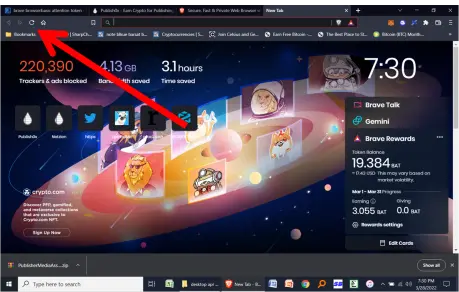
- Once every hour, or two you should do this refresh trick.
- After ad appears as background image like above in newly opened and refreshed tab (not decorative pictures) your rewards will go up.
- This tab background image rewards aspect resets itself after an hour, or couple of hours.
- You will notice after a few refreshes, when you see the ad, it won't give you a reward.
- Don't fret, it's just waiting to reset, based upon a time, and once reset, will reward you again.
- If you see the ad after refreshing and your rewards go up, refresh until you see the "paid ad" and it does not give an additional reward.
- First thing in morning, or if I have not been on Brave a while, I'll refresh and can get about 4 Brave Ads to pay until they again reset.
- So, use that refresh button in a new tab and make sure your refresh enough times to get the maximum rewards!
2) Apply settings so that you receive maximum ads possible (per hour).
- Open your browser.
- Find the Brave Rewards section under settings such as in pic below using the arrows for direction.
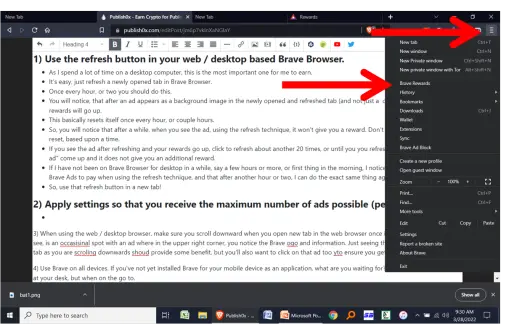
- Next, you should go to a screen that looks like this below and you want to click where the red arrow is:
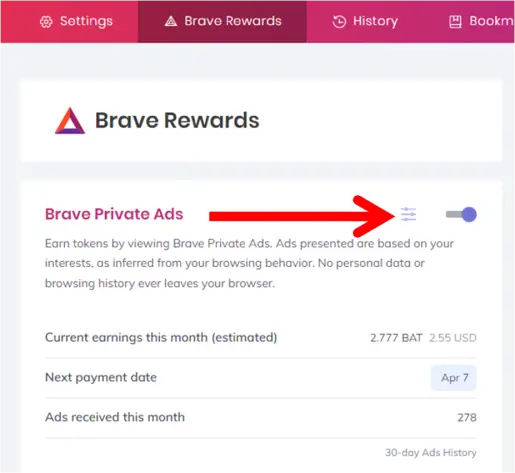
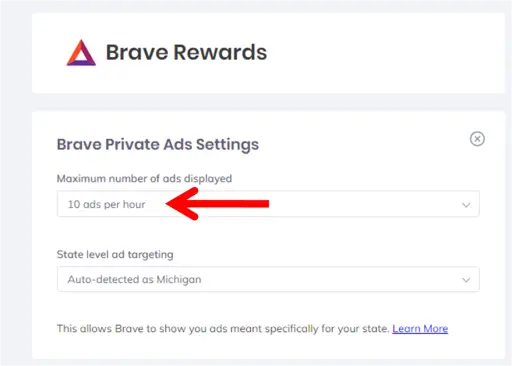
- Next, make sure that you have the maximum number of ads applied - for me, this is ten.
- If possible I also think it helps if you can identify the state, or location you are in. For me, it was Michigan (USA).
3) THIS WAS A STEP I FORGOT ABOUT!
-
I IMMEDIATELY STARTING GETTING WAY MORE BAT REWARDS ONCE I STARTED DOING IT AGAIN.
-
You don't see this step talked about as much out there as far as advice goes for maximizing Brave rewards!
When using the web / desktop browser, make sure you scroll downward when you open new tab in the web browser once in a while.
-
Spin the wheel on your mouse, or use "page down" "PgDn" keys on keyboard once you loaded the new browser tab.
-
You'll see many news stories, e.g., Fox News, New York Post, Wall Street Journal, TechCrunch, ESPN. These are not the ads.
-
The ad's you want to look for though always have two distinctions
-
1) They usually appear near the top, when you first start scrolling
-
2) THEY HAVE THE LITTLE BRAVE AD indicator as seen in two pics below.
-
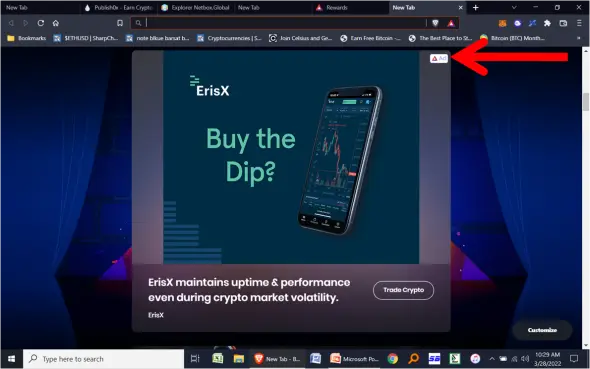
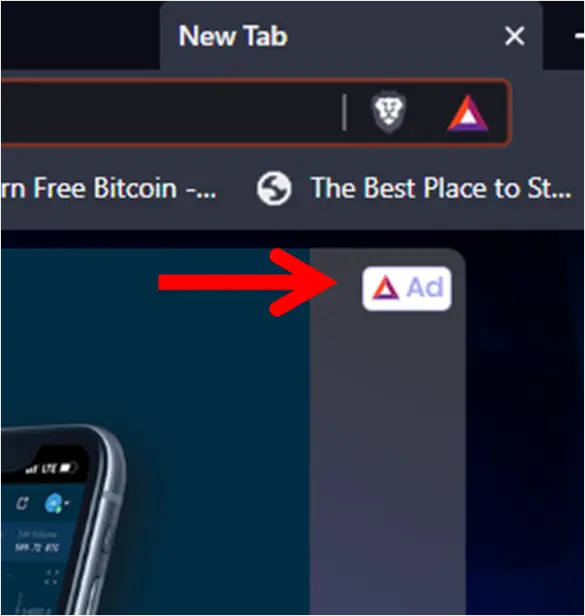
-
For ads you view scrolling downward in your desktop browser where you see the little Brave logo like pictured above, I suggest three things.
-
One
- Although your reward will be registered just seeing the ad scrolling, I suggest you actually click on ad, and let it load.
- If Brave sponsors it, it's safe to click.
- More importantly, my feeing is that if you click the ad, Brave's algorithms may increasingly give you additional ads, seeing that you "interacted" with the ad.
-
Two
- After you click the ad, next open an entirely new we browser tab.
- Scroll down again, and see if there is another ad available near the top, whether the same or different.
- If you see another ad, do the same as above, click it to interact with it.
-
Three
- Once you don't see the ads near the top when scrolling, move on for a while.
- If the ads are not just below the top when you first start scrolling, they probably won't be further down.
- Thus, to maximize your rewards, move on, and come back and try again in an hour or two to if "scroll ads" are there.
- Some ads are interesting - you could probably write Brave articles about them.
-
Next time around, I'll give tips for mobile platforms.
I hope this helps you to get more tips using Brave on your Desktop PC!