How to easily Import your Bitcoin.com wallet to Electron Cash

By k1ll1van1ll1 | How to Bitcoin Cash | 13 Apr 2021


1. Download Electron Cash for Windows/Linux/Mac/Android/iOS

Offical homepage --> electroncash.org/

Be aware of scammers, never use another link.!

2. Give your wallet any name

3. Create "standard wallet"
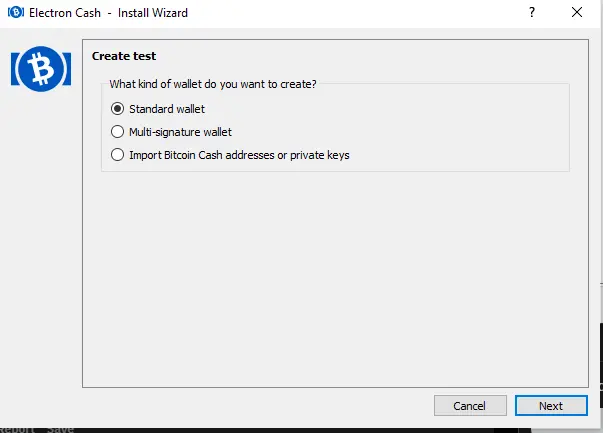
deb10d67e93cb53714608795deb1b2ceee827d3c66287fd142bc580efe2d5230.png

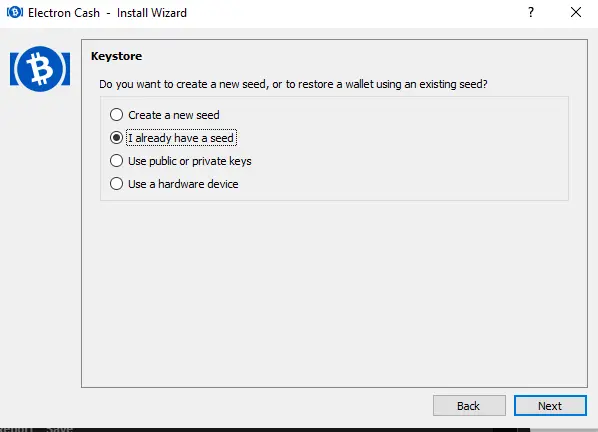
4. "I already have a Seed"

1201d0715a46beed331c4ec5c50850fe13ad2d88670a236592a32422031af048.png

5. Put in your Seed and go to Options and make sure BIP39 is selected
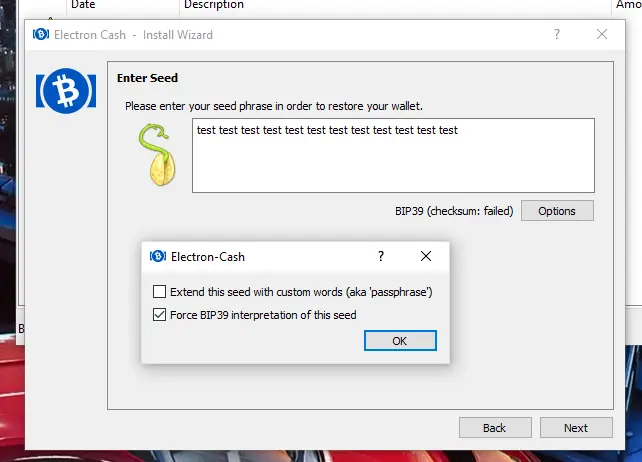
dfd6f566ad70a3df98951f92bc189648c0989e6c01cdfe9d8efe3ff92a3fd0f3.png

6. Put the following in there: m/44'/0'/0'
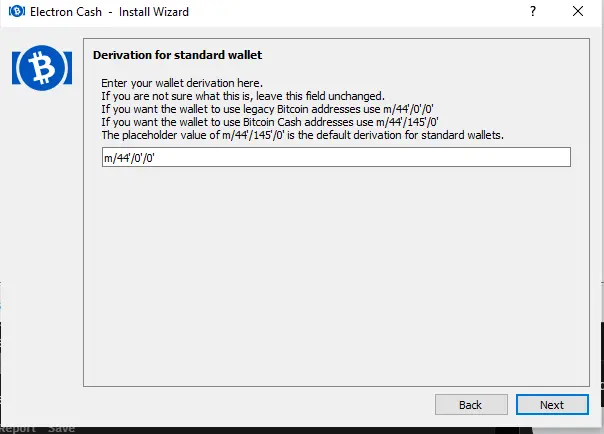
61ab6331c29d7c414d316e1912058b879b3cfa614fd3ed2b293e8f71baaf2ca2.png

Now choose a PW to protect your wallet and wait till everything is in sync.

How do you rate this article?

3


How to Bitcoin Cash
How to Bitcoin Cash

Some Bitcoin Cash knowledge

Send a $0.01 microtip in crypto to the author, and earn yourself as you read!

20% to author / 80% to me.
We pay the tips from our rewards pool.