
This shader creates a grayscale gradient and then draws a green diagonal line across the screen.
The line runs from the bottom-left corner to the top-right corner because the shader compares the X coordinate with the Y coordinate. Whenever they become equal, a line is drawn.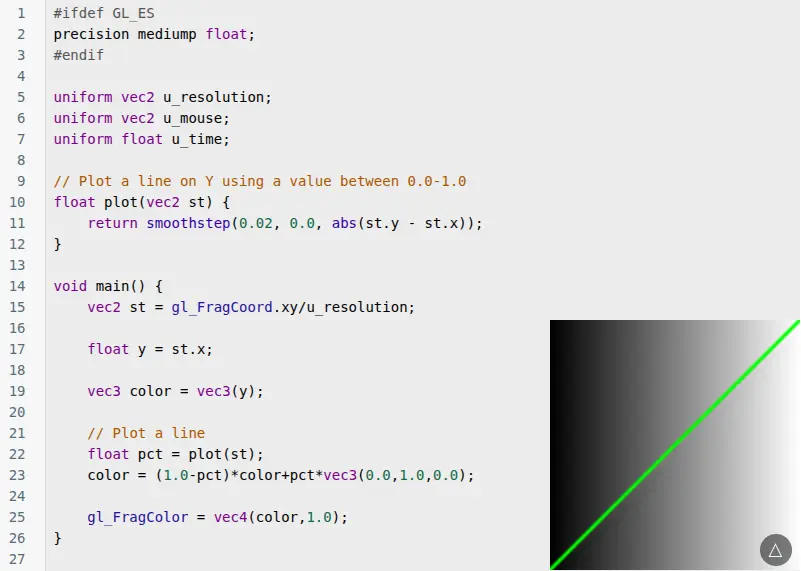
Breaking It Down
Precision Declaration
#ifdef GL_ES
precision mediump float;
#endif
This tells OpenGL ES devices how accurately floating point numbers should be calculated.
-
mediump= medium precision -
Mostly used on mobile devices
Uniform Variables
uniform vec2 u_resolution;
uniform vec2 u_mouse;
uniform float u_time;
Uniforms are values sent into the shader from the outside.
-
u_resolution= size of the screen -
u_mouse= mouse position -
u_time= elapsed time
In this shader only u_resolution is actually used.
Plot Function
float plot(vec2 st) {
    return smoothstep(0.02, 0.0, abs(st.y - st.x));
}
This function creates the line.
Let's look at the important part:
abs(st.y - st.x)
When:
st.y == st.x
the result becomes:
0.0
This means the pixel sits exactly on the diagonal line.
The smoothstep() function then softens the edges so the line appears smooth rather than jagged.
Normalized Coordinates
vec2 st = gl_FragCoord.xy/u_resolution;
gl_FragCoord.xy gives the current pixel position.
By dividing by the screen resolution, the coordinates become normalized:
Bottom Left  = (0,0)
Top Right    = (1,1)
This makes the shader work on any screen size.
Creating a Gradient
float y = st.x;

vec3 color = vec3(y);
Since st.x moves from 0 to 1 across the screen:
Left side  = black
Right side = white
This creates a grayscale gradient.
Drawing the Line
float pct = plot(st);
The plot() function returns:
1.0 near the line
0.0 away from the line
Then:
color = (1.0-pct)*color+pct*vec3(0.0,1.0,0.0);
This blends between:
-
Original grayscale color
-
Green color
When pct is 1, the pixel becomes fully green.
When pct is 0, the original gradient remains.
Final Output
gl_FragColor = vec4(color,1.0);
The final RGB color is displayed with full opacity.
Visual Result
White
│
│       /
│      /
│     /
│    /
│   /
│  /
│ /
│/
Black ─────────►
-
Background = black-to-white horizontal gradient
-
Green diagonal line = where X equals Y
This is the fourth post in the GlSL learning series.






