
This is part 2 of learning about GlSL:
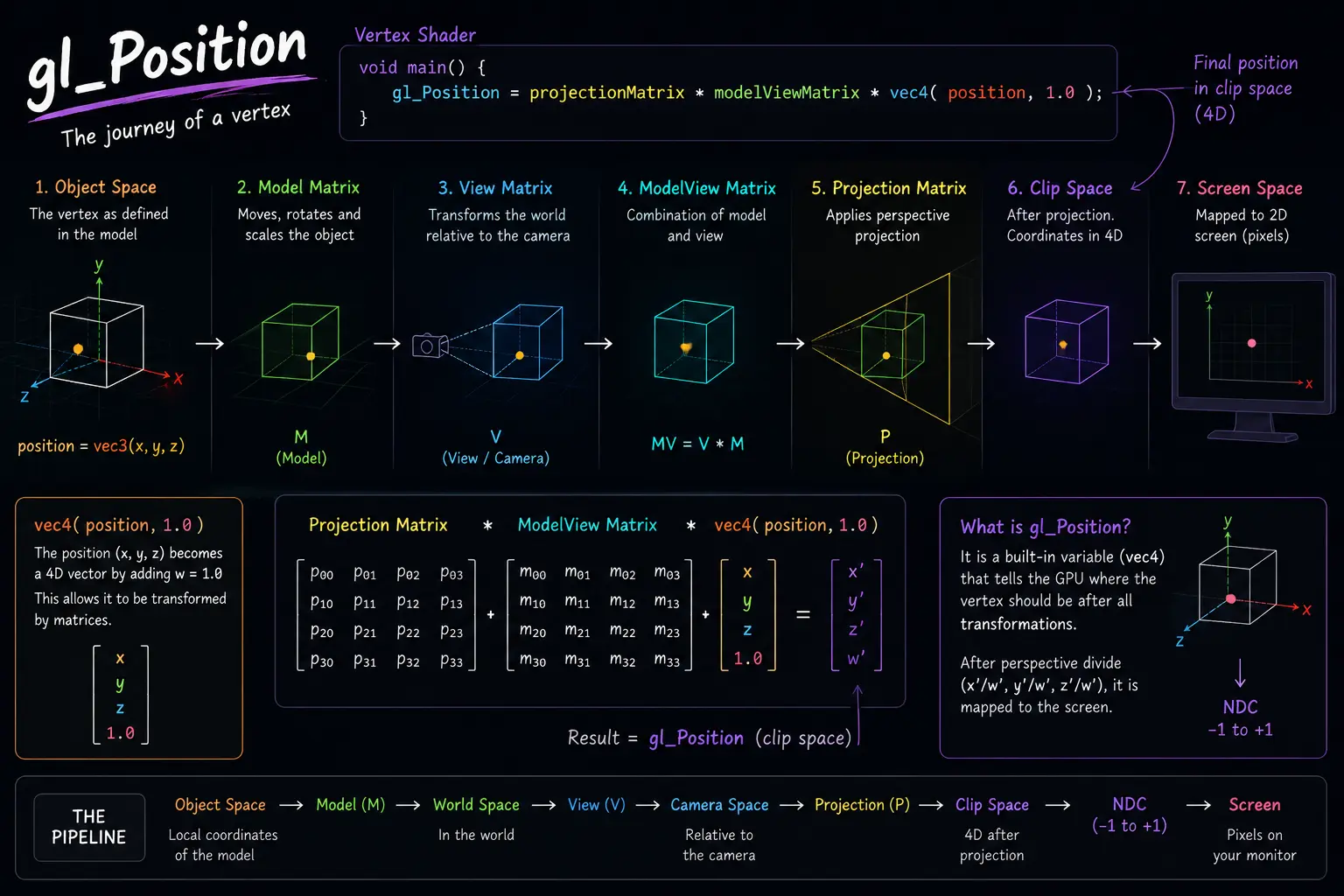
This is a very common vertex shader, especially in libraries like Three.js.
const vshader = `
void main() {
  gl_Position = projectionMatrix * modelViewMatrix * vec4( position, 1.0 );
}
`; 
Let's break it down:
vec4( position, 1.0 )
position is usually a vec3 attribute containing the vertex coordinates:
position = vec3(x, y, z)
By adding 1.0, it becomes:
vec4(x, y, z, 1.0)
The 1.0 is the w component, which allows the position to be transformed by matrices.
modelViewMatrix
modelViewMatrix * vec4(position, 1.0)
This combines two transformations:
- Model Matrix → moves, rotates, and scales the object.
- View Matrix → represents the camera's position and orientation.
After this multiplication, the vertex is transformed from its local object coordinates into camera space.
projectionMatrix
projectionMatrix * (...)
The projection matrix converts the 3D coordinates into clip space so they can be projected onto a 2D screen.
This is what creates perspective, making distant objects appear smaller than nearby ones.
gl_Position
The final result is assigned to:
gl_Position = ...
This tells the GPU where the vertex should appear on the screen.
You can think of the whole line as:
Object Space
      ↓
Model Matrix
      ↓
World Space
      ↓
View Matrix (Camera)
      ↓
Camera Space
      ↓
Projection Matrix
      ↓
Clip Space
      ↓
Screen
Or more simply:
gl_Position =
    projectionMatrix *
    modelViewMatrix *
    vec4(position, 1.0);
means:
"Take this vertex, move and rotate it with the object, view it through the camera, apply perspective, and then draw it on the screen."
This single line is essentially the minimum code needed to display a 3D mesh correctly in Three.js. Once you understand this line, you're already touching the core of the graphics pipeline.






