
Step 1: Appropriate Your Hardware
My poor little Macbook Pro had already gone through hell over the course of its life. It'd seen multiple hard disk failures from drops and bumps up until the day it finally beheld the majesty of the solid state drive -- and even then, it went through about two of those. The screen had been cracked and replaced twice, the battery replaced once, the list goes on and on. Fortunately, we really only need the dumb brick to do one thing and one thing only. And for that task, we are somewhat obligated to commit to the undertaking of disassembly.
It's no coincidence most mining rigs look all futuristic and techy. Open-case builds carry a number of advantages for access and heat dissipation. Given ideal circumstances, a mining rig's really just a machine meant to be plugged in and set up in a sterile room with strict atmospheric controls, turned on, and left to run for months or even years without being attended to.
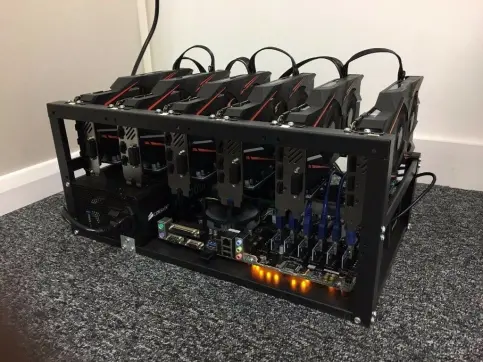
(A similar open-case design for a far more profitable configuration than my abomination will ever be.)
For my poverty build, I used an old project case for a robotics kit, a couple of screws, and careful placement of the power brick adjacent to the logic board for the computer. The system's fan and upgraded RAM were the only components still connected -- the entire rest of the laptop was disassembled. The screen, keyboard, CD tray, hard drive, and even the power button can all be removed and repurposed.
I'd like to note that newer Macbook disassembly procedures may be more complicated or altogether infeasible compared to the steps that I went through. Apple has been focusing more on proprietary hardware in recent years, with Macbooks featuring soldered-in RAM and batteries glued in place. Even in the case of my decade-old laptop, the disassembly procedure required three different kinds of screwdrivers by the time I'd finished.
However, my logic board, upgraded RAM, and the power to run it all is only half the equation. The build needs instructions for mining, and with it, software to interpret the instructions.
Step 2: Make a Bootable Linux Distro USB
It's no coincidence that literally every single one of the top centralized supercomputers in the world since 2017 use Linux as the go-to family of operating systems for computation. Linux builds, at their best, are practically synonymous with optimized computation. At their worst, they're tantamount to that one sports car your stepdad owns that comes with manuals in foreign languages, and which spends more of its time in the driveway with the hood open than it does on the open road.
Linux is not, and generally should not, be considered the foremost choice for the user friendly experience. For most applications, Linux machines are here to do a job and do it well -- and nothing else. Granted, this marked performance in niche fields is already starting to make Linux look like an attractive alternative to windows for the gaming community. And when that job's cryptographic hashing, one need look no further at a Macintosh or Windows computer.
For simplicity's sake, I chose to make and boot my machine from a minimalist Ubuntu install that roughly coincided with the dated hardware. To boost performance even further, I did away with the GNOME environment and opted for LXQt low-impact environment instead. The entire ISO image fit easily on a throwaway 8gb flash drive that had since been scrubbed and formatted for FAT32. To flash the image, I elected to use Rufus. Others might be familiar with Etcher as an attractive choice, for those looking to get their toes wet.
So now I had a stripped-down computer and a drive with an operating system on it. Time to configure a miner.
Step 3: Building a Miner in Linux
Linux usually takes a drastic departure from other operating systems in that you can't depend on a program taking on the same graphical interface we're accustomed to seeing in Windows and Mac. Sometimes if you're lucky, somebody nice will find a user-friendly way of changing things around. For example, in Linux Mint, it's not too hard to find yourself a screen brightness controller that looks it came straight out of an Android phone.
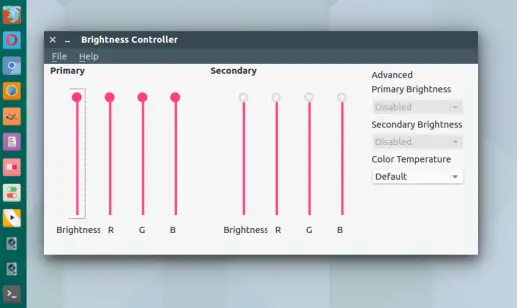
This isn't always the case, however. And realistically, all this groovy looking window is doing is taking user inputs, writing lines of code, and inputting them into a hidden terminal. If your distribution isn't mainstream enough to garner widespread support, or it doesn't get along with this brightness controller's release, you might have to do something like this instead to change the brightness:
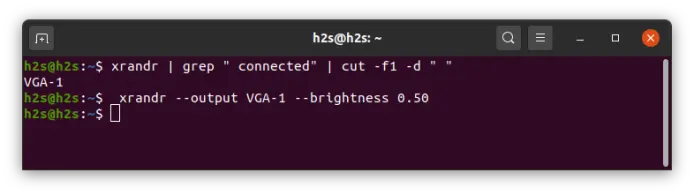
(For example.)
Likewise, there do exist graphical-interface oriented miners out there for Linux. I've praised nanominer in previous posts for its inherent accessibility and universal compatibility -- at least, until graphics card driver installation becomes a pain in the butt.
However, our poor little Macbook is struggling enough as it is. This fossil of a logic chip was brand-spanking new back before Bitcoin was even invented. If we want any kind of optimized performance from the thing, we'll likely need to forgo any computational power dedicated to a desktop environment or a decent window system if we can help it.
Entering stage left, we look to XMRIG.
XMRIG is an excellent open-source mining build that boasts cross-platform performance for RandomX, KawPow, CryptoNight and AstroBWT algorithms, both for CPU and GPU mining. Its footprint is tiny, which is helpful both for installation -- you don't even need a web browser to install this guy -- and in how it accommodated my memory swap processes nicely. To put into perspective just how dumb this entire idea is, this laptop is only employing 4gb of RAM to keep track of its DAG files. This is so little, that the computer actively has to borrow memory from the USB drive in order to keep track of what it's even mining. And yet, despite this, XMRIG had such a small footprint that it ran seamlessly anyways.
So from a fresh ubuntu install, I slapped together the miner through the following terminal commands:
$ sudo apt-get update
$ sudo apt-get upgrade
First and foremost, to ensure that the system was given a fresh slate to download and build the program from.
$ sudo apt-get install git build-essential cmake libuv1-dev libssl-dev libhwloc-devTo install all the appropriate applications necessary to compile the miner.
$ git clone https://github.com/xmrig/xmrig.gitTo get the miner's code from github.
$ mkdir xmrig/buildTo tell mkdir to build the XMRIG program
$ cd xmrig/buildTo tell my system to mount the new directory.
$ cmake ..To tell my system to make and compile the program with CMAKE.
$ make -j$(nproc)Where after this point, my miner was technically fully operational. One line of code is all the system would require to begin the process of verifying transactions. But the means of doing this could go any number of ways. Solo mining struck me as residing within the realm of next-level insanity, so I opted for simple pool mining. Setting aside any expectations for payout with the dumb thing, an open-domain pool mining approach would at least give me a nice look at some performance charts.
Step 4: Selecting a Wallet (Necessary) and a Pool (Optional)
In the same repository of the build, ($ cd xmrig/build if you got lost along the way) I type in the following:
./xmrig -o us-west.minexmr.com:4444 --rig-id=Sleepy_70 -u WALLET_ADDRESS_HERE(Where naturally, "us-west.minexmr.com:4444" is a placeholder for whatever pool and port you choose to use, "Sleepy_70" is whatever name you choose for your mining rig, and "Wallet_address_here" is a pretty obvious placeholder for your public key.)
By hitting "Enter" key after this line of code, provided each step was followed correctly, you officially change the status of your hardware from discarded laptop to Monero mining rig.
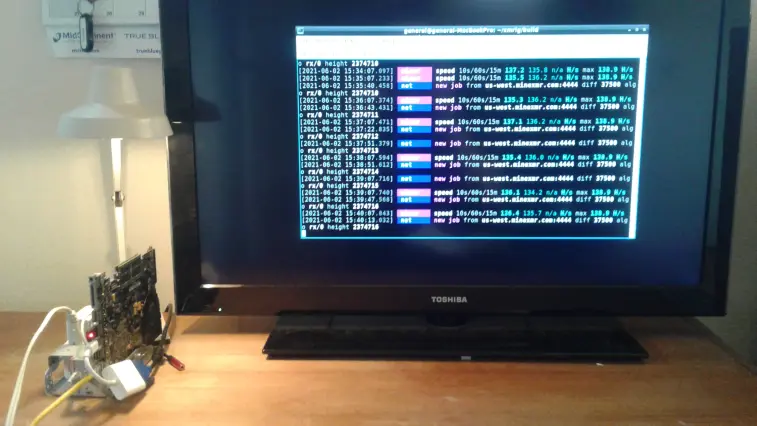
After all that headache, struggle, trial and error, I was finally rewarded with a consistent ~135 H/s from my machine.
Mind you, that's not kilo-hashes, nor mega. My machine was averaging one-hundred and thirty-something hashes per second. For comparison, that'd be only a little better than duct-taping a dozen Raspberry Pi's together. And the wildest part is that this was hovering around double what I was getting off of a nanominer running on a regular old Linux mint installation for the same machine. All of these factors combined, from the open build, to the OS running on a flash bootable, to the explicit choice of software in particular, all led to a tangible difference in what the machine was capable of outputting.
So What Are Our Takeaways?
Foremost, I think it's important to acknowledge that meticulous fine tuning is a practice of diminishing returns. A next possible step here might be to use a USB drive bootable distro of linux that has no interface whatsoever, but which boots from the Kernel with the sole motive of identifying hardware and running a hashing algorithm with every scrap of computational power left to spare. (Why waste precious resources on any Graphical User Interface at all, right?) Whether or not it'd be worth my time to find or create this distro is already debatable. Even doubling my hashing rate only increases my mining income from a measly half a tenth of a penny per day to a blistering whole tenth of a penny per day. As great as my efforts have been to streamline the process, a decade old-laptop CPU just isn't set to break bank any time soon.
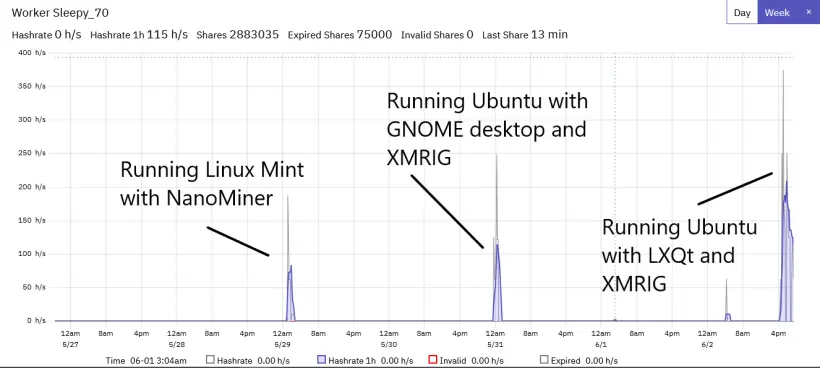
(If this graph excites you, it might do you well to consider that my desktop computer was able to run ~1kH/s on its CPU without even trying.)
But despite all this navel-gazing nonsense and wasted electricity over CPU-Mining for smaller, niche coins in the cryptomarket, optimizing your mining approach can still be a worthwhile endeavor with reasons twofold.
First and foremost, it can increase this terrible percentage of income earned per unit of electricity dedicated to a rig, ultimately increasing efficiency and profit, even if not by just a little. And with a lot of machines working together, those small differences add up. After all, mining is a time-intensive activity. And small differences across lots of rigs can make for a wildly different sum across a given period of time.
Second, it serves as an excellent demonstration of the versatility seen in decentralized processing. Even though this example of hardware is exceptionally limited in its faculties, there still exists the infrastructure in place to enable it to earn some slice of payment in direct proportion to the work it contributes towards verifying transactions. It doesn't matter how powerful your hardware is. Just as anybody can make a cryptocurrency wallet regardless of the hardware they possess, anybody can verify a cryptocurrency transaction regardless of the hardware they possess.
Furthermore, I think it's worth recognizing that this mining rig is but one example of the all-encompassing utility that emerges as a natural byproduct of open source, decentralized computation in the crypto world. Although this franken-laptop does a pretty crummy job as a miner, any miner is still far from totally useless. And its application doesn't need to be limited to just that, either -- suppose we were to bolt a couple of cheap hard drives to the thing and configure it to be a Bitcoin lightning node. I'd wager there exist worse forms of passive income.
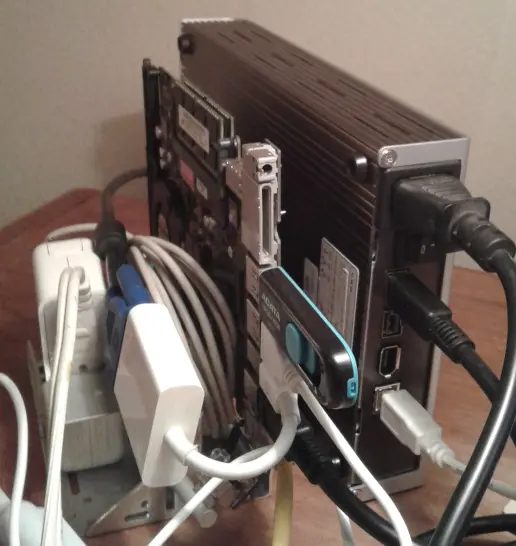
(Think it goes without saying that this has been -- and probably will be -- the only time I've ever seriously consider using a FireWire port.)
Decentralized computation doesn't always need to be powerful to be useful. Oftentimes, dependability is a more sought after attribute. By plugging the rig in and leaving it to do its thing in the corner with plenty of bandwidth and electricity, we're able to offer a network something that I can't usually provide with my work computer or desktop, which are regularly shut down and turned on at irregular intervals. At this point, the rig could be anything. I could make a magnet-torrent server for textbook PDFs -- a system that would benefit from the laptop battery, so as to keep configuration intact in case of a power outage. Or, I could configure it to fold proteins, and maybe even earn some passive Doge from the results, given enough patience. Or, by disabling all Network operations, I could use it as an extra-super-secret computer -- something locked in a dark room, purposed exclusively for signing private keys and Bitcoin transactions through the air-gap of a USB drive. As the old saying goes, the only truly secure computer is one that's been disconnected from the internet, turned off, and locked in a safe.
I find the lessons of cryptocurrency to be a unique synthesis of distributed computing, open source participation, and cryptography. Anybody can make a wallet, anybody can mine a currency, and because of this, anybody can elect to dedicate their existing hardware -- no matter how obsolete -- to have it contribute towards something that has effects across continents and which echoes through history.
Even if it's through a Macbook that's been dropped way too many times.






