
A full node is a program that fully validates transactions and blocks. Almost all full nodes also help the network by accepting transactions and blocks from other full nodes, validating those transactions and blocks, and then relaying them to further full nodes.
Most full nodes also serve lightweight clients by allowing them to transmit their transactions to the network and by notifying them when a transaction affects their wallet. If not enough nodes perform this function, clients won’t be able to connect through the peer-to-peer network — they’ll have to use centralized services instead.
Many people and organizations volunteer to run full nodes using spare computing and bandwidth resources — but more volunteers are needed to allow Bitcoin to continue to grow. This document describes how you can help and what helping will cost you.
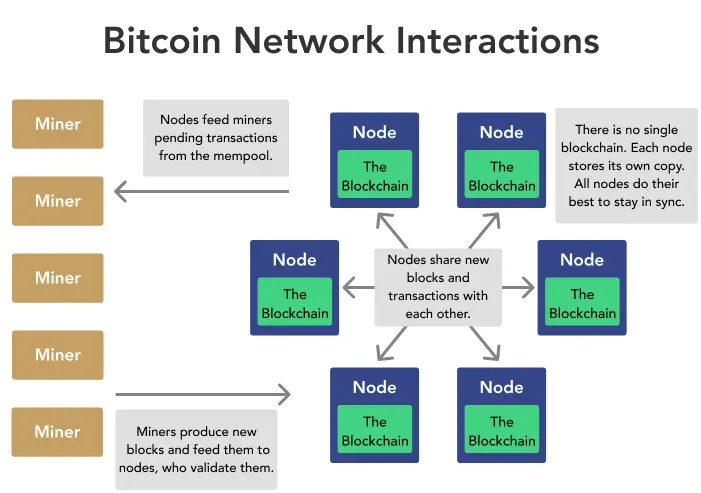
The full node will be reachable over IPv4, IPv6 and as Hidden Service over the Tor network.
1. Prerequisites
a. Storage Space
The Bitcoin blockchain is very large and grows constantly. This is because every Bitcoin mined and every transaction ever made is recorded in the blockchain.
As of April 2015 it is 32 Gigabytes. Along with indexes and other data a full node occupies around 42 GB (Gigabytes) of disk storage space on the server.
You can see the growth of the blockchain over time on the Bitcoin Blockchain Size website. To check the available free space of the disk who will hold the Bitcoin database:
runtu@runtu-desktop:~$ sudo df -h /var/lib
You can check the diskspace used by a running your full node as follows:
runtu@runtu-desktop:~$ sudo du -hs /var/lib/bitcoind/*|sort -h
0 /var/lib/bitcoind/db.log
20K /var/lib/bitcoind/fee_estimates.dat
84K /var/lib/bitcoind/wallet.dat
212K /var/lib/bitcoind/debug.log
952K /var/lib/bitcoind/peers.dat
732M /var/lib/bitcoind/chainstate
41G /var/lib/bitcoind/blocks
b. IP Addresses
This guide assumes we allocate the following IP addresses for our Bitcoin daemon:
- 2001:db8::39 as global public IPv6 address;
- 192.0.2.39 as private local IPv4 address (port forwarded from the public IPv4 address);
- 198.51.100.240 as the ISP provided dynamic public Internet address;
To add the IP addresses on the server:
runtu@runtu-desktop:~$ sudo ip addr add 192.0.2.39/24 dev eth0
runtu@runtu-desktop:~$ sudo ip addr add 2001:db8::39/64 dev eth0
Also add them to the file /etc/network/interfaces to make them persistent across system restarts:
# btc.example.net
iface eth0 inet static
address 192.0.2.39/24
iface eth0 inet6 static
address 2001:db8::39/64
c. DNS Records
Name Type Content Priority TTL
btc A 198.51.100.240 300
btc AAAA 2001:db8::39
Check the “Add also reverse record” when adding the IPv6 entry.
2. Firewall Rules
Bitcoin daemons listen on TCP ports 8333 and 18333 for incoming connections.
IPv4 NAT port forwarding:
Protocol Port No Forward To Description
TCP 8333 192.0.2.39 Bitcoin network
TCP 18333 192.0.2.39 Bitcoin test network
Allowed IPv6 connections:
Protocol Port No Destination Description
TCP 8333 2001:db8::39 Bitcoin network
TCP 18333 2001:db8::39 Bitcoin test network
3. Tor Hidden Service
Add a Tor Hidden Service by editing /etc/tor/torrc:
# BitCoin Full Node Hidden Service for btc.example.net
HiddenServiceDir /var/lib/tor/hidden_services/bitcoin
HiddenServicePort 8333
HiddenServicePort 18333
Reload the Tor client:
runtu@runtu-desktop:~$ sudo service tor reload
Read the newly generated *.onion hostname:
runtu@runtu-desktop:~$ sudo cat /var/lib/tor/hidden_services/bitcoin/hostname
duskgytldkxiuqc6.onion
4. Bitcoin Daemon User
For security reasons its best to run the daemon with its own unprivileged user profile. Create this user on the server system with the following command:
runtu@runtu-desktop:~$ sudo adduser --system --group --home /var/lib/bitcoind bitcoin
5. Software Installation
The Bitcoin reference software is not in the Ubuntu software packages repository, we therefore add the Bitcoin Personal Package Archive (PPA) to your system before installing the daemon:
runtu@runtu-desktop:~$ sudo apt-add-repository ppa:bitcoin/bitcoin
runtu@runtu-desktop:~$ sudo apt-get update
runtu@runtu-desktop:~$ sudo apt-get install bitcoind
Configuration
Create the configuration directory and an empty configuration file and also adjust access rights:
runtu@runtu-desktop:~$ sudo mkdir /etc//bitcoin
runtu@runtu-desktop:~$ sudo touch /etc/bitcoin/bitcoin.conf
runtu@runtu-desktop:~$ sudo chmod 600 /etc/bitcoin/bitcoin.conf
We need a password for remote procedure calls to daemon. The program will create it automatically if started without finding one:
runtu@runtu-desktop:~$ bitcoind -conf=/etc/bitcoin/bitcoin.conf
Error: To use bitcoind, or the -server option to bitcoin-qt, you must set an rpcpassword in the configuration file:
/etc/bitcoin/bitcoin.conf
It is recommended you use the following random password:
rpcuser=bitcoinrpc
rpcpassword=HkFbv9YaWgEgyy7X4B9vi3GsENtGWgPNpwUf2ehsvXX1
(you do not need to remember this password)
The username and password MUST NOT be the same.
The long random string displayed is the generated RPC password we need to add to the configuration. Open the file /etc/bitcoin/bitcoin.conf and add them as follows:
#
# Bitcoind Daemon Configuration
#
# General options
datadir=/var/lib/bitcoind
alertnotify=echo %s | mail -s "Bitcoin Alert" root
# Connection options
bind=192.0.2.39
bind=[2001:db8::39]
externalip=btc.example.net
# Tor Hidden Service Options
onion=127.0.0.1:9150
bind=127.0.0.1
externalip=duskgytldkxiuqc6.onion
# Long running Bitcoin Nodes on the Tor Network
# http://nodes.bitcoin.st/tor/
addnode=pqosrh6wfaucet32.onion
addnode=btc4xysqsf3mmab4.onion
addnode=gb5ypqt63du3wfhn.onion
addnode=3lxko7l4245bxhex.onion
# Verified Online Bitcoin nodes on the Tor Network from
# https://rossbennetts.com/2015/04/running-bitcoind-via-tor/
addnode=kjy2eqzk4zwi5zd3.onion
addnode=it2pj4f7657g3rhi.onion
# Verified Online Bitcoin nodes on the Tor Network from
# https://en.bitcoin.it/wiki/Fallback_Nodes#Tor_nodes
addnode=hhiv5pnxenvbf4am.onion
addnode=bpdlwholl7rnkrkw.onion
addnode=vso3r6cmjoomhhgg.onion
addnode=kjy2eqzk4zwi5zd3.onion
# Verified Online Bitcoin nodes on the Tor Network from
# https://sky-ip.org
addnode=h2vlpudzphzqxutd.onion
addnode=xyp7oeeoptq7jllb.onion
# RPC server options
rpcuser=bitcoinrpc
rpcpassword=HkFbv9YaWgEgyy7X4B9vi3GsENtGWgPNpwUf2ehsvXX1
# Maintain a full index of historical transaction IDs
# Required by Electrum Server
txindex=1
After saving, make sure the file is owned by our bitcoin user:
runtu@runtu-desktop:~$ sudo chown -R bitcoin:bitcoin /etc/bitcoin
Start the Service:
runtu@runtu-desktop:~$ sudo start bitcoind
bitcoind start/running, process 17019
When started for the first time, bitcoind will search for peers and start to download and process the blockchain.

The FreeBSD Handbook - System Administrator
## Table Of Content ##
1. FreeBSD Getting Started Guide
2. PKG and Ports For Managing Software
3. Working with Files and Directories
4. Managing Users And Groups
5. Updating and Building the Kernel
6. Monitor Server Performance
Read Ebook
Author:
Linux BSD Blockchain - publish0x






