
Thanks to guest artist Djimal from Elrond Camel Business, who have a manual transaction mint you can practice on after reading this article (while supplies last)! Information can (and should) be double checked in the ECB Discord.
- SC Address: erd1qqqqqqqqqqqqqpgq3mrsmmwk0flzqneuxmpq4vc6rrar6seq6u4smqw5y5
- Amount:0.33 EGLD
- Gas Limit: 9999999
- Data: mintNft
An important note before I begin, this will allow you to send a transaction to any smart contract. It is important that you follow all steps precisely and realize that these steps will be different for each contract. You must know the details of each specific contract in order to execute a transaction properly. You perform these at your own risk and I provide this information for educational and entertainment purposes only.
The recent mints with the Elrond Apes and The Drifters encountered API issues that ended up blocking people from using the web interfaces each project had built. This left many people who should otherwise have had a fair chance out in the cold. There were those that did mint with no issues at all with the Web Wallet and this is an explanation of the process they used to communicate with the smart contract without going through the mint website interface.
For this explainer I will be using the free mint the Elrond NFT project offered to the first 100 in their discord, Onchain Warriors. Elrond NFT have now done two smart contract mints for their project and have had people use the Elrond Web Wallet both times in lieu of a website. The video tutorials they created are accessible in their discord and can be found in the announcements channel.
The explanation is simple. You only need to know three attributes:
- SC Address
- Amount
- Data
For the OCW mint and the Vaults mint we were provided this information right before mint. They set up an announcement: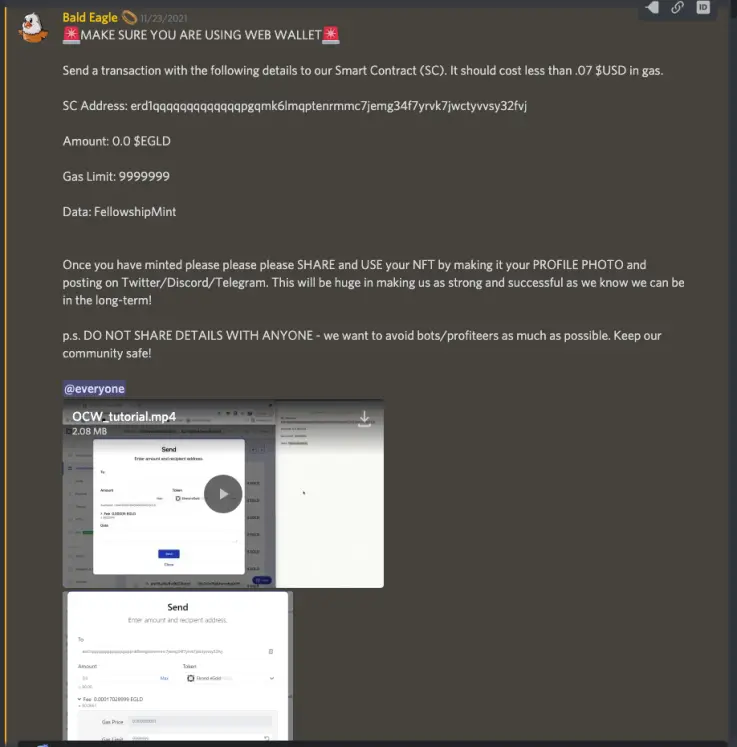
- SC Address: erd1qqqqqqqqqqqqqpgqmk6lmqptenrmmc7jemg34f7yrvk7jwctyvvsy32fvj
- Amount: 0.0 $EGLD
- Gas Limit: 9999999
- Data: FellowshipMint
These parameters were to be put into the Web Wallet interface. You can use your Maiar Wallet app for this, you just need to connect it to the Web Wallet. When you are connected you will click on send and you will see a screen like this: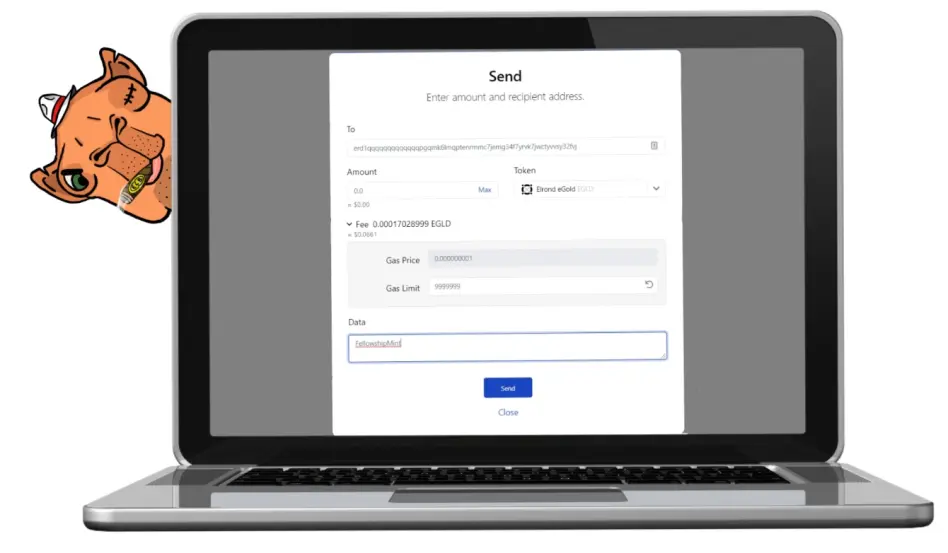
It must be filled in exactly like this. Gas Limit is set high in order to allow for the gas needed to fill the contract. It won't go to that number but it needs the room. A gas limit that is too low will fail the transaction. This is the only thing that will be similar for all contracts. You can see this is set at 9,999,999... nearly 10M. For the Drifters mint I used 60M as that is what was recommended. It needs to be high, is the point.
The Smart Contract address is the address of the smart contract. This goes in the same field as any other wallet address, the only difference is that a smart contract is programmable. A dev wrote code to have it automate the transactions depending on the data you provide.
Here the SC address was erd1qqqqqqqqqqqqqpgqmk6lmqptenrmmc7jemg34f7yrvk7jwctyvvsy32fvj. For the Drifters it was erd1qqqqqqqqqqqqqpgq7sw5z2e4hpmaumz2q8ef6enlnsmh2g8kwhgqkm4e4m. You will notice that they both start the same way. This is one way you know that this is a smart contract and not some random person's wallet. Only the proper address will return the NFT you are after. Always be skeptical when people tell you the secret back door to a mint and look it up for yourself.
The Data will likely be different for every single contract unless the same person wrote them. The Data field is where you write the command you need to tell the smart contract what to do with the EGLD that you are sending it. Here the smart contract dev simply had everyone type FellowshipMint. Everyone who completed this form with all values in place received a free NFT. One important point to understand here, this must be exact. Capital F, capital M. Everything else lower case. Anything different from this, a space, anything would result in a failed transaction. This is a precise command for a specific outcome. There is no room here to fudge it.
For Drifters it was buy@03. letters all lowercase. Zero before the number you wanted to mint. (02 for 2 and 01 for 1. Anything more or less would be rejected). This is the format they chose for their contract. Every contract will be whatever the developer made it to be.
In this case it was a free mint so the EGLD value was 0.0. The initial 0 is important. In Maiar Wallet you can press .1 and it will fill in the 0 for you. In the web wallet you need to write that first zero in yourself. Drifters mint was 0.8. Zero point eight and nothing else. The value must be exact for the transaction you are setting up. Send 0.8 EGLD and the Data needs to be buy@01. Whatever the values are, they need to be in agreement with what the contract is expecting. buy@02, 1.6 EGLD. buy@03, 2.4 EGLD.
How to get these values
The short answer is, you can't....unless someone tells you or you find it out after the mint is running. For the ENFT project mints, they had provided them as well as video tutorials on each one. For the rest, you just have to figure it out or have a friend who always seems to know like DalekUnknown . Thankfully, there is a way to figure this out yourself but the catch is, you have to have attempted a transaction yourself at least once (or had a trusted friend tell you).
For the purposes of this article I logged into the Maiar Exchange (which is itself just another smart contract) with the Web Wallet and connected to that with my Maiar Wallet. I did a simple restake command and recieved this: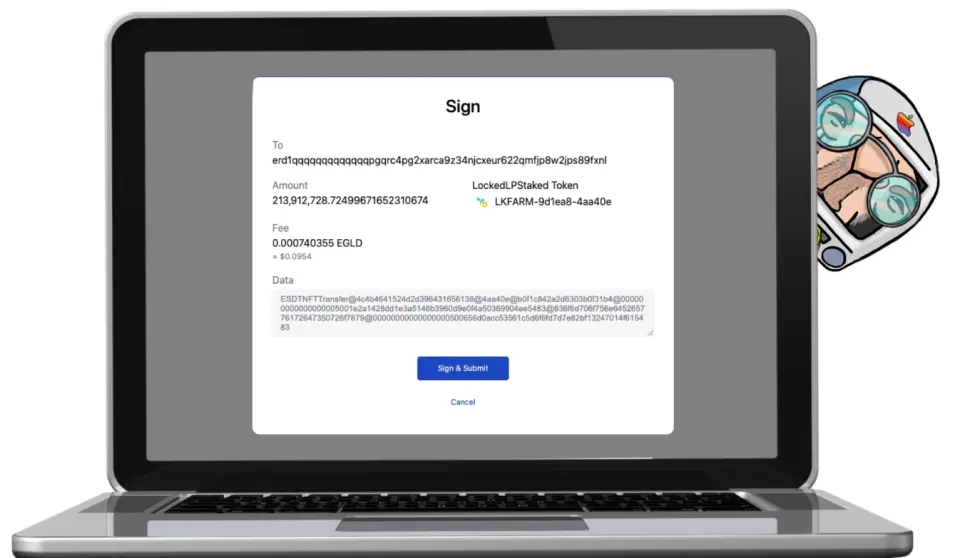
You can see here, the address of the Smart Contract (notice the beginning), and the Data. You don't need to know how to read the complex commands in all smart contracts (though it is possible and not too difficult to learn what is going on here in the Maiar Exchange), but for NFT mints it is nearly always a very simple and easy to read command. If you go through a transaction one time, pay attention to the screen. Copy and paste the information and note it down.
Suppose you were participating in a public mint and wanted to use the Web Wallet to try and beat out all of the bots and everything else that gets in the way of an average user. If you happened to have been white listed and gone through a sale on the contract already, and assuming they are using the same contract with the same address and same commands then it should work. This happened to be the case with some recent mints but there is no a guarantee that there won't be an update between sale phases for other projects. If the devs changed the contract or use a different contract for the new sale then this will obviously no longer be the case. 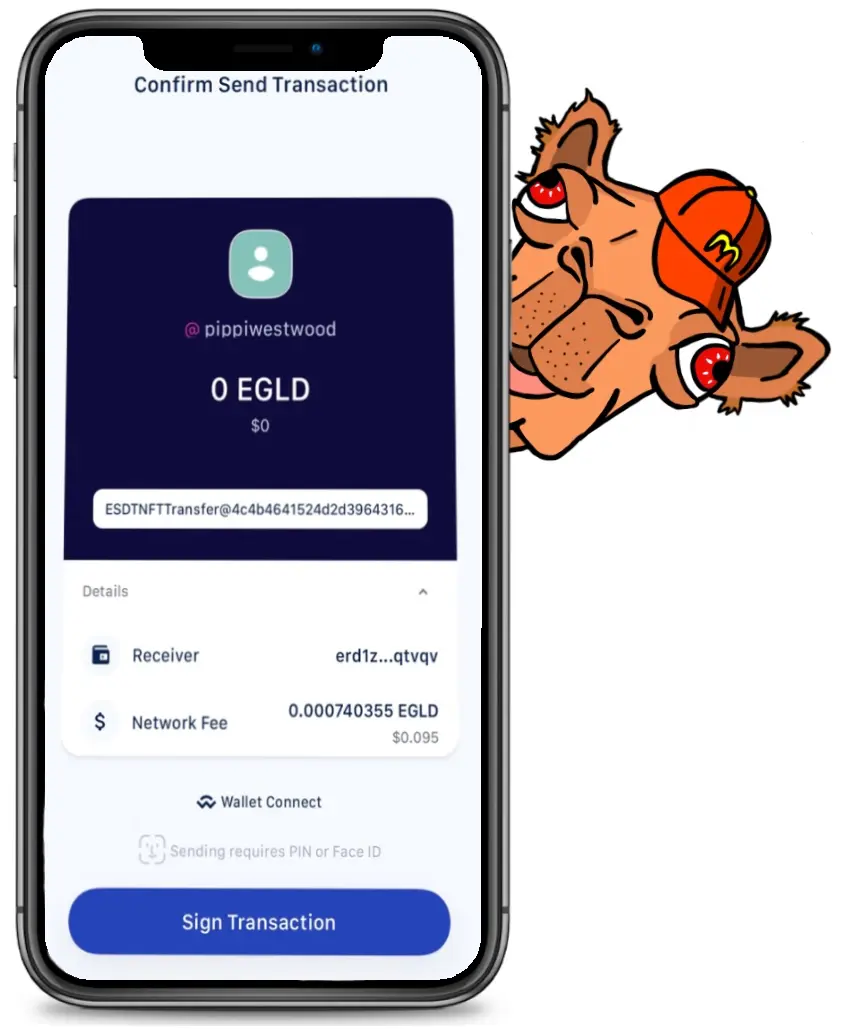
You can see here, the same information is more or less present in the Maiar Wallet but you can't access it. The Web Wallet (or the Maiar Defi Wallet) is the only way to see the full transaction details without being told.
There is one more way to access this information. If you happen to have the SC address already you can look it up on the blockchain explorer and examine a successful transaction. This is from the currently ongoing Elrond Camel Business mint and ou will see that all of the information you need is also right there as well. If you try and fail a tx, go ahead and look up your own address on explorer and examine the failed transaction. A well written smart contract will tell you why it failed. You can link from there to the SC itself and see what a successful transaction looked like. There is a lot to learn from watching one of these sales go and seeing what all of the transactions coming in look like. If there was already one phase of a mint and this is an additional one, they may also be the same and you could potentially have the transaction all lined up and ready to execute as soon as the contract goes live and begins accepting transactions.
When examining a transaction for the data, Elrond Explorer now has options for how to view them. The options are Raw, Text, Decimal, and Smart. What you want here is Raw. Raw is the actual information sent to the smart contract. The other options merely display the Raw information in a more human readable way. Notice I said "more human readable." This is because it's merely a calculator that converts the actual data (Raw) from hexadecimal to either text or decimal or both at once and sometimes it can makes mistakes. It's a tool to help you read the actual data so you can easily see what's going on. The smart contract will only know what to do with the Raw data.
This may not always work. One reason is that this is essentially what bots are doing. With a bot, someone has written a script to execute transactions with this data across multiple wallets all at once. Potentially hundreds of transactions going faster that 100 regular people could possibly do them individually. This sort of marketplace imbalance leads some devs to implement bot protection to make the sale more fair. This was the case with the WWWine project where they had their front end interface in communication with the SC where each transaction would be assigned a random code that would only work for that transaction. This meant that bot programmers didn't have time within the 3 minutes it took them to sell out to adapt. In this case, even if you knew most of the information, you would never have been able to guess secret code and your manual transaction would have also failed.
Risks
When engaging with manual transactions and smart contracts, it is important to understand that you are only interacting with the code of a specific dev. A well written SC will reject all transactions unless they fit perfectly into the design of the sale, with one letter or decimal out of place leading to a failed transaction. This may not always be the case. For Elrond NFT they had an oversight where a blank memo would not only take the money but return nothing back to the user. This happened a few times in their first mint and they quickly resolved the issue, sending back the EGLD and adapting their future SC code to account for this potential user error. Will the organization you are interacting with this time do the same for you? Do you trust them to have written a flawless contract and will they be their to support if there is an error? This is a question you must ask yourself.
Another risk to consider, anyone can write a smart contract and use it for malicious purposes. Particularly in the rush to grab a popular NFT at mint that is selling out faster than you can think, consider the source of the information you are recieving for that back door manual transaction access. Make sure it's the right contract. Even better, study the explorer, practice with web wallet, and learn how to do this for yourself.

Thanks for stopping by my Elrond blog! Please share with others and let me know if there are topics you would like me to dive into for future articles
If you would like to contribute and help me write more articles like these you may tip me with $EGLD, ESDT tokens, or NFTs to my address:
erd1ztcpuncemxcpes6t58cs28acre0zarjh6zj32a4e9vyhfp3g5agq0qtvqv
or to my herotag: pippiwestwood.
Don't have a Maiar wallet? Download one here and start your Elrond journey! Use my referral code if you want: txs89adg0p to get $10 in free $EGLD.
0x0x Pippi 💕
Social Media:
Twitter: @pippiwestwood
eMoon: SaoirseNS
Medium:@passinginterest
* Did you know you can tip yourself and earn just for reading articles like this one on Publish0x? Scroll all the way to the bottom of this page and you can give yourself up to 80% of the tip. *






