
All of us have combatted the Ethereum chain's enormous fees at some point, sometimes knowingly, and sometimes because we were none the wiser. This time, I thought since I had to go through the trouble of learning how to make MATIC work, I should share my tiny bit of knowledge in hopes that someone else doesn't have to lose MATIC by sending it to a place that doesn't accept it as is.
I'm not going to speak about the technology behind the Polygon network in much detail, simply because I don't have the know-how to explain it, so I'll leave that part to more capable people.
All the things I'll go through on this post:
- Background/Basic info about MATIC & Polygon Network
- How to get access to Polygon Network?
- How to get MATIC/where to buy with FIAT & related fees
- What can I do with MATIC?
- Can I change the gas fees?
- Gasless swap for more MATIC
- Basic guide to Crypto Defense Heroes (a game on Polygon network)
- What is wMATIC?
- How to add new tokens to your Polygon network on Metamask
What do you need to know about it? - History, purpose and the works
Well, first of all, Polygon is the name of the currency, $MATIC is the ticker of said currency. Founded in 2017, the network was called Matic Network until February 2021 when they chose to rebrand as Polygon Network. The network was built on the main Ethereum network as an L2 solution to combat the enormous fees and low throughput while benefitting from ETH Network's secure environment, essentially making it a user-friendly platform not only for us users but also for dApp developers. The name 'Matic' is a remnant of the original chain, and the network's developers chose to keep the ticker the same instead of renaming it since the $MATIC token was already well integrated with the system before the name change.
The gas token for Polygon Network is $MATIC. To truly utilize the system Polygon team has built, I'd suggest using MATIC on Polygon Network whenever possible. However, $MATIC is an interchain currency, meaning it can be transferred in ERC-20 (Ethereum Network), BEP-20 (BSC/Binance Smart Chain) and MATIC (Polygon Network) format. The two biggest benefits for this in my eyes are the fact that you can choose the fees you pay, and due to the many options, it's possible to use $MATIC in a variety of projects across different chains with relative ease. Some exchanges only support specific formats, so always make sure the address you want to transfer to matches the network you want to use, e.g. do not send BEP-20 $MATIC to an ERC-20 address, it will not arrive and mostly cannot be recovered in such cases.
Hmm, I'm curious about this. How do I get access to Polygon Network?
Firstly, get a Metamask. If you already have one, great! I won't get into details on how to create a Metamask account, because this isn't the post for that, but just searching "how to create Metamask" will yield results I'm sure. Now then, there are 2 ways to add Polygon Network to your Metamask, the easy way and the manual way.
The easy way:
1. Go to https://polygonscan.com/
2. Scroll down to the bottom, and click this button:

3. A pop-up will appear on your Metamask, make sure to view the details before approving. If they match the ones below, Approve.
If you don't get the pop-up check that you're logged in to Metamask first!

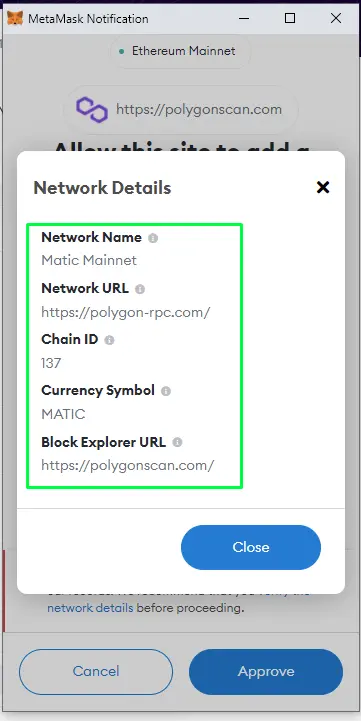
Metamask might prompt you to switch network now, and if you're about to use Polygon Network, you should. If you switched the network, now when you open the Metamask extension, it'll automatically be on Polygon Network immediately. END RESULT BELOW:
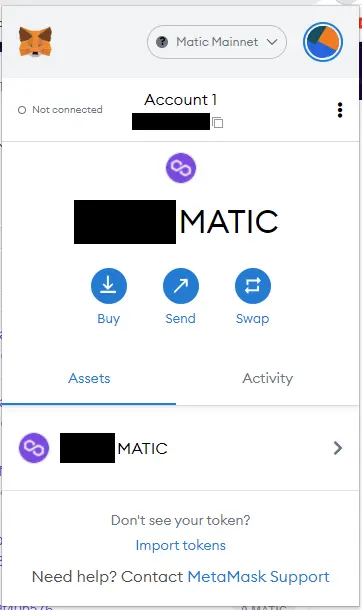
Congratulations, you have Metamask with Polygon Network~
The manual way:
1. Open the Metamask extension and click this button:
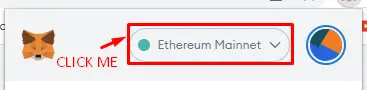
2. Now click this:
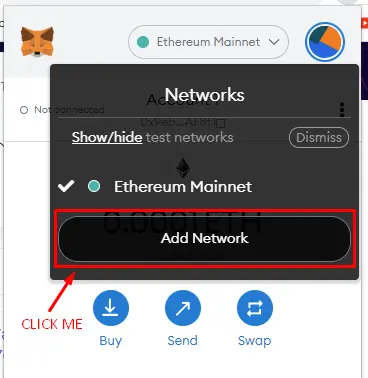
3. You should be forwarded to a new tab that looks like this:
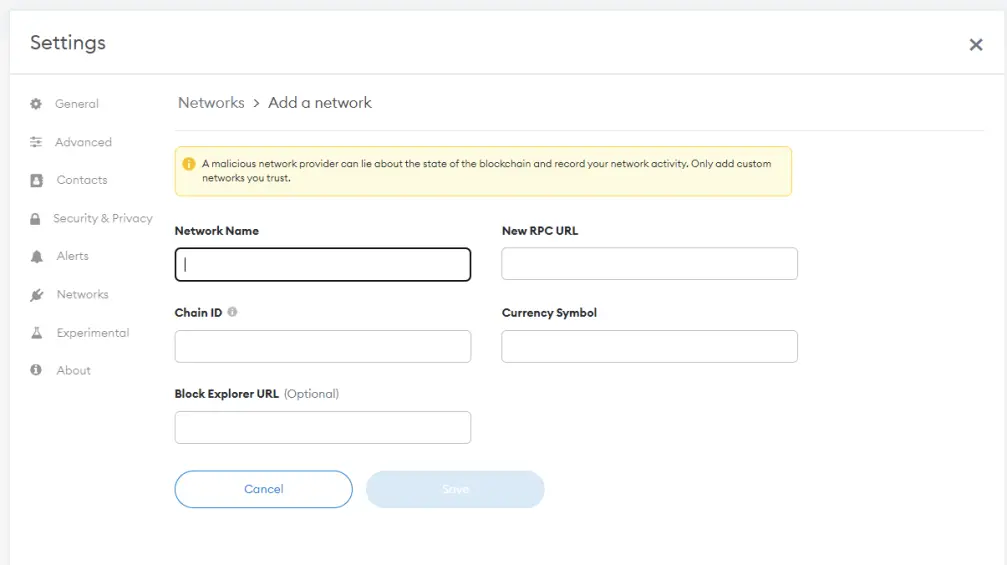
4. Fill in the information with these:
- Network Name: can be whatever you prefer to call it, this is what will appear on your list of networks. Honestly, the only perk of adding the network manually
- New RPC URL:
https://polygon-rpc.com - Chain ID:
137 - Currency Symbol:
MATIC - Block Explorer URL:
https://polygonscan.com
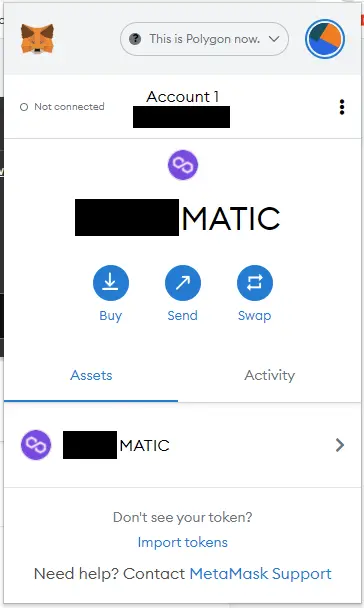
5. Open Metamask, and if your final result doesn't look like this, read the instructions again. If you've succeeded, congratulations on making it!
Okay, but what do I do now? How do I get MATIC?
There used to be plenty of faucets online that'd send you a small amount of MATIC for gas straight to your Metamask before gas fees were increased on the network. While you can still find those websites for claiming, all that I've tried have shown an error or have been shutdown. Also, when I speak about gas fees increasing, I mean from $0.01 to $0.02, not a crazy amount.
Now, I'd say the best way to get MATIC is either by purchasing it directly with FIAT or by swapping existing crypto you might have on an exchange for MATIC, which you can then forward to Polygon network (make sure your preferred exchange supports it). Since there are so many different cryptos you might have, I won't go into that too much, just log in to your exchange's site and make the swap. Remember to check on withdrawal fees for Polygon chain MATIC withdrawal before making the swap so you don't get greeted by unfortunate news. There's always claiming from a free crypto faucet too, but that's a whole other avenue to explore, and getting your hands on a decent amount of MATIC that way will take a long time. If, however, this is something you want to do on the side, Pipeflare is probably one of the only MATIC faucets. Min. withdraw from 0.25 MATIC directly to your Metamask, but since you can only claim once a day, reaching the minimum will take months. SHAMELESS PROMOTION WITH A REFERRAL LINK HERE!
Where should I buy MATIC with FIAT?
In case you have 0 MATIC and no other cryptos you could/would swap, you need to purchase it. I made a small experiment and compared 6 platforms for purchasing with a credit card directly to see which one would be best suited for this scenario. These 6 were my choices of comparison because I happen to have an account with each already. In this case, I took €100 (or $110.15 for U.S. folks) as the hypothetical purchase amount on each place, specifically with a credit card because transfer time is rather quick. Depending on your location some platforms may not be available or might be regulated differently from my location, keep that in mind.
EXPERIMENT:
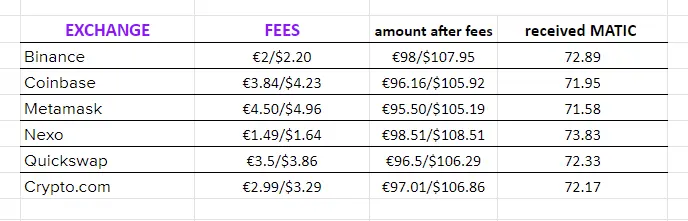
In this case, Nexo is the clear winner. However, this is just the 1st step in deciding where to buy... you still need to send your MATIC to Metamask through Polygon network to be able to use it conveniently, which means another transaction and more fees...
About withdrawal fees, and how to minimize them
No one wants to pay more fees than necessary, so let me take a screenshot from binance.com for some reference here.
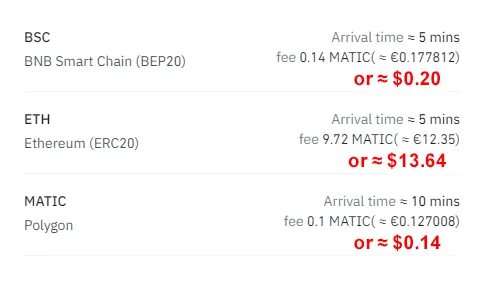
This is for withdrawing from a centralized exchange. Spending this every time you want to use another program (be it liquidity pools, games or whatever it may be) is just not feasible or convenient, sometimes not even possible. This is one of the reasons you'll want to take a hold of your coins, and Metamask is a wonderful & easy solution for that. So, in conclusion, once you buy MATIC, move it out of the exchanges.
With all that accounted for, here are the actual stats:
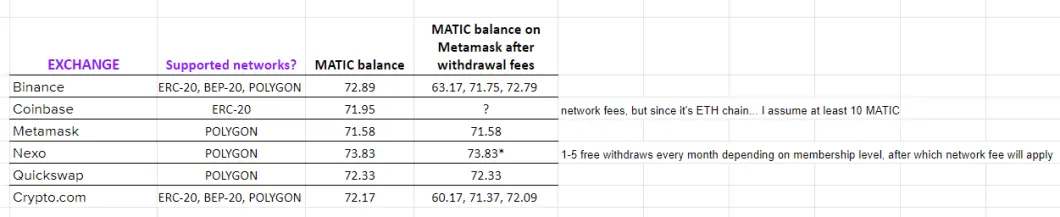
Okay, NOW we have some real data to work with. First, Coinbase is out the window completely, we don't want ETH network because the purpose here is to avoid fees, not add more. Lesson, don't use Coinbase to buy or send MATIC to if you want to use it, only exchange in CB! Metamask and Quickswap are in direct connection to the Metamask Polygon network, which means no fees for withdrawal are accrued at all, and the balance is automatically available to you on Metamask. Nexo takes the cake still, however, this is only if you withdraw once a month and don't use the platform for any other coin as a basic level member. Something I didn't mention here is, they do have a (ridiculously small) cashback too, so you might get an extra 0.01 MATIC.
Conclusion: Nexo offers the best rates, but if you don't like/can't access Nexo for any reason, the next best bet is Binance.
About KYC verification
Something worth noting here might be KYC policies. I am aware not everyone agrees with this system but as a European, most platforms require it for me to be able to use them. The point is, I don't know if Binance, Crypto.com, or any other name on the list requires KYC from everyone or not. If you are against KYC verification in general, I can't advise you which platform is the best for you.
What can I do with MATIC?
Alright, so we got Metamask configured to our needs and $MATIC is there. What's next? A sea of possibilities I say. Polygon network is an amazing platform that has housed over 7000 dApps. 7000! And all the time I see new dApps moving towards Polygon for all the conveniences it offers because it's simply that good. Call me a shill or what you want, but Polygon network truly is a remarkable creation in my opinion. As I concluded above, moving €100 from FIAT to $MATIC to Metamask in Polygon network costs a few euros in fees (most from the credit card fee) and takes a few silly moments. I'd call that a pretty liquid asset, which in my eyes reflects what crypto could be as a whole. One of the reasons crypto is superior to FIAT is transaction speed, and the Polygon network really lives up to that.
Now, let's get back to the topic... what can we do with MATIC? I'd say the main uses for it are gaming and farming (liquidity pools included). This is a section that is difficult to put into 1 mold because everyone has different goals with crypto, but to get a better understanding of your options with Polygon network, I can suggest taking a look at Dappradar's list of choices: https://dappradar.com/rankings/protocol/polygon
Personally, for exchange purposes, I'd recommend either Quickswap or Sushiswap (if you're already using it with other networks), but there are many more to look into as well.
If you're worried about losing $ value because MATIC value can go down, swap some of your MATIC for stablecoins and lend them in Sushiswap or get into liquidity pools through USDC-USDT in Quickswap for dQUICK or in Sushiswap for MATIC & SUSHI because you can.
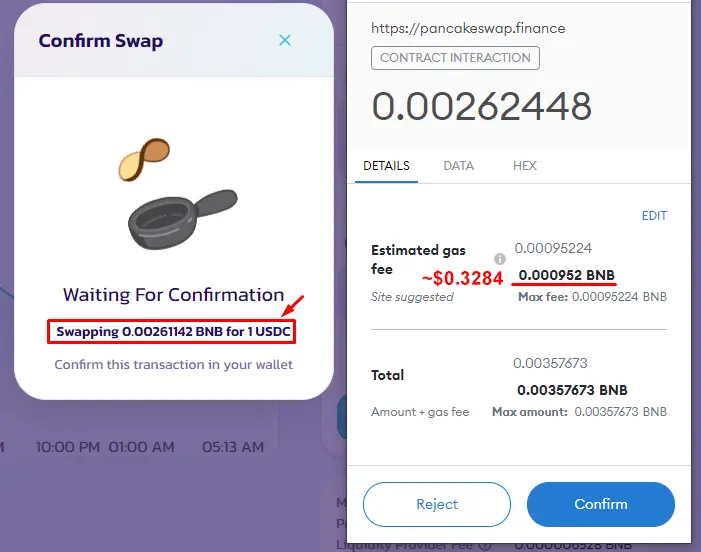
Why should you use Polygon Network for stablecoins? The main reason here is this:
VS
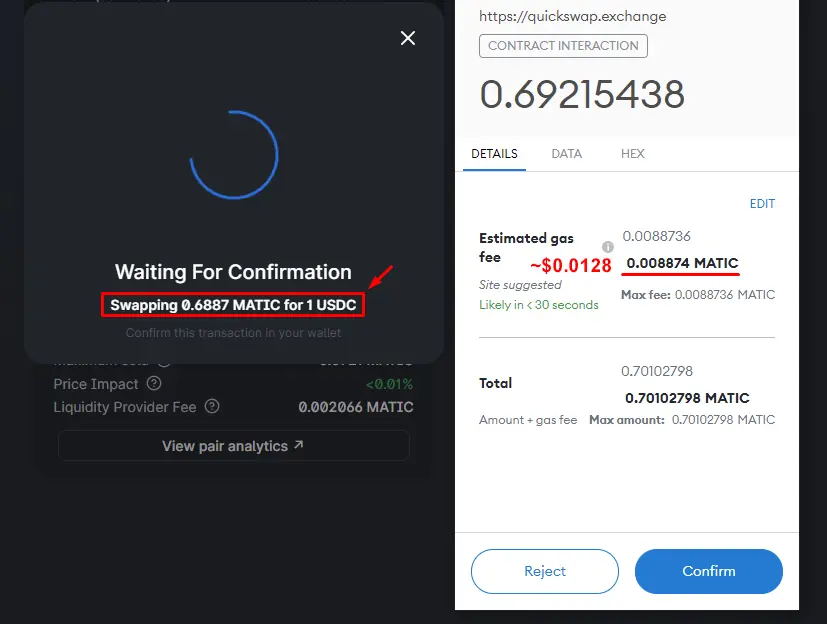
We're talking about the same exact amount of 1 USD here in BSC and Polygon chains, yet the difference in fees across networks is so vast. Bonus thing here is the fact that if for any reason you want to withdraw your stablecoins and exchange them for FIAT/anything not on Polygon chain, you can withdraw USDC to Binance without any issues. Just remember to choose the right network.
Can I change the gas fees?
Why yes you can! Now I'll teach you how to do that.
First, when a transaction pops up on Metamask, here is what you need to pay attention to:
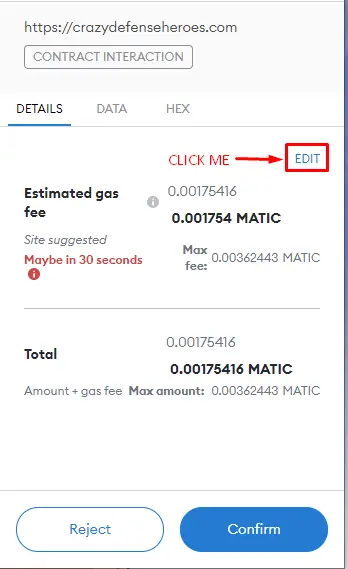
2. This window should appear.
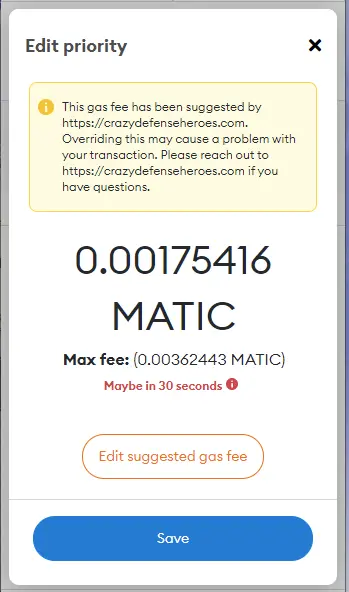
3. By clicking "Edit suggested gas fee", you'll get access to a new window like this:
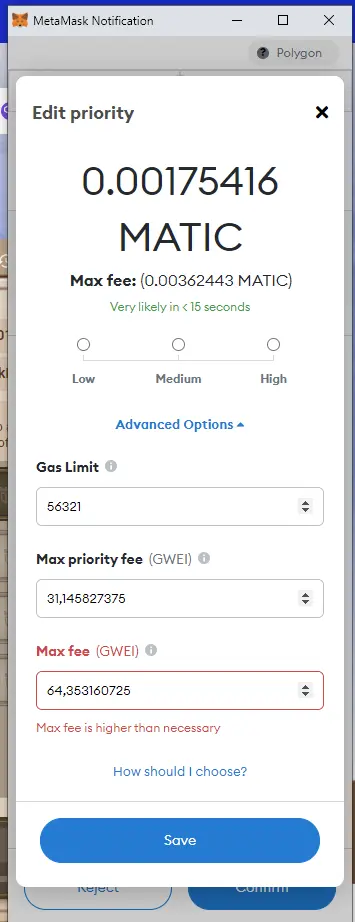
Now, this is where all the magic happens. At this point, I'd suggest heading here: https://polygonscan.com/gastracker. This is where you can see the network load aka. gas fees in real-time, which will help you to modify the suggested gas fee appropriately. Remember, the smaller the gas fee, the longer the wait for a transaction to go through = the cheaper the transaction.
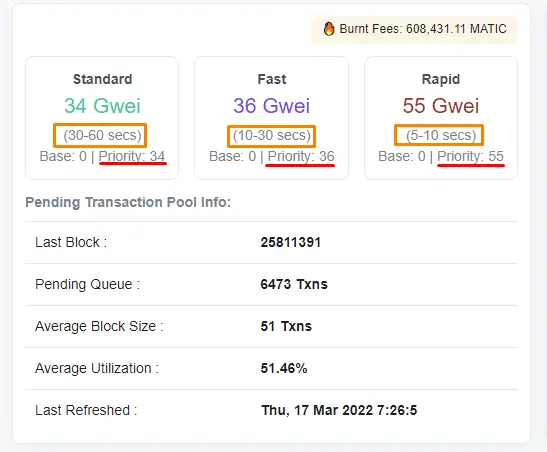
4. Based on what we know, I chose to modify the fee like this:
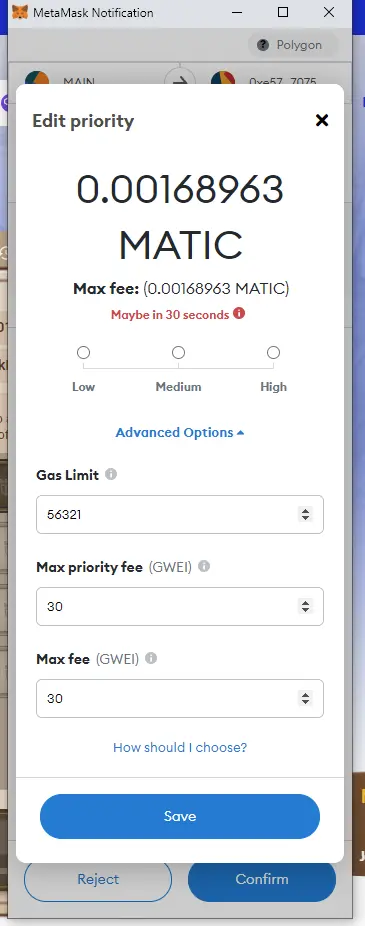
and it went through no problems, just had to wait an extra minute or two.
Troubleshooting:
If you have issues with Metamask failing the transaction, try again with a slightly increased gas fee. On the other hand, if it feels like it's taking too long to complete the transaction, you can speed it up from Metamask as well. Again, we're mostly speaking cents and or even fractions of a cent with Polygon network, I just don't like to spend more than I know I have to.
A side note:
The transaction above cost me $0.00255 originally and $0.00246 afterward for anyone curious. The transaction I made was for a game I speak about later in this post, and these are the usual fees I have to pay daily. The whole month costs like $0.08 while getting in return $8 worth of tokens with 5-10 minutes of playing per day so whether you can afford to dedicate 2-3 hours a month for that amount is something to think about.
"Hidden" gasless swap for MATIC
Now, I'm gonna teach you a neat trick with Polygon Network.
This is the official Polygon Network's wallet website (linked to Metamask, so any transaction you do affects your Metamask balance): https://wallet.polygon.technology/
What you can do here is get more MATIC when you've run out but by swapping some (read: a limited pool of) tokens without paying gas fees.
1. Connect Metamask to the website I linked above. It'll give a pop-up but signing it won't cost anything, it's just a login.
2. Click "Polygon wallet".
3. Locate the menu below on the left side of your screen. 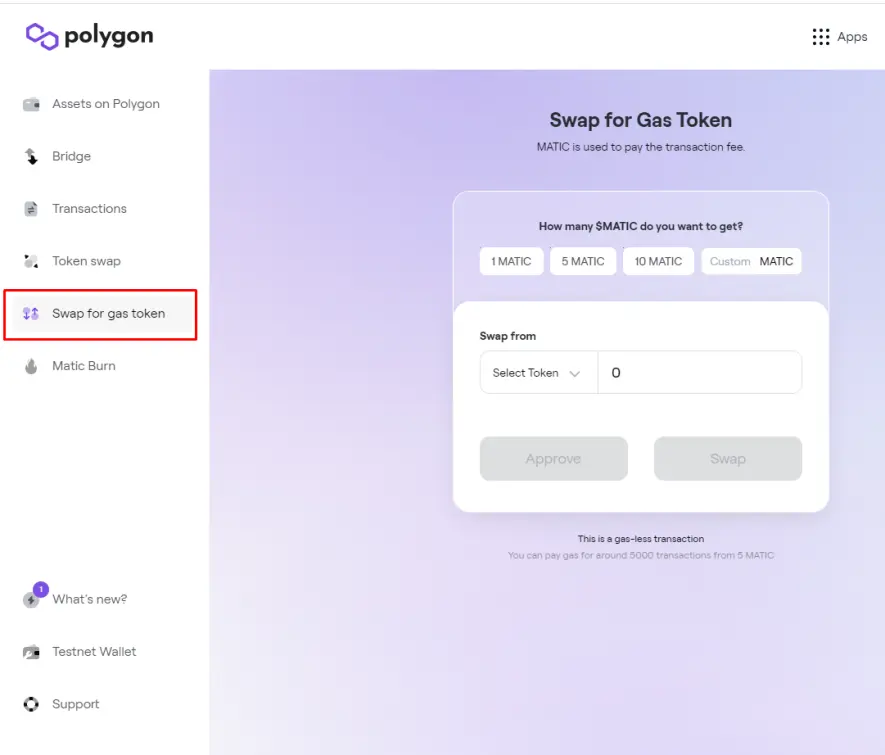
4. Select the token you want to swap for MATIC from the list. Again, I suggest actually checking what can be swapped before running out of MATIC, or simply keep an extra MATIC on your Metamask just in case. Here, for instance, I had some leftover TOWER I've saved from before in case I ever needed an extra MATIC for gas.
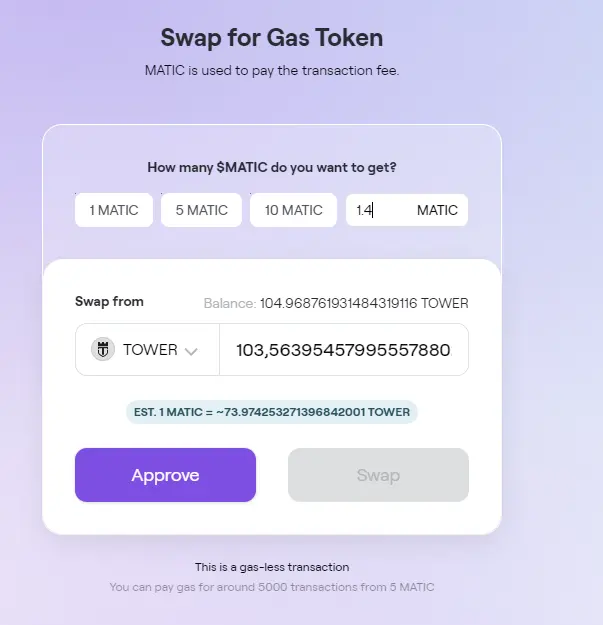
5. Click Approve, then Swap, and a new window should pop up. Scroll all the way down until the "Sign" button becomes blue.
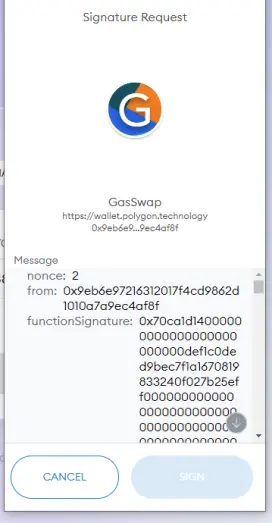
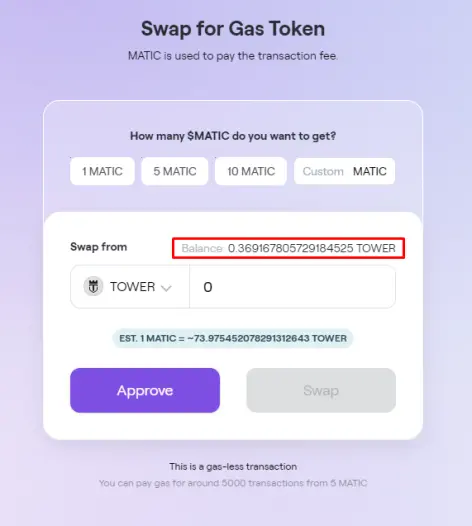
6. Annddd... you're done, swap completed.

Basic guide to Crypto Defense Heroes (a game on Polygon network)
The reason I've chosen to bring this up is 2 reasons: 1. I've played this game since December 2021 so I've received $TOWERs before, and 2. It's the most popular Polygon network game as of now.
First, you need some $MATIC on your Metamask to pay for daily gas fees for claiming the rewards. Second, CDH is a mobile tower defense game (=it's highly automated). Each level gives you 1-3 stars depending on how many enemies get through. If more than the allowed number of enemies pass through your towers/heroes, you fail the level. Fairly simple mechanism to be honest, it's like the other tower defense games in that sense.
Now on to how you can earn from playing the game.
First-time users: on the top right corner of the phone screen, there's a cogwheel. Click it and log in using a google account or whatever are the options to make sure your game progress doesn't get lost & that you can log in to the game's website on your browser.
Your job is to claim 16 stars from the levels to be able to open a "Star chest" daily. This can be found under "Chests" on the main menu. For some unknown reason, the star chest resets every 16 hours, meaning technically you could claim twice within 24 hour period, however, it doesn't reward you twice so I'd advise against doing that.
Once you've collected 16 stars, head to https://www.crazydefenseheroes.com/earn-tower and log in using the account you registered with on mobile. A screen such as this should appear:
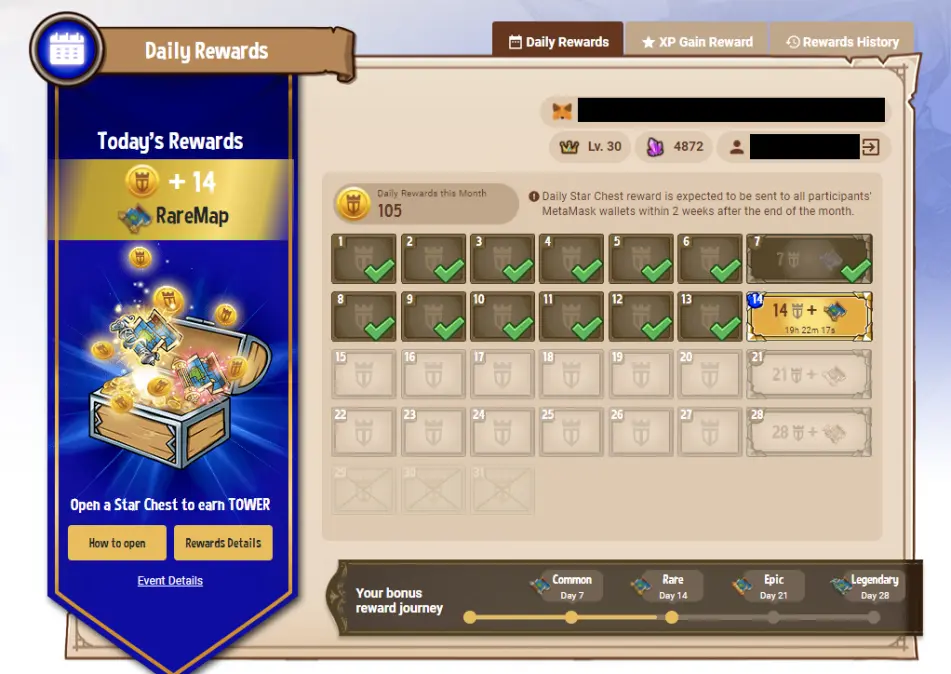
Once you open a star chest, immediately go here and click the day's glowing box. Every day you complete the star chest claiming process, you get an extra $TOWER added to your streak, up to 28 per day this month (actually, if you start now, up to 14 + 2 NFTs).
How to claim your daily chest:
After you've opened the star chest on your phone, and clicked the glowing box on the website, your Metamask should pop up. Handle this as any other transaction, pay the fee, and as soon as the transaction is completed, you'll get a "Congratulations, you've claimed X amount of TOWER Tokens" message on your screen. The tokens can be transferred to your linked Metamask wallet usually after a few weeks from the end of the month.
Troubleshooting:
Occasionally some people have issues with getting a Metamask pop-up, but as long as you've added Polygon network correctly, and you have it selected when you click the daily reward box, you should be good to go. If you have claiming issues, log out, disconnect Metamask from the site, and refresh the page. Then log in and try again. If the issue persists, you can try claiming the daily reward on another browser or at a later time (at least those are what have fixed it for me before).
Here's a detailed breakdown of the rewards for this month: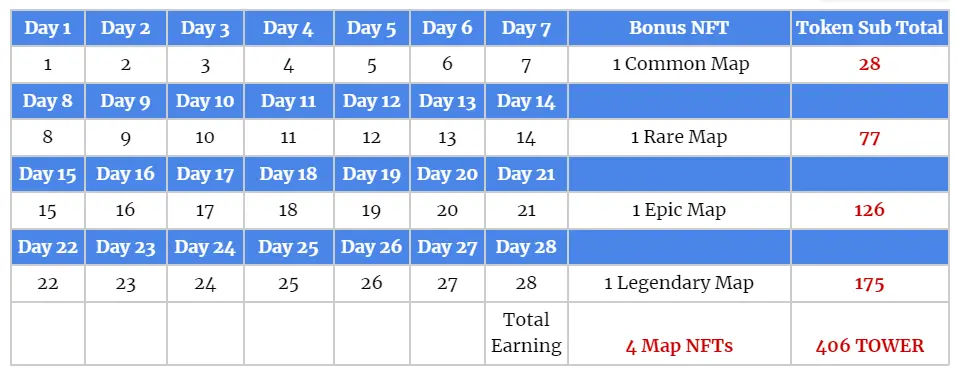
On top of this, it's possible to be rewarded just for playing the game as long as you meet a certain XP quota (Each level in the game gives XP). I've received about 90 $TOWER a month just for XP rewards in the past, but I don't spend all my effort into playing the game. Now you might say ~2 bucks isn't worth it, but this is with our current course. $TOWER has gone as high as $0.14+ when bitcoin was high + if nothing else, at least you'll be able to trade your $TOWERs for $MATIC with the gasless swap I showed earlier, and not worry about paying gas fees for other transactions from your pocket for a while. More info on the XP rewards:
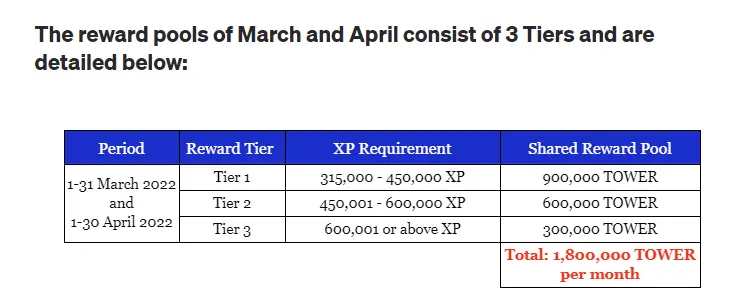
Note that you must gain a minimum of 315,000 avatar XP within each month to start earning TOWER tokens. For example, if you started in March 2022 with 250,000 XP (Avatar Level 20) you will need to have at least 565,000 XP (around Avatar Level 29) by the end of March 2022 in order to be eligible to earn from March’s Tier 1 Reward Pool.
If you gain more than 450,000 avatar XP within the month, you can gain a share of both Tier 1 and Tier 2 Reward Pools. If you gain more than 600,000 avatar XP, you’ll be earning TOWER tokens from all 3 Tiers of Reward Pools!
You may check the cumulative experience table and use the XP calculator created by our players here to see which Levels you have to reach in order to be qualified for the reward pools.
Pictures & the quote taken from Tower token's Medium post
What is wMATIC?
Bear with me, I'm not too great at explaining the system. Simply said, wMATIC is wrapped MATIC. "Okay, but what does that mean?" you ask. Well, even though the Polygon network is built on Ethereum Main Network (= Polygon is a Layer-2 solution to ETH Network), MATIC doesn't follow the ERC-20 standard. This means that when we want to interact with other smart contract based dApps, such as the beforementioned Quickswap, we need to mask aka. "wrap" MATIC to behave like all the other ERC-20 tokens to trade it directly with them, in order to make sure all the ERC-20 tokens follow the same standardized format for every trade. wMATIC is ultimately the same as MATIC in value, just like wBTC is the ERC-20 version of BTC.
How to add new tokens to your Polygon network on Metamask
As you add Polygon Network to your Metamask the first time, this is how your Metamask account should look like:
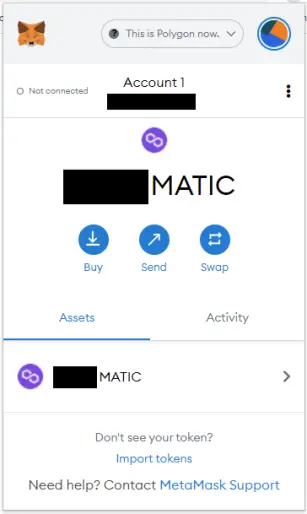
The issue here is, you'll only have MATIC visible on the list of tokens. Generally, once we add a network, we also want to be able to use it conveniently. If you're not able to see your other token balances, you need to head to https://polygonscan.com/ and manually search up your address every time to know how much of everything you have. We don't want that. Now let's say you want to add Pipeflare's Flare token (1FLR) or the TOWER token so once you receive any, you'll actually be able to see it on your Metamask easily. You have 2 options to do this, the manual way and the easy way.
The manual way:
1. Go to https://coinmarketcap.com/ and search for the token you want to add. Once you find it, this is what you want to click. Some tokens (such as TOWER) have multiple explorers because the token is available on multiple networks. We want to find "polygonscan.com". If the token is only available on Polygon Network, clicking "Explorers" button will automatically redirect you.
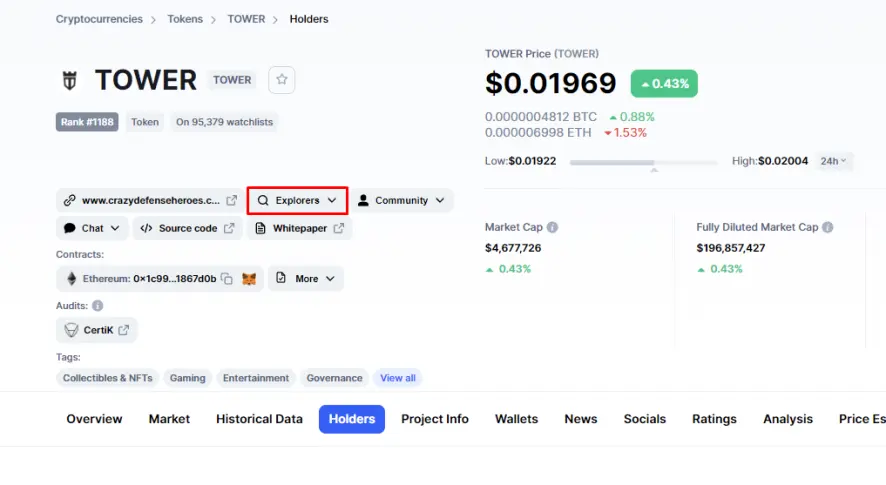
2. Copy the contract address, you'll need this later. You can easily do so by hovering over the contract address and clicking "Copy address" 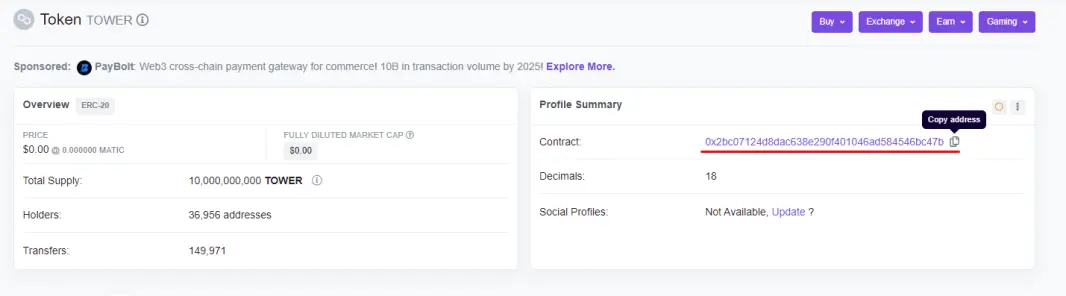
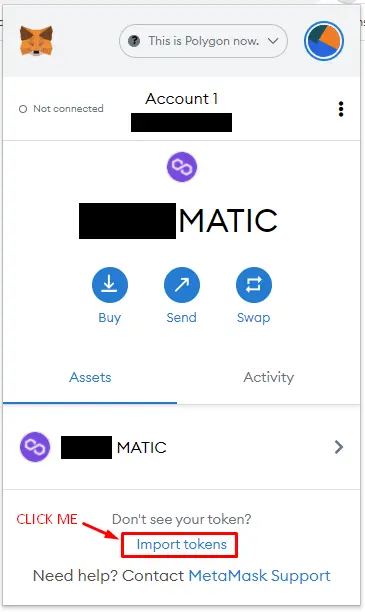
3. Open Metamask on Polygon Network, and click the button below:
2. You'll be directed to a new window like this, and to add a new token, you need to know the contract address of the said token. This is where you'll need to paste the copied address from before. Once you do this, it'll often automatically fill in the symbol and decimal for the token, like so:
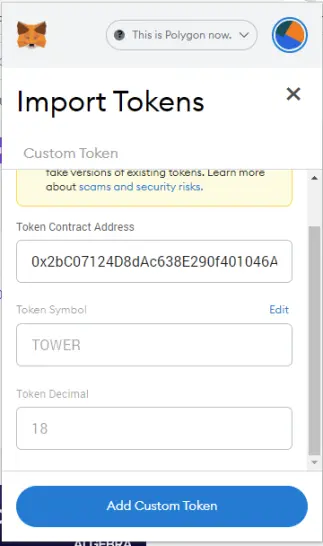
3. Click "Add Custom Token" and you'll have yet another window open, like in the picture below. Click "Import Tokens" and congratulations, you have added a new token to your Metamask wallet.

This is how the end result should be:
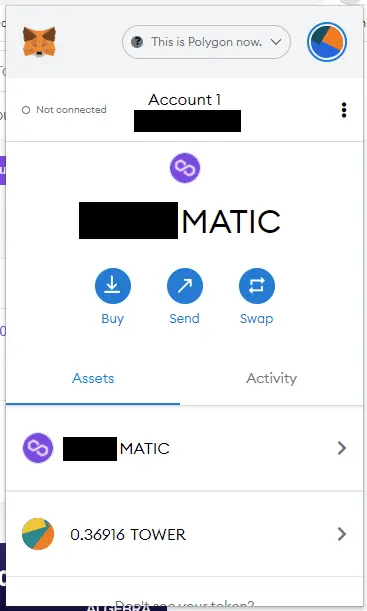
If you don't see the new token, read the directions once more and try again.
I have 2 glaring issues with the manual way: 1. It's too much effort for something that should be easy, and 2. The icons for the added tokens don't show up. Maybe this isn't a problem for you, but when you have multiple tokens added, it starts to get annoying that all have the default icons on Metamask showing up. We can fix this by using "the easy way" for adding new tokens.
This is how our account would look if we added all tokens the manual way:
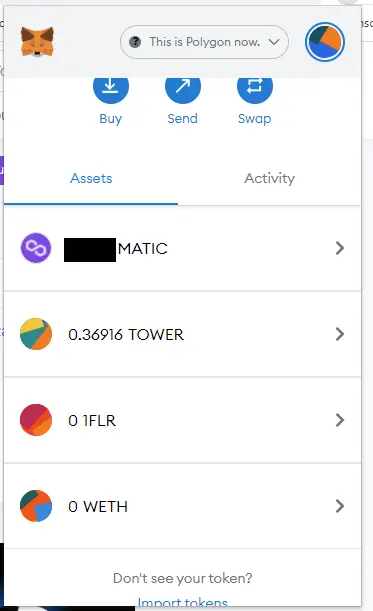
The easy way:
1. Open https://quickswap.exchange/
2. Click "Connect Wallet" here, and choose Metamask.
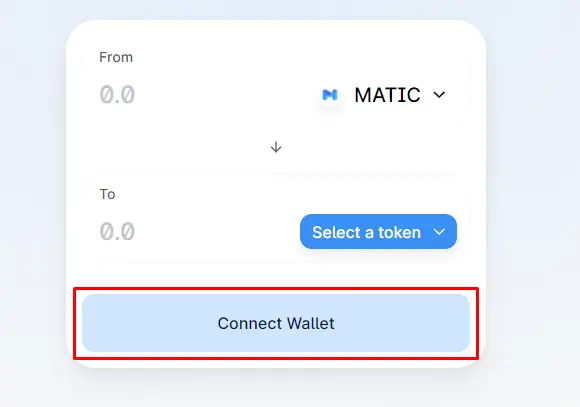
3. When Metamask pops up, choose the account you want to connect with Quickswap, click "Next" and on the next window "Connect". Once this is done, your Quickswap page should look like this:
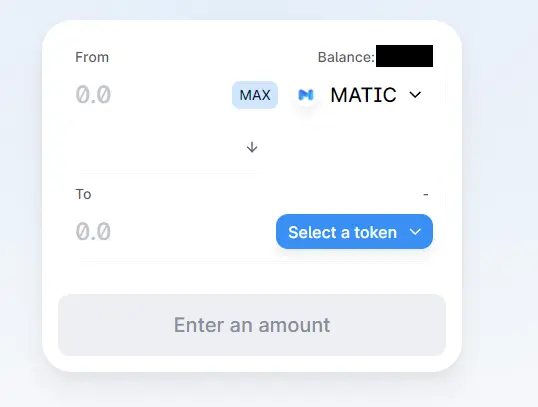
4. Click the button here:
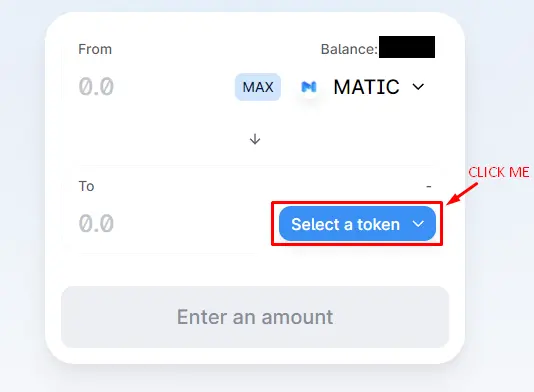
5. You'll have a new window pop up. Here you can search tokens by name or just scroll down until you find your token (they're in alphabetical order)
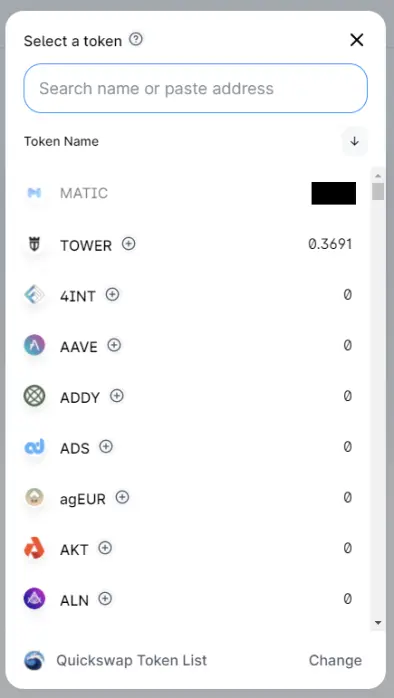
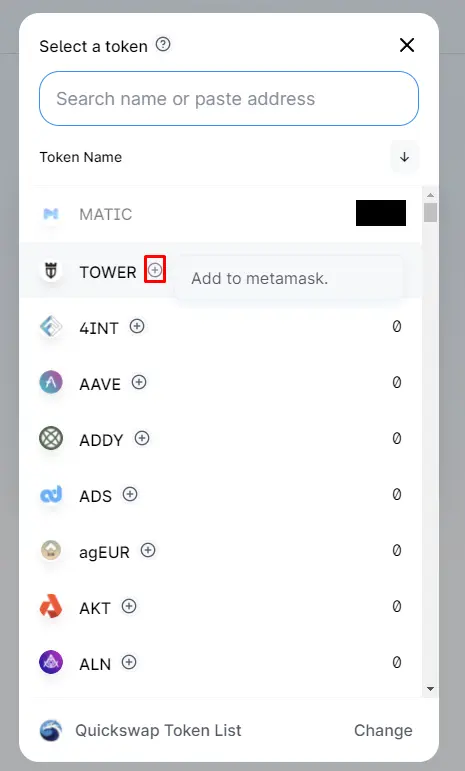
6. Once you locate the token you want to add to Metamask, click the + button. Clicking the button will initiate Metamask to open up.
7. You'll get one of 2 screens here. If you've previously added a token manually, the window will look like this:
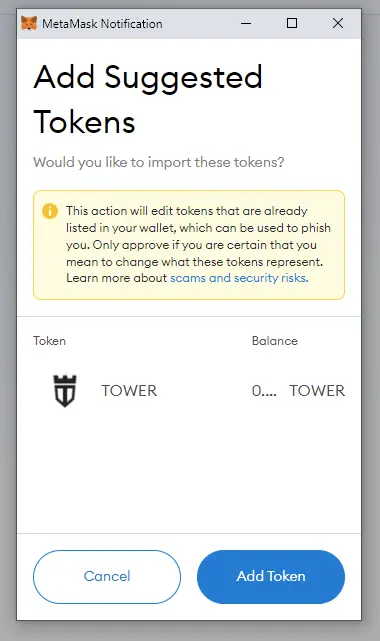
If you haven't added the token in question before, the window will look like this:
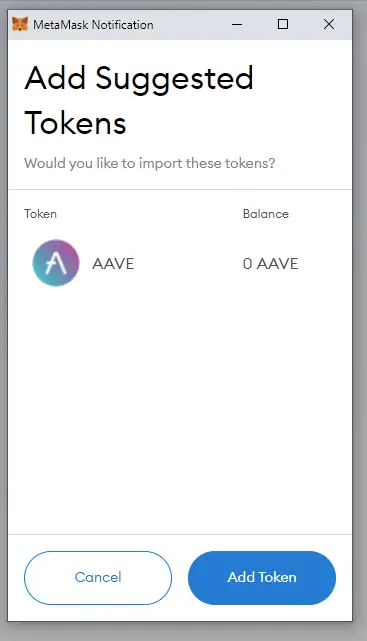
In either case, just click "Add Token" and you're done.
Now when you view your Metamask the next time, this is what it should look like:
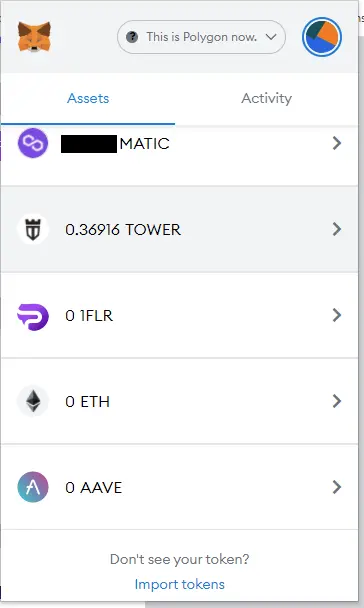
Much nicer, isn't it?
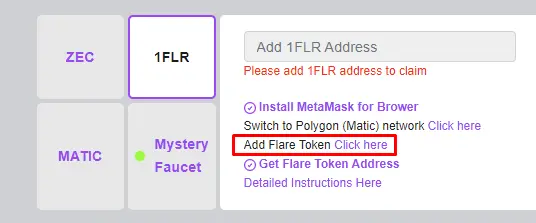
Something to note here is, unfortunately not all tokens can be found on Quickswap list, especially tokens of small projects. In my case, 1FLR can't be added through Quickswap, which means we need to go to the project's website https://pipeflare.io/dailyrewards and click the button below to have Metamask add the token. This will initiate the same process as if we clicked the + button on Quickswap essentially.
I think this is a good spot to end this post, it's already long as all eternity... I know I missed some things here (such as how to stake MATIC on ETH chain) but I think this post might help some to maybe learn something new if nothing else. I hope you found this post helpful!
The title of this post came to me as a joke after having a small discussion with a fellow writer here, @TrocProcLock. Do check his blog out too!





