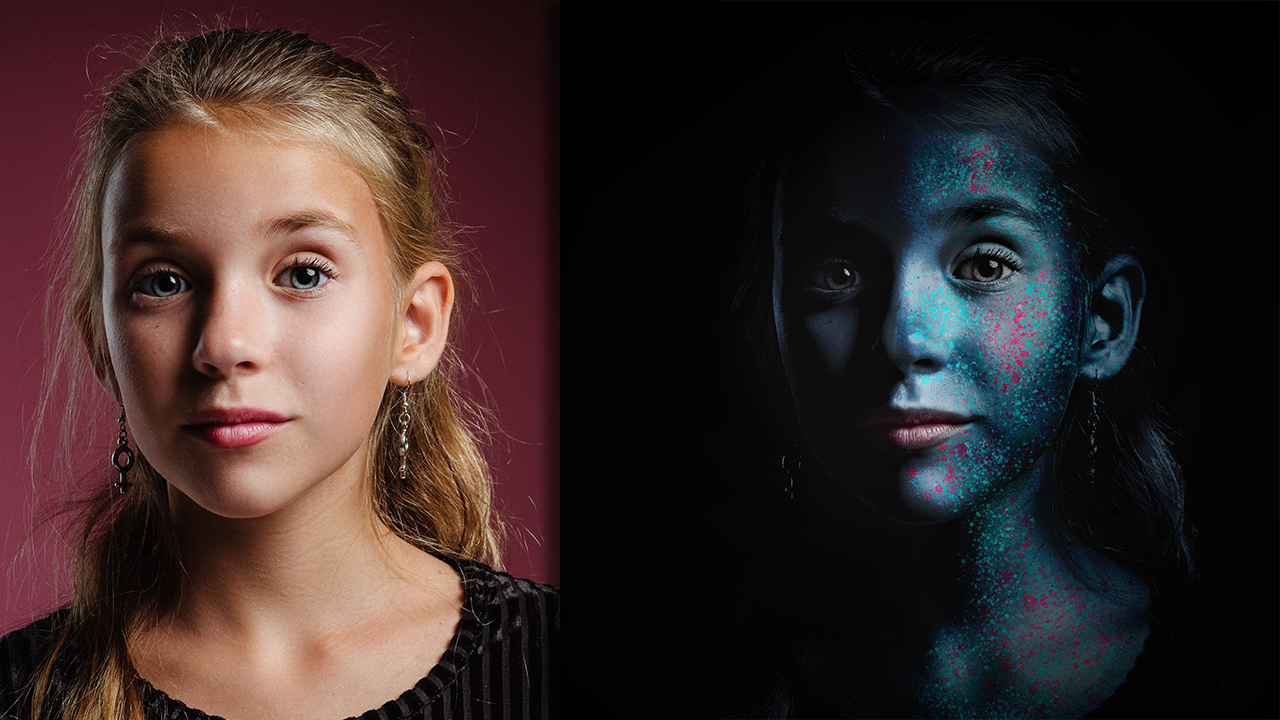

Photo-Manipulation

Quick Creation Process GIF
In this post, we will learn how to make your ordinary portraits look like some sci-fi characters when we will add drama and fantasy to them. We will paint the face of the girl, add some glitters and then adjust the whole scene's lighting to give it like a cinematic look.
So, let us now begin the creation process steps in brief. After the steps, I will also give the whole YouTube Tutorial link so you can learn all the techniques I used in it and create this artwork.
First, let me share the original stock images used in this effect.
Stock Image
Source Link
 http://bit.ly/36OcEcL
Step 1. Open the stock image in Photoshop and make a selection around the girl with the quick selection tool or the pen tool. Mask Out The Background

Step 2. Now adjust the size of the subject and change the background color to black.

Step 3. Increase the contrast and reduce the brightness by adding the brightness/contrast adjustment layer.

Step 4. Now colorize the whole image with the desired colors by taking the hue/saturation adjustment layer.

Step 5. Paint with black color and keeping the blending mode to overlay on certain parts of the face to give more punch to the colors.

Step 6. Add the glitters for the shining on the face with the particle brush tool. Keep the colors in contrast to highlight them.

Step 7. Erase the colors from the eyes and lips and reduce the saturation a little bit.

Step 8. Now adjust the lighting of the scene with the curves and add vignetting to highlight only the face and hide all the other parts like hair, ears, and clothes.

And we are done with this cool Photo-Manipulation Artwork.
Watch The Detailed YouTube Tutorial Here
I am a professional digital artist, photo-editor and motion designer having experience of 5 years. If you also want these cool effects and creative logo animations for your text, logo or graphics, I will design them for you at very reasonable prices. You may contact me on telegram, discord or Fiverr. Here are my contact ids for these social handles.
TELEGRAM : @gauravrocksg DISCORD : @rocksg#4832
FIVERR : https://www.fiverr.com/grocksg/ (Fiverr is a marketplace for the freelancer, you can watch my portfolio there and past works I have done for clients and place your own orders, it is very secure and safe)